

Project 4 month updates list





Try Before you Buy Download Free Sample Product
 Impress Your
Audience
 100%
Editable
 Save Hours
of Time


Achieve the desired impact at every event with our Project 4 Month Updates List. Avoid being ineffective or inefficient.
People who downloaded this PowerPoint presentation also viewed the following :
Content of this Powerpoint Presentation
Description:
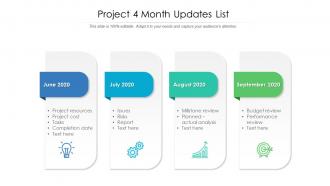
The image is a PowerPoint slide titled "Project 4 Month Updates List," designed to present monthly project updates in a clear, tabulated format. Each month, from June to September 2020, is represented by a separate tab with a unique color and icon, suggesting a theme or focus for that month's update. The text elements include:
1. June 2020:
This tab includes items such as project resources, project cost, tasks, and completion date, with additional space for more text.
2. July 2020:
This month's focus appears to be on issues, risks, and reports related to the project, indicating an analysis of challenges and progress.
3. August 2020:
The highlighted points are milestone review and planned vs. actual analysis, suggesting a strategic assessment of the project's development against its plan.
4. September 2020:
This tab mentions budget review and performance review, indicating a financial and performance assessment of the project.
Use Cases:
This slide can be useful across multiple industries for internal project updates, strategic planning, and performance tracking:
1. Construction:
Use: Tracking project milestones and budget adherence.
Presenter: Project Manager.
Audience: Stakeholders, Construction Team.
2. Information Technology:
Use: Software development lifecycle management and risk assessment.
Presenter: IT Project Lead.
Audience: Developers, IT Management.
3. Healthcare:
Use: Monitoring progress of healthcare initiatives and compliance.
Presenter: Healthcare Administrator.
Audience: Medical Staff, Department Heads.
4. Education:
Use: Updating academic program developments and resource allocation.
Presenter: Program Coordinator.
Audience: Faculty, Institutional Leadership.
5. Finance:
Use: Financial project planning and quarterly fiscal reviews.
Presenter: Financial Analyst.
Audience: Investors, Executive Management.
6. Marketing:
Use: Overview of marketing campaign progress and budgeting.
Presenter: Marketing Manager.
Audience: Marketing Team, Brand Managers.
7. Non-Profit:
Use: Providing updates on fundraising activities and program implementations.
Presenter: Program Director.
Audience: Donors, Board Members.
Project 4 month updates list with all 2 slides:
Induct the best ideas with our Project 4 Month Updates List. Implement them to generate gain.
FAQs for Project 4
Honestly, just focus on timeline milestones, budget burn rate, and how much of your deliverables you've actually finished. Team velocity matters too - oh, and watch out for scope creep because that stuff will absolutely destroy your project faster than anything else. Resource utilization is huge if you're running multiple things at once. Don't go crazy with metrics though. Pick like 4-5 max and check them weekly. I'd set up a simple dashboard with red/yellow/green so you can catch issues early. Way better than drowning in spreadsheets all day.
Dude, templates are honestly a game changer for stakeholder updates. Your audience knows exactly where to look for budget stuff, timeline changes, all that. No more hunting around different formats each time. Plus you're not starting from scratch every update - saves so much time it's ridiculous. I always do status, risks, next steps, and what needs deciding. The best part? People can actually spot changes quickly instead of reading through walls of text. Clear headers and bullets are your friend here. Trust me, once you get a simple template down, you'll wonder why you didn't do it sooner.
Honestly, the biggest mistakes I see are being way too vague or going completely overboard with details. Find that middle ground where people actually get what's happening without their eyes glazing over from tech jargon. And please - don't drop bad news at the last second! People hate being blindsided. I always try to include what's going well, what's not, and what I need from them. Oh, and stick to a regular schedule for updates. Consistency helps everyone know when to expect info, which makes your life easier too.
Weekly updates are your baseline - anything less and people start losing track of what's happening. Fast projects or high-pressure stuff? Go bi-weekly or even daily standups. I've watched teams completely fall apart with monthly check-ins, it's brutal. Pick whatever frequency works and stick to it religiously. Consistency beats everything else here. Don't just blast out status updates though - actually make space for questions and roadblocks. Oh, and start weekly then tweak it based on how much alignment your team actually needs. Most teams think they need less than they do.
Dude, you need visuals in your project updates - trust me on this. Charts and graphs make complex stuff instantly digestible, while spreadsheets just make people's eyes glaze over (learned that the hard way). Progress bars show exactly where you stand better than rambling about percentages. Your stakeholders will actually remember what you said when there's something visual to anchor it to. Oh, and always put your best chart first - it sets the whole vibe. I swear, a good timeline or dashboard can spot problems you'd totally miss otherwise.
Totally review your old feedback - you'll start seeing patterns emerge. Like maybe people always want more budget breakdowns or clearer timelines. I keep a simple feedback log now (wish I'd started sooner tbh). Don't just focus on complaints though. If your dashboards got good reactions, do more of those! Questions during presentations are goldmines - they show you what wasn't clear enough. Before your next update, make a quick checklist hitting those recurring issues. Way better than winging it and repeating mistakes.
Track your completion rates, budget, and timeline stuff first - that's the obvious baseline. Then add whatever KPIs actually matter for your specific project, like user adoption or performance gains. Quality metrics are huge too - defect rates, how happy stakeholders are, that kind of thing. Honestly, I always add a "quick wins" section because everyone eats that up. Oh, and definitely call out any risks you've handled or roadblocks you've cleared. The whole point is picking metrics that actually show if you're hitting what your stakeholders care about most.
So it really depends on what methodology you're using. Agile updates are all about sprint progress and what's blocking you - pretty iterative stuff. Waterfall? You're just reporting on milestones and whether you hit your deadlines. Way more straightforward but kinda boring tbh. With Kanban you focus on workflow and where things get stuck. Scrum throws in those ceremony updates too. Here's the thing though - you gotta match what your stakeholders expect. Don't send sprint updates to waterfall people who just want to know if you completed phase 2.
You've gotta speak their language, honestly. Execs want the big picture stuff - budget hits, timeline shifts, outcomes. Skip the technical drama (they really don't care about your debugging nightmare from Tuesday). Your dev team needs all the details though - blockers, next steps, the works. Stakeholders are somewhere in between, wanting progress but tied to business stuff. Format matters too. Bullet points and charts work great for leadership, but your teammates probably want more context. Just lead with what actually matters to each group and ditch everything else.
Dude, try telling your updates like a story instead of just dumping info on people. Start with "here's what happened this week" - seriously, it works. Walk them through the problem you hit, how you guys figured it out, what went wrong (there's always something lol). People actually pay attention when there's a narrative instead of boring bullet points. I learned this the hard way after watching too many eyes glaze over in meetings. Frame your completed tasks as plot points building to the big goal. Throw in specific details about decisions you made. Way more engaging than the usual status report garbage.
PowerPoint and Google Slides work fine, but Canva's templates actually look decent instead of boring corporate stuff. If you're dealing with lots of data, just pull charts straight from Tableau or Excel - way easier than rebuilding everything. Notion's pretty solid too if your team's already on it. You can set up templates and just swap out info each time. Honestly the template thing is huge... I used to waste so much time starting fresh every week. Pick whatever tool works and make one good master template. Then you're basically just filling in blanks instead of designing from scratch each time.
Stop listing every tiny thing you did and focus on what actually matters - outcomes, roadblocks, what's next. I used to write these massive updates until I figured out no one reads past like two sentences anyway. Stick to bullets with "Progress," "Issues," and "Coming up." 150 words tops. Your inbox-flooded coworkers will thank you. If they want more details, they'll ask. The whole point is keeping people in the loop without making them hate you for it.
Don't wait - tell them about the delay right away instead of hiding until your next check-in. Honestly, people get way more pissed about surprises than actual delays. Explain what went wrong and give them a real timeline with actual next steps, not just "sorry my bad." I learned this the hard way lol. Can you break anything into smaller pieces to show you're still making progress? Even partial updates help. The whole thing comes down to not losing their trust - being straight with them beats making excuses every time.
Try rotating who presents each week - let people own the sections they actually work on. Give them heads up beforehand so they're not scrambling. Honestly, meetings get way less painful when people talk about their own stuff instead of sitting there like zombies while one person drones on. You could have someone do a quick technical deep dive or share what went wrong (those are usually more interesting anyway). The whole point is making it feel less like a status report and more like... I dunno, actual conversation? When people present their own work they actually seem to care.
Honestly, just make an agenda and stick to it. Without one, your meetings turn into those nightmare hour-long things where Jim starts talking about the broken printer and suddenly nobody remembers why you're all there. Send it out ahead of time so people can't show up totally unprepared (though some still will, obviously). Block out time for each topic and prioritize the stuff that actually matters. Your team will probably love you for it since most people hate pointless meetings anyway. Plus you'll actually get decisions made instead of just talking in circles.
No Reviews