

Project Closure Process Steps Powerpoint Presentation Slides





Try Before you Buy Download Free Sample Product
 Impress Your
 Audience
 100%
100% Editable
 Save Hours
 of Time


If you are looking for professional templates and slides to prepare a professional PPT on project closure process steps? Well if yes, then download our ready to use project closure process steps PowerPoint presentation slides. Showcase the performance of your company project to the customer using this project closure process steps PPT presentation. Using these project management presentation templates, you will be able to confirm if the team members have met all sponsor and consumer needs. This closing a project PowerPoint presentation includes essential topics such as project brief, project description, project timeline, project progress summary, project status report, and project health card. It also covers a slide on project dashboard, project closure report, work breakdown structure, and project conclusion report-performance analysis, deadline, budget/costs. With the help of the project description presentation PPT, you will be able to represent throughout the progress of the project. Use of stunning graphics and visuals will help you describe the different project stages performance. Download this project closure checklist PPT presentation. Ensure a clean baton change with our Project Closure Process Steps Powerpoint Presentation Slides. They allow flawless accomplishment.
People who downloaded this PowerPoint presentation also viewed the following :
Content of this Powerpoint Presentation
Slide 1: This slide introduces Project Closure Process Steps. State Your Company Name and get started.
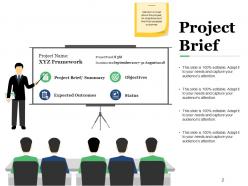
Slide 2: This slide presents Project Brief. Mention in brief about the project, its objectives and the final expected outcomes
Slide 3: This slide showcases Project Description .Describe in detail, what the project is all about
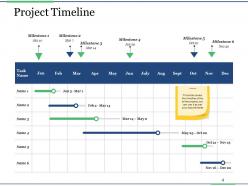
Slide 4: This slide presents Project Timeline. This slide covers the timeline of the entire project, you can use it as per your requirements.
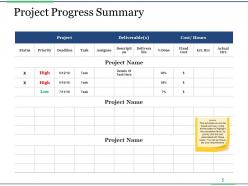
Slide 5: This slide shows Project Progress Summary.This template covers the broad summary of the entire project to highlight the completion level, its priority and the cost associated with these tasks. You can se this as per your requirements.
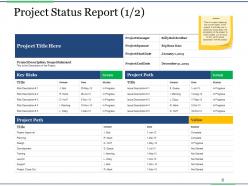
Slide 6: This slide presents Project Status Report (1/2). This is a report capturing the current status of the project. It will help you in achieving clarity about the completion of the project & would enable you to focus on the risk & issues associated with the project
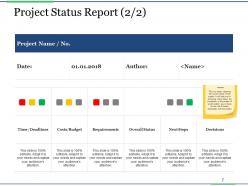
Slide 7: This slide showcases Project Status Report (2/2). This is a report capturing the current status of the project. It will help you in achieving clarity about the completion of the project & would enable you to focus on the risk & issues associated with the project
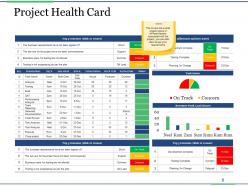
Slide 8: This slide shows Project Health Card. This covers the overall project status of different factors associated with the project, you can alter them as per your requirements
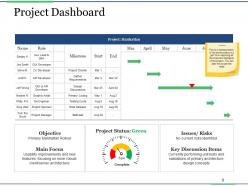
Slide 9: This slide presents Project Dashboard. This is a representation of the entire project in a gist form capturing all the important highlights of the project. You can alter this as per the need
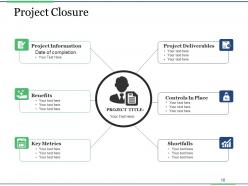
Slide 10: This slide showcases Project Closure with these of the factors presenting- Controls in Place, Shortfalls, Project Deliverables, Key Metrics, Benefits, Project Information, Date of completion.
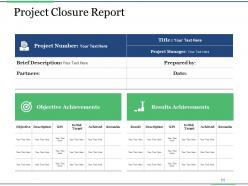
Slide 11: This slide presents Project Closure Report. With this you can use it for the brief description, objective achievement and results.
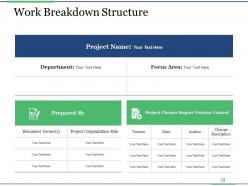
Slide 12: This slide showcases Work Breakdown Structure.
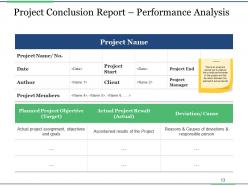
Slide 13: This slide shows Project Conclusion Report – Performance Analysis. This is an analysis carried out to capture the overall performance of the project and the deviation between the planned & actual results
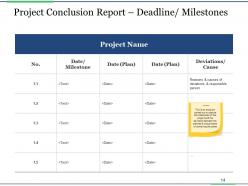
Slide 14: This slide shows Project Conclusion Report – Deadline/ Milestones. This is an analysis carried out to capture the milestones of the project and the deviation between the planned & actual dates of achieving the same
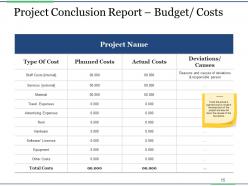
Slide 15: This slide presents Project Conclusion Report – Budget/ Costs.Track the actual & planned cost involved in the execution of the project and also list down the causes of the deviations
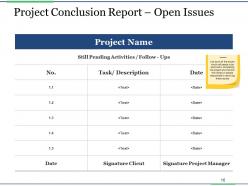
Slide 16: This slide shows Project Conclusion Report – Open Issues. List down all the issues which still needs to be resolved in completing the project and mention the names of people responsible in resolving those issues
Slide 17: This slide showcases Coffee Break.
Slide 18: This slide displays the title Charts & Graphs.
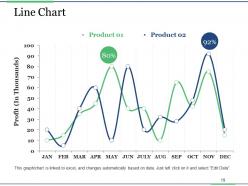
Slide 19: This slide shows a Line Chart for two product comparison.
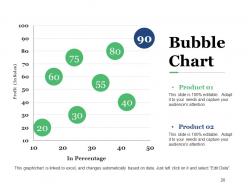
Slide 20: This slide presents Bubble Chart.
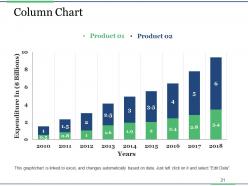
Slide 21: This slide showcases Column Chart with which you can compare the product.
Slide 22: This slide is titled Additional slides.
Slide 23: This slide contains Our Mission with text boxes
Slide 24: This slide helps depict Our Team with text boxes.
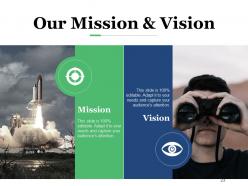
Slide 25: This is Our mission slide with imagery and text boxes to go with.
Slide 26: This is an Our Goal slide. State your important goals here.
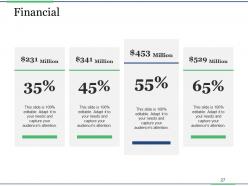
Slide 27: This slide presents Financial scores to display.
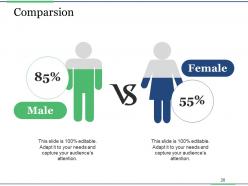
Slide 28: This slide shows Comparison of number of users and Time.
Slide 29: This slide shows Target image with text boxes.
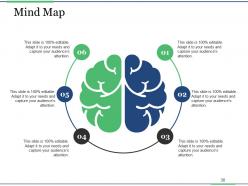
Slide 30: This slide shows a Mind map for representing entities
Slide 31: This is a Thank You image slide with Address, Email and Contact number.
Project Closure Process Steps Powerpoint Presentation Slides with all 31 slides:
Our Project Closure Process Steps Powerpoint Presentation Slides endeavor to excel at communication. They ensure you do good business.





FAQs for Project Closure Process Steps
So first things first - wrap up all your deliverables and get that final sign-off from the client. Document everything while it's fresh: what worked, what was a disaster, lessons learned. I know it's boring as hell but trust me, you'll thank yourself later. Release your team and close contracts next. Handle the boring admin stuff like final invoicing (ugh). Oh, and definitely celebrate with your team! They earned it. One thing though - do your lessons learned meeting ASAP before people forget the details.
Honestly, good communication at project closure is what separates the pros from the amateurs. Make sure everyone knows what deliverables are actually done, what lessons you picked up along the way, and if there's any messy stuff still hanging around. I can't tell you how many times I've watched teams crash and burn right before the finish line because people just assumed someone else handled the details. Keep sending those weekly updates - yeah, I know it feels repetitive, but it keeps things moving. Oh, and definitely make a simple checklist you can share with everyone so the handoff to ops doesn't turn into a disaster.
Look, you absolutely need that stakeholder sign-off before calling it done. Without it? You're basically in project purgatory. Get them to confirm the deliverables hit the mark and they're actually happy with what you built. I learned this the hard way once - verbal approval means nothing when someone changes their mind later. Written confirmation is your best friend here. It's like getting a receipt for expensive stuff, you know? Protects you from all that "but we never said that" drama down the road. Trust me, document everything and save those approvals.
So you'll need the final project report with all your outcomes and lessons learned. Get stakeholder sign-offs too - proves they actually accepted everything. Financial reports are obvious, plus any updated docs if scope changed along the way. Oh, and definitely keep your post-project review stuff, that's honestly the most valuable part for next time. Archive everything - communications, risk logs, contracts, the works. I swear someone always comes asking about random project details like 6 months later when nobody remembers anything. Start collecting this stuff early, don't wait until the last second like I did once.
Get everyone together for a retrospective within 2-3 weeks while things are still fresh in people's minds. Document what worked, what was a disaster, and what you'd do differently. But here's the thing - don't let it become another forgotten document! Put it somewhere people will actually find it later. I usually throw everything in our shared wiki with good tags by project type. That way when someone starts a similar project, they're not making the same mistakes we did. Trust me, your future self will thank you.
Okay so when you're wrapping up, track these four things: did you hit your deadlines, how much you went over/under budget, quality stuff like defect rates and customer satisfaction, plus what percentage of the original requirements you actually delivered. I know documenting feels like torture when you're so close to being done, but honestly this data will save your butt on future projects. Oh and if you've got team productivity numbers lying around, grab those too. Stick everything in your project repo so the next PM doesn't have to learn everything the hard way like we did.
Honestly, just do a proper audit of everything against your original scope - I know it's tedious but trust me on this. Go through each deliverable one by one and get actual written sign-off from stakeholders. Don't assume anything's "good enough" because that'll definitely bite you later. Make a simple checklist mapping deliverables to acceptance criteria, then track who's approved what. Documentation done? Testing finished? Any training stuff handed over? Get written confirmation before you mark anything complete. I learned this the hard way on my last project when something came back three months later.
Talk to everyone upfront about what "finished" actually means for your project. Define when deliverables get handed off, what documentation you'll leave behind, and exactly when support stops. Trust me, I've watched projects turn into zombies because nobody bothered with this step. Get stakeholders together for a proper wrap-up meeting to compare what you delivered against what you promised. Be honest about loose ends. Write up a closure report - sounds boring but they'll thank you later when they need to reference something. Oh, and give them a clear plan for what happens next and who they should bug with questions once you're gone.
Your closure report is basically a cheat sheet for next time. Document what worked vs what you planned, plus all those random roadblocks nobody saw coming. Budget and timeline differences are pure gold - helps you stop being wildly optimistic with estimates (guilty as charged). Write down stakeholder feedback and team dynamics too. What would you do differently? What worked great? Don't let it die in some random folder though - actually use these when you start planning again. I swear, the best project insights come from looking back at what went sideways.
Honestly, you can't properly assess a project without getting real feedback from your team. The people actually doing the work will spot stuff you'd never see from up top. Metrics are fine and all, but they don't tell you when something was a total pain to build or when you just got lucky with timing. Your team knows which processes sucked, where you were short on resources, and what stakeholder drama happened behind the scenes. Set up anonymous surveys or casual one-on-ones so people feel safe being honest. Trust me - that's where the good stuff is for next time.
Ugh, project closures are the worst. People mentally check out but then suddenly want "one more tiny change" when you're trying to get sign-offs. Half your deliverables will be incomplete, documentation's always missing, and good luck getting knowledge transfer if key people already bounced to other teams. Contracts and budgets become this messy scramble because nobody's paying attention anymore - they're all focused on whatever's next. Honestly, I learned the hard way to start your closure checklist way sooner than feels necessary. Don't let anyone disappear without doing proper handovers either.
You've gotta read the room when wrapping up projects - people might be relieved it's over, bummed about the team splitting up, or stressed about what's coming next. I'd definitely do one-on-ones that final week since some folks won't speak up in group settings. Actually acknowledge what everyone brought to the table, not just generic "thanks for your hard work" stuff. Those "so what happens now?" convos can get super awkward if you don't address concerns early. Trust me, things go sideways fast when people feel like their contributions didn't matter or nobody's listening to their worries about transitioning.
For tracking deliverables, I'd go with whatever project management tool you're already using - Asana, Monday.com, or Jira work great. SharePoint or Google Drive are solid for organizing all your files and lessons learned. Excel is actually perfect for budget reconciliation (I know, I know, but it really works). Use Toggl for final time calculations. SurveyMonkey's good for getting stakeholder feedback at the end. Honestly, don't overcomplicate it - just set up a simple closure checklist in your current PM system and work through it methodically.
Okay so first thing - gather all your receipts, timesheets, invoices, the whole mess. Then compare what you actually spent versus what was approved originally. Create some kind of reconciliation report showing the differences. There's always those weird last-minute expenses that come out of nowhere, right? Document any leftover budget that needs to go back to finance and get them to sign off on everything. Honestly, the main thing is just being upfront about where the money went. Schedule a final meeting with your sponsor to walk through it all and get their official approval to close things out.
Honestly, project closure is where you actually capture all the good stuff your team learned. Document what worked and what totally bombed - it becomes this goldmine for future projects. Without it, you're basically tossing all those hard-earned insights in the trash (and trust me, I've seen teams make the same mistakes over and over). The post-mortem discussions are clutch for improving your processes. Just make sure you do the lessons learned session before everyone disappears to their next thing and forgets half the details.
-
Appreciate the research and its presentable format.
-
Great product with effective design. Helped a lot in our corporate presentations. Easy to edit and stunning visuals.