


Project Manpower Planning Dashboard With Talent Matrix




Try Before you Buy Download Free Sample Product
 Impress Your
 Audience
 100%
100% Editable
 Save Hours
 of Time


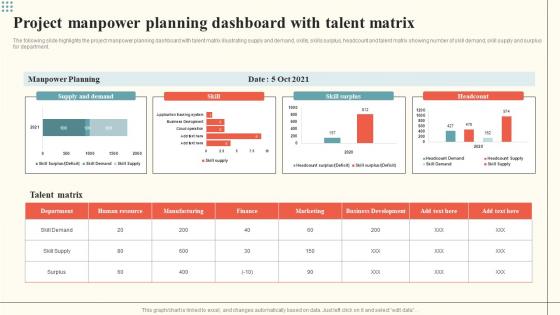
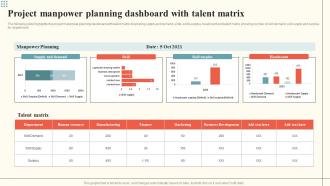
The following slide highlights the project manpower planning dashboard with talent matrix illustrating supply and demand, skills, skills surplus, headcount and talent matrix showing number of skill demand, skill supply and surplus for department.
People who downloaded this PowerPoint presentation also viewed the following :
Project Manpower Planning Dashboard With Talent Matrix with all 7 slides:
Use our Project Manpower Planning Dashboard With Talent Matrix to effectively help you save your valuable time. They are readymade to fit into any presentation structure.





FAQs for Project Manpower Planning Dashboard
Honestly, start with figuring out where your business is headed growth-wise, then work backwards from there. You'll want to map out what roles you actually need and when. Look at your current team - what skills are missing? Some positions take months to fill (learned that the hard way), so factor in lead times. Budget's obviously huge here. Think about who might leave or get promoted too. The market's pretty competitive right now for good talent, which makes timing even more critical. Balance what you need immediately with your longer-term plans, but don't overthink it.
So workforce analytics is basically your cheat code for not just winging it with staffing decisions. Instead of guessing, you'll actually see patterns in who's leaving and why. Plus it catches skill gaps before they screw you over. The predictive stuff is wild once you get into it - like seeing future hiring needs based on actual data instead of hunches. You can finally tell which departments are bloated vs stretched thin. Honestly, even basic tracking makes such a difference. Just start measuring turnover and headcount trends now. Your planning meetings will actually make sense for once.
Dude, get some workforce analytics software if you're still doing this stuff manually. It'll automate all that data collection and give you dashboards to see everything at once. Predictive analytics can actually forecast when you'll need more people based on historical patterns - way better than just winging it. HR software ties together scheduling, budgeting, and recruiting too. Honestly, anything beats those nightmare Excel spreadsheets we've all suffered through. You can run different scenarios for various business situations instead of crossing your fingers and hoping. It saves tons of time and you'll actually have accurate predictions.
So first thing - track job postings in your field and keep an eye on industry reports. Seasonal stuff matters too since some sectors are crazy cyclical. I'd build out a few different scenarios (conservative, aggressive, whatever) so you're not scrambling when things shift. Also watch what competitors are doing with their hiring - that tells you a lot. Historical data helps you spot patterns between market changes and staffing needs. Oh, and don't forget about tech disruptions or new regulations that might change what skills you actually need. Honestly, it's all about staying flexible when the market decides to do something weird.
Dude, retention is everything for workforce planning. High turnover means you're always scrambling to hire replacements and train newbies while dealing with those awkward productivity dips. It's a nightmare honestly. Good retention? Now you can actually plan strategically instead of just plugging holes. Your staffing becomes way more predictable. I'd definitely start tracking turnover by department - some teams are probably worse than others and you'll want to catch that early. Makes such a difference when you're not constantly in reactive mode, trust me.
Honestly? Start with where your business is heading in the next few years. New markets, product launches, digital shifts - whatever your big moves are, those drive what people you'll need. I've watched companies just hire randomly when they get busy, and it's such a money pit. Map out a few different scenarios based on your goals, then spot the skill gaps early. Maybe you upskill your current team, maybe you hire new folks, or bring in contractors. The thing is, your people plan should be just as serious as your business plan - they're basically the same thing anyway.
Honestly, the three big ones are forecasting (basically impossible sometimes), budget limits, and skills gaps. Historical data plus business projections help with predictions - just don't put all your eggs in one basket method-wise. When money's tight, focus on must-have roles first and maybe try contractors or part-timers. Skills gaps are tricky but training programs work if you plan ahead. Oh, and hiring before you desperately need someone is clutch. Start with auditing what you have vs what you'll need - sounds boring but that gap analysis actually shows you where to spend your energy first.
Honestly, this is way more straightforward than companies make it seem. First thing - look at your current team and figure out where the gaps are. Missing women in leadership? Not enough diversity in certain departments? Set actual targets for fixing those gaps, don't just wing it. When you're planning future hires, bake those D&I goals right into your requirements alongside everything else. Mix up where you recruit from, check your promotion process for bias (there's always some), and make sure underrepresented people are in your succession plans. Track the numbers religiously - hoping things change naturally is basically useless.
Honestly, I'd start with turnover rates and time-to-fill - those two hit leadership where it hurts. Cost-per-hire is huge too, plus employee utilization rates. Don't sleep on forecast accuracy though - like, how close were your predictions to what actually happened? Succession planning coverage is something most people forget about but it'll save your ass later. Revenue per employee shows if you're actually developing people right. Oh, and internal promotion rates matter way more than you'd think. The magic happens when you can prove your planning cut down those crazy expensive emergency hires. Pick maybe 3-4 that match whatever fire you're trying to put out first.
Honestly, workforce mobility is like herding cats - everyone's constantly moving around, switching roles, or bouncing to new companies. You'll need buffer capacity since your headcount never stays put. Cross-training becomes huge here. Don't plan for exact replacements because that never works out. Instead, build wider talent pipelines and focus on skills people can actually transfer between roles. Track where people move most in your company so you can spot gaps early. It's way better than scrambling when someone important leaves (which always happens at the worst time).
So succession planning is basically your backup plan for when people bail or move up. You map out critical roles first, then figure out who internally could fill them. Honestly, most companies suck at this until someone important quits unexpectedly - then it's panic mode. The smart move is identifying potential candidates early and working backwards to see what training they need. It's part of your overall workforce planning since you're developing people instead of always hiring from scratch. Keeps things running smoothly when turnover hits.
Look, it all comes down to what the job market's doing right now. Low unemployment? You're screwed - everyone's fighting over the same people, it takes forever to fill spots, and candidates are asking for crazy money. Plan way ahead and maybe hire extra just in case. I swear good talent vanishes overnight these days. But when unemployment's high, you've got options. Take your time, be picky, negotiate harder. Check your local job numbers regularly and see what competitors are doing. Oh, and adjust your hiring timeline based on what you find - saves you headaches later.
Honestly, there's a bunch of solid tools that'll make manpower planning way less of a headache. Workday, SAP SuccessFactors, and Oracle HCM are the big players - they do predictive analytics and all that fancy stuff. I still use Excel more than I probably should though, it's weirdly powerful for smaller teams. Monday.com and Smartsheet work great if you're doing project-based resource allocation. The trick is not getting sucked into buying something with a million features when you really just need the basics. Match the tool to your actual team size, you know?
Build compliance into your planning from the start - don't treat it as an afterthought. Stay on top of employment laws like minimum wage, overtime, and discrimination stuff. The legal landscape changes constantly (honestly gives me a headache sometimes). Get your legal/HR team involved early when reviewing workforce plans and hiring strategies. Your job descriptions and staffing ratios need to match current regs. Document everything and audit regularly - I can't stress this enough. Set up alerts for new labor law changes so you're not scrambling later.
Dude, remote work totally changes how you plan everything. Geography doesn't matter as much for hiring - which is awesome because you can find talent anywhere. But you can't just count who's sitting at desks anymore for productivity metrics. Time zones become this whole thing you have to juggle for meetings and projects. Office costs go down, sure, but then you're spending on tech stipends and all these digital tools instead. I'd start by figuring out which jobs actually need people physically there vs. ones that work fine distributed. The hiring pool expansion alone makes it worth rethinking your whole approach, honestly.
-
The pricing page of this website is very sorted. I felt no pain while buying the PPTs.
-
My presentations were a bit amateur before I found SlideTeam’s designs. I’ve been able to find slides for nearly every topic I’ve had to present. Thanks, Slideteam!