Human Resources Training Report Dashboard

Rating:
90%
Human Resources Training Report Dashboard
Slide 1 of 7
Favourites Favourites

Try Before you Buy Download Free Sample Product

Audience Impress Your
Audience
Editable 100%
Editable
Time Save Hours
of Time
The Biggest Sale is ending soon in
0
0
:
0
0
:
0
0
Rating:
90%
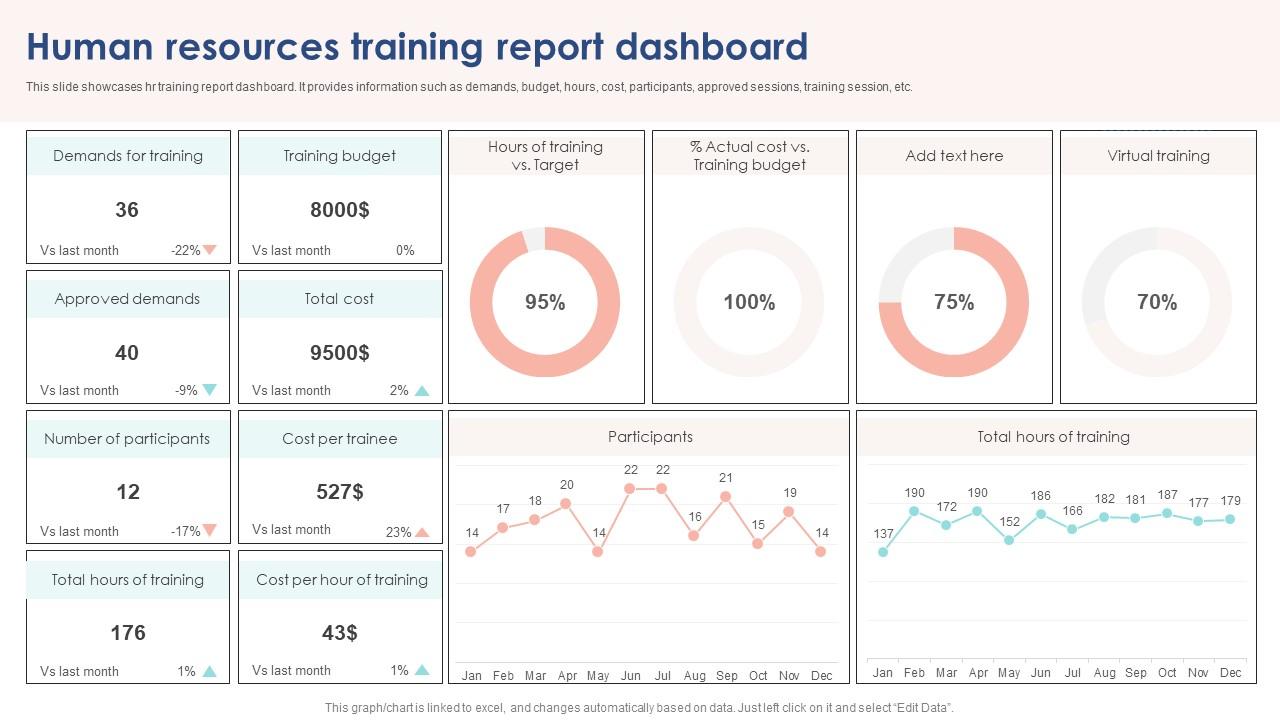
This slide showcases hr training report dashboard. It provides information such as demands, budget, hours, cost, participants, approved sessions, training session, etc. Introducing our Human Resources Training Report Dashboard set of slides. The topics discussed in these slides are Demands For Training, Training Budget, Approved Demands. This is an immediately available PowerPoint presentation that can be conveniently customized. Download it and convince your audience.

FAQs for Human Resources

So first off, definitely track completion rates and how engaged people are during training. Time-to-competency for new hires is huge too. Cost per hour and ROI will keep your boss happy when budget season rolls around. But here's what really moves the needle - before/after skill assessments. I swear this one single metric has saved my butt in so many meetings because it shows actual improvement, not just feel-good numbers. Don't skip satisfaction ratings either, plus how well people retain stuff over time. Start there and build out based on what your leadership actually cares about.

Honestly, ditch those boring spreadsheets - charts and heat maps will save your sanity. You can spot problem areas instantly instead of hunting through endless rows of completion rates. Bar charts work great for tracking who's actually finishing their training. Heat maps are clutch for showing which departments are struggling (our sales team was a disaster zone last quarter). Color-coding performance levels keeps things visual and engaging. Real-time progress bars make people actually care about their scores. Start simple with basic charts, then get fancier once everyone's used to checking the dashboard regularly.

Honestly, data analytics is a game-changer for training stuff. Instead of just hoping your programs work, you'll actually know what's happening. Track completion rates and quiz scores to spot which modules people love vs. which ones they're totally avoiding (looking at you, compliance training nobody asked for). Check your dashboard for patterns - maybe the sales team needs extra help, or people learn better at certain times. Then tweak your content based on real numbers instead of guessing. Oh, and don't go crazy with metrics at first. Pick like 2-3 important ones to start.

Skip the vanity metrics like "hours trained" - nobody cares. Track stuff that actually matters to your business instead. Think skill improvements that boost productivity, faster onboarding times, or compliance rates. Here's what works: show leadership that training led to a 15% sales jump or whatever metric they obsess over. Most dashboards I see are honestly just pretty numbers that collect dust. Focus on indicators that predict real outcomes, then use that data to fight for budget. Oh and prioritize future training based on what's actually moving the needle, not what looks impressive in meetings.

Make it dead simple to navigate - nobody should need help figuring out a training platform, right? Progress bars and color-coding are your best friends for showing status quickly. Put the crucial stuff right up top: deadlines, completion rates, current assignments. Good search and filters are a must since people will constantly be looking for specific courses. Honestly, test it with regular employees, not just HR people - they're the ones actually using it every day. Oh, and don't go overboard initially. Build something basic that works, then add features based on what users actually want, not what you think they need.

So there's a few ways to get employee feedback into your Training Dashboard. Post-training surveys are obvious, but pulse surveys work great too - even informal stuff like Slack comments or whatever. Honestly, the game changer is connecting your survey tools directly to the dashboard with automated feeds. Saves you from copying data around all day, which gets old fast. Track the usual suspects: satisfaction scores, knowledge retention, whether people think the training actually helped them do their job better. I'd just throw a simple 1-10 rating on your current training evals first. See what patterns pop up, then expand from there once you know what's useful.

Honestly, Power BI or Tableau are your best options if you've got budget for them - they're built for this stuff and make those slick dashboards that impress the higher-ups. Google Data Studio's free and works pretty well, though it can be weird sometimes. Check your current LMS first though (Cornerstone, Workday, whatever) - they might already have dashboard features that'll save you a headache. I'd figure out exactly what metrics you need to track first. Then just pick whichever tool makes those easiest to actually see and understand.

Honestly, you're gonna need to connect all those training platforms through their APIs - most LMS systems have them. Set up pipelines that dump everything into one central database. For the in-person workshop stuff, someone's gotta manually enter that data in a standardized way (which is kind of a pain, but whatever). Map all the different formats to common fields - learner ID, completion status, scores, dates. That way your dashboard can actually show the complete picture of what each employee has done across all training methods. It's way cleaner than trying to piece together reports from five different systems.

Honestly, progress bars are your best friend here - people instantly know where they're at with their training. Bar charts work well for comparing completion rates between departments, and line charts are solid for tracking how skills develop over time. Heat maps are actually pretty cool for spotting participation patterns, though most people don't think to use them. Before/after bar charts are obvious winners for showing skill improvements. Pie charts work fine for certification breakdowns too. Just stick with these basics instead of getting fancy - you want something that's actually helpful, not just pretty to look at.

So basically it shows you in real-time how your team's doing with training stuff. You can catch skill gaps early instead of scrambling later. It tracks completion rates and shows which courses actually work - half the time people just ignore training anyway lol. The cool part is personalizing learning paths based on how someone's performing and where they want their career to go. Set up auto reminders too so people don't forget. Oh and start simple - pick like 2-3 metrics that actually matter for your team's growth and build around those first.

Honestly, data integration is going to be your biggest pain point. HRIS, LMS, performance systems - none of them talk to each other properly. Managers will fight you on giving up their beloved Excel sheets too. User adoption makes or breaks these projects, trust me. Oh, and you definitely need someone who can bridge the gap between what HR thinks they want to measure and what the numbers actually mean. I'd say pick one department first, get some wins under your belt, then roll it out wider. Way less messy that way.

Honestly, you've gotta nail down your data validation right from the start. Set up automated checks for duplicates, missing dates, and wonky employee IDs. Our Q3 report was a total disaster because I didn't do this - learned that lesson fast! Pull everything from your HRIS instead of random spreadsheets scattered everywhere. Monthly audits are clutch too. Get your training coordinators to verify their stuff regularly and build simple error reports that catch weird outliers. Oh, and train people on proper data entry upfront. Trust me, it's way better than constantly fixing their mistakes later.

Dude, get those automated alerts set up first - seriously, it'll save your sanity during audit season. The dashboard tracks all your required training automatically and flags when certs are about to expire. Reports show completion rates and any gaps, which is perfect for when regulators come sniffing around. Oh, and it keeps detailed records of everything - who did what training, when they finished, all that good stuff. Creates a solid audit trail without you having to chase people down manually. Honestly wish I'd started using one sooner instead of tracking everything in spreadsheets like some kind of masochist.

So basically, predictive analytics looks at your employee data to spot skill gaps before they become a problem. Performance reviews, project assignments, career plans - all that stuff feeds into models that can predict training needs 3-6 months ahead. It'll catch things like which departments need certifications soon or when new hires typically struggle with certain skills. Way better than playing catch-up later, trust me. You'll want to start by gathering your data sources first, then work with your analytics team to build the models. Honestly, the retirement schedule tracking alone is super helpful for workforce planning.

Honestly, real-time data is a game changer for catching training issues before they blow up. You'll see right away if someone's drowning with new software or a whole department needs help. No more waiting around for those useless quarterly reports that tell you what went wrong months ago (seriously, who has time for that?). When problems pop up, you can jump in fast - tweak the training, move people around, whatever needs fixing. Makes everything so much more focused. Fresh data beats old news every time when you're trying to actually help people succeed.

Ratings and Reviews

90% of 100
Review Form
Write a review
Most Relevant Reviews
  1. 80%

    by Coleman Henderson

    Time saving slide with creative ideas. Help a lot in quick presentations..
  2. 100%

    by Danilo Woods

    “Slides are formally built and the color theme is also very exciting. This went perfectly with my needs and saved a good amount of time.”

2 Item(s)

per page: