

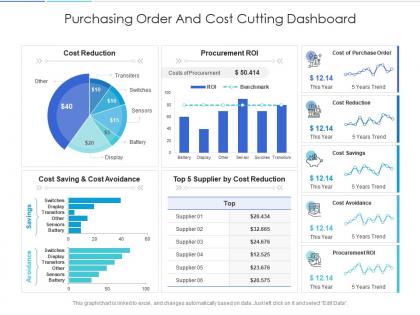
Purchasing order and cost cutting dashboard Snapshot powerpoint template




Try Before you Buy Download Free Sample Product
 Impress Your
 Audience
 100%
100% Editable
 Save Hours
 of Time


Our Purchasing Order And Cost Cutting Dashboard Snapshot Powerpoint Template are topically designed to provide an attractive backdrop to any subject. Use them to look like a presentation pro.
People who downloaded this PowerPoint presentation also viewed the following :
Purchasing order and cost cutting dashboard Snapshot powerpoint template with all 2 slides:
Use our Purchasing Order And Cost Cutting Dashboard Snapshot Powerpoint Template to effectively help you save your valuable time. They are readymade to fit into any presentation structure.
FAQs for Purchasing order and cost cutting dashboard
So for your PO dashboard, start with real-time order tracking - you need to see what's pending, approved, or stuck somewhere. Vendor performance metrics are huge too. Track delivery times and quality scores because honestly, some vendors will drive you insane if you don't stay on top of them. Budget tracking is obvious but critical - can't have people blowing through quarterly spend without warning. Oh, and definitely build in approval workflows with bottleneck alerts. Nothing worse than finding out something's been sitting on someone's desk for two weeks. These four things will cover like 90% of your daily headaches.
Honestly, charts and graphs are a game-changer for making sense of purchasing data. You can spot seasonal spikes, catch budget issues early, and see which vendors are actually performing well - stuff that'd take forever to find in spreadsheets. Plus presenting to your boss becomes so much easier when you're not scrolling through endless rows of numbers (trust me on this one). The visual format just clicks better for most people's brains. Start with whatever metrics your team cares about most. Oh, and delivery patterns become super obvious once you chart them out over time.
Honestly, real-time data is a game changer for avoiding those "oh crap" moments. You'll catch supplier delays and inventory issues as they happen instead of getting blindsided later. Quick pivots become possible when you can actually see what's going on with budget spend and approval bottlenecks. I learned this the hard way after one too many emergency orders that could've been prevented. Set up alerts for stuff that actually affects your day-to-day work though – otherwise you'll just get notification fatigue and ignore everything.
Dude, predictive analytics is a game changer for inventory stuff. Basically it looks at your old buying patterns, seasonal trends, and how long suppliers take to deliver - then tells you when to reorder before you run out. No more scrambling for emergency orders (which cost way too much btw). It also helps you avoid tying up cash in stuff you don't need yet. Honestly, the math behind it is pretty impressive. Start with your most-purchased items first. That's where you'll actually notice the difference in stockouts and cash flow.
Honestly, data integration is going to be your biggest nightmare - nothing ever talks to each other properly. You'll waste so much time cleaning up garbage data feeds from different systems. User adoption though? That's almost worse. People hate change, and if your dashboard feels weird or doesn't fit how they actually work, they just won't use it. Training takes forever too, way longer than you think. Oh, and definitely get your department heads on board first - learned that one the hard way. Start with a small pilot group, focus on getting the basic stuff right, then expand from there.
So ERP integration syncs all your purchasing data in real-time - no more spreadsheet hell. Your dashboard automatically pulls vendor info, inventory levels, budgets, approval workflows, all that stuff. Honestly it's such a relief once it's running. You'll spot spending patterns way easier and approvals move faster. Finance will actually trust what they're seeing for once lol. Way fewer manual screw-ups too. Oh and start by figuring out which data points need to flow between your systems first - saves you headaches later.
Four things you actually need to track: PO cycle time (request to approval), budget vs what you're spending, supplier ratings, and overdue orders. Trust me, I've worked with teams drowning in dashboards with tons of charts nobody checks. Cycle time shows you where things get stuck. Spend tracking saves you from nasty budget surprises. Supplier ratings help with future vendor choices - pretty obvious but people forget. And honestly? Overdue orders will make or break your project timelines. Start there, then add more stuff later if your team's actually using it.
Honestly, user feedback is everything for dashboard design. What looks perfect to you might be a nightmare for people actually using it daily. Get them talking about navigation flow and which data they actually need front and center. Also ask what's slowing them down - that stuff's gold. I've watched so many "beautiful" dashboards become total headaches because nobody asked users what they wanted. Start collecting feedback early, then keep tweaking based on how people really work. Focus on the practical stuff like better filters or faster approvals.
Set up validation rules in your dashboard first - require all the basic stuff like vendor details, quantities, pricing before anything gets submitted. We learned this when orders kept going out without delivery dates, total mess. Do periodic audits against your inventory too. For bigger orders, make someone else approve them as a safety net. Train your team to actually look at vendor info and unit costs instead of just rushing through. Honestly, the dual approval thing saved us more times than I can count. Get these workflows automated now and you won't be putting out fires later.
Honestly, mobile access for your purchasing dashboard is a game changer. You can approve orders while you're out at client sites or stuck in traffic. Real-time notifications help you catch problems before they blow up. I used to miss urgent supplier requests all the time when I was desk-bound - super frustrating. Now you can literally check if that critical shipment went out while you're in line at Starbucks (guilty as charged). The mobile interfaces actually work well on phones now too, not like those terrible desktop versions shrunk down. Your response times will get so much better once you set it up.
Go with color coding - green for approved, yellow pending, red for problems. Progress bars help too so people actually know where their PO is stuck. I'm a sucker for good icons, like checkmarks or warning triangles. Keep status names short though. "Awaiting Approval" is way better than some corporate nonsense like "Under Management Review Process." Timestamps are clutch since everyone wants to know how long something's been sitting there. Oh, and definitely test with real users first. What seems obvious to you might make zero sense to them.
So yeah, definitely set up different dashboard views for each role. Procurement managers want the big picture stuff - spend analytics, vendor performance. Buyers need to track PO status and see where approvals are stuck. Finance cares about budget variance and cost breakdowns, obviously. Requesters literally just want "where's my stuff?" which is probably 90% of what they bug you about anyway lol. The trick is role-based permissions so people only see what matters to them. Otherwise you'll drown them in irrelevant data. Just ask each group what their top 3 daily questions are and build around that.
Start with role-based access - only give people what they need for their actual job. Multi-factor authentication is a must since passwords are basically worthless now. Your data needs encryption both stored and in transit. Session timeouts are key so people don't stay logged in all day (or week, let's be honest). Security audits should happen regularly too. First thing though? Check who has access to your dashboard right now. I bet you'll find random people with permissions they shouldn't have - it's always a mess when you actually look.
So AI can totally transform your PO dashboard - I'd start with demand forecasting since that gives you the fastest payback. You'll get way better at predicting when demand spikes are coming, which means no more annoying stockouts. The automated spend analysis is pretty sweet too, it catches weird purchasing patterns and spots savings you'd probably miss. Machine learning ranks your suppliers by delivery speed, quality, all that good stuff - honestly saves me tons of time vs doing it manually. Oh, and the natural language processing can actually read through contracts and flag sketchy terms. Worth testing demand forecasting first, then expanding from there.
Daily updates are your best bet - that's what works for most places I've seen. Real-time is obviously better if you can swing it, but daily hits that sweet spot between staying on top of things and not killing your system. Weekly? Way too slow, honestly. You'll miss stuff that snowballs into bigger problems. Match it to how fast your business moves, you know? High-volume orders or crazy deadlines mean you probably want hourly updates. I'd start daily and see how often you're like "damn, wish I'd caught that sooner" - then speed it up from there.
-
Great product with effective design. Helped a lot in our corporate presentations. Easy to edit and stunning visuals.
-
Design layout is very impressive.
-
Great product with effective design. Helped a lot in our corporate presentations. Easy to edit and stunning visuals.
-
Qualitative and comprehensive slides.
-
Excellent Designs.
-
Editable templates with innovative design and color combination.