

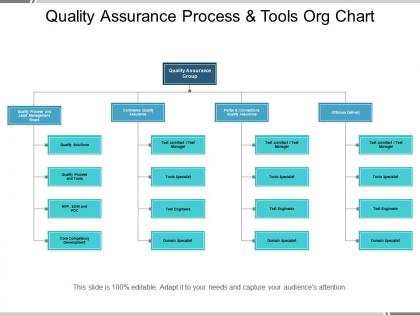
Quality assurance process and tools org chart




Try Before you Buy Download Free Sample Product
 Impress Your
 Audience
 100%
100% Editable
 Save Hours
 of Time


Have you been asked to create the organizational chart to highlight the quality assurance process? If yes, then download our organization chart Presentation design. We have created this impressive PowerPoint slide for the professionals working in the quality management department. With our PPT template, you can show the importance of the quality assurance as how important it is to maintain the quality to attain the customer interest. Our Presentation diagram enables you to engage the prospect customer with your product or services and make them take the decision to choose them. The hierarchy process helps to show the clear picture as how you ensure quality when it comes to meet customer expectation and who are responsible for maintain it. The org chart can also be used to present the key values such as the name and the designation of the people that manages the business. Whatever communication you have you can easily communicate it to audience with this Presentation diagram. Just select and download the PPT design to share the information. Display intense involvement with our Quality Assurance Process And Tools Org Chart. Get down to the job in full earnest.
People who downloaded this PowerPoint presentation also viewed the following :
Content of this Powerpoint Presentation
Your business needs to ensure that top-level quality is maintained in each case for any kind of product and service. To maintain quality, a business can use various back-end techniques, processes, frameworks, and modes. Still, even after using so many elements, your clientele or audience may be skeptical about your products or services because they lack insights into quality maintenance techniques.
However, providing quality assurance to your clients can significantly help your business. One of the most trusted and proven ways to deliver quality assurance is to explain the entire process to the audience.
You can use SlideTeam’s flowchart-based 100% customizable quality assurance process and tools chart for this task. This chart will help you showcase different spectrums and quality assurance processes. So, check out the template provided to learn what it offers.
Look at the detailed and thorough template for quality assurance activities and processes to explain the ins and outs of the domain to your audience.
Template 1: Quality Assurance Process and Tools Org Chart
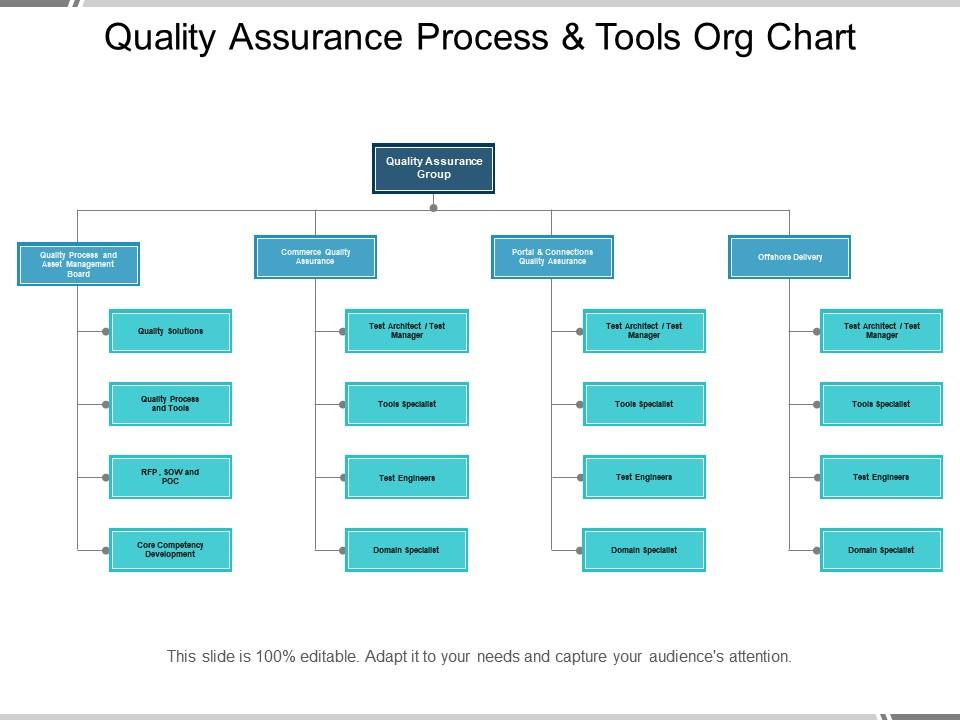
The quality assurance chart is highly inclusive and starts with the Quality Assurance group at the top. It has four categories: Quality Process and Asset Management Board, Commerce Quality Assurance, Portal and Connections Quality Assurance, and Offshore Delivery. You can further divide these categories and list the types of tools and personnel employed within each category to ensure optimal quality. All this information will help your audience analyze the scope and level of the quality assurance program used by the business.
Take the help of this quality assurance program PPT template to help your clients choose the ideal quality assurance plan according to their requirements.
Quality Assurance Template: A Reliable Technique to Gain Client Trust
Sharing or using a quality assurance template helps convey that your business has nothing to hide and does everything in the open. This bold document goes a long way in gaining the required trust of potential clients and the general audience. The above-provided template can help you do the same by offering the quality assurance details comprehensively and informally.
Here is an infographic template on the five-wheel process for quality assurance to attract the required attention of your audience toward the sensitive subject.
Quality assurance process and tools org chart with all 5 slides:
Boost dipping confidence with our Quality Assurance Process And Tools Org Chart. Get your customers believing again.

FAQs for Quality assurance process and
Honestly, focus on building quality in from the start instead of hunting for bugs later - way cheaper that way. Get your whole team thinking about it, not just QA people. Document everything and track whatever you can measure, because how else do you know if you're actually getting better? Oh, and do retrospectives after sprints. Sounds boring but they're actually super helpful for figuring out what's broken in your process. Prevention beats detection every time, and keep your customers in mind with everything. That's really it - nothing too fancy.
QA is about preventing bugs by fixing your processes first. QC is catching bugs in the actual product. So QA = building better guardrails and code standards throughout development. QC = hands-on testing right before you ship. I get these mixed up constantly tbh! QA runs through your whole dev cycle, but QC kicks in when you're actively hunting for problems. Most teams I've worked with do way too much QC and not enough QA, which is backwards. You'll save yourself tons of headaches if you build both in properly.
Mix planned audits with random spot-checks - that combo works best. Focus on the high-risk stuff first instead of treating everything the same. Definitely write everything down as you go (seriously, your memory isn't as good as you think). Talk to the people actually doing the work, not just their bosses. Checklists keep you on track, but don't get so stuck on them that you miss obvious problems. Oh, and always circle back on fixes within a month or they'll just forget about it. Balance being thorough with actually getting done.
So CI runs your tests automatically every time someone pushes code - catches bugs super early instead of that last-minute panic before releases. Every commit gets tested, which stops broken stuff from getting through. Developers end up writing cleaner code too since they know it'll get checked right away. Your QA people can actually focus on the interesting stuff like edge cases instead of running the same boring tests repeatedly. I swear it's like having someone watching your code 24/7. Oh and if you're just starting out, maybe begin with unit tests only - don't go crazy trying to automate everything at once.
Dude, automated testing is like having a safety net that catches bugs before they mess up your live site. I'd go crazy doing CI/CD without it now - seriously saves your team from doing the same boring tests over and over. Unit tests, API stuff, smoke tests... all perfect for automation. But don't think it replaces everything though. You still need actual people checking usability and weird edge cases that your scripts won't catch. My advice? Pick your most important user flows first and automate those, then just keep adding more as you go.
So honestly, the ratio of bugs you catch vs what customers find is huge - tells you everything about how you're doing. I track defect detection rates, how fast we fix stuff, and customer satisfaction scores. Used to get way too obsessed with defect density per feature though lol. Customer impact metrics are what really matter. Also watch your cycle times and whether you're actually hitting deadlines without cutting corners on quality. Just throw these numbers on a simple dashboard and check monthly. You'll start seeing patterns pretty quick and can tweak things from there.
Honestly, the timeline crunch is brutal - QA always gets squeezed when sprints run tight. Requirements shift constantly too, which is fun. Documentation? What documentation? You'll be deciphering acceptance criteria like hieroglyphics half the time. Here's the thing though - automation becomes make-or-break, but setting it up takes forever (ironic, right?). Your CI pipeline better be bulletproof from sprint one or you're screwed. My take? Get tight with the devs immediately. Fight tooth and nail for decent user stories. And yeah, invest in test automation upfront even if it tanks your first sprint's velocity.
Honestly, you gotta make quality everyone's problem, not just QA's. Get your leadership to actually show they care about doing things right vs. rushing crap out the door. When people see managers backing that up, they'll follow. Reward the folks catching bugs instead of just celebrating speed demons - I swear, some places punish you for finding problems! Set up regular retros where teams can be real about what's broken. Oh, and this is huge - give people actual time to do it right instead of these insane deadlines that force shortcuts. Quality takes breathing room.
Focus on defect density and escape rates first - those show how many bugs you're catching vs letting slip through. Test coverage percentage is obvious but still crucial. Mean time to resolution is my favorite though, tells you how fast your team recovers when shit hits the fan. Track test execution rates and first-pass yield too. Customer satisfaction scores are gold if you can actually get reliable data. Honestly, stick to maybe 5-7 metrics max that you check weekly. More than that and you'll just get buried in numbers that don't help you make real decisions.
Honestly, just stick to simple templates for everything - test cases, bug reports, the whole deal. I've watched so many teams create these elaborate docs that collect dust because they're way too complicated. Start with your most critical stuff first, then expand. Document the "why" behind decisions, not just what you did - like why you chose certain test scenarios or skipped others. Oh, and don't forget about risk assessments and acceptance criteria context. Track metrics your stakeholders actually care about (trust me on this one). Keep it all in one central spot so people aren't hunting around. You'll thank yourself later when someone new joins the team.
Honestly, just set up feedback collection everywhere - surveys after beta releases, forms in staging, user interviews during UAT. But here's the thing that everyone messes up: you actually have to DO something with what people tell you. I've seen so many teams collect feedback then let it sit there gathering dust. Sort issues by how often they come up and how badly they affect users, not just what's easiest to fix technically. Oh, and definitely tell users when you've fixed something they complained about - makes them way more likely to keep giving you useful input next time.
So compliance basically controls your whole QA approach - sets your minimum standards, drives how you document stuff, determines testing methods. Ad-hoc testing? Forget about it. Frameworks like ISO or FDA requirements will dictate everything from metrics to defect handling. Build it into your processes from the start though - seriously, retrofitting compliance later is absolute hell (learned that one the hard way). You'll save yourself tons of headaches. The documentation alone will make you want to cry if you try doing it backwards.
Dude, AI is seriously changing QA right now. You can automate way more than just the basic stuff - machine learning actually predicts where bugs will pop up based on your code changes. Pretty crazy, right? Test case generation happens automatically now too. Visual testing got way smarter - AI catches UI changes that would take us ages to find manually. Oh and the tools for this keep getting better every few months. My advice? Don't try to do everything at once though. Pick one thing like automated test generation first, then expand from there. Way less overwhelming that way.
Start with the basics - testing methods and bug tracking stuff like Jira. But honestly? Just dive into hands-on practice instead of getting stuck in theory forever. Check out Test Automation University or those Coursera QA courses. Learn Selenium for automation (everyone uses it) and definitely get comfortable with Postman for API testing. ISTQB certification isn't sexy but it opens doors. The real trick is finding projects where you can break things without consequences - that's where you actually learn. Oh, and maybe grab one free course this week to get rolling.
Honestly, you've gotta shift left and automate early - there's no way around it. Instead of treating QA like some final checkpoint, build those quality checks right into development from the start. Yeah, it's more work upfront (won't sugarcoat that), but automated testing and continuous integration actually make things faster once you get rolling. Oh, and focus your manual QA on the stuff that'll really screw you over if it breaks - risk-based testing is clutch for that. Don't try to automate everything at once though. Start small and just keep building on it.
No Reviews