


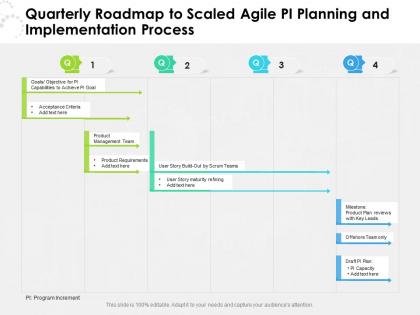
Quarterly roadmap to scaled agile pi planning and implementation process




Try Before you Buy Download Free Sample Product
 Impress Your
 Audience
 100%
100% Editable
 Save Hours
 of Time


Visualize your work plan and communicate your ideas impactfully with our pre designed Quarterly Roadmap To Scaled Agile PI Planning And Implementation Process. Showcase the detailed overview of the project, the key deliverables, and the milestones to be achieved with the help of our fully customizable PowerPoint layout. You can easily emphasize on the project goals and discuss all the activities involved in an easy to comprehend manner by utilizing our professionally designed PPT theme. This roadmap PowerPoint layout is a perfect strategic planning tool that can help in keeping the project on track. With our attractive PowerPoint theme, you can articulate the workflow, track the work progress, and have a clear vision of the goal to be achieved. Download this versatile Quarterly Roadmap To Scaled Agile PI Planning And Implementation Process and save your hours of work.
People who downloaded this PowerPoint presentation also viewed the following :
Quarterly roadmap to scaled agile pi planning and implementation process with all 2 slides:
Use our Quarterly Roadmap To Scaled Agile PI Planning And Implementation Process to effectively help you save your valuable time. They are readymade to fit into any presentation structure.
FAQs for Quarterly roadmap to scaled agile pi planning
So PI Planning is basically about getting your whole Agile Release Train on the same page - alignment, commitment, and spotting risks early. Everyone piles into one room (or Zoom these days) to hash out the next 8-12 weeks together. It's a lot, honestly. But you'll come out with solid team commitments for the Program Increment and all the dependencies between teams mapped out clearly. Any major blockers get surfaced right away too, which saves headaches later. The whole point is everyone walks away knowing exactly what matters most and how their piece fits the puzzle. Oh, and bring your team's capacity info - you'll need it.
So basically everyone gets together (physically or on Zoom) to plan out the next 10-12 weeks. Teams map their work and figure out who needs what from who - sounds boring but it's actually crucial. You'll spot conflicts early instead of panicking later when deadlines hit. Each team presents their plans while leadership explains the bigger vision. Yeah, it gets messy and loud, but that's good! Better to hash things out now. You leave with everyone on the same page about commitments. Just make sure your team's stuff connects to the overall program goals. Oh, and flag anything that needs the executives to swoop in and fix.
So you've got Product Owners who basically decide what features matter and set priorities. Scrum Masters keep their teams on track and clear roadblocks. Developers do the heavy lifting - they're planning, estimating, and committing to what they can actually deliver. The RTE runs the whole circus (honestly, I don't envy them). Business stakeholders show up to give context and field questions. Quick tip though - make sure everyone comes ready with their stuff prepared. Otherwise you'll waste hours just figuring out basic details instead of real planning. Trust me, unprepared PI Planning is painful for everyone involved.
Honestly, the biggest thing is coming prepared - groomed backlogs, dependencies mapped out, and knowing your team's actual capacity. Your POs need their priorities straight and stories ready to go. Everyone should've already reviewed the program vision beforehand (seriously, don't be that team figuring it out on the spot). Got any big architectural decisions or tech constraints? Hash those out first too. The whole point is spending those sessions actually collaborating and making commitments, not scrambling through basic prep stuff. Way more productive that way.
For virtual PI Planning, you'll need some solid collaboration tools. Miro or Mural work great for digital program boards - teams can drag stories around in real-time. Sometimes I think it's actually cleaner than sticky notes everywhere! Zoom handles the main sessions while Slack keeps those side conversations going. Most teams also pull in Jira or Azure DevOps for backlog management during planning. Here's the thing though - don't go crazy with tools. Pick like 3-4 max and make sure everyone knows how to use them beforehand. Trust me on that one.
Honestly, scope creep will probably be your biggest nightmare - that and when dependencies turn into a tangled mess. Teams never seem to agree on what's actually priority either. Missing key people? Yeah, that'll derail things fast. Get your backlog sorted beforehand and be ruthless about what's in scope vs out. Dependency boards are clutch for spotting blockers between teams. Your Product Owners need to actually show up and make decisions, not just sit there nodding. Oh, and book follow-ups within the first week while everyone still remembers what happened.
Honestly, 2 days is the sweet spot. One day? You're basically speed-running through everything and teams walk away with garbage plans. Three days though... I've sat through those marathon sessions and by day 3 everyone's just mentally done. You need breathing room for those awkward "oh wait, we actually can't do that" conversations where the real blockers come up. That's where the magic happens - not rushing through some agenda. Bigger teams might need the extra time, but start with 2 days and see how it feels.
So for tracking PI Planning success, confidence votes are huge - anything under 3/5 means teams don't believe in what they committed to. I'd also check how much you actually delivered vs planned (shoot for 80%+). Dependencies are tricky though - count how many you caught during planning vs the ones that blindsided you later. Those surprise dependencies always mess things up. Oh, and don't skip the retro feedback scores. Teams will tell you straight up if the session was worth it or just a waste of two days. Honestly, just throw this stuff in a simple dashboard and check it every quarter.
Definitely do your retro right after PI Planning while everything's still fresh. Don't wait! Get all the feedback down somewhere everyone can see it and actually assign people to fix stuff - otherwise it just becomes another forgotten doc. Hit the big three: logistics, how well things were facilitated, and team dynamics. Honestly, half the problems are usually just basic stuff like terrible room setup or people not getting enough bathroom breaks. When you're prepping for the next one, pull up those notes and bake the fixes right into your agenda. Teams will actually trust the process more when they see you implemented what they suggested.
Get some good visual collaboration tools set up - digital boards work great so teams can actually see how their stuff connects. Make sure people are really there, not just dialing in half-checked-out (we've all been that person). During breaks, push for cross-team chatting. Do "walk the board" sessions where each team shows their plans to everyone else. Oh, and don't pack the schedule too tight - honestly some of the best breakthrough moments happen when people are just grabbing coffee between sessions. You want tons of chances for actual conversation, not just formal presentations.
During breakouts, teams literally walk around with sticky notes connecting stuff between boards - looks like chaos but it works somehow! Figure out what you're giving other teams and what you need from them. Then hash out timing when you review the draft plans. Honestly, the red dependency strings on your program board are your best friend here. Surface this stuff early instead of crossing your fingers and hoping it'll work out later (spoiler: it won't). And seriously, don't be shy about pushing back if another team's timeline is gonna screw over your commitments.
So PI objectives are what your team commits to delivering over those 8-12 weeks. They're like a contract with stakeholders, but way more flexible than that sounds. You assign confidence levels to each one, which honestly helps manage expectations from the start. The cool part is seeing all the team dependencies during planning - makes everything so much clearer. Just make sure they're specific enough that you can actually tell if you hit them later. Oh, and they keep everyone aligned on what actually matters instead of just wandering around doing random work.
Dude, visual aids will save your sanity during PI Planning. Those sessions are brutal without them. Get some story mapping walls going and throw up dependency boards - honestly, watching people move sticky notes around is weirdly satisfying and actually works. Miro's solid if you're doing remote stuff. Color code everything by team or priority so it's not just chaos on a wall. Real-time progress displays keep everyone focused instead of zoning out (we've all been there). Don't overthink the setup though - start basic and add complexity as you go.
Dude, your leadership team needs to actually stick around for the whole thing - not just pop in for the opening speech and vanish. They should show up with clear priorities and be ready to make decisions when teams get stuck. The worst PI Planning events I've seen? Executives bail after day one and everything goes sideways. Block those two days completely. Don't micromanage what teams commit to, but jump into the actual planning conversations. Oh, and they've gotta model that collaborative vibe they want everyone else to have. Treat it like the strategic investment it really is.
Here's what works for us: during the retro part of PI Planning, actually spend time digging into what went right and what bombed last increment. Don't just complain though - turn those insights into real experiments you'll try next time. The management review sessions are gold for this stuff too. We started documenting everything and sharing it with other ARTs, which honestly saves everyone from making the same mistakes twice. Each PI Planning becomes both a planning session and a learning opportunity. Track your insights properly and you'll see patterns emerge pretty quickly.
No Reviews