


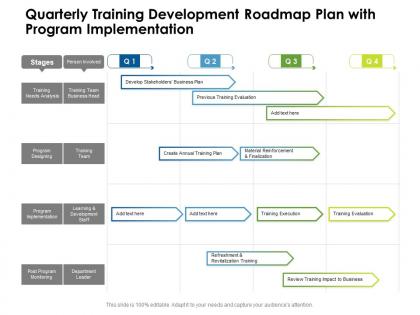
Quarterly training development roadmap plan with program implementation




Try Before you Buy Download Free Sample Product
 Impress Your
 Audience
 100%
100% Editable
 Save Hours
 of Time


The success rate of business plans is hugely dependent on the plan of action, and this editable Quarterly Training Development Roadmap Plan With Program Implementation rightly serves the purpose. Encapsulate all the information related to the project in a well structured manner to obtain maximum efficiency by incorporating our stunning PowerPoint theme. State the critical deliverable, steps involved, time frame, workforce allocation, and lots more in an easy to understand manner by utilizing this pre designed roadmap PowerPoint layout. You can also prioritize your tasks and discuss the problem areas with your colleagues by incorporating this tailor made PPT layout. Empower your work plan by employing this professionally designed PPT theme. Entrepreneurs can download Quarterly Training Development Roadmap Plan With Program Implementation as a beneficial communication tool that facilitates in collaborating with different tasks and achieve targets.
People who downloaded this PowerPoint presentation also viewed the following :
Quarterly training development roadmap plan with program implementation with all 2 slides:
Use our Quarterly Training Development Roadmap Plan With Program Implementation to effectively help you save your valuable time. They are readymade to fit into any presentation structure.
FAQs for Quarterly training development roadmap plan
Focus on three main things for your quarterly training plan: skill gaps that actually hurt your bottom line, leadership development for succession planning, and whatever compliance stuff you can't avoid. Start with what's stressing out your executives - that's where the real priorities live. Cross-functional training helps too since it breaks down those annoying department silos. The tricky part? You've got to balance urgent needs with long-term strategy. Oh, and definitely tie each training back to specific metrics so you can prove it's working. Otherwise you're just throwing money at feel-good workshops.
Honestly, start with the obvious stuff - completion rates and test scores. But here's what really matters: are people actually using this stuff at work? That's where the magic happens. Quick surveys work great for finding out what stuck (and what totally flopped). Also worth asking their managers if they've noticed any changes - sometimes that perspective is super helpful. Oh, and definitely track things like retention or performance over the next few months. Compare everything back to what you originally wanted to achieve. Then just cut the dead weight and focus more on whatever actually worked for your team.
Start by figuring out where the real gaps are - pull performance data and actually ask your employees what training they want. Managers usually guess wrong on this stuff. Check your performance reviews for patterns where people keep missing the mark. Also worth looking at job postings for roles your team wants to grow into someday. Once you have all that, make a simple matrix. Rank everything by business impact vs how hard it'll be to pull off. Go for the high-impact, low-effort wins first - those feel good and build momentum.
First thing - figure out what you actually need to cover this quarter, then mix up how you deliver it. Visual people love infographics and videos. Kinesthetic learners need workshops where they can get their hands dirty. Discussion groups work great for auditory folks. Honestly, I'd also throw in some self-paced online stuff because some people just hate group learning (no judgment). Try to hit each topic 2-3 different ways per month. Oh, and survey your team upfront about preferences - sounds obvious but most people skip this step and it makes a huge difference in who actually shows up.
So basically, pick an LMS that tracks everything and sends out those annoying reminder emails nobody wants but everyone needs. Mobile apps are clutch for people always on the go. The analytics stuff is honestly pretty cool - you can see who's actually doing the training versus who's just clicking through. Video calls work great for remote teams, though we all know how those can go sometimes. AI personalizes the whole thing based on how people perform, which sounds fancy but actually works. My advice? Don't go crazy trying to use every tool at once. Just grab one or two that fix your biggest headaches first.
So here's what works - send out quick surveys 2-3 weeks after each training session, maybe throw in some focus groups too. Managers are honestly your secret weapon since they actually see if people change their behavior (I used to skip this part and regret it). Monthly check-ins with different groups help you catch problems before they get worse. Oh, and make a simple dashboard to track everything - sounds fancy but it's just so you can spot patterns and tweak things for next quarter. The trick is making all this feedback stuff feel normal, not like you're piling more work on everyone's plate.
Honestly, skip the boring mandatory stuff and make it actually relevant to what people do every day. Personalized invites work way better - tell them exactly how it'll help their specific job or career. Mix things up with live sessions, self-paced modules, maybe some lunch-and-learns (those are surprisingly popular). Your managers need to show up and participate too, not just send emails about it. Oh, and definitely record everything for people who can't make it. Here's the thing though - actually ask for feedback afterward and then use it. People can tell when you're just going through the motions.
Honestly, I'd check it every 2-3 weeks if possible. Monthly at minimum though. Business stuff changes so damn fast - January priorities can be totally useless by March. Quick 15-minute reviews work best. Just set a recurring reminder and don't overthink it. The whole point is staying flexible when new regulations drop or skill gaps suddenly appear. I've watched too many training programs crash because they got stuck following outdated plans. Oh, and definitely don't be scared to completely switch direction when it makes sense. Your roadmap should bend, not break.
Don't cram all your compliance training into one quarter - seriously, people will hate you for it. Spread it out across the year instead. I usually map the mandatory stuff (harassment training, data security, whatever) to quarters based on deadlines, then throw in some actually useful skills training alongside each one. Like if Q2 has your annual security training, add some cybersecurity workshops that people might care about. Makes the whole thing feel less like busy work. Oh, and build in buffer time because compliance deadlines are set in stone - you don't want to be scrambling if meetings get moved around.
Honestly, talking to other departments upfront saves you so much headache later. You'll actually know what skills people need instead of just winging it. Like, maybe IT's about to drop new software on everyone or sales is switching things up - you'd never know staying in your bubble. People show up more when they help plan the training too, which makes sense. What works for the finance team will probably flop hard with the creative folks though, so you need those different viewpoints. I'd just grab 30 minutes with each department head to figure out their Q1 stuff and what training gaps they're seeing. Way easier than guessing.
Honestly, focus on completion rates and feedback scores first - that's your baseline to see if people actually care. But the real gold is measuring before/after skill levels and whether performance actually improves afterward. Retention data helps too since decent training usually makes people stick around longer. Don't get crazy tracking every possible metric though. Pick maybe 3-4 things that actually connect to what your company cares about. I've seen too many people drown in data when they should've just focused on what moves the needle.
First thing - tie your training budget directly to business goals so you can defend it later. Split it roughly 60/40: most goes to compliance and core skills, the rest to emerging tech and leadership stuff. Always pad it by 10-15% because weird expenses pop up (trust me on this). Monthly tracking is key, but focus on actual outcomes instead of just completion rates. Oh, and negotiate those vendor contracts annually - way better pricing. Don't forget employee time costs either, that's where budgets usually blow up unexpectedly.
Honestly, the trick is making it feel like actual skill building instead of boring mandatory stuff. Switch up the format each quarter - maybe workshops one time, book clubs another (people surprisingly love those). Short bursts work better than marathon sessions. Connect whatever you're teaching to problems they're actually dealing with right now. Otherwise it just feels random and pointless. Survey your team after each quarter about what they want to learn next. That way they're invested in it. Start planning by asking what gaps they actually want to fill instead of guessing what they need.
Honestly, just survey your team first about what actually works for their schedules - saves you so much headache later. Break everything into small chunks people can knock out between meetings. Remote attention spans are basically nonexistent these days. Skip the PDF dumps and do interactive virtual stuff instead. Oh, and if you've got people in different time zones, plan for that upfront. I'd spread touchpoints throughout the quarter rather than cramming it all into those marathon training sessions nobody remembers anyway. Digital-first is obvious but flexibility is what'll make or break it.
So for the big stuff, check out Cornerstone OnDemand or TalentLMS - they're solid for scheduling and tracking everything. Asana's great for mapping out your quarterly plan, though Monday.com works too. Actually, if you're just starting out, a good Google Sheets setup can be surprisingly effective. Calendly's clutch for booking sessions without the back-and-forth emails. The real trick is making sure whatever you pick actually integrates well together. Nobody wants to update the same info in three different places - been there, it's awful. Start basic and add more tools as things get complicated.
No Reviews