


Real Estate Powerpoint Templates Bundle Powerpoint Presentation Slides





Try Before you Buy Download Free Sample Product
 Impress Your
 Audience
 100%
100% Editable
 Save Hours
 of Time


Are you a property agent? Do not have a plan from where to begin? Here SlideTeam has come up with content ready real estate PowerPoint templates bundle presentation slides that will provide necessary information to land developers. Our predesigned property development PowerPoint templates are fully editable and can be customized according to your needs. This professionally created land expansion PPT presentation comprises variety of slides like market snapshot, executive summary, major investments, average price, property demands & opportunities, market summary, market analysis infographic, sales growth, home sales, price index, land mortgage rates, REO & short sales, investments, leaseholder, land tenure etc. You can use this property market analysis PowerPoint presentation for topics like real property, residential premises, residential trends, land development, premises investing, real estate economics, land appraisal, estate industry overview etc. Clinch your business deal with our real estate PowerPoint templates bundle presentation templates. Hurry up! Download now. Hearts burst with joy due to our Real Estate Powerpoint Templates Bundle Powerpoint Presentation Slides. Folks experience immense bliss.
People who downloaded this PowerPoint presentation also viewed the following :
Content of this Powerpoint Presentation
Slide 1: This slide introduces Real Estate PowerPoint Templates Bundle. State Your Company Name and begin.
Slide 2: This slide showcases Table Of Contents with the title.
Slide 3: This slide presents Agenda. Add the company agenda and use it.
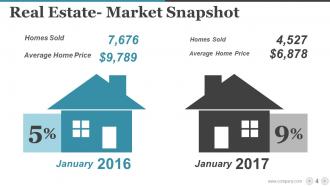
Slide 4: This slide showcases Real Estate- Market Snapshot.
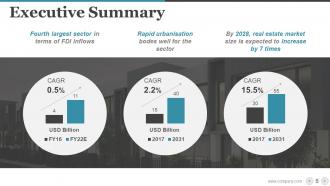
Slide 5: This slide presents Executive Summary. You can add the data and use it.
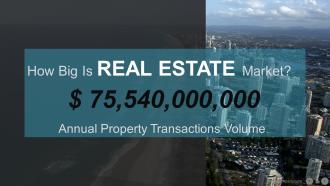
Slide 6: This slide showcases Annual Property Transactions Volume.
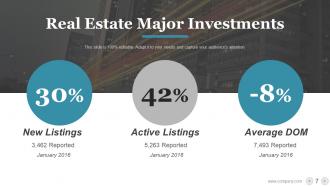
Slide 7: This slide presents Real Estate Major Investments.
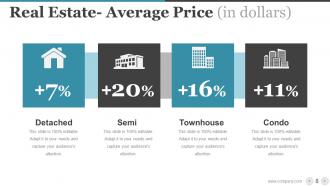
Slide 8: This slide showcases Real Estate- Average Price (in dollars) with these four categories- Detached, Semi, Townhouse.
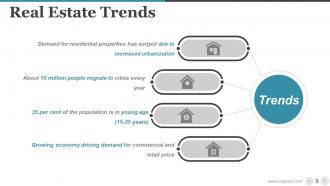
Slide 9: This slide presents Real Estate Trends. You can add the data and information and use it.
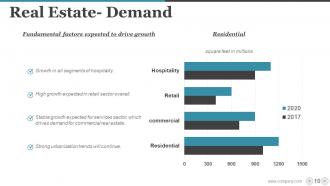
Slide 10: This slide showcases Real Estate- Demand with these factors- Residential, Fundamental factors expected to drive growth, Growth in all segments of hospitality, High growth expected in retail sector overall, Stable growth expected for services sector, which drives demand for commercial real estate, Strong urbanisation trends will continue.
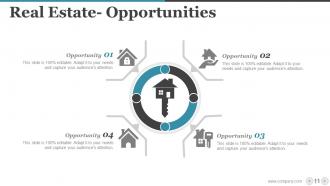
Slide 11: This slide presents Real Estate- Opportunities. You can add the opportunity and make use of it.
Slide 12: This slide showcases Real Estate Major Investments.
Slide 13: This slide presents Real Estate Policy Support.
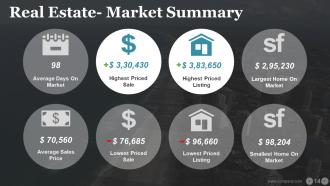
Slide 14: This slide presents Real Estate- Market Summary.
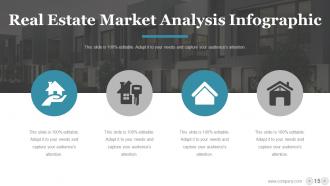
Slide 15: This slide showcases Real Estate Market Analysis Infographic.
Slide 16: This slide showcases Real Estate Market Outlook.
Slide 17: This slide is a COFFEE BREAK.
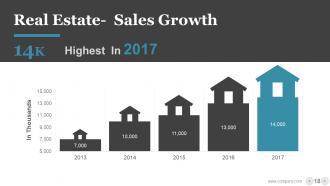
Slide 18: This slide showcases Real Estate- Sales Growth. You can add the of your company and use it.
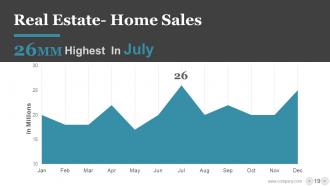
Slide 19: This slide presents Real Estate- Home Sales.
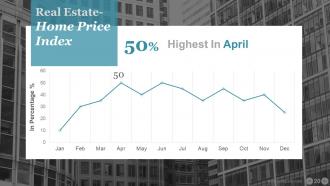
Slide 20: This slide shows Real Estate- Home Price Index.
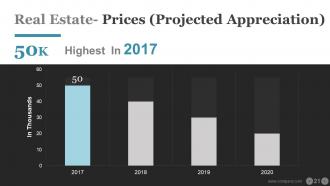
Slide 21: This slide presents Real Estate- Prices (Projected Appreciation).
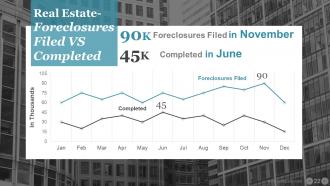
Slide 22: This slide showcases Real Estate- Foreclosures Filed VS Completed.
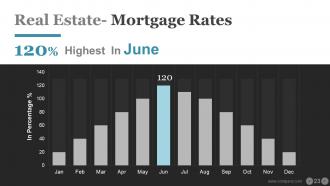
Slide 23: This slide shows Real Estate- Mortgage Rates.
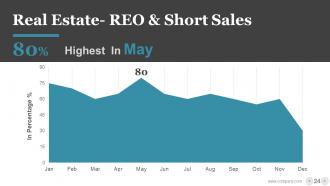
Slide 24: This slide showcases Real Estate- REO & Short Sales.
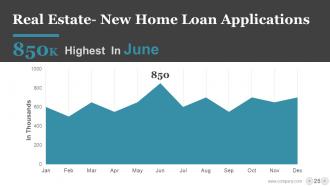
Slide 25: This slide presents Real Estate- New Home Loan Applications.
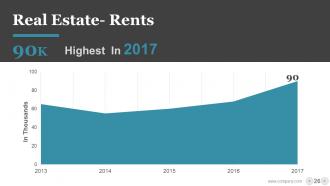
Slide 26: This slide showcases Real Estate- Rents.
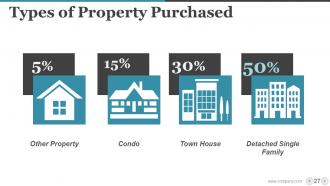
Slide 27: This slide shows Types of Property Purchased.
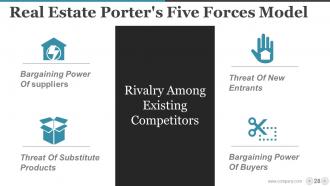
Slide 28: This slide presents Real Estate Porter's Five Forces Model Bargaining Power Of suppliers, Threat Of Substitute Products, Threat Of New Entrants, Bargaining Power Of Buyers, Rivalry Among Existing Competitors.
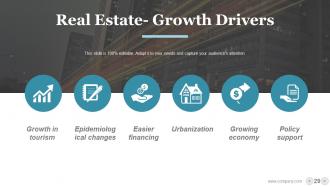
Slide 29: This slide showcases Real Estate- Growth Drivers with these six factors- Growth in tourism, Epidemiological changes, Easier financing, Policy support, Growing economy, Urbanization.
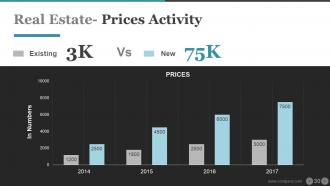
Slide 30: This slide presents Real Estate- Prices Activity.
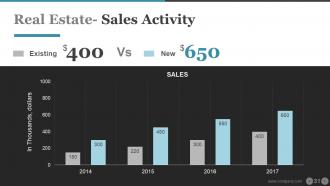
Slide 31: This slide showcases Real Estate- Sales Activity.
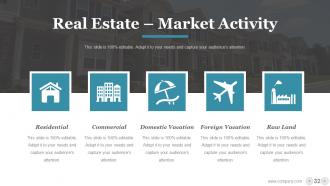
Slide 32: This slide presents Real Estate – Market Activity with these five parameters- Raw Land, Foreign Vacation, Domestic Vacation, Commercial, Residential.
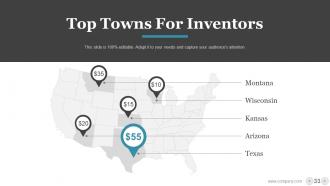
Slide 33: This slide showcases Top Towns For Inventors.
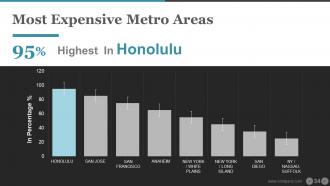
Slide 34: This slide presents Most Expensive Metro Areas.
Slide 35: This slide showcases Real Estate Infographic Layout.
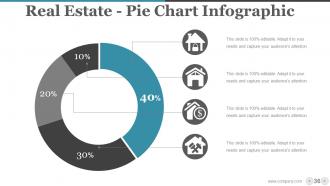
Slide 36: This slide showcases Real Estate - Pie Chart Infographic.
Slide 37: This slide presents Estate Icon Set.
Slide 38: This slide showcases Additional Slides.
Slide 39: This is a Vision, Mission and Goals slide. State them here.
Slide 40: This is an Our Team slide with name, image&text boxes to put the required information.
Slide 41: This is an About Us slide showing Our Company, Value Client, and Premium services as examples.
Slide 42: This is an Our Goal slide. State them here.
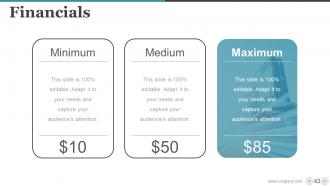
Slide 43: This slide is titled as Financials. Show finance related stuff here
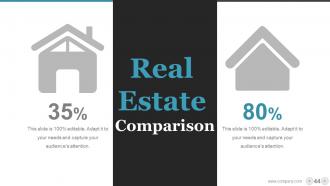
Slide 44: This slide shows Comparison of number of users and Time
Slide 45: This is Dashboard slide to show information in percentages etc
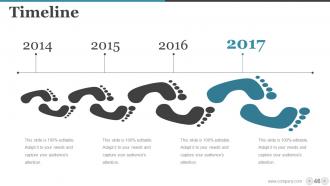
Slide 46: This slide presents a Timeline to show growth, milestones etc.
Slide 47: This slide shows an image with text boxes titled Business Person with Post It notes.
Slide 48: This slide presents a Newspaper image with text boxes to flash company news, position etc.
Slide 49: This is a Puzzle image slide to show information, specification etc.
Slide 50: This is a Circular image slide to show information, specifications etc.
Slide 51: This is a Venn diagram image slide to show information, specifications etc.
Slide 52: This slide shows a Mind map for representing entities.
Slide 53: This slide shows a Matrix in terms of High and Low.
Slide 54: This is a LEGO slide with text boxes to show information.
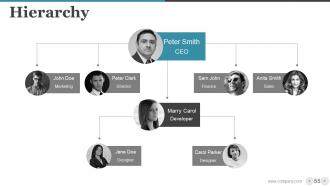
Slide 55: This is a Hierarchy slide showing- Supply Chain Manager, Supply Chain Council, Sourcing, Supplier Quality Engineer, Procurement, Logistics & Management, Supplier Management, Student, Contract Management
Slide 56: This is a Bulb Or Idea image slide to show information, innovative aspects etc.
Slide 57: This is a Magnifying glass image slide to show information, scoping aspects etc.
Slide 58: This is a Bar Graph image slide to show product comparison, growth etc.
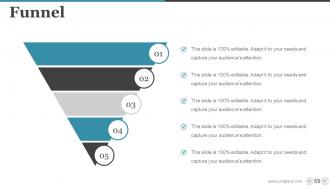
Slide 59: This is a Funnel image slide showing: Calls-to-action, Reachability, User Experience, Color Schemes, Engagement, Simplicity.
Slide 60: This is a Thank You slide for acknowledgement.
Real Estate Powerpoint Templates Bundle Powerpoint Presentation Slides with all 60 slides:
You intend to tell a story and your Real Estate Powerpoint Templates Bundle Powerpoint Presentation Slides should help you achieve this. That is why it is better to always turn to the professionals for help.












FAQs for Real Estate Powerpoint Templates Bundle
Definitely start with killer photos - that's what hooks people first. Price, location, and specs are obvious must-haves. I'd compare it to similar properties in the area so they know it's priced right. Neighborhood stuff matters too... like good restaurants or schools nearby. If you're pitching to investors, throw in some ROI numbers. Buyers might want financing options laid out. Keep everything visual - walls of text are death for these presentations. Oh, and always wrap up with what they should do next, whether that's booking a showing or whatever.
Dude, templates are a lifesaver for real estate presentations. They give you clean photo layouts and comparison charts without spending hours designing everything yourself. I mean, who has time for that? You'll look way more professional when pitching to sellers or showing market data to buyers. The consistency across all your slides makes such a difference too. Just make sure you find ones actually made for real estate - some generic templates are pretty useless for property stuff. Trust me, once you start using good ones, you won't go back to building presentations from scratch.
Keep it clean with lots of white space - messy slides are the worst. High-quality photo placeholders are huge since visuals sell houses. Go with trustworthy colors like blues and grays, nothing too flashy. You'll need sections for property details, neighborhood stuff, and strong call-to-action slides. Oh, and definitely include tools for market data and comparison charts - clients love that stuff. Make sure your branding stays consistent throughout. I'd test it with real property content first though, just to see how everything flows before you're sitting across from actual clients.
Dude, visuals are everything in your presentations. People judge your credibility instantly based on how professional your slides look - and in real estate, that trust factor is make-or-break. I've literally watched agents bomb deals because their presentations looked amateur. Good images and clean layouts also help buyers picture themselves living there, which is half the battle. Oh, and here's something I learned the hard way - don't cheap out on templates. Get quality ones upfront because they'll make you look way more established than you probably are right now.
You'll definitely want templates for property listings and investor pitches - those need to look super professional but who has time to design from scratch? Market analysis stuff works well too since templates keep all your charts organized. Even regular client meetings look way more put-together with a good template (makes you seem more prepared than you actually are lol). Match your style to who you're presenting to though. Sleek/modern for investors, something warmer for actual homebuyers. Oh and change the colors to your brand colors so it doesn't look identical to every other realtor's presentation.
Dude, you gotta start telling stories instead of rattling off square footage and HOA fees. People remember stories way better than boring specs - I've literally watched clients zone out during feature-heavy presentations. Try opening with something like "Picture this: you're coming home after a crazy day at work..." then paint the whole lifestyle picture. Talk about the neighborhood's vibe, maybe some local history stuff. Templates help tons here since you can build slides around actual story flow instead of just bullet points. Honestly, once you switch to this approach, you'll see engagement go through the roof. Way more fun than data dumps too.
Dude, skip the bullet point number dumps - nobody reads those. Charts and graphs are your friend here. Line graphs work perfectly for market trends, bar charts for comparing properties side by side. Pick maybe 3-5 metrics that actually matter instead of throwing everything at people. Their brains just shut off otherwise. Make sure your data's fresh too - old numbers make you look sloppy. Oh, and always cite where you got stuff (MLS, market reports, whatever). One last thing - match your chart colors to your template so it doesn't look like you grabbed random graphics from Google.
Okay so color schemes are actually huge for how people see your properties. Blue's your go-to for trust and professionalism - works amazing for luxury stuff. Green feels stable and growing, so investment properties love it. Orange creates that urgency vibe, though red can be kinda aggressive honestly. Neutrals like gray and white? They're clean and modern, plus your property photos will really stand out against them. Just match whatever you pick to your market and property type. Oh, and stick with one scheme throughout - don't go mixing colors like some kind of rainbow disaster.
Templates are honestly a lifesaver - they save you hours and look way more professional than anything I could make from scratch. You get proper layouts and industry-specific graphics that actually work for real estate stuff. The color schemes and typography are already figured out (that design stuff is harder than it looks). Just swap in your content and listings info. I tried making my own slides once and... yeah, terrible idea. Focus on what you're good at instead of wrestling with fonts and spacing all day. Way smarter approach.
Look, animations can grab attention at first, but they'll backfire if you go overboard. Stick with subtle stuff - smooth transitions between slides, maybe gentle fade-ins for photos. I've watched so many agents completely bomb their presentations because the text was literally bouncing around like a screensaver from 2005! Use animation to highlight the important bits like pricing or standout features. Don't just throw effects everywhere for the sake of it. Your listings should be doing the heavy lifting, not some flashy transitions. Run through it once beforehand so you're not scrambling during the actual pitch.
Ugh, don't cram every detail onto your slides - people will just read instead of listening to you talk. Those cheesy stock photos are the worst too (seriously, nobody needs another generic handshake pic). Mix up your layouts because using the same design gets old real quick. Oh, and definitely swap out the placeholder text and colors to match your brand. I've seen way too many presentations with "Your Logo Here" still showing. Takes like 10 minutes to personalize it but makes such a difference. Trust me on this one.
Ok so first thing - swap out those colors for your brand ones. Replace their logo with yours, obviously. Then pick fonts you actually use. Most templates make this super easy in the design tab. Definitely throw your headshot and contact info on every slide. People need to see who they're working with, you know? Oh and ditch those cheesy stock photos! Use real shots of your listings or cool local spots instead. The whole point is making it look like YOU made it, not some random agent. Start with your colors first - that'll tie everything together.
Dude, infographics are seriously a game changer for real estate stuff. Your clients' eyes will actually stay open instead of glazing over when you show price trends in charts rather than just listing numbers. People absorb visuals so much faster than walls of text anyway. Try swapping out those boring bullet-pointed property features for icons and side-by-side comparisons - makes everything way more digestible. I mean, nobody wants to sit through another slideshow that feels like homework. Start with your most number-heavy slides first. You'll notice people actually engage instead of checking their phones.
Templates are seriously clutch when you're new - they've got the whole structure figured out already. Market analysis, comps, financing, all that stuff is built in. I used to spend forever trying to make slides look decent (spoiler: they didn't). With templates you just drop in your property info and boom, looks professional. Way better than my sad PowerPoint skills lol. Focus on what you're actually saying instead of wrestling with fonts and colors. Grab a solid template first, then tweak it once you figure out what clicks with your clients.
So real estate templates right now are all about that clean, minimalist vibe - tons of white space and crisp fonts. Interactive stuff is becoming huge too, like clickable floor plans and virtual tour links built right in. Dark mode's everywhere (I swear every app has it now). Mobile layouts are clutch since everyone's viewing on their phones anyway. Oh, and the data viz tools are actually decent now - you can get automated comparison charts that don't look like garbage. Honestly, just grab something that tells a visual story instead of cramming slides with text. Make sure it works on whatever device your clients prefer.
-
Very well designed and informative templates.
-
Perfect template with attractive color combination.