

Resource Utilization And Tracking With Resource Management Plan Powerpoint Presentation Slides




Try Before you Buy Download Free Sample Product
 Impress Your
 Audience
 100%
100% Editable
 Save Hours
 of Time


Project resource management plan is a part of the main project plan that provides guidelines for defining, distributing, handling, and publishing project resources. It can be split into the team management strategy and the available physical management plan. Grab our professionally designed Resource Utilization and Tracking with Resource Management Plan template that will help identify and understand the structure and responsibilities for resource management. At present, the company wants to assess the current situation related to resource management and find out the solutions to increase resource management efficiency. It also shows the companys basic requirements and benefits of resource management. This project resource management plan presentation includes various slides, including resource management process flow, cycle for growth, how a firm can improve its resource management, detailed requirements, associated tasks, etc. This also includes slides related to the allocation of resources, features related to the product, resource availability to the product, efficient scheduling of available resources, centralized time tracking and progress, etc. In the end, this presentation covers the budgeted costs of the product development, etc. Customize this 100 percent editable template now.
People who downloaded this PowerPoint presentation also viewed the following :
Content of this Powerpoint Presentation
Slide 1: This slide introduces Resource Utilization and Tracking with Resource Management Plan. State Your Company Name and begin.
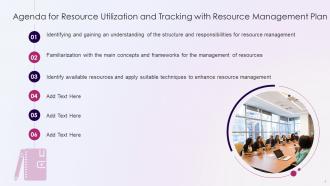
Slide 2: This slide states Agenda of the presentation.
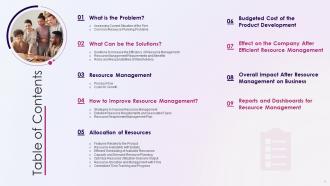
Slide 3: This slide presents Table of Content for the presentation.
Slide 4: This slide depicts title for two topics that are to be covered next in the template.
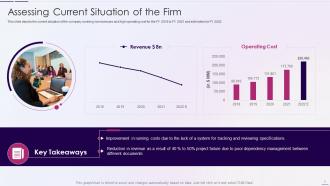
Slide 5: This slide depicts the current situation of the company covering low revenues and high operating cost for the FY 2018 to FY 2021 and estimates for FY 2022.
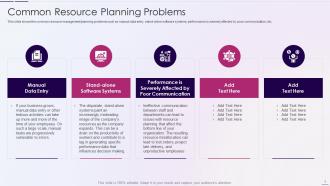
Slide 6: This slide shows the common resource management planning problems such as manual data entry, stand-alone software systems, etc.
Slide 7: This slide depicts title for three topics that are to be covered next in the template.
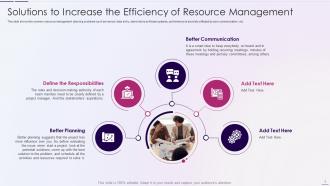
Slide 8: This slide shows the solutions to increase the efficiency of resource management which includes better planning, define the responsibilities, etc.
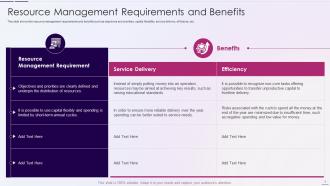
Slide 9: This slide shows the resource management requirements and benefits such as objectives and priorities, capital flexibility, service delivery, efficiency, etc.
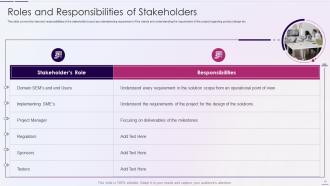
Slide 10: This slide covers the roles and responsibilities of the stakeholder’s such as understanding requirement of the clients.
Slide 11: This slide depicts title for two topics that are to be covered next in the template.
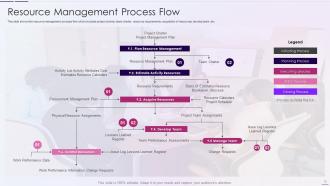
Slide 12: This slide shows the resource management process flow which includes project charter, team charter, resource requirements, etc.
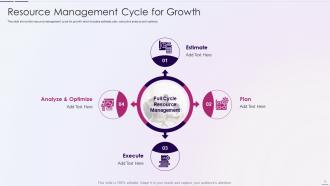
Slide 13: This slide shows the resource management cycle for growth which includes estimate, plan, executive analyze and optimize.
Slide 14: This slide depicts title for three topics that are to be covered next in the template.
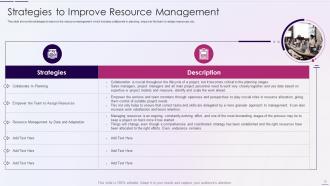
Slide 15: This slide shows the strategies to improve the resource management which includes collaborate in planning, empower the team to assign resources, etc.
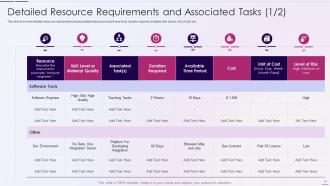
Slide 16: This slide shows the detailed resource requirements and associated tasks such ad software tools, duration required, available time period, unit of cost, etc.
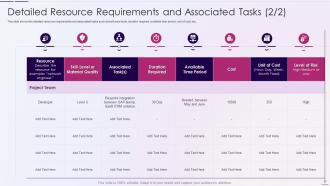
Slide 17: This slide shows the detailed resource requirements and associated tasks such ad software tools, duration required, available time period, unit of cost, etc.
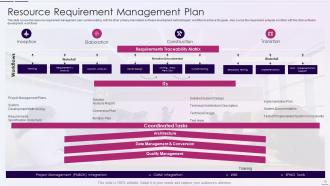
Slide 18: This slide covers the resource requirement management plan communicating with the other primary interrelated software development methodologies' workflow.
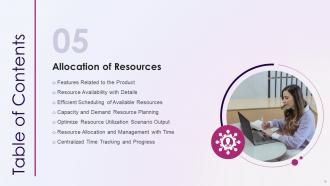
Slide 19: This slide depicts title for seven topics that are to be covered next in the template.
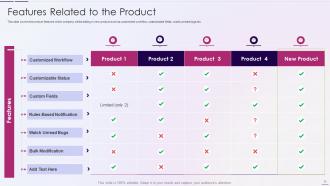
Slide 20: This slide covers the product features which company will be adding in new product such as customized workflow, customizable fields, watch unread bugs etc.
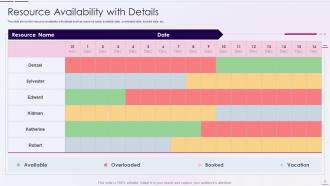
Slide 21: This slide shows the resource availability with details such as resource name, available date, overloaded date, booked date, etc.
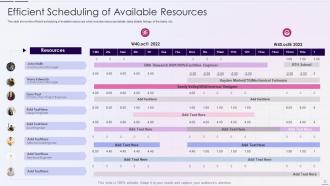
Slide 22: This slide shows the efficient scheduling of available resources which includes resources details, tasks details, timings of the tasks, etc.
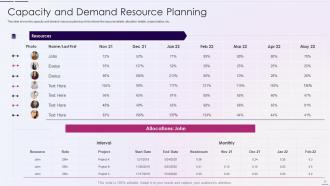
Slide 23: This slide shows the capacity and demand resource planning which shows the resource details, allocation details, project status, etc.
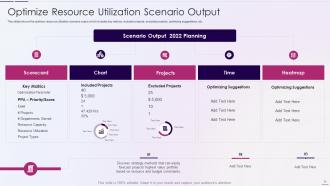
Slide 24: This slides shows the optimize resource utilization scenario output which includes key metrics, included projects, excluded projects, optimizing suggestions, etc.
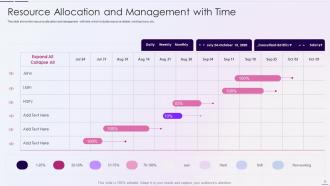
Slide 25: This slide shows the resource allocation and management with time which includes resource details, working hours, etc.
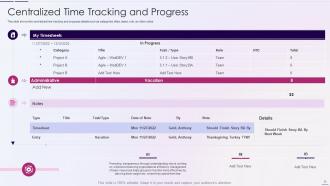
Slide 26: This slide shows the centralized time tracking and progress details such as categories, titles, tasks, role, an other notes.
Slide 27: This slide depicts title for four topics that are to be covered next in the template.
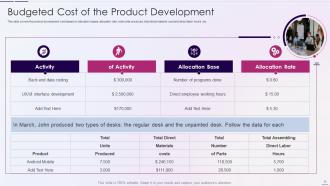
Slide 28: This slide covers the product development cost based on allocation bases, allocation rate, total units produced, etc.
Slide 29: This slide highlights title for topics that are to be covered next in the template.
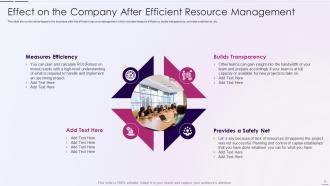
Slide 30: This slide shows Effect on the Company After Efficient Resource Management.
Slide 31: This slide highlights title for topics that are to be covered next in the template.
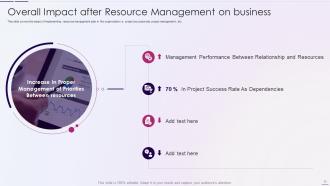
Slide 32: This slide presents Overall Impact after Resource Management on business.
Slide 33: This slide highlights title for topics that are to be covered next in the template.
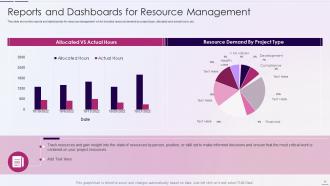
Slide 34: This slide displays Reports and Dashboards for Resource Management.
Slide 35: This slide showcases Icons for Resource Utilization and Tracking with Resource Management Plan.
Slide 36: This slide is titled as Additional Slides for moving forward.
Slide 37: This is Our Mission slide with related imagery and text.
Slide 38: This is About Us slide to show company specifications etc.
Slide 39: This is Our Target slide. State your targets here.
Slide 40: This slide shows Post It Notes. Post your important notes here.
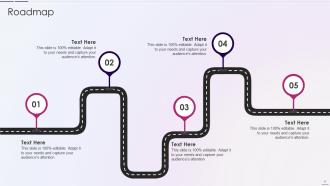
Slide 41: This slide presents Roadmap with additional textboxes.
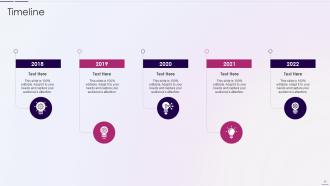
Slide 42: This is a Timeline slide. Show data related to time intervals here.
Slide 43: This is an Idea Generation slide to state a new idea or highlight information, specifications etc.
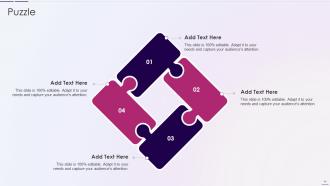
Slide 44: This slide contains Puzzle with related icons and text.
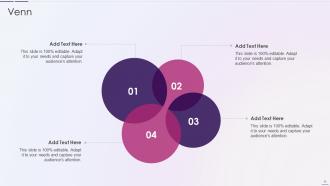
Slide 45: This slide depicts Venn diagram with text boxes.
Slide 46: This is a Thank You slide with address, contact numbers and email address.
Resource Utilization And Tracking With Resource Management Plan Powerpoint Presentation Slides with all 51 slides:
Use our Resource Utilization And Tracking With Resource Management Plan Powerpoint Presentation Slides to effectively help you save your valuable time. They are readymade to fit into any presentation structure.







FAQs for Resource Utilization And Tracking With Resource Management Plan
Honestly, just map out everything you've got first - your team, money, tools, timeline. Then be realistic about what gets priority (easier said than done, I know). Watch those dependencies like a hawk because one person running late screws everyone else over. I definitely learned that one the messy way! Build in some wiggle room for when stuff inevitably goes sideways. Keep tracking everything as it happens and don't wait to tell stakeholders when resources are getting tight. Way better to have that awkward conversation early than scramble later when you're already behind.
Honestly, start by listing everything out - all your projects and what resources they actually need. Then rank them by deadlines and business impact, not just whoever complains the most (you know how that goes). A shared calendar where everyone can see assignments is a lifesaver - stops the whole "wait, Sarah's doing what now?" chaos. I'd suggest some kind of scoring system to keep things objective. Check in regularly too because priorities change like every other week. The trick is staying flexible while being super clear about who can actually do what and when.
Think of tech as your brain for tracking stuff - you'll see what resources you have in real time and where they're going. Manual tracking is honestly such a pain these days, like why make it harder on yourself? Look for tools with automated scheduling and those analytics that predict what you'll need next. Dashboards help too, assuming they're not complete garbage. I'd say pick something that plays nice with whatever systems you already have. Don't create more headaches. Just tackle your worst bottleneck first and find tech that fixes that specific mess.
Cultural differences totally mess with how global teams handle resources and decisions. Some cultures are all about sharing everything collectively, others want clear individual ownership. Time's another big thing - certain teams push for immediate action while others obsess over long-term planning. Communication styles affect how people even ask for resources or admit there's a problem. Honestly, I've seen this tank entire projects when managers ignore it. Quick tip though - figure out your team's cultural preferences upfront and create flexible processes that work for different approaches instead of cramming everyone into the same box.
For real-time resource tracking, I'd probably start with Grafana or DataDog - they're pretty solid for watching CPU, memory, storage stuff live. New Relic and AppDynamics are decent APM options too, honestly the visual dashboards make debugging way less painful. Oh, and if you're already on AWS or Azure, might as well use their native monitoring tools since they're right there. Prometheus is another route if you want something custom. Just pick whatever plays nice with what you've already got running. Set up alerts so you catch issues before everything breaks. Don't overthink it - grab one tool first, then add more later if needed.
Honestly, just pick 3-4 metrics that actually matter to your business and track them before/after you make changes. Project completion rates, resource utilization, overtime costs - that kind of stuff. The money metrics are way easier to prove than the fuzzy ones. Reduced labor costs and faster delivery times? Your boss will get that immediately. Employee satisfaction is harder to measure but still worth tracking - just don't expect quick results there. Oh, and definitely establish your baselines first or you'll be scrambling later trying to figure out what "normal" looked like before.
Oh man, the classic trap is stuffing too many things on people's plates - we've all been there! Also not actually tracking time properly, and thinking you can just swap team members around like chess pieces. Sick days will destroy your timeline if you don't plan for them. Same with those random "urgent" requests that always pop up. Keep a shared calendar showing who's actually free vs what they're supposed to be working on. I usually add about 20% buffer time per person because stuff happens. Weekly check-ins are honestly a lifesaver - catches problems before they blow up in your face. Trust me on this one.
Look, good resource management is huge for your bottom line AND the planet. You'll cut waste, save money, and avoid those nightmare supply chain issues we keep hearing about. Customers actually care about this stuff now too - probably more than they should, but whatever. Start with an audit to see where you're bleeding resources. Materials, energy, time - figure out your biggest drains first. I bet you'll find some obvious fixes that'll save cash right away. It's one of those rare things where being responsible actually pays off immediately.
Dude, getting stakeholders involved early is a game changer for resource stuff. You'll catch conflicts before they blow up, and people actually buy into your decisions instead of fighting them later. They know about resources you probably missed - like that server sitting unused in accounting or whatever. Regular check-ins during planning keep everyone honest. The transparency thing really works too. When people feel included, they're way more likely to share resources between teams. Trust me, it beats the alternative of everyone hoarding their stuff. Map out your key people first, then just start scheduling those conversations.
Okay so three things to watch: how much your team's actually working on the right stuff, whether projects finish on time, and if you're staying on budget. Here's the thing though - most managers get obsessed with keeping everyone at 100% capacity, which is honestly stupid. Burned out people cost way more than having someone idle for a bit. I'd also track if your team's happy and learning new skills. Sweet spot is like 75-85% utilization max. Start simple with whatever you can measure easily, then get fancier once you've got some baseline data. Quality matters more than looking busy.
Honestly, you've gotta bake contingency planning right into your resource allocation from day one. Ask yourself "what could go wrong?" before you even think about what you need. Key people might bail, budgets get slashed, supply chains break - I've watched so many projects implode because teams only planned for everything going perfectly. Map out your most critical resources against your biggest risks. Then build in buffer time and backup resources upfront, not when you're already screwed. Oh, and create actual backup plans for each scenario you identify. Trust me, that extra planning time saves your ass later.
Dude, remote work totally changes your resource game. Office costs disappear but now you're buying laptops for everyone and paying way more for security software. The hardest part? You can't just walk over and see who needs what anymore. People are scattered across different time zones with their own setups at home. Get some kind of digital tracking system set up ASAP - trust me on this one. You'll go crazy trying to remember who has which equipment otherwise. Also figure out your protocols for new software requests early. Once teams start growing it gets messy fast.
Okay so here's what I've figured out after getting burned on this stuff - always keep like 10-15% of your resources floating. Don't assign everything right away because things will change, trust me. Cross-train people so they can jump between projects when you need them to. Also set up some kind of warning system for when it's time to move stuff around. The trick is watching early signals - customer feedback, stakeholder requests, that kind of thing. I made the mistake once of waiting too long to pivot and it was a nightmare. Oh and honestly? Sometimes you just have to accept that plans change and roll with it.
Honestly, get your PMP first - companies are obsessed with it. You'll be doing tons of data analysis and forecasting, so brush up on Excel and maybe Tableau if you're feeling fancy. The communication part is harder than it sounds because you're basically telling people "no" about resources all day, which... fun times. Financial stuff matters too - budgets, cost analysis, that whole world. Oh, and there's specialized resource planning software but every company uses something different. I'd start with a PM course and just mess around with the tools. Most of this you learn by doing anyway.
Honestly, the biggest game-changer is just getting departments to actually talk to each other. You know how marketing always seems to have endless budget while engineering's begging for server money? Regular check-ins fix that weirdness fast. Teams can spot who needs what ahead of time instead of scrambling last minute. Plus you avoid that thing where three different groups are buying the same software (happened at my last job, total mess). Start by sharing your resource calendar with whoever you work with most. Short meetings work better than those marathon planning sessions nobody wants to attend.
-
No second thoughts when I’m looking for excellent templates. SlideTeam is definitely my go-to website for well-designed slides.
-
Unique design & color.