


Restaurant inventory management powerpoint presentation slides




Try Before you Buy Download Free Sample Product
 Impress Your
 Audience
 100%
100% Editable
 Save Hours
 of Time


Restaurant Inventory Management PowerPoint Presentation Slides is a highly visual tool for restaurateurs to demonstrate automation of restaurant management procedures. Use this food stock control procedures PPT theme to summarize business challenges, competitive analysis, and firm scenarios to demonstrate weak links. Then, you can concisely consolidate the management system solutions by the means of this catering industry management system PowerPoint slideshow. Illustrate the wide-ranging operational benefits of introducing a restaurant management system in a compelling manner through restaurant management system PPT template. Food and beverage inventory control PowerPoint presentation’s high-quality images facilitate explanation of point of sale interface, cashier counter interface, and kitchen display system. This hotel management PPT slideshow helps you to present a comparative analysis of different POS systems based on key parameters. This restaurant management system PowerPoint theme outlines all the functions including real-time inventory management, employee management, and marketing management. By downloading this restaurant inventory control system PPT presentation, you can represent the impact of successful implementation.
People who downloaded this PowerPoint presentation also viewed the following :
Content of this Powerpoint Presentation
Slide 1: This slide introduces Restaurant Inventory Management. Mention your Company name and begin.
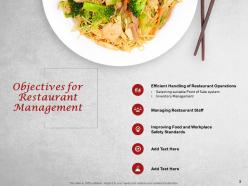
Slide 2: This slide shows Objectives for Restaurant Management.
Slide 3: This slide displays Table of Contents of the presentation.
Slide 4: This slide displays Table of Contents.
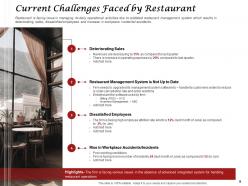
Slide 5: This slide presents Current Challenges Faced by Restaurant.
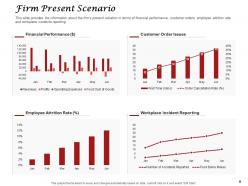
Slide 6: This slide provides the information about the firm’s present situation in terms of financial performance, customer orders, employee attrition rate and workplace incidents reporting.
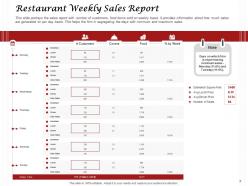
Slide 7: This slide depicts Restaurant Weekly Sales Report. This slide portrays the sales report with number of customers, food items sold on weekly basis. It provides information about how much sales are generated on per day basis. This helps the firm in segregating the days with minimum and maximum sales.
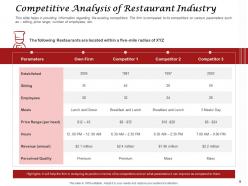
Slide 8: This slide showcases Competitive Analysis of Restaurant Industry
Slide 9: This slide shows Table of Contents.
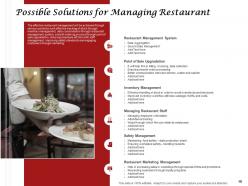
Slide 10: This slide shows Possible Solutions for Managing Restaurant.
Slide 11: This slide displays Table of Contents.
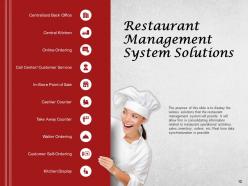
Slide 12: This slide represents Restaurant Management System Solutions
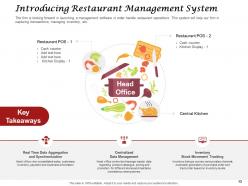
Slide 13: This slide displays the Introduction of Restaurant Management System
Slide 14: This slide displays Table of Contents.
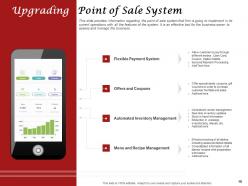
Slide 15: This slide provides information regarding the point of sale system that firm is going to implement in its current operations with all the features of the system. It is an effective tool for the business owner to assess and manage the business.
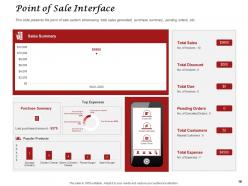
Slide 16: This slide presents the point of sale system showcasing total sales generated, purchase summary, pending orders, etc.
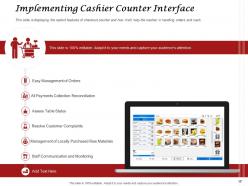
Slide 17: This slide is displaying the salient features of checkout counter and how it will help the cashier in handling orders and cash.
Slide 18: The kitchen display feature will help chef in handling orders so that no order get missed out and for efficient handling of orders.
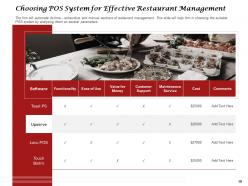
Slide 19: This slide is about Choosing POS System for Effective Restaurant Management.
Slide 20: This slide showcases Table of Contents.
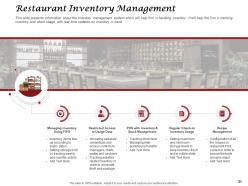
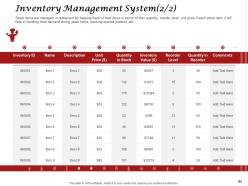
Slide 21: This slide presents information about the inventory management system which will help firm in handling inventory. It will help the firm in tracking inventory and stock usage, with real time updates on inventory in hand.
Slide 22: This slide showcases Inventory Management System.
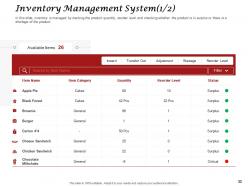
Slide 23: This slide shows Inventory Management System.
Slide 24: This slide displays Table of Contents.
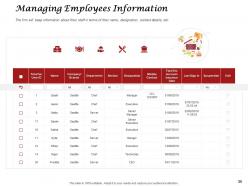
Slide 25: This slide is about Managing Employees Information. The firm will keep information about their staff in terms of their name, designation, contact details, etc.
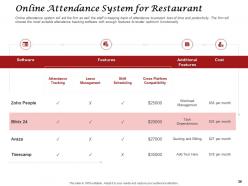
Slide 26: This slide shows Online Attendance System for Restaurant.
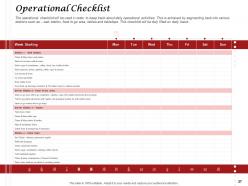
Slide 27: This slide depicts Operational Checklist.
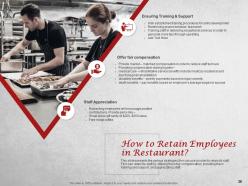
Slide 28: This slide presents the various strategies firm can use in order to retain its staff. Firm can retain its staff by offering them fair compensation, providing them training and support, and appreciating staff.
Slide 29: This slide shows Table of Contents.
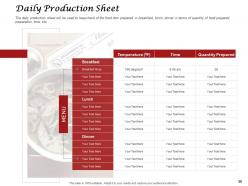
Slide 30: This slide presents Daily Production Sheet. The daily production sheet will be used to keep track of the food item prepared in breakfast, lunch, dinner in terms of quantity of food prepared, preparation time, etc.
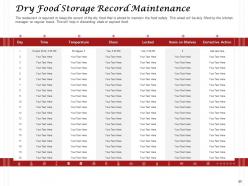
Slide 31: This slide showcases Dry Food Storage Record Maintenance.
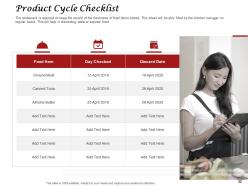
Slide 32: This slide shows Product Cycle Checklist.
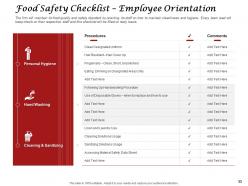
Slide 33: This slide represents Food Safety Checklist – Employee Orientation.
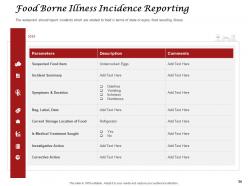
Slide 34: This slide is displaying Food Borne Illness Incidence Reporting. The restaurant should report incidents which are related to food in terms of stale or expiry food resulting illness.
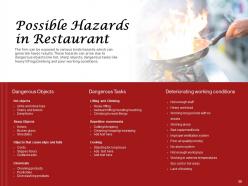
Slide 35: This slide shows Possible Hazards in Restaurant.
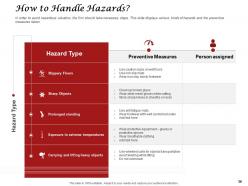
Slide 36: This slide discusses about How to Handle Hazards. In order to avoid hazardous situation, the firm should take necessary steps. This slide displays various kinds of hazards and the preventive measures taken.
Slide 37: This slide displays Table of Contents.
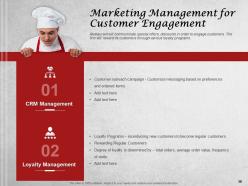
Slide 38: This slide showcases Marketing Management for Customer Engagement.
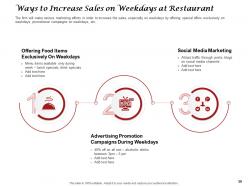
Slide 39: This slide highlights the Ways to Increase Sales on Weekdays at Restaurant.
Slide 40: This slide shows Table of Contents.
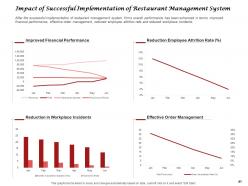
Slide 41: This slide showcases Impact of Successful Implementation of Restaurant Management System.
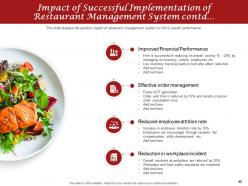
Slide 42: This slide is continued with Impact of Successful Implementation of Restaurant Management System. This slide displays the positive impact of restaurant management system on firm’s overall performance.
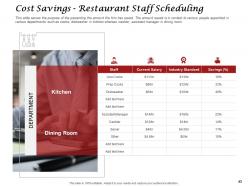
Slide 43: This slide shows Cost Savings - Restaurant Staff Scheduling.
Slide 44: This slide shows Table of Contents of the presentation.
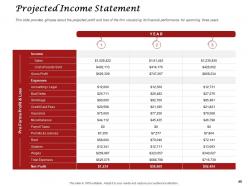
Slide 45: This slide shows Projected Income Statement. This slide provides glimpse about the projected profit and loss of the firm visualizing its financial performance for upcoming three years.
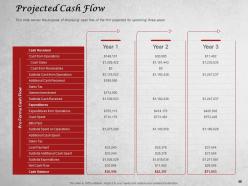
Slide 46: This slide shows Projected Cash Flow. This slide serves the purpose of displaying cash flow of the firm projected for upcoming three years.
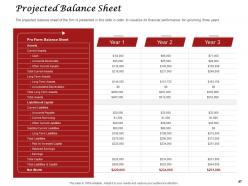
Slide 47: This slide presents Projected Balance Sheet. The projected balance sheet of the firm is presented in this slide in order to visualize its financial performance for upcoming three years
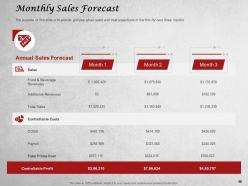
Slide 48: This slide presents Monthly Sales Forecast. The purpose of this slide is to provide glimpse about sales and cost projections of the firm for next three months.
Slide 49: This is How to Manage Restaurant Business Icons Slide
Slide 50: This slide is titled as Additional Slides
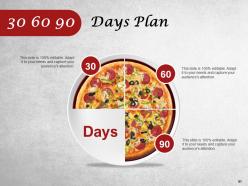
Slide 51: This is 30 60 90 Days Plan
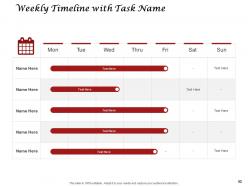
Slide 52: This is Weekly Timeline slide with Task Name
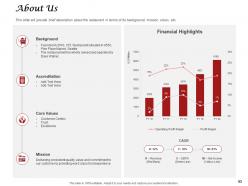
Slide 53: This is About Us slide to showcase Company specifications. This slide will provide brief description about the restaurant in terms of its background, mission, vision, etc.
Slide 54: This slide shows Roadmap process.
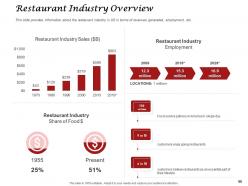
Slide 55: This slide showcases Restaurant Industry Overview.
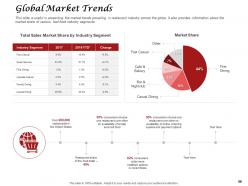
Slide 56: This slide shows Global Market Trends. This slide is useful in presenting the market trends prevailing in restaurant industry across the globe. It also provides information about the market share of various fast food industry segments.
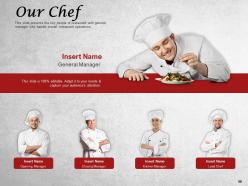
Slide 57: This slide presents the key people of restaurant with general manager who handle overall restaurant operations.
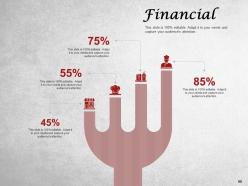
Slide 58: This is Financial slide. Showcase finance related stuff here.
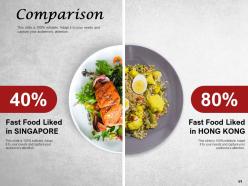
Slide 59: This is Comparison slide.
Slide 60: This slide displays Our Mission, Vision and Values.
Slide 61: This is Thank You slide with Address, Email address and Contact number.
Restaurant inventory management powerpoint presentation slides with all 61 slides:
Use our Restaurant Inventory Management Powerpoint Presentation Slides to effectively help you save your valuable time. They are readymade to fit into any presentation structure.













FAQs for Restaurant inventory management
So you've got four main things to nail down: tracking, ordering, storage, and waste management. First thing - get your tracking system sorted, whether it's fancy software or just better spreadsheets. From there, set up reorder points so you don't suddenly run out of the basics. Storage organization matters too, especially temperature stuff. Most places totally bomb on waste tracking though, which is crazy because that's where you're bleeding money. Oh, and do regular counts to catch problems before they get messy. Start with tracking first, then build everything else around it.
Dude, get a POS system that automatically tracks ingredients when orders go out - saves SO much time. Barcode scanners are clutch too, way better than those awful clipboards. You can set alerts for low stock and actually see waste patterns, which is kinda eye-opening honestly. The best part? Everything updates in real-time so you won't get screwed during a busy rush. Some apps even predict what you'll need based on past orders. I'd start simple with a basic inventory app first. Don't go crazy with features right away - you'll just confuse yourself.
Dude, the worst mistakes I see? Places just guess at their ordering instead of looking at last week's numbers. Seriously drives me crazy. You gotta track your waste religiously and do actual physical counts weekly - then compare that to your POS system to catch problems early. Don't treat all your inventory the same either. Herbs are totally different from proteins storage-wise. Oh, and train your crew on rotation properly or you'll find nasty surprises rotting in the back corners. Start small with weekly counts though, don't overwhelm yourself trying to fix everything at once.
Honestly, monthly is the bare minimum but weekly's way better if you can pull it off. Perishables like produce and seafood? Check those every couple days - trust me, finding rotten fish is not fun. Really depends on your restaurant size and how much stuff goes missing though. I'd start with monthly and see how it goes. Oh, and pick whatever schedule your team won't hate you for. Consistency beats perfection here - no point setting some crazy audit plan that burns everyone out after two weeks.
Your suppliers can make or break your inventory game, honestly. Good ones give you reliable deliveries and actual heads-up about shortages or price hikes. I'd stick with 2-3 solid partners per category - don't spread yourself too thin. Keep talking to them regularly about what you need coming up. When stuff gets scarce, they'll prioritize you if you've built that relationship. Bad suppliers? Total nightmare. You'll be scrambling for stock constantly and probably paying more. Oh, and they can help with forecasting too, which is pretty clutch for planning ahead.
Track everything - what comes in, what goes out, plus count inventory regularly. Always use older stock first (FIFO rotation). Seriously, I've watched so much good produce die in the back of coolers because nobody rotated properly. Label everything with dates and actually train your staff to check them during prep. One person should be in charge of ordering decisions instead of letting everyone just guess. Also analyze your sales patterns - why order 50 pounds of salmon when you typically only move 30? Makes zero sense. Regular counts help you catch problems before they get expensive.
Oh man, there's so many options it's kinda overwhelming honestly. Toast and Resy are solid if you want everything in one place - POS, inventory, the works. BlueCart and MarginEdge focus more on just inventory stuff. BevSpot's decent for bars specifically. Really depends what you're after though - do you need it talking to your POS system or just basic tracking? I'd honestly make a list of what you actually need first (not what sounds cool). Then demo like 2-3 that fit your budget. Sortly works fine if you're keeping it simple. Don't overthink it too much.
Honestly, good inventory data is like having a crystal ball for your menu pricing. Track what each dish actually costs you - not what you think it costs. When avocado prices go nuts (and they always do), you'll spot it immediately instead of wondering why your margins disappeared. I'd start with your top 10 sellers and check their real costs weekly. Some dishes that seem popular might be secretly bleeding money while others are pure gold. Once you know the numbers, you can push the profitable stuff and either fix or ditch the losers.
Honestly, track your food costs first - aim for 28-35% of revenue. Inventory turnover matters too, but here's the thing that'll really save you money: check it weekly, not monthly. Trust me on this one. Par levels are huge - you don't want to run out of your bestseller on busy nights. That's just painful. Also keep an eye on waste by category and watch for supplier price jumps before they hit you hard. Oh, and track how often you're running out of stuff. Weekly inventory checks help you catch problems while they're still small instead of discovering you've been bleeding money for weeks.
Date everything the second it arrives - trust me on this one. Set up your storage so older stuff stays up front where your team grabs it first. I made the mistake once of letting new deliveries just get shoved wherever, and wow, finding those nasty tomatoes weeks later was not fun. Your walk-in needs clear zones basically. Train everyone to actually look at dates during prep, not just grab whatever's closest. Quick daily sweeps help too, especially when it's slow and you've got five minutes to kill.
Ugh, seasonal demand is such a pain but you gotta plan for it. Stock up big before peak times - summer means tons of seafood, winter's all about comfort food ingredients. Then dial it way back when things slow down or you'll waste everything. I made that mistake with soup stuff last spring, what a disaster. Look at your sales from previous years to spot the patterns. Weather and local events mess with timing too, so don't rely on just calendar dates. Start shifting your orders like 2-3 weeks early since demand changes hit faster than you think.
Dude, training your staff is seriously the best thing you can do for inventory accuracy. Like, I've seen restaurants cut their counting errors by 40% just from teaching people the basics. Focus on proper receiving procedures, how to count correctly, and logging waste right when it happens. Your POS system training matters too - can't tell you how many places mess this up. Oh and portion control obviously. Start with checklists for each job role. Do refresher training every few months because people forget stuff. Honestly it's way easier than you think once everyone's on the same page.
With perishables, you're basically racing against time - check those expiration dates constantly and stick to FIFO rotation. I check my fridge temps every day and count inventory twice a week minimum. Non-perishables though? Way more chill. Monthly counts work fine, and honestly I focus more on how fast I'm using stuff rather than worrying about dates. Here's the thing - only keep 2-3 days of perishable stock max, but you can totally stock up on canned goods when there's a sale. Different reorder points for each type, and label everything with dates even if it seems obvious.
Honestly, just dig into your old sales data - that's your goldmine right there. Check what sold on weekdays vs weekends, seasonal stuff, even how weather messed with sales. Your POS probably already tracks this (mine does and it's been a lifesaver). Focus on your bestsellers first since they're like 80% of revenue anyway. I'd set up those automatic reorder alerts so you're not panicking when you run out of popular items. Oh, and definitely factor in local events - learned that one the hard way during last year's festival when I completely underestimated demand. Track your top items weekly and you'll start seeing patterns pretty quick.
Do inventory checks every week - catches slow movers way earlier. I track food costs weekly too, honestly saved me a fortune at my last place. Set par levels based on what you actually use, not random guessing. FIFO is everything, and daily specials are perfect for clearing older stuff. Your POS shows which dishes aren't moving so adjust orders from there. Oh, and staying consistent with weekly checks beats the hell out of those stressful monthly scrambles. Trust me on that one.
-
Colors used are bright and distinctive.
-
Professional and unique presentations.
-
Nice and innovative design.