


Restaurant pos system pitch deck ppt template




Try Before you Buy Download Free Sample Product
 Impress Your
 Audience
 100%
100% Editable
 Save Hours
 of Time


POS solution in a restaurant lets the owners track every transaction through the system, also improves customer experience and satisfaction. Effective restaurant management entails several operational challenges, and restaurants use an integrated restaurant management software system to overcome them for smooth and efficient operation. Here is a professionally designed pitch deck on Restaurant POS System that showcases issues faced by the owners using old technology or poor management style and intelligent solutions to them. At first, companies can use such slides to address the significant operational bottlenecks of restaurants along with next gen systems for handling problems effectively. One can even acknowledge how to present overview and founding members slides, which assist the company in informing potential investors about its business, vision, and mission and critical founding members. Companies can use slides such as essential features offered, how it works, whats more for restaurants, market opportunity, business strategy, pricing packages, why to invest with us, and future milestones to grab the investors attention. Finally, through investment ask an exit strategy slides, organizations can inform their investors about the amount of funding they are seeking and their business exit strategy. Download 100 percent editable pitch deck and get access to it now.
People who downloaded this PowerPoint presentation also viewed the following :
Content of this Powerpoint Presentation
Slide 1: This slide displays title i.e. 'Restaurant POS System Pitch Deck'.
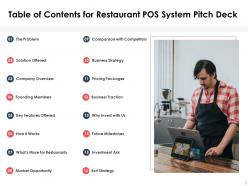
Slide 2: This slide presents table of contents.
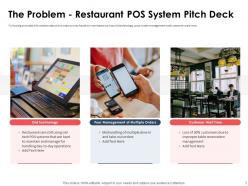
Slide 3: This slide exhibits major points faced by merchants such as old technology, poor order management and customer wait time.
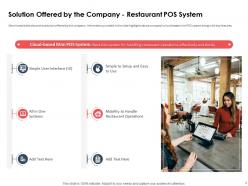
Slide 4: This slide shows solution offered by the company.
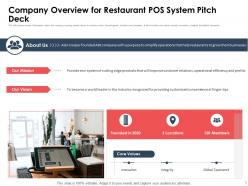
Slide 5: This slide depicts company details like mission, vision, founding year, locations and members.
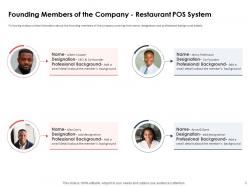
Slide 6: This slide illustrates founding members of the company covering their name, designation and professional background details.
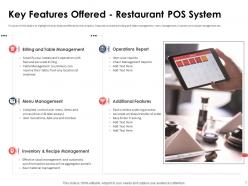
Slide 7: This slide displays key features offered by the company.
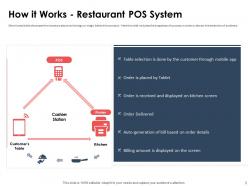
Slide 8: This slide explains investors about technology or magic behind the product.
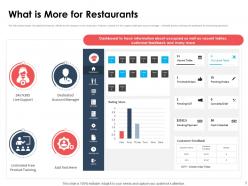
Slide 9: This slide presents additional features offered by the company to the restaurants.
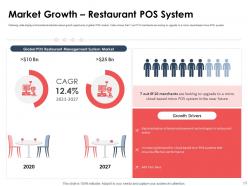
Slide 10: This slide exhibits informational statistics about growth opportunity in global POS market.
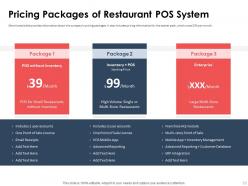
Slide 11: This slide shows company’s pricing packages.
Slide 12: This slide differentiates the POS system offered by the company with its competitors based on different features.
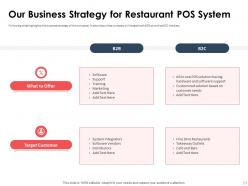
Slide 13: This slide highlights business strategy of the company.
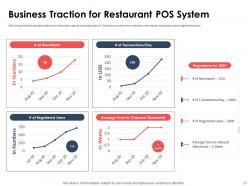
Slide 14: This slide depicts statistical information about business traction.
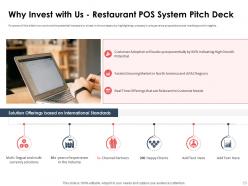
Slide 15: This slide displays how to convince potential investors to invest in the company.
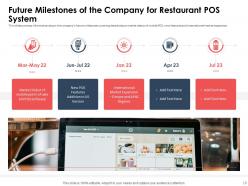
Slide 16: This slide presents company’s future milestones covering details about market debut of mobile POS, etc.
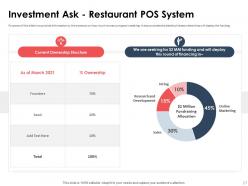
Slide 17: This slide exhibits investors on how much money company is seeking.
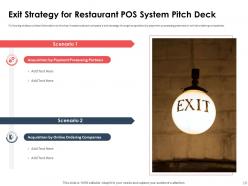
Slide 18: This slide shows key investors about company’s exit strategy.
Slide 19: This is the icons slide.
Slide 20: This slide presents title for additional slides.
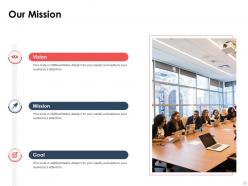
Slide 21: This slide presents your company's vision, mission and goals.
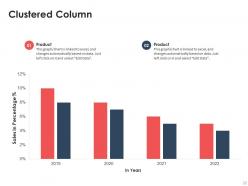
Slide 22: This slide displays yearly sales clustered column graph for different products. The graphs are linked to Excel.
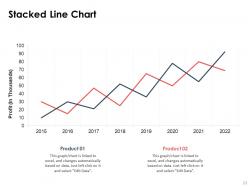
Slide 23: This slide displays yearly profits stacked line chart for different products. The charts are linked to Excel.
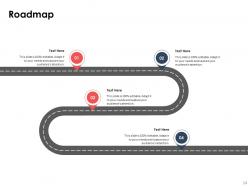
Slide 24: This slide shows roadmap.
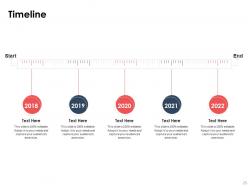
Slide 25: This slide exhibits yearly timeline.
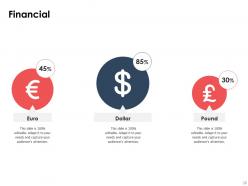
Slide 26: This slide showcases financials.
Slide 27: This slide depicts ideas generated.
Slide 28: This slide displays venn.
Slide 29: This slide depicts posts for past experiences of clients.
Slide 30: This is thank you slide & contains contact details of company like office address, phone no., etc.
Restaurant pos system pitch deck ppt template with all 30 slides:
Use our Restaurant POS System Pitch Deck Ppt Template to effectively help you save your valuable time. They are readymade to fit into any presentation structure.


FAQs for Restaurant pos system pitch
Order management and payment stuff is definitely your foundation. Get something that handles table assignments and can split checks easily - seriously, customers always want to pay separately. Kitchen display integration is a must because paper tickets get lost constantly during rush hours. Mobile ordering from tables is pretty much expected now. Real-time reporting helps you see what's selling and how your team's doing. Also make sure it plays nice with your accounting system and any delivery apps you're using. Test the hell out of the interface first though - clunky software makes everyone miserable.
Dude, get a POS system - it'll change everything. Servers just tap orders straight to the kitchen instead of that chaotic yelling back and forth. Bills come out perfect automatically too, so no more weird recalculating moments with customers. You can actually see which tables are taking forever and where things are getting stuck in real-time. Honestly, the whole table turnover thing speeds up like crazy. Your customers won't be sitting around forever waiting, and that means more money in your pocket. Trust me on this one.
Most POS systems nowadays can hook up to your kitchen displays and order management stuff, but honestly it depends on what you're already running. Your current setup needs to have APIs or some way for the new system to connect - otherwise you're kinda stuck. Some brands work together super smoothly, others... not so much. I'd definitely test compatibility first before dropping money on anything new. Oh, and if you've got weird custom workflows or specialty kitchen gear, that makes things trickier. Get your vendor to demo it with your actual equipment so you can see if everything talks to each other properly.
Your POS data is honestly a goldmine you're probably ignoring. Track which dishes actually make money (not just what sells), then use those reports to nail your staff scheduling during peak hours. I swear, the food waste insights alone will blow your mind - seeing which ingredients sit around too long versus what flies off the shelf. Customer behavior patterns help with menu pricing too. My buddy started checking his weekly reports religiously and saw his margins improve within like a month. Short bursts of analysis beat drowning in spreadsheets any day.
Honestly, a decent POS system is a game-changer for tracking inventory. Real-time updates show you what's running low or about to go bad. When orders come in, stock levels adjust automatically. You can set alerts for reorder points too. The waste tracking is where it gets really useful though - you'll see which dishes bomb and can tweak portions or cut menu items. Some systems even break down ingredient usage per dish, which is pretty cool if you're into that level of detail. Reports show your food costs and waste patterns. I'd start with alerts on your priciest ingredients first.
First thing - get end-to-end encryption for all your transactions, that's like the bare minimum for payment stuff. Your provider better be PCI DSS compliant too or you're asking for trouble. Set up separate logins for each employee (and definitely remove any old ones from people who left). Two-factor authentication is a no-brainer if they offer it. Keep the software updated since those patches fix security holes. Oh and make sure they're storing everything on secure servers with backups. Honestly, I'd start by just going through who has access to what right now.
Your POS system is basically a goldmine for scheduling data. You'll see exactly when you're slammed vs dead, plus which servers are actually bringing in sales. The automatic time tracking is clutch - no more manual timesheets. During those random Tuesday afternoon lulls? The system shows you're burning money on too many staff. I love that some sync with scheduling apps now, makes shift swaps less of a headache. Track things like sales per hour and table turnover. Then just put your rock stars on Friday nights and optimize from there.
Dude, mobile POS is a total lifesaver for table service. Your servers can take orders and run payments right there instead of constantly running around. Customers pay when they're actually ready to leave - no more awkward "where's our check" situations. Orders go straight into the system too, so way fewer mix-ups from messy handwriting. The whole tip and sign thing happens on the spot which is pretty slick. We looked into it last year and honestly wish we'd switched sooner. If you're thinking about upgrading, definitely check out the mobile options.
So the price gap is honestly wild - small places usually pay like $1,200-3,000 upfront plus maybe $50-150 monthly. Big restaurants though? We're talking $10K-50K+ just to start, which is brutal. Once you scale up you need multiple terminals and all that inventory management stuff gets expensive fast. Smaller spots can totally survive on those basic cloud systems now. But large operations need the serious equipment for handling multiple locations. My cousin learned this the hard way - bought way more system than his café needed. Just match what you actually require, not what looks fancy.
Yeah, your POS can handle all that loyalty stuff automatically. It tracks purchases and points in real-time, spots your regulars, and sends them targeted deals based on what they usually order. When someone hits a spending milestone, boom - automatic reward kicks in. The data's pretty wild too - you can actually see which customers are drifting away and hit them with personalized offers. Email and SMS marketing keeps you in their heads between visits. Honestly, I'd start simple with basic points-per-dollar, then add the fancy customer segmentation once you're not overwhelmed by it all.
Look, don't just grab the cheapest one - learned that the hard way at my last place. Test it during your actual busy hours first because crashes during dinner service are brutal. Hardware costs add up quick too, so ask about terminals upfront before they surprise you later. Integration matters more than you think - standalone systems become total headaches with accounting and inventory. Oh, and check their support hours. Nothing worse than being stuck at 8pm with only a voicemail. Negotiate everything before signing anything!
Dude, training is everything with POS systems. Seriously. Pick something intuitive or you're screwed - I've watched teams completely revolt against clunky systems. When it's easy to learn, people actually use it right instead of creating their own messy workarounds that destroy your data. You want visual interfaces and decent training materials, none of that manual-heavy nonsense. Quick learning = less downtime during the switch. Plus your staff won't hate you, which is honestly underrated. The whole timeline basically depends on how fast everyone gets comfortable with it.
Dude, totally worth it. The main thing is it syncs all your orders from different apps straight to the kitchen - no more tablet chaos during dinner rush. Your inventory updates everywhere automatically too, which is honestly pretty sweet. I'd focus on finding one that works with whatever delivery platforms you're already on since that's where you'll notice the difference right away. Oh and your staff will actually thank you for once instead of wanting to quit every Friday night. The whole thing just runs smoother without people manually entering orders from like five different places.
You definitely need 24/7 support - restaurants aren't exactly 9-to-5 businesses, right? System crashes during dinner rush are brutal. Phone and chat support are must-haves, not just some slow ticket system. Also figure out their update schedule beforehand. Do updates happen automatically or can you control when? Because surprise updates during peak hours will mess you up. Training with interface changes is worth asking about too. Oh, and test how fast they actually respond before signing anything. Get all the support details in writing - I learned that one the hard way with my last vendor.
Dude, it's a game changer for tracking money stuff. No more drowning in receipts or staying up late with spreadsheets. Everything gets automated - sales data, inventory costs, profit margins, all of it. You'll see exactly what's selling and what isn't, plus get reports on daily revenue without doing math by hand (which honestly sucked). The real-time data is clutch when you need to make quick decisions. Oh, and tax season becomes way less painful since everything's already organized. Being able to spot trends over months helps with ordering too - like knowing not to overstock that item nobody wanted last quarter.
-
Innovative and Colorful designs.
-
Excellent products for quick understanding.