

Point of sale system pos powerpoint presentation slides




Try Before you Buy Download Free Sample Product
 Impress Your
 Audience
 100%
100% Editable
 Save Hours
 of Time


Introducing Point Of Sale System POS PowerPoint Presentation Slides. Discuss how authorized and unauthenticated aspects of transactions are handled with our eye-catching PPT templates. The content-ready presentation covers the detail about the global merchant acquiring market along with the market growth rate. You can easily present the global card penetration of the market with the help of graphs using our PowerPoint templates. Depict the key players of the merchant acquiring industry in a tabular format with the help of MSPs PPT themes. Our content-ready presentation also covers the SWOT and PESTLE analysis of merchant acquisition. Showcase growth drivers for merchant acquirers such as eCommerce, mPOS, regulation, and Omni retailing by using this thoroughly researched point of purchase PPT infographics. It is possible to graphically depict the market size based on the components used by merchant acquirers. Showcase the features and benefits provided by the merchant to different competitors in the market by incorporating payment gateway providers PPT slide deck.
People who downloaded this PowerPoint presentation also viewed the following :
Content of this Powerpoint Presentation
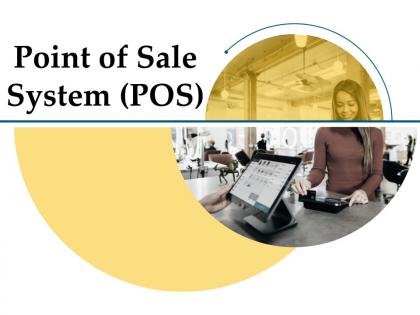
Slide 1: This title slide introduces the Point-of-Sale System (POS).
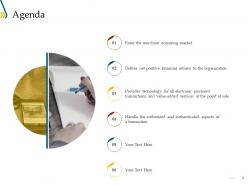
Slide 2: This is the Agenda slide. It includes - Enter the merchant acquiring market, Deliver net positive financial returns to the organization, Provides technology for all electronic payment transactions and value-added services at the point of sale, etc.
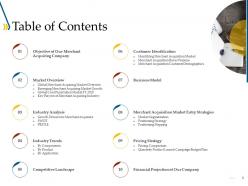
Slide 3: This slide contains the Table of Contents. It includes - Market Overview, Competitive Landscape, Objective of Our Merchant Acquiring Company, Industry Analysis, etc.
Slide 4: This is a table of content slide showing the Objective of Our Merchant Acquiring Company.
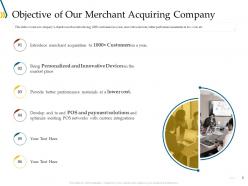
Slide 5: This slide presents the Objective of Our Merchant Acquiring Company. It covers our company’s objective such as introducing 1000+ customers in a year, innovative devices, better performance materials at low cost, etc.
Slide 6: This is a table of content slide showing the Market Overview. It includes - Global Merchant Acquiring Market Overview, Emerging Merchant Acquiring Market Growth, Global Card Penetration Market FY 2019, and Key Players of Merchant Acquiring Industry.
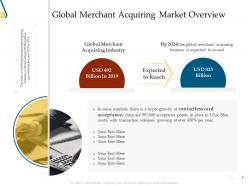
Slide 7: This slide presents the Global Merchant Acquiring Market Overview. It covers the global merchant acquiring business overview along with the market growth from the year 2019 to 2024.
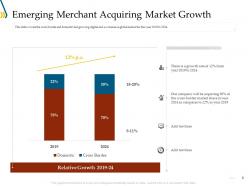
Slide 8: This slide presents the Emerging Merchant Acquiring Market Growth. It covers the cross-border and domestic fast-growing digital and e-commerce global market for the year 2019 to 2024.
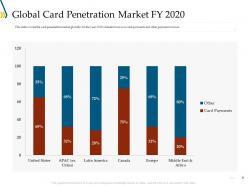
Slide 9: This slide presents the Global Card Penetration Market FY 2020. It covers the card penetration market globally for the year 2019 wherein the focus is on card payments and other payment sources.
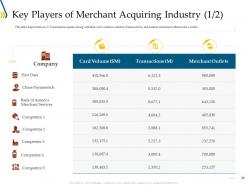
Slide 10: This slide presents the Key Players of the Merchant Acquiring Industry (1/2). This table depicts the key U.S merchant acquirers along with their card volumes, number of transactions, and number of merchant outlets in the country.
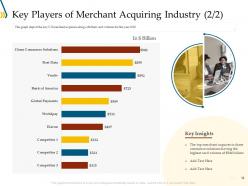
Slide 11: This slide presents the Key Players of the Merchant Acquiring Industry (2/2). This graph depicts the key U.S merchant acquirers along with their card volumes for the year 2020.
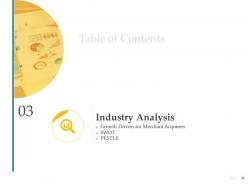
Slide 12: This is a table of content slide showing the Industry Analysis. It includes - Growth Drivers for Merchant, Acquirers, SWOT, and PESTLE.
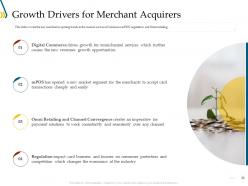
Slide 13: This slide presents the Growth Drivers for Merchant Acquirers. It covers the key merchant acquiring trends in the market such as eCommerce, mPOS, regulation, and Omni retailing.
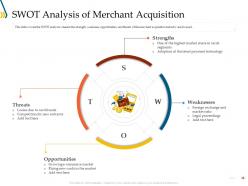
Slide 14: This slide presents the SWOT Analysis of Merchant Acquisition. It covers the SWOT analysis wherein the strength, weaknesses, opportunities, and threats of the merchant acquisition industry are focused.
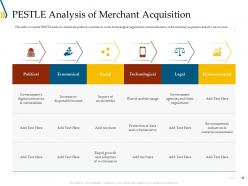
Slide 15: This slide presents the PESTLE Analysis of Merchant Acquisition. It covers the PESTLE analysis wherein the political, economic, social, technological, legal, and environmental status of the merchant acquisition industry are focused.
Slide 16: This is a table of content slide showing the Industry Trends - By Components, By Product, and By Application.
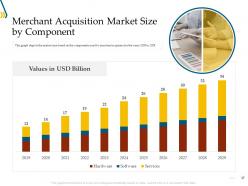
Slide 17: This slide presents the Merchant Acquisition Market Size by Component. This graph depicts the market size based on the components used by merchant acquirers for the years 2019 to 2029.
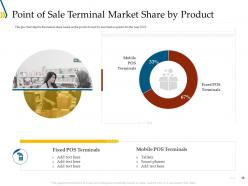
Slide 18: This slide presents the Point-of-Sale Terminal Market Share by Product. This pie chart depicts the market share based on the products used by merchant acquirers for the year 2019.
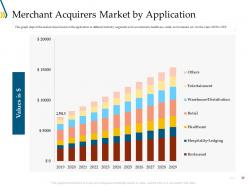
Slide 19: This slide presents the Merchant Acquirers Market by Application. This graph depicts the market share based on the application in different industry segments.
Slide 20: This is a table of content slide showing the Competitive Landscape.
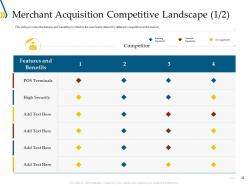
Slide 21: This slide presents the Merchant Acquisition Competitive Landscape (1/2). It provides the features and benefits provided to the merchants offered by different competitors in the market.
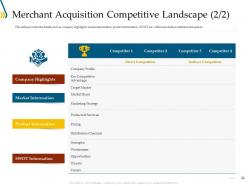
Slide 22: This slide presents the Merchant Acquisition Competitive Landscape (2/2). It provides the details such as company highlights, market information, product information, SWOT, etc. of the merchants available in the market.
Slide 23: This is a table of content slide showing the Customer Identification. It includes - Identifying Merchant Acquisition Market, Merchant Acquisition Buyer Persona, and Merchant Acquisition Customer Demographics.
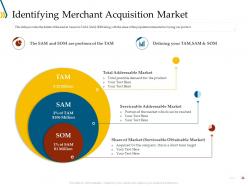
Slide 24: This slide presents the Identifying Merchant Acquisition Market. It provides the details of the market based on TAM, SAM, SOM along with the share of the population interested in buying our product.
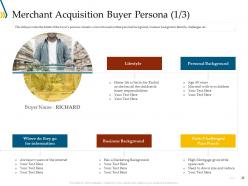
Slide 25: This slide presents the Merchant Acquisition Buyer Persona (1/3). It provides the details of the buyer’s persona wherein we have focused on their personal background, business background, lifestyle, challenges, etc.
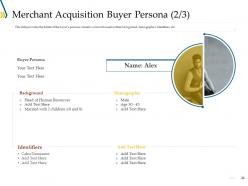
Slide 26: This slide presents the Merchant Acquisition Buyer Persona (2/3). It provides the details of the buyer’s persona wherein we have focused on their background, demographics. Identifiers, etc.
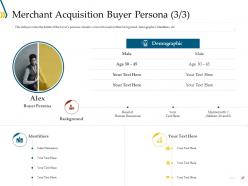
Slide 27: This slide presents the Merchant Acquisition Buyer Persona (3/3). It provides the details of the buyer’s persona wherein we have focused on their background, demographics. Identifiers, etc.
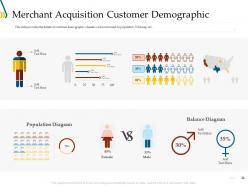
Slide 28: This slide presents the Merchant Acquisition Customer Demographics. It provides the details of customer demographic wherein we have focused on population, USA map, etc.
Slide 29: This is a table of content slide showing the Business Model.
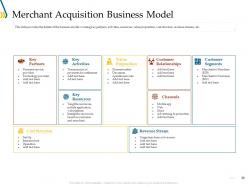
Slide 30: This slide presents the Merchant Acquisition Business Model. It provides the details of the business model covering key partners, activities, resources, value proposition, cost structure, revenue streams, etc.
Slide 31: This is a table of content slide showing the Merchant Acquisition Market Entry Strategies. It includes - Market Segmentation, Positioning Strategy, and Positioning Mapping.
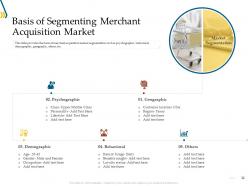
Slide 32: This slide presents the Basis of Segmenting Merchant Acquisition Market. It provides the basis of merchant acquisition market segmentation such as psychographic, behavioral, demographic, geographic, others, etc.
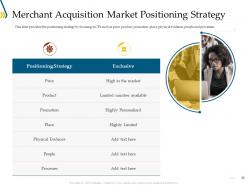
Slide 33: This slide presents the Merchant Acquisition Market Positioning Strategy. It provides the positioning strategy by focusing on 7Ps such as price, product, promotion, place, physical evidence, people, and processes.
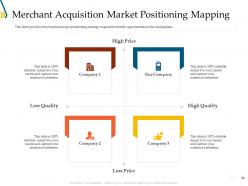
Slide 34: This slide presents the Merchant Acquisition Market Positioning Mapping. It is the perpetual map in positioning strategy required to identify opportunities in the marketplace.
Slide 35: This is a table of content slide showing the Pricing Strategy. It includes - Pricing Comparison and Quarterly Product Launch Campaign Budget Plan.
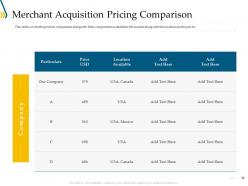
Slide 36: This slide presents the Merchant Acquisition Pricing Comparison. It covers the product comparison along with their competitors available in the market along with the location and its prices.
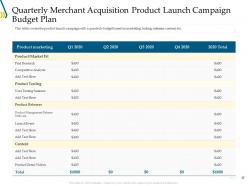
Slide 37: This slide presents the Quarterly Merchant Acquisition Product Launch Campaign Budget Plan. It covers the product launch campaign with a quarterly budget based on marketing, testing, releases, content, etc.
Slide 38: This is a table of content slide showing the Financial Projection of Our Company.
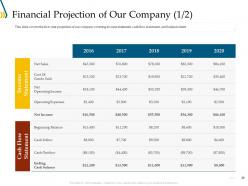
Slide 39: This slide presents the Financial Projection of Our Company (1/2). It covers the five-year projection of our company covering income statement, cash flow statement, and balance sheet.
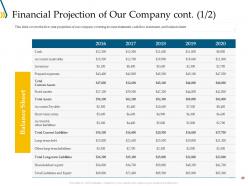
Slide 40: This slide presents the Financial Projection of Our Company cont. (1/2). It covers the five-year projection of our company covering income statement, cash flow statement, and balance sheet.
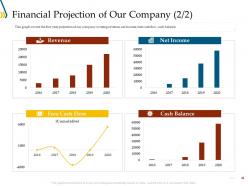
Slide 41: This slide presents the Financial Projection of Our Company (2/2). This graph covers the five-year projection of our company covering revenue, net income, free cash flow, cash balance.
Slide 42: This is the Point-of-Sale System (POS) - Icons Slide.
Slide 43: This slide introduces the Additional Slides.
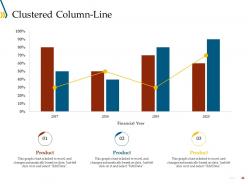
Slide 44: This slide shows a Clustered Column-Line that compares 3 products’ data over a timeline of financial years.
Slide 45: This slide provides the Mission for the entire company. This includes the vision, the mission, and the goal.
Slide 46: This slide shows the members of the company team with their name, designation, and photo.
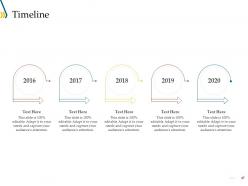
Slide 47: This slide is a Timeline template to showcase the progress of the steps of a project with time.
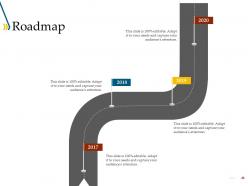
Slide 48: This slide is a Roadmap template to showcase the stages of a project, for example.
Slide 49: This is a Thank You slide where details such as the address, contact number, email address are added.
Point of sale system pos powerpoint presentation slides with all 49 slides:
Use our Point Of Sale System POS Powerpoint Presentation Slides to effectively help you save your valuable time. They are readymade to fit into any presentation structure.



FAQs for Point of sale system pos
Look, real-time inventory sync is absolutely crucial - you don't want to be selling stuff you don't have. Payment processing needs to handle cards and mobile payments obviously. Customer tracking is huge for seeing purchase history and building relationships. The reporting stuff honestly changed everything for us - sales data, how your staff's performing, automatic alerts when you're running low. Multi-location support if you're thinking about expanding later. Oh, and different employee access levels so everyone can't mess with everything. Returns handling and accounting integration are must-haves too. Just write down what's driving you crazy every day first, then demo whatever fixes those specific headaches.
So basically when you connect your POS to inventory management, sales automatically update your stock counts in real-time. No more spreadsheets or manual counting - thank god. You'll get alerts when stuff's running low, plus you can actually see which products are making money vs just sitting there. During rush periods this saves your sanity, trust me. The data helps you buy smarter too instead of just guessing what you need. I'd start by checking if your current POS has inventory features built in, or find one that plays nice with whatever system you're already using.
Honestly, PCI DSS compliance is your biggest headache but you can't skip it - auditors will tear you apart. Get end-to-end encryption set up for all card data, plus tokenization so you're storing random tokens instead of actual sensitive stuff. EMV chip readers are a must, and contactless payments are way more secure than those old magnetic stripe cards anyway. Don't forget role-based access controls - you don't want every employee seeing everything. Oh, and for the love of god, stay on top of security patches. I've watched companies get absolutely wrecked because someone got lazy with updates for like six months straight.
Honestly, mobile POS is a game changer for flexibility - your team can take payments literally anywhere in the store. No more herding customers to that one register, you know? Staff can actually help people where they're shopping instead of making them walk across the store. Plus the interfaces don't suck since they're built like regular apps. Traditional systems handle crazy high volume better, I'll give them that. But if you want your employees moving around freely? Mobile's the way to go. Really depends on whether you need that mobility or just raw processing power.
Dude, cloud POS systems are night and day compared to those old clunky setups. You can literally run your whole business from your phone now - pretty wild when you think about it. No more being stuck behind one register or waiting forever for reports to generate. Everything syncs instantly across locations, updates happen automatically, and you're not dropping serious cash on servers upfront. My cousin made the switch last year and keeps raving about how much he's saving. Honestly, if you're still dealing with an on-premise system, you're making life way harder than it needs to be.
Honestly, get a POS system from day one - it'll save you so much pain down the road. Your sales data stays clean, inventory tracking actually works, and customers think you've got your shit together instead of scribbling receipts by hand. I started with spreadsheets thinking I was being scrappy, but what a nightmare that became. Square's pretty solid to start with, nothing fancy. The best part? You're not scrambling to fix messy data later when things get crazy busy. Trust me, building good habits early beats trying to untangle everything when you're swamped.
Honestly, tablet POS systems are so much better than those old cash registers. You can track inventory in real time and see all your sales data instantly. The setup costs way less since you don't need that expensive clunky hardware. Your employees will figure out the touchscreen super fast - way easier than memorizing all those random buttons. Being able to process payments anywhere in the store is a game changer too. Oh, and the cloud thing means you can obsessively check your numbers from home (guilty). Definitely try one for a month and you'll see what I mean.
Your POS system is seriously a treasure trove of data you're probably not even using. It tracks everything - what's selling, dead hours (Tuesday afternoons are the worst, trust me), seasonal stuff, and what people buy together. Check out those weekly reports first - I bet you'll find patterns you never saw before. The customer data shows who's coming back, what they love, buying habits, all that good stuff. Perfect for tweaking your inventory or running targeted promos. Most systems have dashboards that actually make sense of the numbers without giving you a headache.
Hardware runs about $500-2K per terminal, then you're looking at $50-300 monthly for software. Don't forget setup and training - that's another $500-2K upfront. Transaction fees hit around 2-3% too. Honestly, the initial costs can be rough depending on how big you go. If you need it to talk to your current inventory system, tack on more for integration. I'd calculate your whole first year including everything, then those monthly fees after. Most places break even in 6-12 months from better tracking and speed. Get quotes from like 3-4 vendors though - compare the full picture, not just the flashy price they lead with.
Look, a good POS interface will save you so much headache with training. New employees pick it up in days instead of weeks when everything's intuitive. Fast checkouts keep customers happy too - nobody wants to wait while someone's hunting around for buttons. I learned this the hard way at my old job, ugh. Fewer clicks means fewer mistakes, which keeps your staff confident. When you're looking at systems, go for the ones with big, clear buttons and menus that actually make sense. Trust me, it's worth paying a bit more for something that doesn't suck to use daily.
Don't just go for the cheapest option - trust me, you'll hate yourself later when it crashes during your busiest day. Check if it plays nice with whatever software you're already using because nobody wants to manually enter everything twice. Cloud sounds fancy but if your internet sucks, maybe stick with something local. Oh and get the REAL price upfront - they love hiding training costs and equipment fees. Test it out with your actual employees first too, not just the tech-savvy ones. Some systems look great until Karen from front desk tries using them.
Yeah, most POS systems nowadays hook up with tons of payment options - credit cards, debit, Apple Pay, contactless stuff, even those buy-now-pay-later things. You really can't just take cash anymore (I mean, who even carries cash?). Different people prefer different ways to pay, so having all the options means you won't lose sales when someone's card doesn't work or whatever. The trick is finding a system that handles everything smoothly without making you deal with a bunch of different companies. Trust me, checkout flexibility keeps customers happy.
Honestly, COVID changed everything with payments. People expect contactless now - Apple Pay, tap cards, all that stuff. Your old terminals probably can't handle the new tech, which sucks but whatever. Transaction speeds are way faster though, so customers aren't standing around forever anymore. Security got more complicated too - there's always some new compliance thing to worry about. I'd just take a look at what you've got and see what actually needs upgrading. No point replacing everything if you don't have to, you know?
Honestly, a decent POS system is like having a crystal ball for your customers. It'll track what they buy, how often, all that good stuff. So instead of those boring "buy 10 get 1 free" promotions, you can hit them with offers they actually want. The automated point tracking is clutch too - no more awkward conversations about missing rewards points. You can spot buying trends super fast and switch up your marketing game. Oh, and start with automated emails triggered by purchases - that's probably the lowest hanging fruit. Trust me, the data insights alone make it worth it.
Starbucks totally nailed it with their mobile POS - tied it right into rewards and cut wait times like crazy. Target's system upgrade helped them track inventory way better. Oh and those tablet setups at places like Sweetgreen? Game changer for speed and getting orders right. Even small shops see transactions go 20-30% faster with newer systems, which honestly surprised me at first. You'd probably want to check out what businesses similar to yours are doing though - a coffee shop's needs are totally different from like a clothing store or whatever you're thinking about.
-
Very unique, user-friendly presentation interface.
-
Excellent products for quick understanding.
-
Good research work and creative work done on every template.
-
Innovative and Colorful designs.