

Sales Process Automation To Improve Sales Powerpoint Presentation Slides






Try Before you Buy Download Free Sample Product
 Impress Your
 Audience
 100%
100% Editable
 Save Hours
 of Time


Sales Automation streamlines the sales process to focus more on prospects and customers. The purpose of this deck is to eliminate repetitive tasks for better productivity in order to improve revenues. This Sales Process Automation to Improve Sales PPT covers the challenges faced by the sales manager, the decline in sales volume, and a comparative assessment of sales performance. It also showcases the importance of sales automation, sales team organizational structure, and processes. This deck also focuses on the importance of sales automation and pipeline management. Further, it represents key areas of digital sales, which includes marketing automation, lead tracking, and order management. Talk about the ways of implementing sales process automation and choosing the best CRM software to improve sales. Incorporate the given PowerPoint presentation for the training delivery schedule of employees. Moreover, this PowerPoint captures the impact of automation on sales performance and dashboards to monitor sales effectiveness. Build a powerful template like this for yourself, and book a free demo with our research team now.
People who downloaded this PowerPoint presentation also viewed the following :
Content of this Powerpoint Presentation
Slide 1: This slide introduces Sales Process Automation to Improve Sales. State your company name and begin.
Slide 2: This slide states Agenda of the presentation.
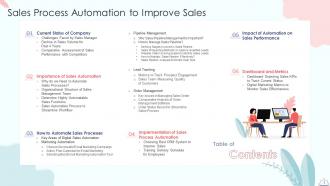
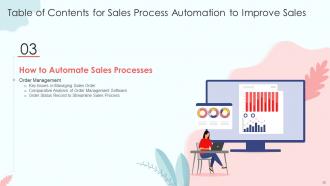
Slide 3: This slide presents Table of Content for the presentation.
Slide 4: This slide highlights title for topics that are to be covered next in the template.
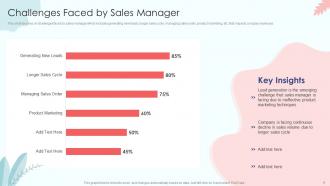
Slide 5: This slide focuses on challenges faced by sales manager which includes generating new leads, longer sales cycle, managing sales order, product marketing, etc. that impacts company revenues.
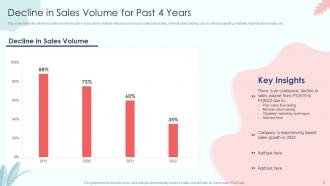
Slide 6: This slide shows the decline in sales volume for past 4 years due to multiple reasons such as poor sales forecasting, minimal sales training, fails in sales prospecting, outdated marketing techniques, etc.
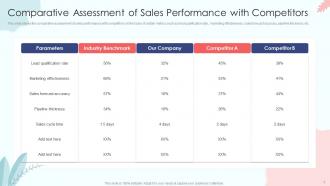
Slide 7: This slide shows the comparative assessment of sales performance with competitors based on certain metrics such as lead qualification rate, ,marketing effectiveness, sales forecast accuracy, pipeline thickness, etc.
Slide 8: This slide highlights title for topics that are to be covered next in the template.
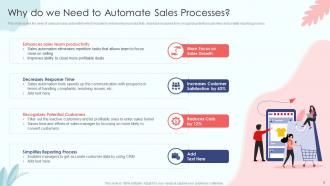
Slide 9: This slide covers the need of sales process automation which includes to enhance team productivity, decrease response time, recognize potential customers and simplify reporting process.
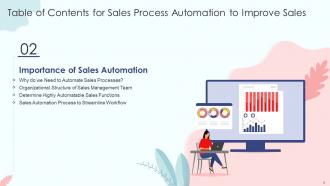
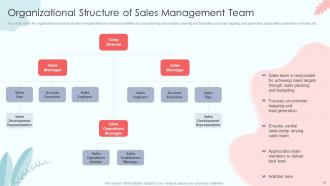
Slide 10: This slide covers the organizational structure of sales management team and responsibilities such as achieving sales targets, planning and budgeting, customer mapping, lead generation, appreciating sales team members, etc.
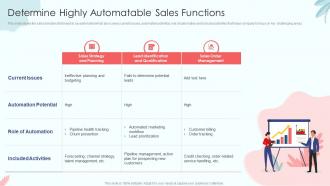
Slide 11: This slide shows the sales functions that need to be automated which also covers current issues, automation potential, role of automation and included activities that helps company to focus on key challenging areas.
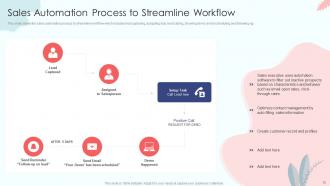
Slide 12: This slide shows the sales automation process to streamline workflow which includes lead capturing, assigning duty, lead calling, showing demo, email scheduling and following-up.
Slide 13: This slide highlights title for topics that are to be covered next in the template.
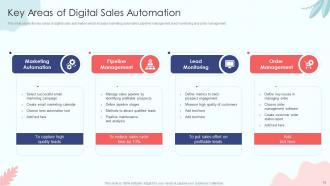
Slide 14: This slide shows the key areas of digital sales automation which includes marketing automation, pipeline management, lead monitoring and order management.
Slide 15: This slide highlights title for topics that are to be covered next in the template.
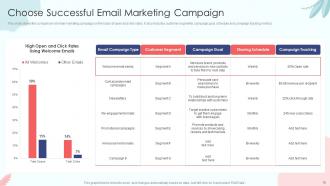
Slide 16: This slide shows the comparison of email marketing campaign on the basis of open and click rates. It also includes customer segments, campaign goal, schedule and campaign tracking metrics.
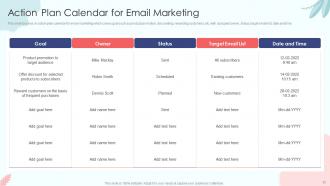
Slide 17: This slide focuses on action plan calendar for email marketing which covers goal such as product promotion, discounting, rewarding customers, etc. with assigned owner, status, target email list, date and time.
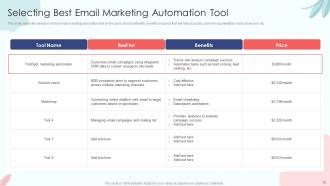
Slide 18: This slide shows the selection of best email marketing automation tool on the basis of best suitability, benefits and price that will help accurate customer segmentation, lead conversion, etc.
Slide 19: This slide highlights title for topics that are to be covered next in the template.
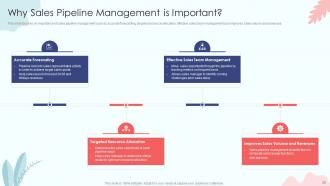
Slide 20: This slide focuses on importance of sales pipeline management such as accurate forecasting, targeted resource allocation, effective sales team management and improves sales volume and revenues.
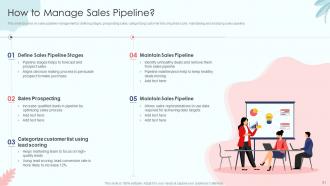
Slide 21: This slide focuses on sales pipeline management by defining stages, prospecting sales, categorizing customer list using lead score, maintaining and analyzing sales pipeline.
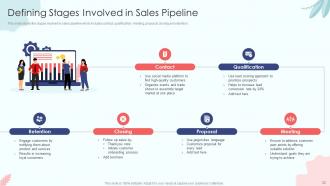
Slide 22: This slide shows the stages involved in sales pipeline which includes contact, qualification, meeting, proposal, closing and retention.
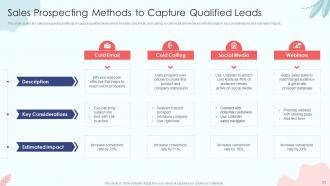
Slide 23: This slide covers the sales prospecting methods to capture qualified leads which includes cold email, cold calling, social media and webinars with description, key considerations and estimated impact.
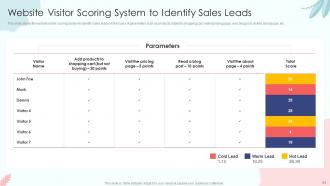
Slide 24: This slide shows the website visitor scoring system to identify sales leads on the basis of parameters such as products added to shopping cart, visited pricing page, read blog post, visited about page, etc.
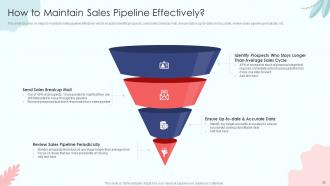
Slide 25: This slide focuses on steps to maintain sales pipeline effectively which includes identify prospects, send sales breakup mail, ensure data is up-to-date and accurate, review sales pipeline periodically, etc.
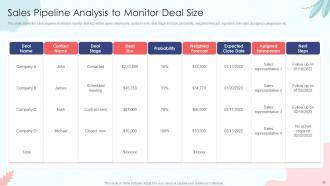
Slide 26: This slide shows the sales pipeline analysis to monitor deal size which covers deal name, contact name, deal stage and size, probability, weighted forecast, expected close date, assigned salesperson, etc.
Slide 27: This slide highlights title for topics that are to be covered next in the template.
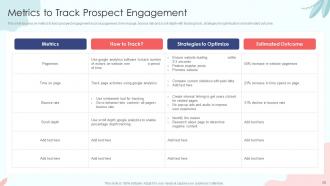
Slide 28: This slide focuses on metrics to track prospect engagement such as pageviews, time on page, bounce rate and scroll depth with tracking tools, strategies for optimization and estimated outcome.
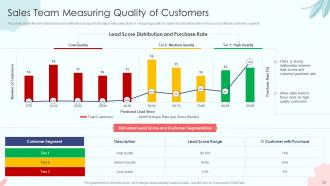
Slide 29: This slide shows the estimated lead score distribution and purchase rate to help sales team in measuring quality of customers and allows them to focus on profitable customer segment.
Slide 30: This slide highlights title for topics that are to be covered next in the template.
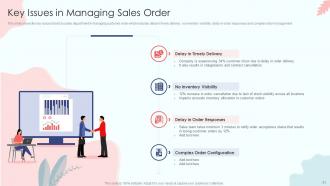
Slide 31: This slide shows the key issues faced by sales department in managing customer order which includes delay in timely delivery, no inventory visibility, delay in order responses and complex order management.
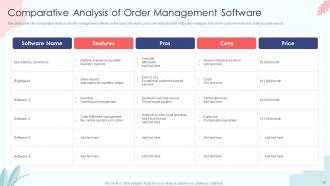
Slide 32: This slide covers the comparative analysis of order management software on the basis of features, pros, cons and price that help sales managers to track the customer order and create accurate reports.
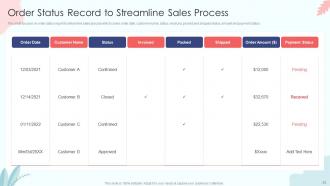
Slide 33: This slide focuses on order status report to streamline sales process which covers order date, customer name, status, invoiced, packed and shipped status, amount and payment status.
Slide 34: This slide highlights title for topics that are to be covered next in the template.
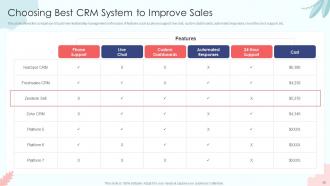
Slide 35: This slide shows the comparison of customer relationship management on the basis of features such as phone support, live chat, custom dashboards, automated responses, round the clock support, etc.
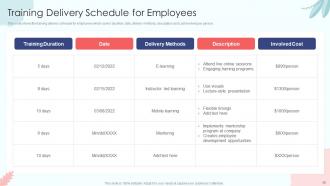
Slide 36: This slide shows the training delivery schedule for employees which covers duration, date, delivery methods, description and cost involved per person.
Slide 37: This slide highlights title for topics that are to be covered next in the template.
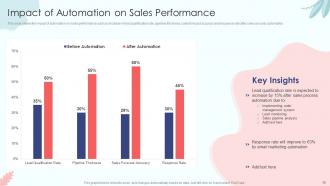
Slide 38: This slide shows the impact of automation on sales performance such as increase in lead qualification rate, pipeline thickness, sales forecast accuracy and response rate after sales process automation.
Slide 39: This slide highlights title for topics that are to be covered next in the template.
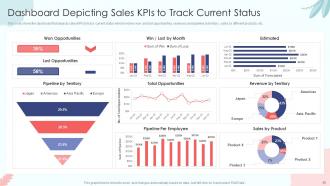
Slide 40: This slide shows the dashboard that depicts sales KPIs to track current status which involves won and lost opportunities, revenues and pipeline by territory, sales by different products, etc.
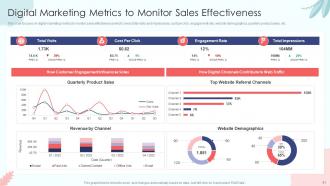
Slide 41: This slide focuses on digital marketing metrics to monitor sales effectiveness which covers total visits and impressions, cost per click, engagement rate, website demographics, quarterly product sales, etc.
Slide 42: This slide contains all the icons used in this presentation.
Slide 43: This slide is titled as Additional Slides for moving forward.
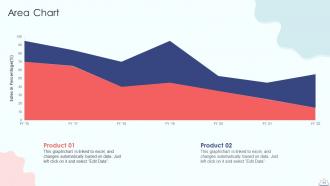
Slide 44: This slide depicts Area chart with two products comparison.
Slide 45: This slide depicts Venn diagram with text boxes.
Slide 46: This slide shows Post It Notes. Post your important notes here.
Slide 47: This slide contains Puzzle with related icons and text.
Slide 48: This is Our Target slide. State your targets here.
Slide 49: This slide showcases Magnifying Glass to highlight information, specifications, etc.
Slide 50: This is a Thank You slide with address, contact numbers and email address.
Sales Process Automation To Improve Sales Powerpoint Presentation Slides with all 55 slides:
Use our Sales Process Automation To Improve Sales Powerpoint Presentation Slides to effectively help you save your valuable time. They are readymade to fit into any presentation structure.









FAQs for Sales Process Automation To Improve Sales
Honestly, the biggest win is just getting hours back in your day. No more typing the same info into three different systems - automation handles all that tedious stuff. Your leads actually get followed up with consistently (we both know how often that gets forgotten when things get crazy). Sales reps can spend time on real conversations instead of updating spreadsheets. The pipeline visibility is pretty sweet too - you'll spot problems way faster. Most companies see decent ROI since it's like having extra team members without the payroll. I'd say start small with whatever task annoys you most, then expand from there.
Honestly, sales automation is a game changer for lead tracking. You'll never forget to follow up again because it handles all that automatically - scores leads, sends emails when people are actually paying attention, moves them through your pipeline. No more spreadsheet hell or "oh crap I was supposed to call that guy back three days ago" moments. Your conversion rates go up since nothing gets lost in the shuffle. I'd start with email sequences first though, that's where you'll save the most time. Then you can actually focus on real conversations instead of boring admin stuff.
Honestly, you can't go wrong starting with a solid CRM - Salesforce, HubSpot, or Pipedrive are the obvious choices. They handle all your lead tracking and pipeline stuff automatically. For email sequences, Mailchimp or ActiveCampaign work great. Oh, and Zapier is seriously underrated - it connects everything without needing to code anything yourself. If you're doing heavy prospecting later, Outreach or SalesLoft are worth checking out. But yeah, nail down your CRM setup first. Then just add tools wherever you're wasting too much time on repetitive tasks.
Dude, it's a game changer. Your sales team stops wasting time on all the boring admin stuff - updating CRM, sending follow-up emails, tracking leads. The software does that automatically so they can actually talk to customers and close deals. You get real-time data on what's working too, which is pretty sweet. I'd say start small though - pick your most annoying repetitive tasks first and automate those. Then build from there. It's like having a super organized assistant who doesn't need coffee breaks or complain about workload.
Honestly, go after the stuff that's eating your time but doesn't need much brain power. Data entry, scoring leads, those follow-up email chains - that's where you'll see the biggest wins. I'd track where your team's spending hours each week first (trust me, it's probably way more than you realize). Pipeline updates are another big one. You want tasks with clear rules that anyone could do but nobody wants to. Skip anything that needs real judgment calls though. Pick one thing, nail it, then move on to the next. Way better than trying to automate everything at once.
Honestly, AI just takes care of all the tedious stuff your sales team hates doing anyway. It'll score your leads automatically, predict which deals will actually close (pretty accurately too), and personalize outreach without you writing individual emails all day. The cool thing is it gets smarter by learning from your past wins. Plus it handles the boring tasks - data entry, scheduling follow-ups, even telling you the best time to call someone. I'd start by looking at whatever you're doing over and over again manually. That's where AI shines.
Totally! Everyone thinks automation kills personalization but it's actually the opposite. Your system can trigger different messages based on what people do - like if they checked out your pricing page or bought something before. Way better than blasting the same email to your whole list, which honestly never works anyway. Set up workflows for stuff like product recs based on browsing history or automatic birthday discounts. The trick is getting good data in there first, then let it handle all the tedious personalized stuff while you focus on actually building relationships with prospects.
Honestly, your biggest headache will be getting your sales team on board - those guys HATE changing how they work. Then there's the nightmare of moving data from your old system and making everything talk to each other properly. Don't even get me started on training people on these tools... they're not exactly user-friendly. Pick the wrong software and you're screwed. My take? Start with just one small process. Get your star salespeople excited about it first. Trying to automate everything at once is a recipe for disaster, trust me.
Hey! So most sales tools connect through APIs or those built-in connectors - they just sync everything automatically. Your email sequencers, lead scoring stuff, call automation - they'll all plug into Salesforce, HubSpot, whatever you're running. Honestly, most modern tools are designed for this now, so it's way easier than it used to be. Some have those one-click setups which are amazing (seriously, why doesn't everything work like that?). Main thing is getting your field mapping right so data doesn't get weird between systems. I'd start with your CRM's marketplace first - usually the smoothest option.
Track conversion rates at each stage, sales cycle length, and how fast your team responds to leads - that stuff shows if automation is actually speeding up deals. Revenue per rep is the big one though. Also watch activity metrics like calls and emails, since automation should free up your salespeople for the important conversations instead of busy work. Compare your before/after numbers over a full quarter minimum (seasonal stuff can mess with your data otherwise). Don't go crazy tracking everything - pick 3-4 key metrics and stick with those.
Honestly, automated follow-ups can be a game changer if you don't make them feel super robotic. Your customers actually appreciate getting timely responses - beats radio silence any day. Set up triggers based on what they're doing so it feels natural, not like some random email blast. The sweet spot? Let automation handle the basic check-ins while your team focuses on the meaty conversations. I've seen people mess this up by going full bot mode though. You still need to jump in personally when someone clearly needs human help. Just don't let everything fall through the cracks and you'll be golden.
Look, tech and SaaS companies absolutely kill it with sales automation - their cycles are long and messy with a million touchpoints. Financial services too. Real estate agents are crushing it because they're constantly juggling leads (honestly, I don't know how they survived before automation). Manufacturing works great since they've got complex B2B stuff going on. If your sales team is buried in repetitive crap and you've got a cycle longer than 30 days with multiple decision-makers, you'll probably see solid results. Just need enough volume to make the setup worth it.
Dude, first thing - don't automate everything right away or your prospects will think they're talking to some weird bot. Map out what you're actually doing now before you change anything, otherwise you'll just make your broken process faster (which is worse lol). I see so many teams get excited about all these random features they'll literally never touch. Your data has to be clean first - messy data just creates messy automation. Train your people properly on whatever system you pick. Honestly, just start with one small piece, test it until it works, then move on. Way less headache that way.
Honestly, just grab HubSpot's free CRM to start - it'll handle your lead tracking without costing anything. Pipedrive's basic plan works too. Set up some email sequences and task reminders first since that's probably eating up most of your time anyway. Oh, and definitely check out Zapier if you haven't already. It connects all your tools so you're not manually moving data around like it's 1995. Calendly's another no-brainer for scheduling - saves me probably 3-4 hours every week just not going back and forth on meeting times. Pick one thing that's annoying you most, automate that, then move on to the next. Don't try to do everything at once or you'll burn out.
Dude, AI's gonna get crazy good at reading customers and personalizing stuff automatically. Your CRM will start talking to your email and social platforms without you doing anything - which is honestly pretty wild. Voice AI might handle those first prospecting calls too (kinda creepy but whatever). The whole sales strategy thing will adjust itself based on real-time data. All your platforms will just... work together seamlessly. My advice? Start messing around with AI writing tools now. Better to figure it out before everyone else catches on.
-
The service is fast, and I could access any presentation after buying the subscription. I don’t think I’ll ever have to worry about a presentation in my life.
-
I want to express my gratitude to SlideTeam’s presentation design services team for helping me create the best presentation of my life!