

Pruebas de seguridad Diapositivas de presentación de PowerPoint





Try Before you Buy Download Free Sample Product
 Impress Your
 Audience
 100%
100% Editable
 Save Hours
 of Time


Explorar nuestra presentación de pruebas de seguridad, que incluye una introducción, objetivos, características, evolución, principios, ventajas, etc. El poder de las pruebas de penetración de seguridad también demuestra el análisis del mercado, incluido el tamaño del mercado global de las pruebas de seguridad, el análisis del mercado por región, las tendencias emergentes, etc. Además, nuestra Guía de aprovechamiento del mundo del hacking ético analiza la implementación de las pruebas de seguridad, la arquitectura de las pruebas de seguridad, etc. Esta Presentación sobre el poder de las pruebas de seguridad de IoT también representa herramientas y tipos de pruebas de seguridad, listas de verificación para implementar pruebas de seguridad, mejores prácticas, etc. Además, la Cubierta de pruebas de seguridad de aplicaciones móviles contiene secciones sobre los desafíos y soluciones del presupuesto del programa para las pruebas de seguridad, etc. Por último, nuestro Módulo de pruebas de fuzzing contiene paneles de seguimiento y monitoreo de las pruebas de seguridad, la hoja de ruta para implementar las pruebas de seguridad, etc. Descargue nuestra plantilla 100% editable y personalizable, también compatible con Google Slides.
People who downloaded this PowerPoint presentation also viewed the following :
Contenido de esta presentación de Powerpoint
Diapositiva 1: Esta diapositiva presenta las pruebas de seguridad. Indique el nombre de su empresa y comience.
Diapositiva 2: Esta diapositiva es una diapositiva de agenda. Indique sus agendas aquí.
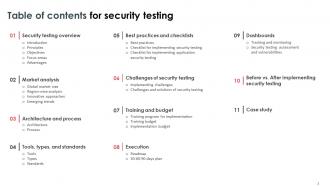
Diapositiva 3: Esta diapositiva muestra un índice para la presentación.
Diapositiva 4: Esta diapositiva es una diapositiva introductoria.
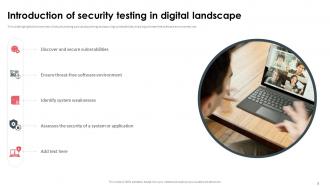
Diapositiva 5: Esta diapositiva destaca la descripción general de las pruebas de seguridad, como descubrir y asegurar vulnerabilidades, garantizar un entorno de software libre de amenazas, etc.
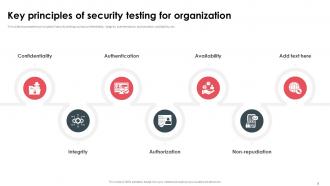
Diapositiva 6: Esta diapositiva muestra los principios de las pruebas de seguridad, como confidencialidad, integridad, autenticación, autorización, disponibilidad, etc.
Diapositiva 7: Esta diapositiva representa los objetivos de las pruebas de seguridad, como resoluciones de problemas de seguridad de codificación, descubrimiento de riesgos de seguridad del sistema, etc.
Diapositiva 8: Esta diapositiva presenta el área de enfoque en las pruebas de seguridad, como seguridad de redes, seguridad de software de sistema, seguridad de aplicaciones del lado del cliente, etc.
Diapositiva 9: Esta diapositiva muestra las ventajas de las pruebas de seguridad de software, como identificar debilidades, mejorar la seguridad, garantizar el cumplimiento, etc.
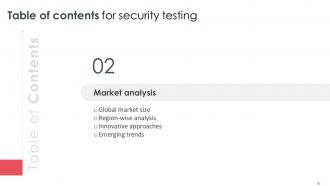
Diapositiva 10: Esta diapositiva es una diapositiva introductoria.
Diapositiva 11: Esta diapositiva se refiere al tamaño del mercado global de pruebas de seguridad basado en diferentes almacenamientos como locales y en la nube, etc.
Diapositiva 12: Esta diapositiva contiene el análisis del mercado global de pruebas de seguridad por regiones como América del Norte, Europa, Asia Pacífico, América del Sur, etc.
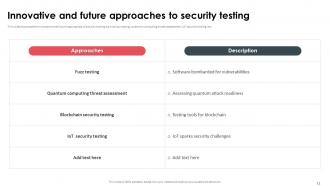
Diapositiva 13: Esta diapositiva menciona los enfoques innovadores y futuros de las pruebas de seguridad, como pruebas de fuzz, evaluación de amenazas de computación cuántica, pruebas de seguridad de IoT, etc.
Diapositiva 14: Esta diapositiva muestra las tendencias emergentes en las pruebas de seguridad, como pruebas de seguridad shift-left, DevSecOps, pruebas de seguridad en la nube, pruebas de seguridad de IoT, etc.
Diapositiva 15: Esta diapositiva es una diapositiva introductoria.
Diapositiva 16: Esta diapositiva destaca la arquitectura de los componentes de pruebas de seguridad, como interfaz de usuario, controlador, probador, informe de prueba, caso de prueba, etc.
Diapositiva 17: Esta diapositiva muestra los pasos a seguir para las pruebas de seguridad, como crear un caso de prueba funcional, agregar una prueba de seguridad, ejecutar la prueba, crear los informes, etc.
Diapositiva 18: Esta diapositiva detalla los pasos a seguir para las pruebas de seguridad, como crear un caso de prueba funcional, agregar una prueba de seguridad, ejecutar la prueba, crear los informes, etc.
Diapositiva 19: Esta diapositiva es una diapositiva introductoria.
Diapositiva 20: Esta diapositiva destaca las principales herramientas de código abierto para pruebas de seguridad, como netsparker, immuniweb, Vega, wapiti, etc.
Diapositiva 21: Esta diapositiva ilustra los tipos de pruebas de seguridad, como pruebas de penetración, pruebas de seguridad de aplicaciones, pruebas de seguridad de aplicaciones web, etc.
Diapositiva 22: Esta diapositiva presenta los elementos de las normas ISO para pruebas de seguridad, como confidencialidad, integridad, disponibilidad, etc.
Diapositiva 23: Esta diapositiva es una diapositiva introductoria.
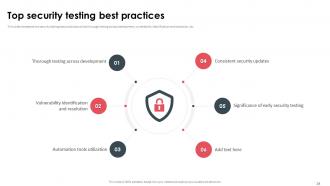
Diapositiva 24: Esta diapositiva representa las mejores prácticas de pruebas de seguridad, como pruebas exhaustivas en todo el desarrollo, identificación y resolución de vulnerabilidades, etc.
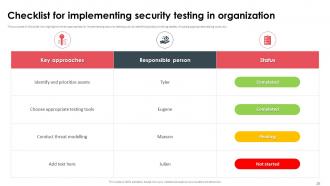
Diapositiva 25: Esta diapositiva presenta los enfoques clave para implementar pruebas de seguridad, como identificar y priorizar activos, elegir las herramientas de prueba adecuadas, etc.
Diapositiva 26: Esta diapositiva incluye la lista de verificación para implementar componentes de pruebas de seguridad de aplicaciones, como cobertura, bajo falso positivo, explotabilidad, visibilidad del código, etc.
Diapositiva 27: Esta diapositiva es una diapositiva introductoria.
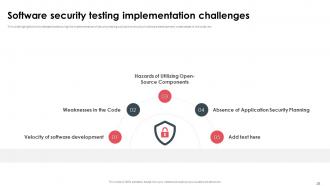
Diapositiva 28: Esta diapositiva destaca los desafíos que se enfrentan durante la implementación de pruebas de seguridad, como la velocidad del desarrollo de software, debilidades en el código, etc.
Diapositiva 29: Esta diapositiva representa los principales desafíos de las pruebas de seguridad con soluciones.
Diapositiva 30: Esta diapositiva es una diapositiva introductoria.
Diapositiva 31: Esta diapositiva describe el programa de capacitación para la implementación de pruebas de seguridad, como modo, costo, agenda y cronograma para los programas de capacitación.
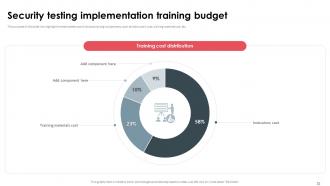
Diapositiva 32: Esta diapositiva presenta el costo estimado de varios componentes de capacitación, como el costo de los instructores, el costo del material de capacitación, etc.
Diapositiva 33: Esta diapositiva denota el presupuesto para implementar componentes de pruebas de seguridad, como herramientas de evaluación de seguridad, capacitación y talleres, software de pruebas de seguridad, etc.
Diapositiva 34: Esta diapositiva es una diapositiva introductoria.
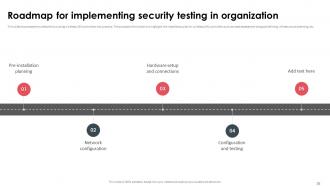
Diapositiva 35: Esta diapositiva muestra el cronograma para poner en práctica los controladores de LAN inalámbrica.
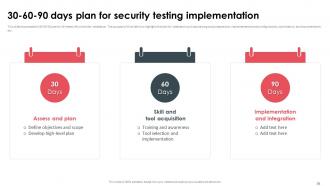
Diapositiva 36: Esta diapositiva muestra el plan de 30-60-90 para la instalación del controlador de LAN inalámbrica.
Diapositiva 37: Esta diapositiva es una diapositiva introductoria.
Diapositiva 38: Esta diapositiva marca los componentes del tablero de seguimiento y monitoreo de pruebas de seguridad, como planificación, diseño, desarrollo, pruebas, presupuesto del proyecto, etc.
Diapositiva 39: Esta diapositiva denota los componentes de evaluación de pruebas de seguridad, como puntaje CVSS, gravedad, niveles de riesgo actuales para el índice de seguridad, impacto comercial, impactos técnicos, etc.
Diapositiva 40: Esta diapositiva es una diapositiva introductoria.
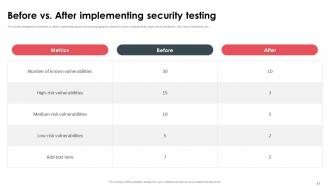
Diapositiva 41: Esta diapositiva incluye el antes y después de implementar pruebas de seguridad basadas en varias vulnerabilidades conocidas, vulnerabilidades de alto riesgo, vulnerabilidades de bajo riesgo, etc.
Diapositiva 42: Esta diapositiva es una diapositiva introductoria.
Diapositiva 43: Esta diapositiva representa el caso de estudio de pruebas de seguridad de - Verificación de salud de TI con objetivos, habilidades utilizadas y enfoques a utilizar.
Diapositiva 44: Esta diapositiva muestra todos los iconos incluidos en la presentación.
Diapositiva 45: Esta diapositiva se titula Diapositivas adicionales para avanzar.
Diapositiva 46: Esta diapositiva detalla la evolución de las pruebas de seguridad desde finales de la década de 1960, cuando el inicio de las pruebas de seguridad no estaba claro, hasta la práctica universal para todos los tamaños.
Diapositiva 47: Esta diapositiva muestra el gráfico/gráfico adecuado.
Diapositiva 48: Esta diapositiva es una diapositiva de línea de tiempo. Muestre datos relacionados con intervalos de tiempo aquí.
Diapositiva 49: Esta diapositiva representa un diagrama de Venn con cuadros de texto.
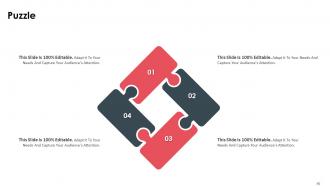
Diapositiva 50: Esta diapositiva contiene un rompecabezas con iconos y texto relacionados.
Diapositiva 51: Esta diapositiva es Nuestro objetivo. Indique los objetivos de su empresa aquí.
Diapositiva 52: Esta diapositiva es una diapositiva de generación de ideas para expresar una idea nueva o resaltar información, especificaciones, etc.
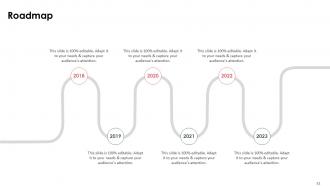
Diapositiva 53: Esta diapositiva presenta una hoja de ruta con cuadros de texto adicionales.
Diapositiva 54: Esta diapositiva es una diapositiva de agradecimiento con dirección, números de contacto y dirección de correo electrónico.
Pruebas de seguridad Diapositivas de presentación de PowerPoint con las 63 diapositivas.
Nuestras Diapositivas de Presentación de Pruebas de Seguridad le ayudarán a ahorrar tiempo valioso. Están listas para adaptarse a cualquier estructura de presentación.































FAQs for Security Testing
So basically you want to catch vulnerabilities before the bad guys do. Test your login systems, make sure data protection actually works - all that stuff. Honestly, trying to break your own app feels super weird at first but it's worth it. Check how your system handles sketchy input too. Oh and compliance boxes need checking if that applies to you. Don't save this for the end though - start early with some automated scans. You can always level up to proper pen testing later once you've got the basics down.
So basically, functional testing checks if your stuff actually works - like "does this login button do what it's supposed to?" Security testing is totally different though. It's looking for ways hackers could mess with your app, like bypassing that login completely. You'll run functional tests constantly with every build. Security testing? That's more strategic - you do it throughout development but really ramp it up before launch because shipping vulnerable code is honestly terrifying. My advice: keep them separate. Different tools, different thinking required. Don't try to cram security checks into your regular test cycles.
SQL injection is still *everywhere* - it's honestly embarrassing at this point. XSS pops up constantly too, along with broken authentication and those insecure object references where you can just change a URL parameter to see someone else's data. Half the time it's just basic stuff like default passwords nobody bothered changing. Access control issues are probably the worst offenders though. People can see whatever they want because permissions got set up wrong. Oh, and security misconfigurations - that's like 90% of what I find during testing. OWASP Top 10 is still your best starting point for coverage.
Honestly, just figure out what would absolutely wreck you if it got hacked - that's your starting point. Customer data, payment stuff, anything exposed to the internet. Map out those crown jewels first. Then think like the bad guys (I know, sounds cheesy but it actually works). Score your threats by how likely they are vs how much damage they'd do. Don't try to test everything at once though - you'll burn out fast. Pick your top 5-10 scariest scenarios and really nail those down before moving to the smaller stuff.
Honestly, automated tools are lifesavers for security testing. They handle all the boring, repetitive scanning so you don't have to manually check every single input field for SQL injection or XSS. Speed-wise, they blow manual testing out of the water. The downside? They throw a lot of false positives at you - kinda annoying but whatever. I usually run them first to get a baseline scan of everything, then focus my time on manually digging into the sketchy stuff they found. Works way better than trying to test everything by hand from scratch.
So threat modeling is like having a game plan instead of just randomly testing stuff. Map out where attackers could get in and what they'd actually want to steal. Then you can focus your testing on the real risks - like if databases are exposed, hit those SQL injection tests hard. Way better than running generic scans that find a million useless issues. I'd start by sketching out your system's entry points and data flows first. Honestly, it saves so much time compared to the spray-and-pray approach most people use. You'll actually test what matters instead of chasing false positives all day.
First thing - get written approval before you touch anything, seriously. Document everything as you go and make sure you're crystal clear on scope so you don't accidentally nuke production (been there, it's terrifying). Use tools you trust and triple-check your targets. Wrong server = resume update time. Work with the security team, have rollback plans ready. Oh, and don't screenshot sensitive data you find - I've seen people get fired for that. The paperwork's boring but get that scope agreement signed first. Trust me on this one.
Dude, you gotta build security into your pipeline from day one instead of slapping it on at the end. Get SAST, DAST, and dependency scans running automatically with every build - treat them like unit tests. Your devs need basic secure coding training so they're not blindsided by vulns every sprint. Here's the thing though - security people should actually sit in on sprint planning instead of swooping in later to torpedo everything. Also set up threat models that grow with your features. Honestly, the whole "security as code" approach just works better than the old gatekeeping method.
Dude, compliance standards are basically your cheat sheet so you don't have to guess what to test. OWASP Top 10 shows the nastiest web vulnerabilities hackers actually use - it's like their greatest hits album. PCI-DSS breaks down exactly what you need for credit card stuff. Honestly beats trying to figure out threats from scratch. Map your pen tests and code reviews to these since they're pulled from real attacks. Oh and start with OWASP if you're doing web apps - way more practical than the other frameworks I've seen.
Honestly, you can't just tack security on at the end anymore. Get your devs and testers doing threat modeling sessions together - basically sitting around thinking like hackers trying to break your stuff. It's weirdly addictive once you get going. Set up code reviews that actually hunt for the usual suspects: SQL injection, XSS, all that fun stuff. Automated scanning tools help too, just make sure both teams can actually read the results. The real trick? Make everyone own security from day one. Developers need to write cleaner code upfront, testers should be plotting attacks early. Nobody gets to punt it to the security team later.
Dude, the main issue is you're basically testing blind - no source code, no clue how stuff works internally. Documentation is usually garbage too, and vendors love hiding their security flaws. Can't tweak anything to test weird edge cases either since licensing locks you out. Oh, and good luck staying current when updates happen whenever they feel like it. Honestly though? Just hammer their APIs and external surfaces. That's where you'll actually find stuff worth reporting. Way more productive than banging your head against their black box.
Attackers keep finding new ways to mess with systems - AI-powered attacks, cloud screwups, supply chain hacks are everywhere now. Can't just stick with the same old OWASP tests from years ago, honestly. Your testing has to keep up with whatever fresh hell they're cooking up. I'd say plug into threat intel feeds and security forums to catch new patterns early. Also, don't make security testing some end-of-project checkbox thing. Run it continuously throughout development - way more effective that way.
Track coverage stuff first - like what percentage of OWASP Top 10 you're testing and how much code your SAST tools actually hit. Then focus on outcomes: detection rates, false positives, time to fix critical bugs. Mean time to detection is clutch because it shows if you're catching things fast enough. Oh, and definitely watch for repeat vulns - same issues showing up means something's broken in your process. I'd start with maybe 3 metrics tops. You can always add more later but tracking everything from day one just creates noise.
Start with just one or two security tools - don't overwhelm yourself trying to add everything at once. SAST tools work great early in the build to catch code issues. Then throw DAST into your staging environment for testing live apps. Container scanning is a must (seriously, some of those base images are disasters waiting to happen). Tools like Snyk help flag sketchy third-party libraries too. The key thing? Make sure your team actually gets what the results mean, otherwise you're just creating noise.
Honestly, AI and IoT are making security testing way more complicated. Traditional testing just doesn't cut it anymore - you've got adversarial inputs messing with AI models, IoT devices with garbage default passwords everywhere, and attack surfaces that keep multiplying. I swear most IoT manufacturers don't even think about security. You'll need to start testing machine learning validation, API security for all those connected devices, plus way more network stuff. The tools are getting better but threats move faster than teams can handle. First step though? Figure out what AI/IoT gear you're actually using.
-
Crisp and neat slides. Makes it fun and easier to curate presentations.
-
My search for complete decks ended with SlideTeam. Such a surplus collection of HD PowerPoints. Moreover, their standard and widescreen formats have helped me in delivering bullseye presentations.