


SEO For Education Industry Detailed Strategy And Action Plan Edu Ppt





Try Before you Buy Download Free Sample Product
 Impress Your
 Audience
 100%
100% Editable
 Save Hours
 of Time


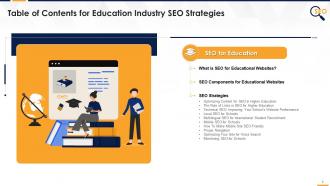
This set of slides includes the customized SEO approach for the education industry, such as technical and local SEO, content optimization, multilingual and mobile SEO for schools, proper navigation, optimizing the website for voice search, etc.
People who downloaded this PowerPoint presentation also viewed the following :
Content of this Powerpoint Presentation
Slide 3
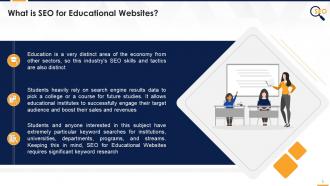
This slide covers what SEO means for Education industry and why it is different from other industries. It also depicts that educational websites require particular keyword searches for different institutions.
Slide 4
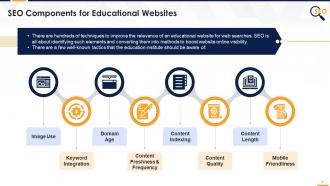
This slide covers SEO techniques for schools, institutions, universities, departments, programs, and streams such as use of visual elements, keywords integration, domain age, fresh content & frequency, content indexing, quality, length, and mobile optimization
Instructor's Notes:
- Image Use: Using engaging visual components on educational websites, like video and pictures, will improve your search results dramatically
- Keyword Integration: Organically including relevant education field keywords in the online content enhances the pages' likelihood of being found in relevant course searches
- Page and domain authority: As more people visit the educational website and web pages, the online reputation improves, and the domain authority rises
- Freshness and Frequency of content: The quicker you generate stuff and the more fresh educational content you have, the better you will rank
- Page Architecture: Each search engine has its indexing system, and crawlers are used to assess the composition of the content. It is critical to include components such as page titles and header tags (H1s, H2s, etc) on the educational website to demonstrate to these crawlers that your content is well-structured
- Content Quality: During the optimization process, don't lose sight of the audience. Make an effort to generate high-quality content that the prospects will find entertaining and valuable
- Content Length: With an average length of 1,890 words for a top-ranked article on Google, search engines prefer lengthier content. Long-form blogs are an excellent method for schools to incorporate more lengthy content into their overall SEO plan
- Mobile-Friendliness: If the site isn't mobile-friendly, the search rating will suffer
Slide 5
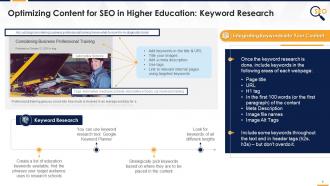
This slide covers content optimization as SEO strategy for education industry. It also depicts that keywords should be included in page title, URL, H1 tag, in first paragraph of the content meta description, image files, and alt tags.
Instructor's Notes:
Keyword Research: look for keywords of all different lengths
- One to two-word phrases with a high search volume are best for headers; select some shorter, more generic keywords
- Body keywords are often two to three-word phrases with a medium search volume
- Long tail keywords — phrases with more than four words have a low search volume, are less competitive, and produce a lot of web traffic
Additional Content Optimization Tips
There are a few additional strategies to boost your school's search ranking by creating content.
- Shorter URLs are preferable to longer URLs when it comes to search algorithms
- Try to incorporate as few words as possible beyond the keyword in your URLs while still distinguishing each page
- You may do this by removing short, non-descriptive terms like "the" or "an"
Optimize multimedia content, such as video to boost the school's search ranking.
Use the following strategies to optimize video content for SEO:
- Inserting metadata such as titles, descriptions, file names, schema tags, and thumbnails
- Creating one-of-a-kind webpages for the videos
- Optimizing for YouTube by adding tags and actively attempting to increase interaction on the videos
- Inviting prospects to subscribe, directing visitors to your website, and more
- Incorporate transcripts and closed captions into your videos
Slide 6
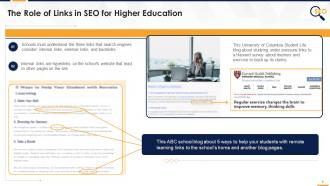
This slide covers link building as SEO strategy for education industry. It also depicts that the more links one website gets from another, the higher will be the search engine ranking and better page & domain authority, and ranking power for linked pages.
Instructor's Notes:
Internal linking has three main functions:
- To help navigate around the website
- To display the website’s design
- To distribute page authority and ranking power
Why is it important to use links?
As website visitors consume the content on the school's webpages, you may continue to feed them links to topics that may be of interest to them. It will keep them on the website for a more extended period. The longer people remain, the better it is for the school website.
- It is also critical to include external links in the article. These links explain to search engines that the material has been thoroughly researched and deserves a spot on Google's first page
- Don't just link to any old website; instead, make sure the external links take readers to popular, authoritative websites. If you direct users to untrustworthy websites, Google may penalize the school
How will it benefit the school website?
- The use of links is another essential component of creating domain authority
- When people connect to the school's website, Google recognizes that it contains information worth linking to. The same logic applies to internal linking. When you link to other pages on the website, Google considers this as a "vote" or a sign of support for the content
- The more content gets linked to, the more votes it receives, thus ranking better in search engines. Adding internal links to the content, in other words, can boost the number of votes your page receives
Slide 7
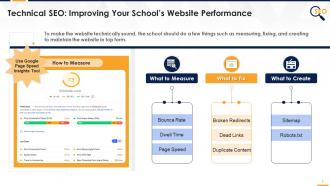
This slide covers optimizing website performance as technical SEO strategy for education industry. Technical SEO tells what to measure, i.e. bounce rate, dwell time, page speed; and what to fix, i.e. broken redirects, dead links, and duplicate content; and what to create, i.e. sitemap & robots.txt file.
Instructor's Notes:
The school must strive to make its website as organized and glitch-free as possible. By improving technical SEO, increase search ranking, and provide prospects with a better user experience.
What to Measure
- Bounce rate: The number of users that left your website without taking any further action after reading a single page
- Dwell time: The time visitors spend on the website. As you may expect, the longer the dwell time, the better
- Page speed: It refers to how quickly the website loads. To evaluate the effectiveness of this SEO element, utilize the Page Speed Insights tools to measure. If you get a poor score, you might rework on the website design or condense the photos
What to Fix
Some technical issues can hurt the site's search ranking, so it's essential to mitigate these factors as much as possible:
- Dead links: It directs users to a nonexistent page. If something irritates the visitors, it reduces your technical SEO score
- Broken redirects: These send users to a resource that may no longer exist
- Duplicate content: refers to pages containing identical or highly similar content because it is virtually hard for search engines to decide which pages to display in search results. So often, none are shown
What to Create
- Consider establishing a sitemap and robots.txt files to make it easy for search engines to analyze the site's structure
- A sitemap is just a file that lists all of the website's URLs and is used by search engines to index the website. A robot.txt file, on the other hand, comprises the sites that you don't want to get indexed or show in search, such as particular policy pages
- By generating these files, the school can prove to search engines that its website is well-organized and, as a result, easy to browse for visitors
Slide 8
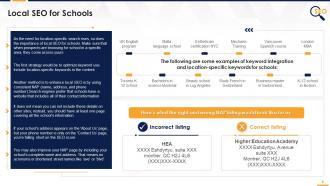
This slide covers local SEO technique as SEO strategy for education industry. Local SEO for schools include keywords optimization and NAP (name, address, and phone number) strategies.
Instructor's Notes:
Many people can call your company/school ‘HEA’, Google prefers full names as it’s easier for them to differentiate you from another unrelated business that goes by the same name.
Slide 9
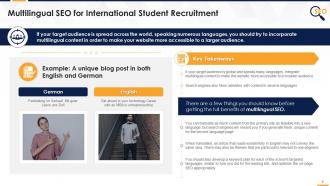
This slide covers multilingual SEO technique for international student recruitment in education industry. It also depicts that translating from original website is good but search engine will give extra rewards if businesses will generate fresh, unique content for the second language page.
Slide 10
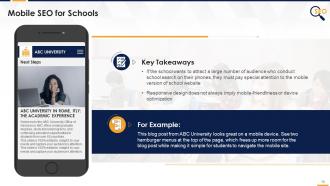
This slide covers mobile SEO technique for education industry.
Slide 11
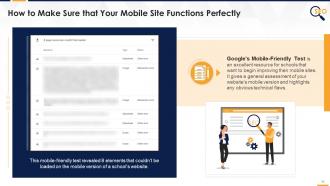
This slide covers details on how to make mobile SEO-friendly for education industry. It also lists the methods for ensuring that your mobile site complies with search engine requirements.
Instructor's Notes:
Manually update the mobile site to improve user experience to increase mobile SEO.
Here are some methods for ensuring that your mobile site complies with search engine requirements:
- Images should be scaled for mobile users
- With only 4-8 pages, create clickable, easy-to-view navigation
- Use a hamburger menu if you need additional options
- Avoid Pop-ups
- Reduce copy above the fold
- Make your own mobile CTAs
Slide 12
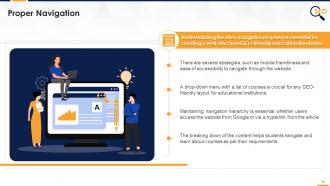
This slide covers proper navigation on school website as SEO strategy for education industry. It also depicts that understanding the site's navigational system is essential for well-structured website.
Instructor's Notes:
For example: Suppose a student is looking for a bachelor's degree in chemistry. They will be given a list of institutions ranked according to their preferences. They wish to take the application process and cut-off marks once they've decided on a specific university domain. The student's search will be more straightforward if the site contains easy-to-find specific links for admission procedures, online applications, needed documents, etc.
Slide 13
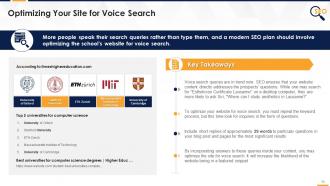
This slide covers optimizing school website for voice search as SEO strategy for education industry. It also depicts that school website should include 29-words answer for school-related questions in the blog posts, which will optimize the website for voice search.
Instructor's Notes:
- A featured snippet is a brief response to a user's query that appears at the top of Google's search results. When someone does a verbal search, this is the only result that is read back to them - therefore, schools should work hard to get their site in this 'zero' position for relevant searches.
Slide 14
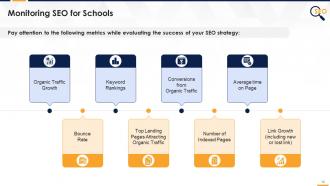
This slide covers monitoring SEO for school as strategy for education industry. It also depicts that education businesses must monitor their website through KPI/metrics such as loading speed, your website’s mobile-friendliness, etc.
Instructor's Notes:
- Search engine optimization isn’t a one-time thing. It’s a lifetime project. As search algorithms change with new online trends and user activities, so your website is never optimized
- With this aspect, SEO strategy for higher education must include monitoring the website’s search rankings
- Keep a check-up on your site to identify pitfalls and ensure that everything performs how you’d like it to be
- Regularly perform some of the tests mentioned above to assess your site loading speed, your website’s mobile-friendliness, and more
Additional Slide 1
This slide contains icons related to Search Engine Optimization (SEO). The slide uses the same color theme and similar design elements as the main deck.
Additional Slide 2
This slide can be edited to provide information about one's organization. The slide uses the same color theme and similar design elements as the main deck.
Additional Slide 3
This editable slide can be used to share the organization's vision, mission, and goals. The slide uses the same color theme and similar design elements as the main deck.
Additional Slide 4
This slide can be edited to provide information about the organization's core team. The slide uses the same color theme and similar design elements as the main deck.
Additional Slide 5
This slide can be used to present multiple discussion ideas to the stakeholders concerned.
Additional Slide 6
This slide contains an editable 30-60-90-day plan to suit the presenter's needs.
Additional Slide 7
This slide contains a timeline to showcase multiple milestones of the organization.
Additional Slide 8
This slide contains a roadmap template for effective strategic planning. The slide uses the same color theme and similar design elements as the main deck.
Additional Slide 9
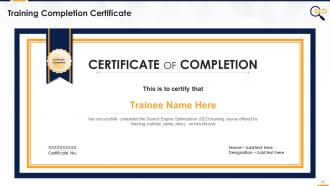
This fully editable training certificate template can be presented to attendees post the successful completion of training.
SEO For Education Industry Detailed Strategy And Action Plan Edu Ppt with all 29 slides:
Use our SEO For Education Industry Detailed Strategy And Action Plan Edu Ppt to effectively help you save your valuable time. They are readymade to fit into any presentation structure.








FAQs for SEO For Education Industry Detailed Strategy And Action
Definitely start with local SEO - grab your Google Business Profile and target stuff like "[your city] + nursing program" or whatever. Students always search by location first. Create content answering their actual questions: application process, program details, job prospects after graduation. The education space is brutal competition-wise, honestly. Build up your credibility with student success stories and faculty bios. Oh, and partner with other schools if you can. Don't ignore the boring technical stuff either. Site speed, mobile optimization - students are glued to their phones. I'd kick things off with a keyword audit to see what competitors are crushing that you're not even ranking for yet.
Okay so basically, students are googling super specific stuff like "Bachelor of Engineering Admission Requirements" instead of generic fluff like "Academic Excellence." Most school websites are honestly pretty bad at this. You'll want dedicated pages for each program with clear titles. Throw in some local SEO - like your city name plus the program. Student testimonials work great too. Make your contact info and application deadlines stupidly easy to find (can't tell you how many sites bury this stuff). Oh, and detailed program descriptions are huge. I'd start by just going through your current pages and swapping out the vague language for terms students actually search for.
Local SEO is absolutely critical for schools - parents and students search geographically, you know? Nobody's hunting for kindergartens across the country. Start with your Google My Business profile first, that's the low-hanging fruit. Use keywords like "nursing programs near me" or "best high schools in [city]" throughout your content. Getting reviews from current families helps tons too. Oh, and don't forget local citations - basically getting your school listed in local directories and education sites. It sounds boring but honestly, this stuff works way better than fancy marketing campaigns for bringing in nearby families.
Dude, blogs are perfect for SEO because you can hit those long-tail searches students actually type in - like "what jobs can I get with a biology degree" or "is nursing school really that hard." You're answering their actual questions while sneaking in keywords naturally. Fresh content keeps Google happy too, way better than just having those boring static program pages sitting there. Honestly, the trick is making it genuinely useful - show off what makes your school cool. Just ask your admissions people what questions they get nonstop. That's literally your content calendar right there.
Google Keyword Planner is your best starting point - target stuff like "nursing programs Chicago" or "online MBA courses." Question keywords work really well too since everyone's googling "how to become a teacher" type stuff. Answer the Public is amazing for this, shows you exactly what people are asking. I'd also peek at competitors' course pages with SEMrush to see what's working for them. Oh, and seasonal spikes are huge around application deadlines. Google Alerts helps you catch trending topics before they blow up. Students search differently than other audiences - way more research-heavy.
Dude, you HAVE to get your site mobile-ready. Most parents and students are doing school research on their phones now - like over 60% of them. Google prioritizes mobile sites in search results, so you'll basically disappear if yours sucks on phones. I learned this the hard way with my cousin's tutoring site last year. Nobody has patience for slow-loading pages or tiny text they can't read. Your bounce rate will be brutal. Run Google's mobile test thing on your main pages first - it'll show you exactly what's broken. Fix the obvious stuff and you'll see a huge difference.
Focus on organic traffic and where your keywords rank for education stuff. Conversion rates matter way more though - track which pages actually get people to fill out contact forms or request info. I'd honestly ignore total impressions since they don't mean much. Set up goals in Google Analytics for the big stuff like application starts and campus tours. Local search is huge if you're targeting a specific area. Also watch bounce rates on your main landing pages - if people are leaving immediately, something's wrong. The whole point is seeing which SEO work actually brings in students.
Yeah SEO definitely helps with course enrollments! First thing - do keyword research for your niche and see what people actually search for. Like "learn Python programming" works way better than just "coding course." Write blog posts about your course topics too, builds trust and gets organic traffic. Your course descriptions should focus on benefits, not features - nobody cares about "12 modules," they want to know what they'll actually learn. Oh and the competition's brutal now, so find gaps you can fill. Honestly though, good content still wins over keyword stuffing every time.
Honestly, students are constantly searching for answers to their questions, so make videos that directly address what they're asking. Course previews and campus "day in the life" stuff performs really well - kids love that content. Don't forget captions since Google can actually read that text. Host videos on your site first before uploading to YouTube so people stay on your domain longer. Your thumbnails need to be eye-catching, and titles should match what students would actually type into search. Then just embed them on the right landing pages. Oh, and throw your keywords into descriptions too - that part's pretty obvious but still matters.
So Google basically looks at social media buzz as a trust signal - more people talking about your school online makes you look legit. Post your blog stuff, campus news, student wins across Facebook, LinkedIn, Instagram (Instagram's honestly perfect for showing off campus vibes). Traffic flows back to your site, which helps rankings. Don't try to be everywhere at once though - pick like 2-3 platforms max and actually engage. Reply to comments, jump into education discussions, get your students and faculty sharing your content. I'd probably start with Facebook and LinkedIn since they work best for colleges. Consistency beats perfection every time.
Look, educational sites get screwed over by Google's obsession with .edu domains and Wikipedia. Those giants dominate everything. Your competition for basic terms like "math help" is absolutely brutal - honestly, don't even bother trying. What works better? Target super specific long-tail stuff instead. Build up authority in one narrow topic rather than spreading thin. Also, brace yourself for weird traffic patterns. Everyone panics and searches during finals, then your site's dead all summer. It's annoying but predictable once you get used to it.
Okay so backlinks are seriously important for your learning platform's SEO. Think of them as votes - when good education sites or industry blogs link to you, Google sees that as proof your stuff is worth ranking higher. Your domain authority goes up, plus you get actual traffic from people clicking those links. I'd focus on making things people actually want to link to - maybe free resources, some research, or write guest posts for education blogs. Just avoid those sketchy link farms, they're honestly not worth it. You want links from sites that make sense in your space.
Honestly, student success stories are gold for education SEO. Prospective students are totally creeping on your graduates anyway, so give them what they want - "day in the life" content and alumni spotlights. Career placement stats work great too. Virtual tours and faculty interviews pull in decent traffic, but here's the thing: people basically want to know "will I get a job?" and "is campus life decent?" I'd start with landing pages for your biggest programs. Real testimonials hit different than generic marketing speak. Employment rates seal the deal.
Honestly, getting student reviews and testimonials is probably your best bet for SEO - search engines eat up that authentic stuff. Set up something simple where graduates can share their stories. Alumni posts are clutch because they naturally mention your programs and career stuff without sounding forced. Some schools I know crush it with student blogs, but that's way more work to coordinate. Make it super easy for people to contribute, then just optimize those pages with decent titles. Oh, and definitely start with basic testimonials first - way less hassle than trying to launch some massive content thing right away.
Dude, biggest thing I see schools mess up? Stuffing keywords everywhere - Google's way smarter now and just penalizes you for it. Also, if you're targeting specific cities or regions, don't sleep on local SEO. Page speed is huge too. Students bounce immediately if your site takes forever to load. Oh, and most people are browsing on their phones now, so mobile optimization isn't optional anymore. Don't copy-paste content across different program pages either - search engines hate that. Your site navigation should actually make sense so people can easily go from programs to admissions to costs. I'd honestly start with a basic site audit to see what's broken first.
-
Appreciate the research and its presentable format.
-
Informative presentations that are easily editable.