

Shipping Dashboard Powerpoint Ppt Template Bundles




Try Before you Buy Download Free Sample Product
 Impress Your
 Audience
 100%
100% Editable
 Save Hours
 of Time


Our Shipping Dashboard Powerpoint Ppt Template Bundles are topically designed to provide an attractive backdrop to any subject. Use them to look like a presentation pro.
People who downloaded this PowerPoint presentation also viewed the following :
Shipping Dashboard Powerpoint Ppt Template Bundles with all 19 slides:
Use our Shipping Dashboard Powerpoint Ppt Template Bundles to effectively help you save your valuable time. They are readymade to fit into any presentation structure.
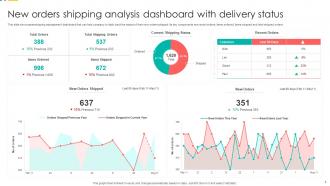
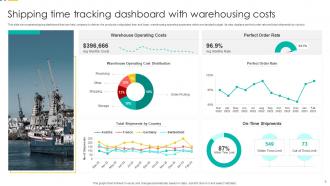
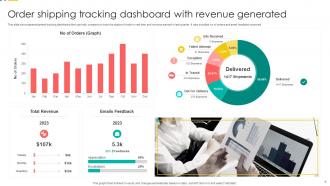
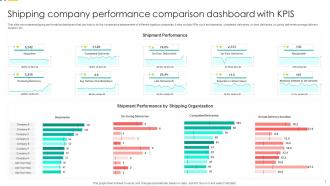






FAQs for Shipping Dashboard Powerpoint
Track your delivery stuff first - on-time rates, transit times, shipping costs per package. Damage rates are huge too since angry customers = headaches. Honestly, carrier performance comparisons will save your butt when contracts come up for renewal. Don't go crazy with metrics though - maybe 6 core ones max? Volume trends show you patterns, and breaking down shipping methods helps optimize your mix. My old boss used to say "measure what you can fix" which actually made sense. Start simple, add more KPIs once your team's actually using the dashboard regularly.
Honestly, real-time dashboards are a game changer for catching problems before they blow up. You'll see vessel positions, port delays, weather issues - all the stuff that usually blindsides you. I can't tell you how much I hated those "your shipment's stuck" calls from customers. Now you can reroute things or give people a heads up before everything goes sideways. The visual setup makes trends pretty obvious too, which is nice. My advice? Pick your top three headaches and set alerts for those first. Don't try to track everything at once or you'll go crazy.
Dude, automation is what actually makes your shipping dashboard worth using instead of just being pretty wallpaper. It'll automatically update tracking info, flag delays, ping customers, and calculate delivery times - no more babysitting required. Without it you're basically refreshing browser tabs like a caveman. The best part? Smart alerts when stuff goes sideways - stuck packages, delivery fails, whatever. I swear, once you dial in those automation rules right, your dashboard starts catching issues before customers even know there's a problem. Way better than playing whack-a-mole with shipments all day.
Set up different user roles and permissions for each team - that's your starting point. Warehouse folks need real-time inventory and picking status. Executives want the big picture stuff like delivery rates and shipping costs. Customer service gets hit with all the panicked tracking calls (poor them), so they need visibility and exception alerts. Operations managers care about route optimization and carrier metrics. Most platforms let you build custom views and hide widgets that don't matter to each role. Honestly though, just ask each team what numbers actually make their day easier first.
Real-time tracking is your bread and butter here, so focus on that first. Cache stuff like service levels or you'll hit rate limits fast. Webhooks are way better than constantly pinging their servers - trust me on this one. Each carrier formats data differently (annoying but true), so you'll need to normalize everything. Error handling is crucial because these APIs go down more than you'd expect. Oh, and start with your biggest carriers first, then work your way down. Keep those auth tokens somewhere secure, obviously.
Dude, the UX on your shipping dashboard is honestly make-or-break. Your team needs to find tracking numbers and update stuff fast - if they're clicking around confused, that's just wasted time. I've literally watched people abandon dashboards because the design was such a mess. You want clean organization, decent filters, and buttons that actually make sense. Short sentences work. Longer ones should flow naturally when you're explaining the workflow logic. Don't overthink the visual hierarchy thing, but test it with real users first. Trust me, what seems obvious to you might be totally backwards to them.
So predictive analytics is basically like having a heads-up for your shipping stuff. You can spot delays coming before they hit and figure out which routes actually work best. Peak volumes? You'll see those coming too. Plus it helps you predict which carriers are gonna give you headaches - though honestly, sometimes they surprise you anyway. The big win is getting ahead of problems instead of scrambling after everything's already gone sideways. You can forecast costs way better and be smarter about where you put inventory. Start digging into your old shipping data first. Look for patterns that keep screwing you over.
Dude, shipping dashboards are game-changers for cutting costs. Real-time visibility shows you exactly where money's bleeding out - late carriers, overpriced routes, bottlenecks you didn't even know existed. I was honestly shocked how much waste we had going on. The data helps negotiate better carrier rates and catch those sneaky billing errors before they add up. Oh, and you'll stop relying on expensive expedited shipping so much. Focus on your biggest 3 cost issues first. You'll probably find some easy fixes within days - I'm not even exaggerating.
So the big thing right now is AI doing predictive stuff - like actually predicting delays before they happen, which honestly blows my mind how accurate it's gotten. Real-time IoT tracking is everywhere now too. Most platforms are going cloud-native so they scale better when you're shipping more. Oh, and everyone's designing mobile-first since we're all obsessing over tracking packages on our phones anyway. APIs connecting directly to carrier systems are pretty standard now for live updates. If you're looking at options, I'd definitely prioritize the ones with solid API integrations and built-in analytics. Makes life way easier.
Honestly, shipping dashboards are a game changer for keeping customers happy. People can see exactly where their stuff is and when it'll show up, so they're not constantly hitting up your support team asking "where's my order?" The transparency thing is huge - customers actually chill out about delays when they can watch their package move through each step. Plus you'll get way fewer support tickets, which is nice because those add up fast. Set up automatic notifications too so they don't even need to check manually. Trust me, once customers feel like they're in the loop, they're so much more patient with the whole process.
Ugh, data integration is the worst part honestly. Your WMS, ERP, and carrier systems all hate talking to each other. Plus every department wants their own special metrics shown - sales wants one thing, ops wants another, you know how it goes. Real-time data? Good luck with that when shipping info comes through delayed or gets scrambled between platforms. Custom builds take months and good pre-built solutions cost a fortune. My advice? Map out which systems need to connect first. Then just focus on the metrics everyone can actually agree on instead of trying to please everyone at once.
Honestly, dashboards are a game changer for tracking your carbon footprint and fuel usage across all your shipping routes. You'll spot inefficiencies you never noticed before - like routes that waste gas or carriers that aren't eco-friendly. The visuals make it obvious where you're bleeding resources. I'd start with just one sustainability metric that actually matters to your business (don't try to track everything at once). Load consolidation opportunities become super clear too. Set some green KPIs and watch your progress month by month. It's pretty wild how much waste becomes obvious once you can actually see the data laid out.
Line charts are your best bet for tracking shipping volumes over time. You'll catch seasonal patterns and growth trends easily. Heat maps look pretty slick too - great for comparing different routes or carriers (plus they always impress in meetings, trust me). Try adding moving averages to smooth out those crazy daily spikes. Break everything down by shipping method, destination, or product type. Start monthly, then zoom into weekly data when something catches your eye. Oh, and drill down to daily if you need the nitty-gritty details.
Start with role-based permissions - only give people access to what they actually need. Multi-factor authentication is a must because passwords are basically joke-level security now. Encrypt everything in transit with SSL/TLS, plus store sensitive data like addresses encrypted too. You'll want regular security audits and activity logs to track who's accessing what. Actually, do a quick audit first of current dashboard users - I bet half of them have way more access than necessary. People love hoarding permissions for some reason. Set up those logs though, they're lifesavers when something goes sideways.
Honestly, the mobile app changed everything for me. Instead of being glued to my desk all day, I can handle shipping issues from anywhere - even stuck in traffic or waiting in line somewhere. Route changes, delivery problems, resource shuffles - all handled in minutes instead of hours. Real-time alerts are clutch because you catch problems right when they start, not after they've already screwed up your whole day. My customers are way happier now that I'm not leaving them hanging for hours. Download it if you haven't - seriously wish I'd done it sooner.
-
Great product with effective design. Helped a lot in our corporate presentations. Easy to edit and stunning visuals.
-
“Slides are formally built and the color theme is also very exciting. This went perfectly with my needs and saved a good amount of time.”