


Short medium and long term planning powerpoint ppt template bundles




Try Before you Buy Download Free Sample Product
 Impress Your
 Audience
 100%
100% Editable
 Save Hours
 of Time


Our Short Medium And Long Term Planning Powerpoint Ppt Template Bundles are topically designed to provide an attractive backdrop to any subject. Use them to look like a presentation pro.
People who downloaded this PowerPoint presentation also viewed the following :
Short medium and long term planning powerpoint ppt template bundles with all 17 slides:
Use our Short Medium And Long Term Planning Powerpoint Ppt Template Bundles to effectively help you save your valuable time. They are readymade to fit into any presentation structure.
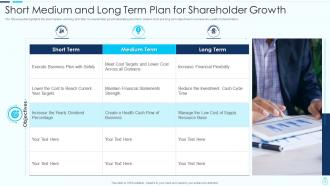
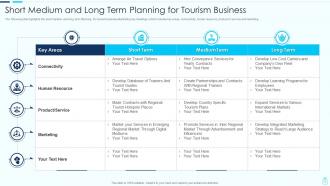
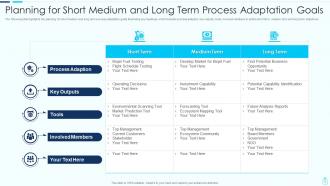
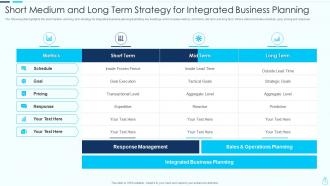






FAQs for Short medium and long term planning powerpoint
Start with clear goals at the top, then map out your timeline and milestones. Assign who's doing what - trust me, this saves so much confusion later. I'd definitely add a risks section because projects never go perfectly. Budget and resource stuff is obvious but easy to forget when you're excited about the actual work. Oh, and build in some way to track progress - could be simple checkboxes or whatever works. Success metrics help too, otherwise you're just guessing if things are working. Keep it flexible though. You'll probably need to tweak it as you go.
Honestly, just find a template that's kinda close to your industry and tweak it from there. The basic structure works for everything - you're mainly swapping out the specific stuff. Manufacturing focuses on production schedules and supply chains, marketing agencies care about campaign deadlines and creative work. But the planning fundamentals? Same everywhere. I'd grab something generic first, then customize the categories and metrics that actually make sense for what you do. People way overcomplicate this process for some reason. Most templates are like 80% there already - you're just adjusting the sections that don't match your workflow.
Start with knowing your audience and what you actually want to achieve - that's like 90% of the work right there. Then map out your main points with data to back them up, plus smooth transitions between sections. Time each part so you don't run over (learned this the hard way). Build in visual cues and have backup slides ready because tech always fails at the worst moment. Q&A prep is clutch too. Oh, and here's something most people skip - create a follow-up checklist for after. You'll forget half the feedback otherwise.
Honestly, visuals are a game-changer for planning stuff. Nobody wants to stare at walls of text when they're trying to figure out project deadlines. Charts and color coding help people instantly spot what's important without digging through paragraphs. Progress bars? Perfect for quick status checks. Flowcharts show how tasks connect - way clearer than explaining it with words. I learned this the hard way after watching people's eyes glaze over during presentations. The trick is being intentional about it though. Don't just throw in random graphics to make things look fancy. Pick visuals that actually make your content easier to understand.
So I'd definitely build comment sections and task assignments right into your templates. Real-time editing is huge too - saves everyone from that annoying "which version are we using" mess. @mentions work great for getting people's attention without separate emails. Honestly, don't go overboard though. Pick like 2-3 features max or it gets cluttered fast. Calendar sync is nice if your team actually uses it (ours rarely does lol). Start with comments and assignments - you'll see the difference immediately. Way better than having everyone bounce between five different apps just to plan one project.
Honestly, the biggest trap is making it way too rigid - you need room to adapt for different projects. I've seen people create these monster templates with like 50 data points. Total nightmare. Keep it simple instead of trying to capture every possible detail. Vague instructions are another killer. People need clear examples of what actually goes in each section. Oh, and definitely test it with real users first! I learned this the hard way. Start basic, run it through an actual project, then tweak based on what people tell you. Way better than perfectionist overthinking.
Templates are honestly a lifesaver - you get this ready-made structure for timelines and tasks instead of reinventing the wheel every single time. Just drop in your project details and boom, you're set. Can't tell you how often they've saved my butt from forgetting basic stuff like getting stakeholder sign-off (happened way more than I'd like to admit). Your team stays on the same page too when everyone's working with identical formats. Oh, and definitely start simple then tweak things as you figure out what actually works for your projects.
Honestly, timelines are what save you from total project chaos. They show your team exactly what needs to happen and when - no guessing games. Plus you can spot problems way before they blow up in your face. Without them? Good luck keeping everyone aligned on deadlines and milestones. One thing I learned the hard way - always pad your timelines with extra buffer time. Like, more than you think you need. Trust me on this one, something always takes longer than expected. Dependencies between tasks become super obvious too when you map everything out visually.
Look, your templates aren't set in stone - they should change as your business does. Check them every quarter or after big projects to spot what's actually useful. So many teams get stuck using the same old stuff because nobody wants to rock the boat, which is honestly just lazy. Ask people who use them daily what sucks. Notice which parts always get ignored or completely rewritten. Industry shifts matter too - sometimes you need totally new sections. The trick is making template reviews a regular thing instead of waiting until everything's broken.
Okay so obviously scrub out any old client stuff first - confidentiality and all that. Then swap in their brand colors and logo if you can get it. I always try to use examples that actually make sense for their industry instead of generic ones, you know? The template's just your foundation, so move sections around or throw in custom slides for their specific problems. Oh and honestly? I spend way too much time on the final pass making sure it doesn't scream "template." Nothing worse than presenting something that feels obviously copy-pasted.
Look, analytics will show you exactly where people get stuck or bail out of your templates. You can see which sections take forever vs. what gets skipped entirely. Most templates are honestly bloated with unnecessary fields anyway! Track completion rates and how much time each section takes. The data reveals patterns - like which inputs always cause headaches or what steps correlate with project success. Use those insights to cut the redundant stuff. Focus on streamlining until you've got something teams actually want to fill out instead of avoiding.
Honestly, startup planning templates are a nightmare because you're basically guessing at everything. No historical data means you're flying blind. Resources are crazy tight, so whatever you build has to be simple but cover the important stuff. Everything moves so fast that your template will probably be wrong in like two weeks anyway - which is super frustrating but just how it goes. You can't afford the fancy planning software either. My take? Start ridiculously basic. Focus on maybe 3-5 metrics that actually matter for your business. You'll figure out what's missing as you go.
Add review sections to your templates at major milestones - stuff like "what worked," "what didn't," and "next time we'd do this differently." Those sections are honestly what separate useful templates from total paperwork hell. Make space for both hard numbers and team feedback. Regular template reviews are clutch too - actually update the format based on what you learn. Otherwise they just become these dusty documents everyone ignores. The trick is making feedback feel natural, not like extra work nobody wants to do.
Honestly, sprint planning templates are a game changer for remote teams - keeps everyone on the same page even when you're spread across different time zones. Meeting agenda templates are clutch too since you can't just wing it when half your team is async. Daily standup templates help maintain momentum without forcing everyone to be online at once (thank god). I'd also grab some project roadmap templates for the bigger picture stuff. The trick is finding ones that force people to be clear upfront instead of vague. Just start with one sprint template and see how your team tweaks it to fit your style.
Oh absolutely - culture plays a huge role in how you should set up planning templates. Like, some teams want everything super detailed and hierarchical with clear boss-subordinate lines. Others work way better with flexible, collaborative formats where everyone can jump in. Time perception is another big thing. Western cultures usually want that step-by-step linear approach, but other cultures think more in cycles and interconnected loops. I've literally watched templates bomb because they just didn't match how the team's brain worked. Before you design anything, dig into how your audience naturally approaches structure and decision-making. It'll save you so much headache later.
-
Illustrative design with editable content. Exceptional value for money. Highly pleased with the product.
-
Designs have enough space to add content.