

Short term long term planning powerpoint template




Try Before you Buy Download Free Sample Product
 Impress Your
 Audience
 100%
100% Editable
 Save Hours
 of Time


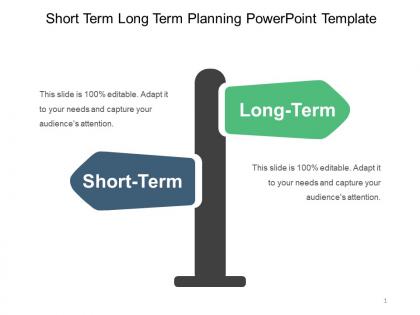
Planning is essential for businesses to reach their goals. Keeping this fact in mind, we have provided readymade short term and long term planning PowerPoint template. This will assist you in tracking current progress as well as finding any loopholes in the system. The short-term long-term business goals PPT design focuses on different time frames which will help in completing immediate tasks while the keeping final goal in mind. The slide can be used to cover related topics such as strategic management, business succession planning, business growth, capacity planning, company vision, enterprise development strategy, milestone for business progress, strategic roadmap, business idea vision, aggregate planning, 30 60 90 transition plan, milestone timeline, career path strategy, and action plan. The graphic includes a direction pole poiting in two directions which is highly apt for goal planning template. Download short term and long term planning presentation right now. The only reason why some businesses do well than others is because they make use of team work. Don?t kill yourself with too much work trying to create presentations from scratch when our Short Term Long Term Planning Powerpoint Template can help.
People who downloaded this PowerPoint presentation also viewed the following :
Content of this Powerpoint Presentation
Description:
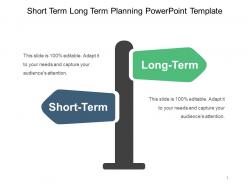
The image depicts a PowerPoint slide titled "Short Term Long Term Planning PowerPoint Template." The slide is designed to visually differentiate between short-term and long-term planning. It features two directional signs, one pointing to the left labeled "Short-Term" in a blue box, and another pointing to the right labeled "Long-Term" in a green box. This could symbolize the distinct paths or strategies one would take when planning for different time frames.
Use Cases:
This slide template is versatile and could be used in a variety of industries for strategic planning purposes:
1. Finance:
Use: Differentiating between short-term financial goals and long-term investment strategies.
Presenter: Financial Planner
Audience: Clients, investors
2. Healthcare:
Use: Planning immediate patient care versus long-term treatment plans.
Presenter: Medical Administrator
Audience: Healthcare providers, hospital staff
3. Education:
Use: Setting immediate academic objectives against long-term educational goals.
Presenter: Academic Advisor
Audience: Students, educators
4. Marketing:
Use: Aligning short-term marketing campaigns with long-term brand strategy.
Presenter: Marketing Manager
Audience: Marketing team, company executives
5. Real Estate:
Use: Juxtaposing short-term property flips with long-term property development.
Presenter: Real Estate Developer
Audience: Investors, project managers
6. Technology:
Use: Balancing quick product iterations with long-term technology roadmaps.
Presenter: Chief Technology Officer
Audience: Development team, stakeholders
7. Non-Profit:
Use: Weighing immediate operational needs against long-term mission objectives.
Presenter: Executive Director
Audience: Board members, donors
Short term long term planning powerpoint template with all 5 slides:
Feel carefree about doing the job with our Short Term Long Term Planning Powerpoint Template. You will experience joie-de-vivre.
FAQs for Short term long term
Start with figuring out exactly what you're supposed to deliver - sounds basic but I've watched projects completely implode because nobody was on the same page. Map out your timeline and resources next. Budget some extra time too because honestly, something always breaks or takes longer than expected. Oh, and don't skip the risk assessment part. Identify what could go wrong before it actually does. Keep everyone in the loop with regular updates - stakeholders get weird when they're left in the dark. A simple template helps keep everything organized without overcomplicating things.
Honestly, visual templates are a game changer for planning. Your team actually pays attention instead of glazing over boring text docs. Flowcharts and timelines show how everything connects - way better than paragraphs of explanation. I've seen meetings where people suddenly "get it" once you map things out visually. Templates also keep your projects consistent, which stakeholders love. Oh, and they're not hard to make either. Start simple with basic milestone charts. Trust me, you'll never go back to those dense planning documents once you see how engaged everyone gets.
Think of stakeholder analysis as figuring out who actually cares about your project - and trust me, there's always more people than you'd expect. Map out everyone from your sponsor down to end users. What do they want? How much pull do they have? I learned this the hard way on a project last year. Once you know who matters, it'll shape everything - your scope, timeline, how you communicate. Don't just do it once either. Keep updating that list because new players always pop up. Honestly, skipping this step is like driving blindfolded.
Okay so here's what saved my ass after a projector completely crapped out during a huge presentation - add a risk section to your planning template. Right after you nail down your content but before logistics stuff. Jot down what could go sideways: tech issues, running over time, brutal questions, important people not showing up. Then think through backup plans for each scenario. Shorter deck versions, canned responses for tricky questions, that kind of prep work. Honestly wish someone had told me this sooner! Do it early though - you need actual time to create alternatives, not just stress about disasters.
There's this thing called the Eisenhower Matrix that's actually pretty useful - you just dump tasks into four boxes based on urgent vs important. Helps you figure out what's real priority vs busy work. The MoSCoW method is another option (yeah, dumb name but whatever) - basically Must have, Should have, Could have, Won't have. I personally like the 1-3-5 rule though. Pick one big task, three medium ones, five small ones per day. Keeps things realistic instead of making impossible to-do lists. Just pick whichever one doesn't make your brain hurt and try it for a week.
Gantt charts are your best bet here, or those timeline slides with the visual bars showing how long stuff takes. The default templates most programs give you are honestly pretty boring looking. I'd go with horizontal timelines instead - use different colors for each phase, add milestone markers, and throw in some progress indicators people can scan quickly. Don't forget buffer time and key dates. Oh, and deliverables too obviously. Keep it high-level if you're presenting to execs though. Save the nitty-gritty details for when you're meeting with your actual project team.
Honestly, start with getting everyone in a room to hash out the vision - like actually agree on what you're building. Weekly check-ins are a must when things get busy. Document stuff in a shared space because people forget decisions constantly (I learned this the hard way). Visual roadmaps help since not everyone thinks the same way. Here's the thing though - encourage pushback early on. Way easier to fight about direction during planning than when you're halfway done. Oh, and set up a Slack channel where people can voice concerns without waiting for meetings.
You know, SMART goals are basically your project's GPS during planning - they show you exactly what success looks like before you get into all the nitty-gritty details. Think about it like planning a vacation without knowing where you're going. Doesn't make much sense, right? Your work packages and milestones should all connect back to these goals. I always tell people to nail down the SMART goals first, then use them as a checkpoint for every other planning decision. That way everything you're building actually serves a purpose instead of just... existing. Makes the whole process way less chaotic.
Dude, there's so much cool stuff out there! Asana, Monday, and ClickUp are great for seeing timelines and tracking progress. Mind mapping tools like MindMeister help you dump all your ideas visually first. I've been totally hooked on Notion lately - seriously, it does everything. Oh, and don't sleep on AI tools like ChatGPT for breaking down big projects or catching stuff you missed. Even Miro's solid for brainstorming if you're more of a visual person. Just pick whatever clicks with how you think and go from there.
Build check-ins right into your plan from the start - like every 2-4 weeks, sit down and figure out what's actually working. Weekly pulse surveys are pretty solid for catching problems before they blow up. Don't just wing it though, you need some kind of system or people won't bother giving feedback. Templates help keep things consistent. Here's the thing - if you're not willing to actually change your plan based on what people tell you, you're basically wasting everyone's time collecting useless data. Quick team retrospectives work too, honestly whatever gets people talking.
Okay so you want to use the SMART thing - specific, measurable, achievable, relevant, time-bound. Don't just say "improve customer satisfaction." Instead write something like "increase customer satisfaction scores from 7.2 to 8.0 by Q3." Way better, right? Every goal needs clear metrics and deadlines. I've seen too many plans that are just fantasy because they're super vague! What are you measuring exactly? By how much? When's the deadline? Keep it realistic though - impossible goals just crush everyone's spirit. Oh and start with maybe 3-5 key metrics that actually move the needle for your project.
Oh man, cultural stuff will totally throw off your timeline if you're not careful. Like, some teams need forever to build consensus before deciding anything, while others just want the boss to call it. Deadlines? What feels urgent to you might seem crazy rushed to stakeholders in other countries. I learned this the hard way when a project got completely derailed because we scheduled key meetings during Ramadan - whoops. Also, hierarchy matters way more in some places than others. My advice? Research their cultural norms upfront and pad your timeline with extra coordination time. Trust me on this one.
Document every single change and make stakeholders sign off before you do anything - trust me on this one. You'll also want buffer time built in because honestly, I've never seen a project without scope creep. Regular checkpoint meetings help you review requests properly instead of just winging it. Oh, and don't just say "yeah sure we can add that" - actually break down what changes will cost in time and money. Create some basic template for change requests too, so you're not making random decisions based on whatever mood you're in that day.
Looking back at old projects is honestly a game-changer for getting better estimates. I used to suck at this stuff until I started writing everything down! You'll start seeing patterns in how long things actually take vs what you thought. Track your wins AND your disasters - the failures teach you more anyway. Seasonal stuff becomes obvious too, like how Q4 always gets crazy. Your team's real capacity vs what you hope it is? Yeah, that gap shrinks when you have numbers. Just pick 2-3 things to track from your current work and build from there.
Honestly, the worst thing you can do is dump every tiny detail on your slides. People's eyes will glaze over instantly. Stick to the big stuff - milestones, major risks, key deliverables. Build in time for questions because someone will definitely challenge your timeline. Don't act like dates are carved in stone when they're really your best guess. Skip the corporate speak too - if your audience doesn't live in project management land, they won't get it. Those fancy Gantt charts? Unless people actually use them, they're just confusing. Focus on what depends on what and your critical path stuff. Oh, and pause after each section to check if anyone's lost.
-
Nice and innovative design.
-
Editable templates with innovative design and color combination.