


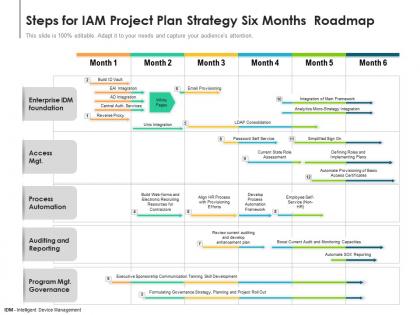
Steps for iam project plan strategy six months roadmap




Try Before you Buy Download Free Sample Product
 Impress Your
 Audience
 100%
100% Editable
 Save Hours
 of Time


A well thought out action plan makes execution easier and increases the possibility of success significantly. Ensure hitting all the milestones within the deadlines by introducing our fully customizable Steps For IAM Project Plan Strategy Six Months Roadmap. Streamline the work related information, budget, timeframe, key deliverable, landmarks, and major steps involved, all in one place to give an organized overview of the project by utilizing our PowerPoint theme. Minimize time lag and increase work efficiency by providing insight into the process with our comprehensively researched roadmap PowerPoint layout. Color coding helps in highlighting the process and grabs the attention of the audience. Download our handy Steps For IAM Project Plan Strategy Six Months Roadmap to identify the possible problem areas in a much shorter time and propose solutions. Have a productive brainstorming session with your workforce by utilizing our action plan visualization tool.
People who downloaded this PowerPoint presentation also viewed the following :
Steps for iam project plan strategy six months roadmap with all 2 slides:
Use our Steps For IAM Project Plan Strategy Six Months Roadmap to effectively help you save your valuable time. They are readymade to fit into any presentation structure.
FAQs for Steps for iam project plan strategy
Honestly, start by figuring out what disaster you're inheriting first - do a proper assessment of where things stand now. Map out your ideal end state, then break it into phases that won't make everyone's head explode. Politics will kill you faster than any technical problem, so nail down who the key players are and get your governance sorted early. Risk assessment and budget planning are obvious musts. Oh, and definitely run a small pilot first to prove this isn't just another expensive IT project that goes nowhere. Much easier to get buy-in when you've got actual wins to show.
First thing - figure out exactly what you're dealing with. Which apps, databases, user groups are actually in scope? Because everyone's gonna want their pet project included right away, and you can't do everything at once. Set real numbers for your goals: cut manual work by 40%, hit compliance standards, whatever. Just make it measurable. Oh, and connect it to business wins, not just tech stuff - execs care about that more anyway. Here's the thing nobody tells you - write down what you're NOT doing too. Seriously. That list will save you from so many "but can we also add..." conversations later.
Get your IT security and system admin teams involved right away, plus business unit leaders. HR is huge here since they handle all the user access stuff. Compliance will show up eventually anyway, so bring them in early - saves headaches later. Application owners need to be part of this too, especially if they're dealing with sensitive data. Legal should weigh in on the data governance side of things. Oh, and start with a kickoff meeting to get everyone aligned on what you're actually doing and when. Makes sure nobody's confused about their piece of it.
Honestly, the biggest pain points are always user pushback, nightmare integrations with old systems, and scope creep. Stakeholders will 100% try sneaking in "quick additions" halfway through - it's like clockwork. Start by getting people excited early with training sessions. Map your current systems first so you're not blindsided by integration hell later. Lock down that scope with solid change processes, and I can't stress this enough - budget way more testing time than feels reasonable. Oh, and definitely pilot with a small group first. Saves you from company-wide disasters.
First thing - audit everything you've got right now. Map out identity stores, access points, how people actually log into stuff. Talk to IT, security folks, and business teams about what's broken or annoying them. Seriously, you're gonna find some wild stuff that nobody talks about. Document the whole mess: how you add users, role setups, password rules, who has admin access, compliance holes. Oh and definitely run access reviews - bet you'll find tons of old accounts and people with way too many permissions. This baseline becomes your starting point because you can't fix what you don't know about.
Honestly, compliance needs to drive your whole IAM planning from day one. Map out whatever regulations hit you - SOX, GDPR, the usual suspects - and bake those controls right into your project timeline. Don't be like the teams I've watched who figure they'll handle compliance later (spoiler: it never goes well). Figure out your audit needs first, then design workflows that'll automatically spit out the evidence you need. Oh, and set up compliance checkpoints throughout the build, not just some final review. Way easier to prove you're compliant as you go rather than trying to reverse-engineer everything at the end.
Honestly, just start with a solid risk assessment to figure out what's actually worth protecting and where you're most vulnerable. Score different scenarios - like someone hacking privileged accounts or a data breach - based on how likely they are and how badly they'd mess up your business. I know, sounds boring as hell, but it works. Hit the high-risk stuff first: privileged access management, MFA for anything critical, automated user provisioning. Quick wins that tackle big risks are your best bet while you're planning the longer projects. Create some kind of scoring system so you can actually compare which projects matter most instead of just guessing.
Track the technical stuff first - authentication failures, password resets, how long it takes to set up new users. Business metrics matter too though. Compliance scores, security incidents, user satisfaction surveys (trust me, angry users will let you know). I'd also watch for unauthorized access detection times and IT tickets about login problems. Set your baselines early, then check quarterly. Leadership's gonna want proof this wasn't just expensive theater anyway. Oh, and don't forget mean time to provision accounts - that one always looks good in reports.
Map out your IAM phases first - discovery, design, implementation, testing, rollout. Give each one clear deliverables like "finish user inventory" or "get MFA pilot running." I always work backwards from go-live dates since stakeholders are obsessed with those. You'll want buffer time for every milestone (vendor delays are the worst). Dependencies between tasks matter too, plus who's actually available to do the work. Keep your timeline realistic, not wishful thinking. Weekly check-ins help you stay on track and pivot when things inevitably go sideways.
Look, map out what you actually need first before diving into vendor demos - trust me on this one. SailPoint and Saviynt handle identity governance well. For SSO and access management, Okta's pretty solid, Azure AD too if you're already in that ecosystem. Those demos will try to dazzle you with every shiny feature imaginable, but half of it you won't use. Jira or ServiceNow are lifesavers for tracking milestones during implementation. Don't forget SIEM integration - Splunk's the usual suspect there. Really though, your existing tech stack and budget will probably make the decision for you more than anything else.
Don't just dump training at the end - that's where most projects crash and burn. Get your executives on board first, then train people as you roll out each phase. IT folks need the nitty-gritty technical stuff, but regular users just want to know "how does this change my login?" User adoption is honestly what kills most IAM projects I've worked on. Budget for ongoing campaigns too, especially when you're pushing new security policies or that annoying two-factor auth everyone complains about. Oh, and don't treat this as optional - if people don't buy in, your fancy new system becomes expensive shelf-ware.
Honestly, automation is your best friend here - manual stuff always leads to disasters. Create role-based templates so new people get the right access for their job, but make sure managers still have to approve everything. Here's the thing though - most places totally bomb the removal part. When someone quits or switches teams, you need workflows that kick in automatically. Do regular reviews too because stuff always falls through. Document it all since you'll need proof later (learned that one the hard way). Start with your riskiest users first.
Honestly, you gotta nail down who owns what from day one or you'll be pulling your hair out later. Quarterly access reviews are clutch - automate the compliance stuff where you can. Your IT team needs ongoing training because this isn't something you set up once and walk away from (learned that the hard way). Oh, and don't forget about training business users too - they're always the weak link. Build these governance processes into your normal workflow instead of bolting them on afterward. Document everything now while you're thinking about it. Short sentences work. Trust me on the documentation part - future you will thank present you.
Moving to the cloud totally changes your IAM game plan. Your old on-prem security stuff won't just port over - super annoying but true. Now you're dealing with hybrid setups, federated auth, and way messier permissions across different platforms. Honestly, the API security piece alone adds weeks to your timeline. Plus your team will need training since cloud IAM tools are nothing like the traditional stuff. I'd map out your migration schedule first, then build IAM milestones around it. Don't let identity issues become that one thing that derails your whole project.
Honestly, AI and ML are completely flipping IAM on its head. Your old "set and forget" approach is toast - now you need dynamic controls that actually learn from user behavior and adjust on the fly. The authentication stuff gets way more complex too. Sure, there's new attack vectors to worry about (like people trying to mess with your ML models), but the payoff is pretty solid. You can automate most access decisions and spot weird activity way faster than doing it manually. I'd start by figuring out which parts of your current setup would actually benefit from some smart automation.
-
Very unique, user-friendly presentation interface.