


Support model ppt slides download





Try Before you Buy Download Free Sample Product
 Impress Your
 Audience
 100%
100% Editable
 Save Hours
 of Time


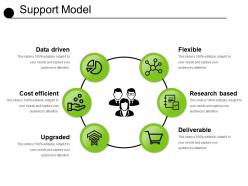
Evaluate the dependence of IT services on your business with our support model PPT slide template. You can sync up your business IT framework with your traditional company functions with the help of this support model diagram PPT image. Use this service support process PowerPoint template to explain its benefits for your organization. It improves the operational efficiency of your business functions. It enhances your productivity levels by reducing your operational downtime. You can even manage your product or service cost with the help of this supporting IT service PPT diagram. Describe the IT structure of your company which results in devising and maintaining the successful long term company strategy. It allows the management to provide their business products to the consumers at the competitive prices. It also results in taking an edge over your competitors in the market. Therefore, just tap on the download link given and start commencing with our professionally developed technical support model PowerPoint layout template. Insist on highlighting facts with our Support Model Ppt Slides Download. It will increase your credibility.
People who downloaded this PowerPoint presentation also viewed the following :
Support model ppt slides download with all 5 slides:
Open up the champagne with your ideas. Uncork the spray with our Support Model Ppt Slides Download.


FAQs for Support model
Basically comes down to where your support people sit organizationally. Centralized means they're all together in one big team with the same manager. Decentralized spreads them out - they work within different product teams instead. You'll get way more consistency with centralized, plus knowledge sharing is easier. But man, they can feel so disconnected from what users actually need. Decentralized is the opposite - super close to customers and products, resolving things faster. Just becomes chaos trying to coordinate everyone though. Honestly? Go centralized for consistent processes, decentralized when you need people who really know the product inside and out.
Start with post-ticket surveys - they're easy wins. Quarterly NPS scores help too, but honestly the real magic happens when you actually DO something with the feedback (too many companies just collect it and let it sit there gathering dust). Set up monthly team meetings to spot patterns in complaints. Fix the stuff that'll help the most people first. Oh, and this part's crucial - tell customers when you've made changes based on what they said. People love knowing they were heard. Build from there once you get the hang of it.
Honestly, just start with one thing - maybe a chatbot for your FAQ stuff. It handles the boring repetitive questions so your team doesn't have to. Ticketing systems are game-changers too because nothing gets lost anymore. Oh, and customers love when they can find answers themselves in a knowledge base (saves everyone time). The analytics part is actually pretty cool - you'll start noticing patterns like "wow, literally everyone's confused about this one feature." Don't go crazy trying to automate everything at once though. Baby steps work better.
Mix quantitative stuff with qualitative - response times, resolution rates, satisfaction scores for the hard numbers. But honestly? The soft metrics are where you'll find the real gold. Do feedback sessions with your team, talk to customers directly, watch escalation patterns. Oh and track agent burnout because burned out staff = terrible support (learned that one the hard way). I'd pick maybe 3-5 metrics that actually matter to your goals first. You can always add more later once you've got the basics nailed down.
Honestly, the worst mistake is blindsiding your support team - they'll absolutely push back if you don't get them on board first. Last year I changed way too much at once and it was a disaster. Test new processes but keep your current ticket routing running. Oh, and timing matters - never launch this stuff during peak season, trust me. Your customers won't magically know about new channels unless you actually tell them clearly. Start small with a pilot group and set up feedback loops from the beginning so you can fix things quickly when they inevitably go sideways.
First thing - actually ask your users how they want to get help. Some people live for self-service docs, others need to talk to a real person ASAP. Check where your current tickets are coming from too. Age totally matters here (yeah, I said it) - younger folks usually want chat or social media, older users often prefer calling. Don't overpromise though. If you've only got two support people, offering 24/7 phone support is just setting yourself up to fail. Start with maybe 2-3 channels and see what actually gets used. You can always add more later based on real demand instead of guessing.
Yeah, so multichannel support usually bumps satisfaction up by like 15-25% - pretty solid numbers. Basically people can pick whatever they want - email, chat, phone, social stuff - instead of being stuck with something they hate. Quick issues get handled through chat, bigger messes go to phone calls. Makes everything faster honestly. The main thing is keeping your team synced so customers don't have to explain their problem five times (so annoying when that happens). I'd definitely track which channels people actually use most - might surprise you which ones they gravitate toward.
Honestly, just pick the boring stuff first - password resets, basic troubleshooting, that kind of thing. Chatbots are actually pretty decent at handling those repetitive tickets, which means your team can focus on the weird problems that need actual brain power. The trick is making it not feel robotic to customers. Nobody wants to deal with a bot that clearly doesn't understand what they're asking about. I'd say start with maybe one or two simple use cases, see how it goes, then slowly add more from there. Oh, and make sure it knows when to punt difficult issues to real people automatically.
Cross-train everyone on digital tools AND phone skills - they'll be jumping between both all day. Skip the boring demos and get them actually using the chat platforms, knowledge bases, all that stuff. Role-playing scenarios is honestly where the magic happens, especially since you're dealing with people who are already annoyed that self-service didn't work. Oh, and nail down those escalation rules so your team knows exactly when to bump someone from chat to a call. Check in regularly to see what's actually working versus what sounds good on paper.
Oh man, this is huge and most companies totally mess it up. You can't just take what works in the US and drop it everywhere else. Japan taught me that lesson - our casual, direct style bombed hard there. Time zones are tricky enough, but then you've got communication preferences all over the map. Germans want detailed tickets, Brazilians prefer quick chats, some places only do phone calls. Don't even get me started on holiday schedules. Survey your biggest markets first to see what they actually want, then build from there. Way easier than rebuilding everything later.
Honestly, start with the basics - response and resolution times because nobody likes waiting forever. First contact resolution is probably the most important one though; customers get so annoyed having to explain their issue multiple times. CSAT scores and NPS will tell you if people actually like dealing with your team or just tolerate it. Track your ticket volumes to spot trends and figure out staffing. Oh, and escalation rates too - shows you if your front-line folks are getting overwhelmed or need more training. These will give you a pretty solid picture of what's broken.
Dude, you gotta think about scaling from the beginning or you'll hate yourself later. Document everything - seriously, write down your processes so new people aren't completely lost. Get a decent ticketing system and knowledge base that won't crash when things get crazy. Cross-training is huge because someone always quits right when you're swamped (Murphy's law, I swear). Watch your response times and resolution rates like a hawk. Those numbers will tell you when to panic and start hiring. Oh, and map out your hiring process early - finding good support people takes forever.
Honestly, just dig into their history before you respond to anything. Check what they've bought, previous complaints, stuff like that. Drop their name in conversations and bring up past issues so they know you actually pay attention. AI tools are pretty solid for pulling up context automatically - saves you tons of time digging around. Oh, and definitely treat different customer types differently. Your high-value clients probably want a phone call, but most people are fine with chat. Really it's just about making them feel like you're talking to THEM specifically, not sending the same boring template to everyone. Makes a huge difference.
Okay so basically you gotta connect your support numbers to what execs actually give a damn about - like revenue and customer lifetime value. Ticket counts? Nobody cares. Show them how support prevents churn or drives account expansion instead. Here's what worked for me: set up monthly check-ins with sales and success teams to see what they're tracking. Then mirror those metrics in your reports. Your team needs to understand this connection too - when they solve a problem, they're literally saving revenue. Oh and ditch the vanity metrics. Focus on stuff that moves the needle financially.
Okay so first thing - map out what you're doing now and figure out what needs changing first. Most people skip this step and it bites them later. Talk to everyone about timelines and their new roles upfront, because when people get confused, productivity tanks. Don't flip everything at once though - do it in phases so you can spot problems early. Have your old processes documented alongside the new stuff, plus training materials ready. Oh, and if you can swing it, start with a small pilot group first. Way easier than dealing with company-wide chaos right off the bat.
-
Excellent Designs.
-
Editable templates with innovative design and color combination.