

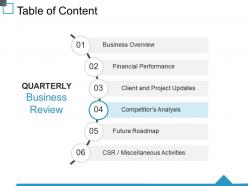
Table of content ppt visual aids ideas





Try Before you Buy Download Free Sample Product
 Impress Your
 Audience
 100%
100% Editable
 Save Hours
 of Time


Give friendship a chance to grow with our Table Of Content Ppt Visual Aids Ideas. They help get hatred to disappear.
People who downloaded this PowerPoint presentation also viewed the following :
Table of content ppt visual aids ideas with all 5 slides:
Curiosity about your ideas begins to grow due to our Table Of Content Ppt Visual Aids Ideas. It will draw in the disinterested.
FAQs for Table of content ppt
Honestly, visuals are a game changer for presentations. Your audience won't zone out as much when there's something to look at - I mean, nobody wants to just stare at someone talking for 20 minutes straight. Complex stuff becomes way easier to follow too. Visual learners especially need to see things to actually absorb them. Oh, and they're lifesavers if you blank out mid-sentence since your slides can get you back on track. The confidence boost is real. Just don't go overboard with cluttered slides - I've seen people cram everything on one slide and it's painful to watch.
Oh yeah, colors totally mess with people's heads in presentations! Red screams "urgent" and grabs attention, but man, I once made an entire budget deck with red text - looked like a horror movie. Blue's your friend for trust and keeping things chill, green feels positive and growth-y. Here's the thing though - warm colors pump people up while cool ones help them actually focus on boring data stuff. You really want to match your colors to what you're trying to do. Stick with 2-3 colors max or it'll look like a rainbow exploded. Trust me on that one.
Dude, so for business stuff, keep slides super clean - minimal text, good visuals. Charts for data, mockups if you're demoing products. Academic presentations? Pack in those detailed graphs and citations. Sales pitches need customer testimonials and those dramatic before/after shots. I can't tell you how many presentations I've watched die because nobody could read the tiny text from row 10. Training sessions are different though - throw in polls or videos because bullet points make people zone out hard. Oh, and definitely test your slides on the actual screen beforehand. Colors look way different on projectors than your laptop.
Dude, infographics are game-changers because our brains just eat up visual stuff. People remember like 65% more when you mix visuals with text instead of drowning them in pure text blocks. Honestly, anything beats those soul-crushing bullet point presentations we've all suffered through. The trick is keeping each one focused on a single big idea - don't try to shove your entire presentation into one graphic or it'll look like a hot mess. I usually do one clean infographic per main concept I actually want people to remember later.
Dude, don't cram everything onto one slide - it's painful to watch. One idea per slide, max. Make your fonts huge (24pt minimum) or people in the back will squint the whole time. High contrast colors too. I see so many people write entire paragraphs... just don't. Bullet points work way better. Good images are clutch, but skip the cheesy stock photos. Your slides should back up what you're saying, not just repeat everything word-for-word. Oh, and definitely test it beforehand on whatever screen you'll actually use - trust me on this one.
Okay so here's the thing - people's brains can actually handle way more info when you show AND tell instead of just talking at them. Like, they've got these separate channels for processing visual vs auditory stuff. Charts and diagrams are basically mental shortcuts that make abstract concepts click. I used to drone on with just words until I saw how much graphs helped (honestly felt dumb for not realizing sooner). The key is making visuals work WITH your words, not just slapping pretty pictures on slides. Trust me, you'll actually see people nodding instead of staring blankly.
Dude, stop dumping data on slides and start telling a story instead. People zone out with random facts, but we're literally hardwired to remember narratives. Build your deck like a story arc - here's the problem, here's what we tried, boom here's the solution. Each slide should be like a scene that pushes things forward. I always think of it this way: if someone walked in halfway through, would they still get what's happening? Your visuals need to support whatever chapter you're in. It's way more engaging than just throwing charts at people and hoping something sticks. What story are you actually trying to tell here?
Honestly, interactive stuff is a game-changer because it forces people to actually participate instead of just staring blankly at your slides. Polls work great. So do clickable diagrams or live Q&A tools. I've watched the most mind-numbing topics suddenly get interesting when people can vote on something or mess around with data themselves. Once someone clicks or responds to something, they're hooked - they want to see what happens next. Maybe aim for 2-3 interactive moments so you don't lose them halfway through.
Ugh, the worst is when people cram way too much text on every slide - like, we can all read, you know? Also those super pixelated images that look like they're from 2005. Your colors shouldn't make people's eyes bleed either. Honestly, skip the crazy animations unless they actually help make your point. Keep text short and sweet. Make sure your images are decent quality and actually relate to what you're saying. Oh, and definitely test your tech stuff beforehand because nothing's more awkward than spending 10 minutes trying to get your laptop to connect while everyone just sits there.
Look at what kind of data you've got first, then think about who's reading it. Bar charts? Perfect for comparing stuff. Line graphs show trends over time really well. Pie charts are for showing parts of a whole, but honestly everyone uses them way too much - they're kinda overrated. Your visuals should make the main point super obvious. If people are squinting or confused, go simpler. Tables work when you need exact numbers, but charts actually tell the story. Here's what I always do: show it to someone else first. They should get your main point in like 3 seconds or you need to try again.
Honestly, just start with Canva - their templates are clutch when you're in a rush. PowerPoint and Google Slides are solid for basic presentations, nothing fancy but they get the job done. If you want more control over design stuff, Figma's pretty sweet. Oh, and for charts and data things, Tableau's great but Excel actually has some decent newer features too (who knew?). Adobe's obviously the best but unless you're doing serious design work, it's probably too much. I'd say stick with Canva for most things, then maybe try other tools once you figure out what you actually need.
Dude, visual aids are a game changer because people learn so differently. Some need to see charts and graphs, others want hands-on stuff, and yeah - there are still folks who just listen. I swear, if you only do straight talking, you'll lose like half your audience. Mix it up with infographics, maybe throw in a video or demo. Even basic slide animations help. I usually try to hit 2-3 different formats and honestly? The difference in engagement is crazy obvious. People actually pay attention instead of checking their phones.
Honestly? Less is more with slides. Stick to a clear headline, bullet points (no paragraphs!), and tons of white space. People will glance at it for maybe 3 seconds before zoning out - brutal but true. One idea per slide works best. Make fonts huge and use high-contrast colors since you never know if the lighting will suck. Oh, and if you're just reading everything off your slides word-for-word, you've already lost them. Your visuals should back up what you're saying, not do all the talking for you.
Dude, keep those clips SHORT - like 30-60 seconds tops. I made this mistake once where I showed this 3-minute video and literally watched everyone's eyes glaze over. Painful. Always tell people what they're about to see before you hit play, then connect it back to your point right after. Test everything beforehand too because tech fails are presentation killers. Oh, and don't make video the star of your show - it should just support what you're saying. Have a backup ready because Murphy's law is real with this stuff.
Don't cram too much on each slide - people can't listen and read at the same time. One main idea per slide works way better. I learned to preview slides before clicking (trust me on this one, got burned bad during a client pitch). Show stuff right when you're talking about it, not all at once upfront. Your slides are there to back you up, not steal the show. Oh and practice those transitions! Nothing kills momentum like awkward pauses between slides. Tech always fails when you need it most, so have a backup ready.
-
Amazing product with appealing content and design.
-
Excellent work done on template design and graphics.