

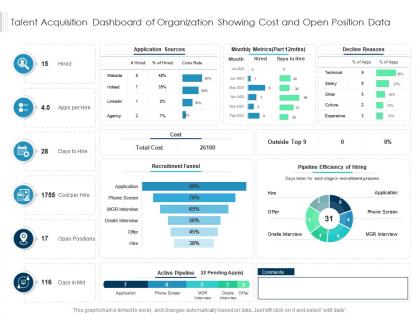
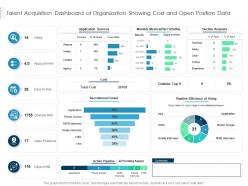
Talent acquisition dashboard of organization showing cost and open position data




Try Before you Buy Download Free Sample Product
 Impress Your
 Audience
 100%
100% Editable
 Save Hours
 of Time


Our Talent Acquisition Dashboard Of Organization Showing Cost And Open Position Data are topically designed to provide an attractive backdrop to any subject. Use them to look like a presentation pro.
People who downloaded this PowerPoint presentation also viewed the following :
Talent acquisition dashboard of organization showing cost and open position data with all 2 slides:
Use our Talent Acquisition Dashboard Of Organization Showing Cost And Open Position Data to effectively help you save your valuable time. They are readymade to fit into any presentation structure.
FAQs for Talent acquisition dashboard of organization showing cost and
Definitely start with time-to-fill and cost-per-hire - those are your bread and butter. Track which channels actually bring good candidates (not just lots of them). Offer acceptance rates will show if you're lowballing people. I'm weirdly obsessed with funnel conversion rates between each interview stage, they tell you so much about your process. Pipeline health is huge too - how many people are stuck where right now? Oh and don't skip diversity metrics and hiring manager satisfaction scores. Candidate experience feedback is nice but honestly, get the basics down first before you go crazy with fancy stuff.
Honestly, data viz saves your sanity when recruiting gets messy. You'll catch problems way faster - like why everyone bails after the second interview or which job sites actually send decent candidates. Charts beat spreadsheets every time because your brain just gets it quicker, you know? Track your time-to-hire, see how different recruiters are doing, figure out what's working. I'd start with whatever's driving you most crazy right now - probably something obvious will jump out that you can fix immediately. Way better than drowning in Excel hell.
So here's the thing - when candidates have a crappy experience, your recruiting numbers tank fast. Drop-off rates shoot up, it takes forever to fill positions, and people start rejecting your offers. Honestly, candidates are brutal on Glassdoor these days, so one bad experience ripples out and kills your future application rates too. Even dumb stuff like making people fill out endless forms or ghosting them after interviews adds up quick. I'd watch your application completion rates like a hawk - that's usually where you'll spot the biggest leaks in your funnel first.
Think of it like making different playlists for different people. C-suite wants the big picture stuff - time-to-fill, cost-per-hire, diversity numbers. They don't care about daily recruiting drama. Hiring managers need their own open roles, pipeline updates, interview feedback. That's it. HR folks want the nitty-gritty operational details - where candidates drop off, which job boards actually work (spoiler: most don't). Just set up role-based access so everyone sees their relevant stuff automatically when they log in. Makes life way easier.
First thing - get your data fields standardized across platforms. Job titles, candidate stages, dates, all that stuff needs to match before you connect anything. Most ATS systems have APIs, and Zapier works pretty well for pulling it together (though custom integrations are better if you've got the budget). The real pain? Getting teams to actually agree on this. Everyone's super attached to their current system. I'd start with whatever metrics your stakeholders care about most, then build out from there. Oh, and definitely set up automated syncing - daily or weekly. Trust me, you don't want to be stuck updating spreadsheets manually forever.
So predictive analytics can basically forecast your hiring needs and spot which candidates will actually work out long-term. Pretty neat stuff, honestly. The data reveals patterns you'd miss otherwise - like time-to-fill predictions and candidate scoring based on past hires who crushed it. You'll also see which sourcing channels bring in people who stick around (LinkedIn vs job boards, etc). First step is tracking your current hiring data consistently. Once you've got enough history - maybe 6 months or so? - then you can start layering in the predictive models. Trust me, it's way more useful than just looking at basic metrics.
Dude, real-time data is a game changer - you can actually fix stuff as it happens instead of realizing three weeks later that nobody's applying from Indeed. Low response rates? Move that budget somewhere else immediately. I've literally been saved by catching interview bottlenecks when hiring managers just... disappear (why do they always do that?). Plus you'll spot diversity issues early and switch up your sourcing before it becomes a whole thing. Just set up alerts for the big stuff so you're not glued to dashboards 24/7.
Honestly, time-to-hire metrics are super useful for figuring out where your hiring process is broken. Like when candidates get stuck waiting forever between interviews - so annoying for everyone involved. The data shows you which roles drag on the longest, plus which hiring managers are speedy vs. the ones who take their sweet time. You'll also see if you're competitive with other companies or if top talent is probably bailing for faster offers. I always check seasonal patterns too since some times of year are just brutal for hiring. Bottom line: use this stuff to fix bottlenecks and actually compete for good people.
Honestly, dashboards are really good at exposing this stuff. You can see demographic breakdowns at each hiring stage - like if certain groups keep getting filtered out during screening or whatever. It tracks things like where diverse candidates are coming from, how long different people take to get hired, even which interviewers might have patterns. The data can be pretty shocking when it's all laid out like that. Job posting language gets monitored too, plus rejection reasons. Oh, and you definitely want alerts set up - so when your diversity numbers start going sideways, you catch it before it becomes this whole systematic thing.
Honestly, automated reporting is a game changer for recruiting. You'll get real-time data on stuff like time-to-hire and which sources actually work without manually pulling reports every week. No more Friday afternoon Excel disasters either - the accuracy is way better. The dashboards catch trends and bottlenecks automatically, so problems don't sneak up on you. I'm terrible at remembering to check dashboards regularly, so I'd definitely set up alerts for your most important metrics. That way you stay in the loop without having to constantly monitor everything yourself.
Honestly, these dashboards are game-changers for tracking diversity stuff. You'll see your candidate pipeline in real-time - like if diverse candidates are dropping off during interviews or your sourcing is totally missing certain groups. Way better than drowning in Excel hell, trust me. Set some diversity goals and actually watch your progress instead of guessing. The visual format makes problems super obvious. Here's the thing though - you gotta act on what you're seeing mid-process. Don't just use it for post-mortem analysis when it's already too late to fix anything.
Don't cram everything onto one screen - users get totally overwhelmed. Skip vanity metrics like "total job views" because honestly, who cares? That doesn't tell you if someone's actually applying. Your data better be fresh too. Nothing's worse than seeing last month's numbers when you're trying to make decisions today. Design for whoever's actually using it - if it's recruiters, focus on pipeline stuff instead of high-level executive charts. Oh, and start small. Pick 3-5 metrics that actually matter, then build from there once people get comfortable with it.
Honestly, dashboards are a game-changer for tracking if your employer brand actually works. Look at where applications come from, candidate quality scores, time-to-hire, offer acceptance rates - break it all down by discovery source. Social media engagement data is pretty wild when you see it. Also track Glassdoor ratings, employee referrals, and organic careers page visits. This shows whether you're attracting good talent or just making noise (spoiler: sometimes it's just noise). Set up monthly automated reports. Trust me, you don't want to be scrambling for numbers when your boss suddenly asks how things are going.
Honestly, external market data is a game changer - salary benchmarks, what competitors are doing, regional talent stuff. But don't sleep on internal goldmines either. Employee engagement scores, performance data, exit interviews... there's so much sitting in your HRIS that nobody touches. Diversity metrics tell stories too, and candidate experience surveys (though those can be brutal to read sometimes). The magic happens when you connect these instead of just staring at application counts. I'd start with one new data source and see what patterns pop up. Way more interesting than basic time-to-hire metrics.
Honestly, start with solid data entry standards and make sure everyone knows them. Monthly audits are clutch - catch the mess before it gets ugly. Connect your ATS straight to the dashboard instead of doing manual uploads (trust me on this one, manual = mistakes). Someone on your team needs to actually own this stuff, like it's their baby. Build those validation checks right into your process so it happens automatically. Oh, and don't rely on people remembering to be perfect - we're all human. Clean data should just happen, not be something you're constantly chasing.
-
Thanks for all your great templates they have saved me lots of time and accelerate my presentations. Great product, keep them up!
-
Easily Understandable slides.