


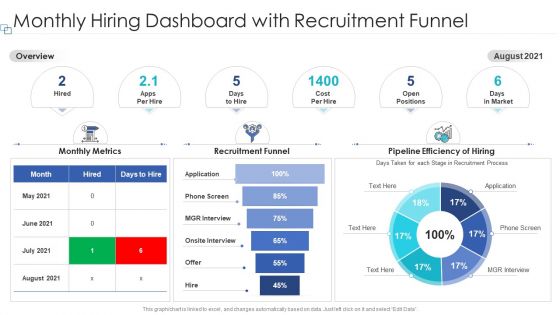
Monthly hiring dashboard with recruitment funnel




Try Before you Buy Download Free Sample Product
 Impress Your
 Audience
 100%
100% Editable
 Save Hours
 of Time


Our Monthly Hiring Dashboard With Recruitment Funnel are topically designed to provide an attractive backdrop to any subject. Use them to look like a presentation pro.
People who downloaded this PowerPoint presentation also viewed the following :
Monthly hiring dashboard with recruitment funnel with all 2 slides:
Use our Monthly Hiring Dashboard With Recruitment Funnel to effectively help you save your valuable time. They are readymade to fit into any presentation structure.
FAQs for Monthly hiring dashboard
Track time-to-fill and cost-per-hire first - those are your bread and butter. Source effectiveness matters too, plus candidate pipeline numbers and offer acceptance rates. Quality-of-hire scores are gold if you can actually measure them (big if though). Hiring manager satisfaction is clutch - seriously saved my butt so many times when things got tense later. Don't just chase speed metrics or you'll hire fast but wrong. Start with these basics, then pile on industry stuff once you've nailed the foundation. Focus on what actually improves your decisions, not dashboard eye candy.
Honestly, spreadsheets are such a pain when you're trying to spot recruitment trends. With charts though? You'll catch seasonal hiring patterns right away, see which job boards actually work, find where candidates drop off. Bar charts work great for basic stuff - time-to-hire, source effectiveness, that kind of thing. Then add trend lines so you can track if things are getting better or worse over time. Trust me, your boss will actually look at the data instead of glazing over. I learned this the hard way after presenting way too many boring Excel tables that nobody cared about.
Put time-to-fill and open positions right at the top - that's what hiring managers actually care about. Navigation should be dead simple: "Active Jobs," "Candidates," "Analytics." I swear, some dashboards look like someone just dumped every chart they could find onto one page. It's ridiculous. Make key numbers bigger and stick to consistent colors throughout. Search and filters need to be obvious since recruiters are constantly looking up specific stuff. Oh, and definitely test it with real users first - they'll spot the annoying things you totally missed.
Honestly, recruitment dashboards are game-changers for cutting down time-to-fill. You get this real-time view of exactly where candidates are getting stuck - like if applications are just sitting in screening forever or hiring managers are dragging their feet on decisions. Way better than guessing what's going wrong. The cool part is you can spot bottlenecks before they totally screw up your timeline and actually do something about it. I'd start by figuring out your current average time-to-fill first, then dive into which stages are eating up the most time. Trust me, the data will surprise you.
Honestly, if you've got budget and someone tech-savvy, Tableau or Power BI are amazing for recruitment stuff - all those hiring metrics look so clean. Google Data Studio is free though and connects to most ATS platforms pretty easily. I mean, even Excel or Google Sheets work fine if you're into spreadsheets (I still use them way too much lol). Main thing is finding something that pulls data automatically instead of you updating everything manually each week. That gets old fast. Just start basic and add more features as you figure out what you actually need.
Honestly, a recruitment dashboard is a game-changer for tracking diversity stuff. You'll see your candidate demographics at every stage instead of wrestling with spreadsheets later. The real win? Spotting where people drop off - like if diverse candidates keep getting cut after phone screens, that's your red flag right there. Set it to automatically send reports to leadership so they can't ignore the numbers. I mean, accountability matters. It shows patterns you'd totally miss otherwise, and you can actually measure if you're hitting those D&I targets or just talking about them.
Start with your ATS - that's your main data source. Then grab stuff from LinkedIn and Indeed to see what the market looks like. Your HR system has all the headcount and budget numbers you need. Calendar tools are actually super helpful for tracking how efficient your interview scheduling is (honestly didn't realize this until recently). Candidate surveys are huge for feedback - seriously, use that data to fix your process. Social media APIs can track employer brand mentions if you're into that. The trick is connecting everything so you see the whole journey from first contact to hire. Pick 3-4 sources to start, then add more when you spot gaps.
Daily updates are your best bet, honestly. Real-time if you can swing it. Old recruiting data is basically useless - like trying to navigate with last month's traffic report, you know? You'll miss trends and bottlenecks when they actually matter. Weekly is the absolute minimum if daily feels impossible. Beyond that? You're just guessing at everything. I'd set up automated pulls so you don't have to think about it, but even manually refreshing key metrics each morning beats stale numbers. Takes maybe 15 minutes tops.
Don't get trapped looking at one metric by itself - context matters way more than you think. Low application numbers? Could actually be great if quality's high. Vanity metrics are the worst though - like, who cares about 500 applications if they're all garbage? Time-to-hire is super misleading too since rushing usually bites you later. Oh and seasonal stuff will totally throw you off if you're not ready for it. I learned that the hard way last year. Compare similar periods and dig into anything weird. Set up those team dashboard sessions regularly - catches problems before they get ugly.
Set up RBAC first - define your basic roles like recruiter, hiring manager, admin, readonly viewer. Each role gets different permissions for viewing candidate data, editing job posts, salary access, etc. Most platforms let you create custom groups which honestly saves your ass when you get those weird one-off situations (and there's always at least three of them). Don't forget to audit permissions regularly. People switch roles all the time and suddenly Jim from accounting has access to executive salary data. Run a quarterly cleanup to stay on top of it.
So basically, recruitment dashboards show you where your hiring process is falling apart. Response times, interview scheduling, feedback - all that stuff gets tracked. When candidates are sitting around for weeks without hearing anything (super annoying, btw), you'll actually see it in the data. The dashboard catches patterns in feedback scores and shows exactly where people drop off. Time-to-hire metrics tell the whole story. Then you can fix the obvious problems - set up automatic updates, create follow-up reminders, whatever keeps people from ghosting your process.
Honestly, recruitment dashboards are like having a crystal ball for your hiring. They track stuff like how long it takes to fill roles and show you which departments are always struggling (engineering, I'm looking at you). You'll start noticing patterns - maybe you always need more people in Q4 or certain teams have crazy high turnover. The cool part is you can actually plan ahead instead of scrambling when someone quits. Set up automated reports so your boss gets updates without you pulling data manually every week - trust me on this one.
Honestly, just start with time-to-fill predictions - they're super easy and your boss will love seeing immediate results. Most recruitment platforms already let you plug in ML models that crunch your old hiring data. You know, stuff like how many people usually apply, interview ratios, seasonal patterns, whatever. From there you can predict acceptance rates and figure out which job boards actually work for different roles (spoiler: LinkedIn isn't always the answer). Just make sure your data isn't a mess first - garbage in, garbage out and all that. Focus on metrics that'll actually change how you hire, not just fancy numbers that look good in presentations.
Dude, you've gotta get the mobile app - total lifesaver. I'm always checking candidates on my commute or approving interviews between meetings. Real-time notifications are clutch so you don't miss anything important. Last week I almost lost this perfect candidate because I didn't see their response until the next day (rookie mistake). You can literally respond to urgent stuff instantly instead of waiting to get back to your computer. Honestly, good candidates move fast these days. Download it and turn on push notifications - you'll thank me later when you're not losing people to slow response times.
Track stuff like time-to-hire and where candidates drop off, then actually sit down with your team monthly to review it. Most dashboards just collect dust honestly - the magic happens when you spot patterns and change what you're doing. Like if LinkedIn candidates always bomb but referrals crush it, shift your focus. Pick maybe 2-3 metrics that tackle your biggest headaches first. Don't try to measure everything or you'll go crazy. Schedule those reviews with recruiters and hiring managers, otherwise the data just sits there looking pretty while your process stays broken.
-
Attractive design and informative presentation.
-
Perfect template with attractive color combination.
-
Excellent work done on template design and graphics.