


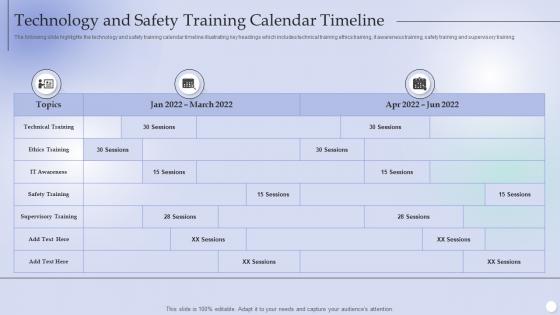
Technology And Safety Training Calendar Timeline




Try Before you Buy Download Free Sample Product
 Impress Your
 Audience
 100%
100% Editable
 Save Hours
 of Time


The following slide highlights the technology and safety training calendar timeline illustrating key headings which includes technical training ethics training, it awareness training, safety training and supervisory training.
People who downloaded this PowerPoint presentation also viewed the following :
Technology And Safety Training Calendar Timeline with all 6 slides:
Use our Technology And Safety Training Calendar Timeline to effectively help you save your valuable time. They are readymade to fit into any presentation structure.





FAQs for Technology And Safety
Honestly, hands-on practice is everything - people need to actually use the tech, not just sit through boring demos. Real scenarios work way better than theory. Case studies are gold, especially the disaster stories (people remember those way more than procedures lol). Cover basic safety stuff plus emergency responses. Content needs regular updates since tech moves so damn fast. But here's the thing - one training session is useless. You'll need quarterly follow-ups and refreshers to make anything stick. Maybe throw in some interactive elements too. The horror stories really drive the point home better than any manual ever could.
Don't just do training once and call it done. Quarterly refresher sessions work great, plus get some cybersecurity newsletters to forward around. Honestly, threats evolve so fast that last year's training is basically useless now. Set up a team Slack channel where everyone can drop links about new scams they've spotted - makes people feel more involved. Oh, and bring in outside trainers once a year since they're usually on top of the latest stuff. Way better than having your IT guy lecture everyone again.
Dude, hands-on training is a total game changer. Reading safety protocols is one thing, but actually experiencing what a real phishing email looks like? That's when it clicks. I've seen people's faces when they realize how easily data gets compromised - it's genuinely shocking. Your team will build that muscle memory through practice, not lectures. Try running some simulated scenarios next time (way more engaging than PowerPoints, trust me). People retain so much more when they're actually doing something. Short sessions work better than those marathon training days too.
Look, you gotta tailor it to what each team actually deals with. HR handles all that sensitive employee stuff, so hit them with data privacy and phishing scenarios. Your IT folks obviously need the heavy technical security training. Sales teams are constantly clicking random links from prospects - honestly, they're kind of a nightmare from a security standpoint. Manufacturing should focus more on operational tech risks. The trick is figuring out what threats each group faces every day, then create training around their real situations. I'd start by just asking each department what tech issues stress them out most. Way more effective than generic company-wide training.
Most people think cybersecurity means having strong passwords and antivirus - done, right? Wrong. It's like thinking a seatbelt makes you invincible on the highway. The real problem? Everyone assumes it's IT's responsibility, not theirs. Plus there's this weird belief that Macs are bulletproof (spoiler: they're not) and that sketchy emails always look sketchy. They don't. What really gets me is how much people overshare on social media without thinking twice. Train them on stuff they'll actually face - like that coffee shop Wi-Fi isn't as safe as it seems.
Track completion rates and quiz scores, but the real test is whether security incidents drop after training. Phishing simulations are golden - you want people reporting suspicious emails, not clicking them. Pre/post assessments help, though everyone hates those things. Here's something interesting: if help desk gets more security questions after training, that's actually great news. Means people are thinking twice before acting. Do quarterly check-ins to spot trends. If something's not clicking with your team, switch up the content. Short sentences work. But also mix in longer ones that feel natural when you're explaining the strategy.
Get yourself a good LMS first - tracks everything without you having to babysit it. Interactive simulations are clutch because people can mess up without, you know, actually breaking anything expensive. Videos beat text every single time for this stuff. I swear people's eyes just glaze over when you hand them a manual. Assessment tools are obvious but necessary. Oh, and make everything mobile-friendly since everyone's always checking procedures on their phones anyway. Keep some printable backup guides around too. Start with what you've got, then figure out what's missing based on your specific setup.
So VR training is actually pretty cool for this stuff. You can throw people into dangerous situations - electrical hazards, chemical spills, whatever - without anyone getting hurt. The crazy part is how much better people remember things when they're actually doing it instead of just sitting through another PowerPoint. Makes sense, right? They can mess up as many times as they need until it becomes second nature. Honestly, the graphics these days are insane, way more realistic than I expected. I'd probably start with your scariest procedures first and see how it goes.
Oh totally, remote work flips everything upside down for security training. Home networks are sketchy compared to office setups, so that's priority
-
The templates you provide are great! They have saved me tons of time and made my presentations come alive. Thank you for this awesome product. Keep up the good work!
-
The quality of PowerPoint templates I found here is unique and unbeatable. Keep up the good work and continue providing us with the best slides!