

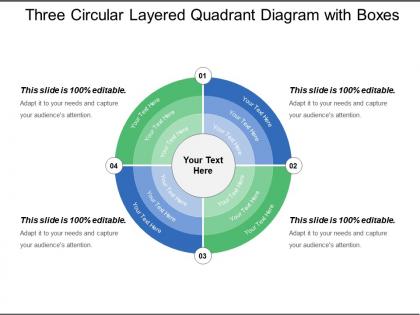
Three circular layered quadrant diagram with boxes




Try Before you Buy Download Free Sample Product
 Impress Your
 Audience
 100%
100% Editable
 Save Hours
 of Time


Facilitate happy endings with our Three Circular Layered Quadrant Diagram With Boxes. Address every individual demand.
People who downloaded this PowerPoint presentation also viewed the following :
Three circular layered quadrant diagram with boxes with all 5 slides:
Get to the business end with our Three Circular Layered Quadrant Diagram With Boxes. Implement decisions with alacrity.
FAQs for Three circular layered quadrant
So you've got two lines crossing each other - one horizontal, one vertical. Each line represents something you're measuring, like how urgent something is versus how important it is. This creates four boxes. Plot your stuff in whichever box fits best based on both criteria. I actually use these all the time for work decisions because they're way better than just making random lists. The key is being super clear about what each axis means before you start throwing things into the quadrants. Otherwise you'll just confuse yourself. Makes prioritizing so much easier though.
Honestly, quadrant diagrams are game-changers for cutting through data mess. You just throw everything into four boxes based on two variables - like high/low impact versus easy/hard to pull off. Way better than drowning people in spreadsheets, right? I swear by these in stakeholder meetings because even executives who hate numbers instantly get it. The cool part is how outliers jump out at you. Decision-making becomes so much clearer. Oh, and try plotting your next project on urgency versus importance - you'll see exactly what I mean about that instant "aha" moment.
Dude, quadrant diagrams are literally everywhere once you notice them! Consulting firms use them constantly - like that famous BCG matrix thing. Product managers swear by them for figuring out which features to build first. Finance and healthcare teams map out risks with them. Even HR uses them for talent stuff, which honestly seems like overkill to me sometimes. But they work because you're forced to plot everything on just two axes - cuts right through overthinking. Marketing teams love them too. Next time you're drowning in options or need to explain messy data, just sketch a quick 2x2 grid first. Works way better than you'd expect.
Don't make your axes super vague like "good vs bad" - be specific and measurable instead. Also, cramming 20+ items on there just looks chaotic (learned that the hard way). Before you plot anything, define what each quadrant actually means. Otherwise you'll randomly scatter things everywhere. Make sure your two axes don't overlap either - they need to measure totally different things. Oh, and test it out with just a few items first. Way easier to catch problems early than redo the whole thing later when it's a mess.
Look for criteria that actually fight against each other - like effort vs impact, or how urgent something is vs how important it really is. That's where the good stuff happens because you're forced to make real choices. Start by brainstorming all the factors that matter for your specific situation, then pick the two that capture your biggest trade-offs. Both need to be measurable (even if it's just your gut feeling) and you should be able to define what high/low means for each. Honestly, I'd test it out with a few real examples first - sometimes what sounds good in theory doesn't actually help you sort things properly.
Yeah totally! Customer segments work great when you map them by value vs engagement. Marketing channels too - just plot cost against ROI and you'll see which ones are worth it. The BCG matrix is honestly kind of dated but I still love it for figuring out where to put your money. You can also do perceptual maps showing how customers see you compared to competitors - like "premium vs cheap" and "innovative vs boring" or whatever. Oh and product portfolios against competitors by price and quality obviously. Just make sure the two variables you pick actually matter for your strategy, then use it to decide where to spend your budget.
So quadrant diagrams are pretty clutch - you just plot tasks against two things like urgency vs importance. Each task lands in one of four boxes, and boom, you can see what needs doing first, what to delegate, or what to ditch entirely. Honestly, it's like a sanity check for when your to-do list gets completely out of hand. Your team will actually get why certain stuff takes priority when they can see it mapped out. I use them all the time now - literally just draw four squares on a whiteboard and start dropping your current projects in there. You'll be surprised where some things end up.
Honestly, Miro's been my favorite lately - super easy for brainstorming with teams. Lucidchart's solid too if you need more structure. Visio looks the most professional but costs way more (typical Microsoft, right?). You can actually make decent ones in PowerPoint or Google Slides with their alignment tools - sounds weird but it works. Canva's perfect if you want something that doesn't look like garbage without learning complicated software. I'd just use whatever your team already has access to first, then see if you need to upgrade later.
Oh yeah, quadrant diagrams are perfect for this! Start with showing where everything sits right now, then walk them through how things move between quadrants over time. It's basically like creating a visual story with actual plot points - way better than boring static charts that just sit there. You can do before/after comparisons or show step-by-step movement. Honestly, if you can animate the items actually moving during your presentation, that's when it gets really cool. People love seeing that transformation happen right in front of them. Makes the whole thing feel more like a journey than just data.
Okay so quadrant diagrams are all about making them easy to read. Pick different colors for each section - people need to tell them apart quickly. Skip red and green together though, colorblind people can't see the difference. Clean fonts and clear labels on your axes are clutch. I always make the most important data points darker or bolder so they pop. Oh and definitely test it on someone first! You'd be surprised how often what makes perfect sense to you is confusing to everyone else. Trust me on that one.
Ugh, yeah this bit me once during a presentation in Japan! Western people scan left-to-right and expect good stuff in the upper right corner. But other cultures read right-to-left or have totally different ideas about colors and where things should go. What you call "high priority" might not even make sense depending on how that culture views hierarchy. Honestly, the whole thing's trickier than you'd think. Before you show your diagram to an international crowd, run it by some local colleagues first. Or at least Google cultural norms for visual stuff in whatever region you're targeting.
Dude, quadrant diagrams are seriously useful for this stuff. Plot whatever you're deciding between on two axes - like urgent vs important for projects, or market share vs growth for products. Everyone instantly gets what you're showing them in meetings, which is nice because some frameworks are just confusing. The visual thing really helps you spot patterns and figure out your quick wins. I've used them for competitive stuff too - way better than just making lists. Honestly, try mapping out your current projects this week. You'll probably notice some obvious priorities you missed before.
Oh totally! Quadrant diagrams are seriously helpful for figuring out your life stuff. The urgent/important one is classic, but you can make them for literally anything. I map out skills I want to learn - like high impact but easy to start vs. high impact but gonna take forever. Same with relationships actually - who gives you energy vs. who drains it. Honestly gets a little dark when you see it all laid out like that lol. But try plotting your habits or goals this week. You'll spot patterns you never noticed before.
So basically, quadrants are just the empty four-box template you can use for whatever. SWOT fills those boxes with specific stuff - strengths, weaknesses, opportunities, threats. It's like having a blank calendar vs one that's already set up for meal planning, you know? Regular quadrants work for anything - task priority, comparing options, random brainstorming. But SWOT's locked into that business strategy thing. Which is actually pretty smart since it forces you to think about internal vs external factors. I'd probably just start with basic quadrants and see if you actually need SWOT's structure or if you're overthinking it.
Honestly, it's all about knowing your audience. Execs want the big picture stuff - think "Market Impact" vs "Implementation Difficulty." Technical teams? Go nuts with the specific metrics and detailed criteria. Mixed groups are trickier - just use simple language and ditch the jargon. Also, I know this sounds weird, but spend time on colors because readability actually matters more than you'd think. The real trick is making sure your quadrant labels match what each group cares about. Before presenting, ask yourself: would my audience naturally think in these terms? That'll save you from awkward blank stares.
-
Designs have enough space to add content.
-
Informative design.