

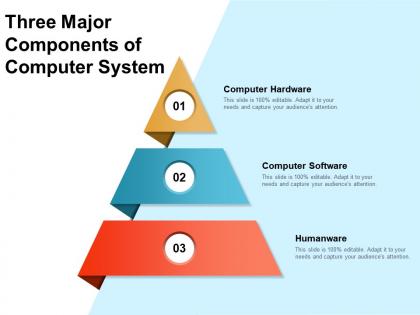
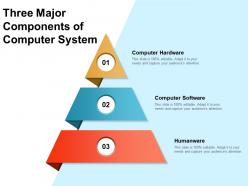
Three major components of computer system




Try Before you Buy Download Free Sample Product
 Impress Your
 Audience
 100%
100% Editable
 Save Hours
 of Time


Our Three Major Components Of Computer System are topically designed to provide an attractive backdrop to any subject. Use them to look like a presentation pro.
People who downloaded this PowerPoint presentation also viewed the following :
Three major components of computer system with all 2 slides:
Use our Three Major Components Of Computer System to effectively help you save your valuable time. They are readymade to fit into any presentation structure.
FAQs for Three major components
So basically you've got your CPU which is like the brain doing all the calculations, then RAM - that's your temporary workspace (more RAM = smoother multitasking). Storage drives hold everything permanently, and the motherboard connects it all together. Don't forget the power supply obviously, plus all your peripherals like keyboard and monitor. Honestly the analogy that helped me most was thinking of it like a workshop - each part has its role. When stuff breaks, I usually check these main components first since that's where most problems come from anyway.
So basically, your CPU is like having one really smart person who can tackle complicated stuff step by step. Meanwhile, your GPU is more like having a thousand people who aren't geniuses but can all do the same simple task at once. For everyday stuff - browsing, running programs, complex math that has to happen in order - your CPU's got you covered. But GPUs? They absolutely destroy anything that's repetitive and can be split up. Graphics, AI training, crypto mining (if you're into that). Think about it this way: ten hard math problems = CPU territory. Ten thousand easy ones = definitely GPU time.
So RAM is like your computer's short-term memory - holds all the stuff your CPU needs while you're using programs. More RAM means you can run way more apps at once without everything grinding to a halt. It's kinda like having a bigger desk when you're juggling multiple projects. Once you max out your RAM, your computer starts using the hard drive as backup memory instead, which is painfully slow and causes all that lag. Honestly, if you're consistently hitting 80%+ usage, upgrading RAM is probably the cheapest performance fix you'll find.
Dude, SSDs blow HDDs out of the water speed-wise. Flash memory means no spinning parts - it just grabs your files instantly. HDDs have to physically spin up and hunt for data, which is why your old computer took ages to boot up. Opening big files? Night and day difference. I swear multitasking actually works properly with an SSD instead of that laggy mess you get otherwise. Honestly, if you're still running an HDD as your main drive, switching to SSD will make your computer feel like you bought a whole new machine.
So basically, integrated graphics are just part of your CPU and borrow your regular RAM. Dedicated cards are their own thing with separate memory and way more muscle. Integrated stuff works totally fine for browsing, Netflix, basic work - they're actually not terrible anymore like they were years ago. Gaming though? Video editing? You're gonna want dedicated for sure. Way more horsepower. Downside is they're pricier and suck more power. What are you mainly planning to do with it? That'll tell you which way to go.
Your motherboard is basically the boss of your whole setup. It decides what CPU socket you've got, how much RAM you can cram in there, and what kind of expansion slots are available. Pretty much everything has to play by its rules. I learned this the hard way when I bought a sweet graphics card that didn't fit my PCIe slot - total waste of money. Storage connectors too, depending on what you've got. Always check your mobo specs before buying upgrades or you'll end up with expensive paperweights sitting on your desk.
Dude, don't cheap out on your PSU - it's literally what feeds everything else. Bad power supply = random crashes, reboots, and your components can't even run at full speed. I fried a graphics card once with a garbage unit, still mad about it. Clean power keeps your CPU and GPU happy without those voltage spikes that mess everything up. Get something 80+ rated from a decent brand. Oh and size it with like 20% extra headroom above what your system actually needs.
Heat kills PC parts, plain and simple. When your CPU and GPU get too hot, they automatically slow down to protect themselves - which means worse performance for you. Plus all that heat just wears everything out faster. I learned this the hard way with my old setup, honestly. Good cooling keeps your components running full speed without throttling. Your fans might run a bit more, but it's way quieter than dealing with thermal issues. Decent airflow saves you money long-term since you won't need to replace fried components. Trust me, it's worth spending a little extra upfront.
Basically, 64-bit can crunch twice as much data per cycle than 32-bit. The RAM thing is huge though - 32-bit maxes out at 4GB while 64-bit can handle like 18 billion GB (wild numbers, I know). Pretty much all new software is made for 64-bit now anyway. You'll get better performance and won't run into compatibility issues. Honestly, 32-bit is dead at this point unless you're running some ancient machine. If you're buying anything new, 64-bit is a no-brainer.
Honestly, it really depends on what you're doing with your computer. Windows eats up more resources but everything just works with it. Linux runs way faster and uses less memory - I've been impressed with how snappy it feels - but you'll be troubleshooting stuff yourself. macOS is pretty solid performance-wise, though you're stuck with their hardware obviously. Try to match what you pick to your actual workflow. Like if you're doing heavy video editing or gaming, think about how each OS handles that workload. Maybe test a few out first if you can swing it before making the jump.
So bus speed and bandwidth are basically how fast data moves around inside your computer. Think of it like traffic lanes - wider roads = more stuff can flow through at once. Your CPU, RAM, and other parts all talk to each other this way. When your system feels sluggish, mismatched speeds between components might be the problem. Like if your RAM is way faster than what your motherboard can actually use, you're wasting money honestly. Always check what speeds your mobo supports before buying RAM. Short sentences help performance. Longer ones with multiple components talking can create bottlenecks you'll definitely notice.
Honestly, your peripherals make such a huge difference in how your computer actually feels to use day-to-day. Like, a good mechanical keyboard turns typing from this annoying task into something you actually enjoy. Crappy mouse? You'll be cursing at it constantly when it doesn't track right. I'm telling you, dual monitors changed my life - sounds dramatic but it's true. Audio matters more than you'd think, especially if you're on calls all the time. Even little things like having fast external storage add up. Don't just buy the cheapest stuff - think about what you actually do on your computer and buy accordingly.
GPU first - that's where most of your money should go since it drives gaming performance. Don't go cheap there, trust me. For CPU, grab something mid-range from Intel or AMD that won't bottleneck your graphics card. 16GB RAM minimum these days, no question. SSD is a must for load times (I can't go back to spinning drives honestly). Oh and check what resolution you're planning to game at - 1440p needs way more power than 1080p. That'll help you figure out how beefy everything needs to be.
So your modem basically takes the signal from your internet provider and turns it into something your computer can actually use. Then the router spreads that connection around to all your devices - kinda like how your house's main water pipe branches out to different rooms, if that makes sense. Most people just get one box that does both jobs now, which honestly makes life easier. You can connect stuff through ethernet cables or WiFi depending on what your devices have. Oh, and don't forget to update your network drivers once in a while or you'll get random connection issues.
Quantum processors are getting crazy fast now. Also neuromorphic chips - they basically copy how our brains work, which is pretty cool. Photonic computing uses light instead of electricity, sounds sci-fi but it's happening. ARM chips are literally everywhere now, even Apple dumped Intel which honestly shocked everyone. DNA storage is wild too, you can fit insane amounts of data in like no space at all. Oh and edge computing means less relying on cloud stuff. If you're thinking about upgrading anything major soon, I'd definitely watch these areas.
No Reviews