

Zeitmanagement-Powerpoint-Präsentationsfolien





Try Before you Buy Download Free Sample Product
 Impress Your
 Audience
 100%
100% Editable
 Save Hours
 of Time


Unsere Zeitmanagement-Powerpoint-Präsentationsfolien sind thematisch gestaltet und bieten einen attraktiven Hintergrund für jedes Thema. Verwenden Sie sie, um wie ein Präsentationsprofi auszusehen.
People who downloaded this PowerPoint presentation also viewed the following :
Inhalt dieser Powerpoint-Präsentation
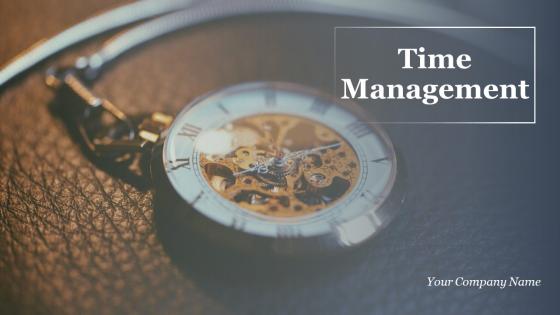
Folie 1 : Diese Folie stellt das Zeitmanagement vor. Geben Sie Ihren Firmennamen an und beginnen Sie.
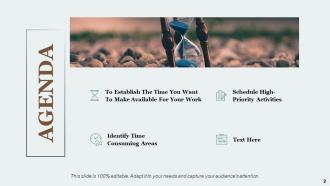
Folie 2 : Dies ist eine Agenda-Folie. Geben Sie hier Ihre Agenden an.
Folie 3 : Diese Folie zeigt den Inhalt der Präsentation.
Folie 4 : Diese Folie zeigt Identifizieren von zeitaufwändigen Bereichen mit zugehörigen Bildern und Textfeldern, um Informationen anzuzeigen.
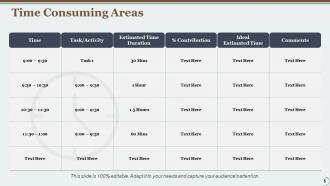
Folie 5 : Diese Folie präsentiert zeitaufwändige Bereiche in Tabellenform, um Informationen anzuzeigen.
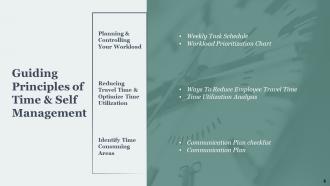
Folie 6 : Diese Folie stellt die Leitprinzipien des Zeit- und Selbstmanagements dar, mit der Planung und Kontrolle Ihrer Arbeitsbelastung, Reduzierung der Reisezeit und Optimierung der Zeitnutzung, Identifizierung zeitaufwändiger Bereiche.
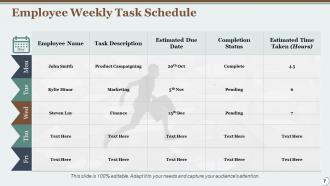
Folie 7 : Diese Folie zeigt den wöchentlichen Aufgabenplan des Mitarbeiters mit Mitarbeitername, Aufgabenbeschreibung, voraussichtlichem Fälligkeitsdatum usw.
Folie 8 : Diese Folie zeigt das Arbeitslast-Priorisierungsdiagramm mit den Kategorien DELEGIEREN, WENN MÖGLICH, DUMP, DRINGEND, NICHT DRINGEND.
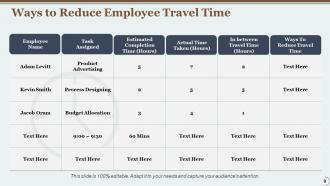
Folie 9 : Diese Folie schlägt Möglichkeiten zur Reduzierung der Reisezeit von Mitarbeitern in Tabellenform mit Kategorien wie Mitarbeitername, zugewiesene Aufgabe, tatsächlich benötigte Zeit usw. vor.
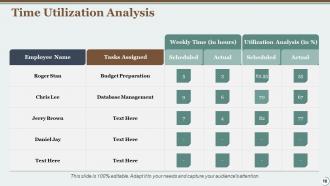
Folie 10 : Diese Folie präsentiert die Zeitnutzungsanalyse in Tabellenform mit Kategorien als zugewiesene Aufgaben, Nutzungsanalyse usw.
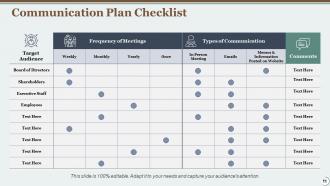
Folie 11 : Diese Folie zeigt eine Checkliste für den Kommunikationsplan, die Folgendes beschreibt: Zielgruppe, Vorstand, Aktionäre, Mitarbeiter usw.
Folie 12 : Diese Folie stellt einen Kommunikationsplan dar, der beschreibt, was, Zweck, Häufigkeit usw.
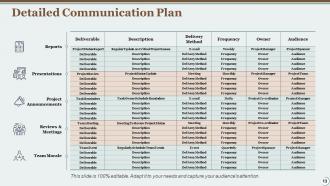
Folie 13 : Diese Folie zeigt einen detaillierten Kommunikationsplan mit Berichten, Teammoral, Projektankündigungen, Präsentationen, Bewertungen und Besprechungen.
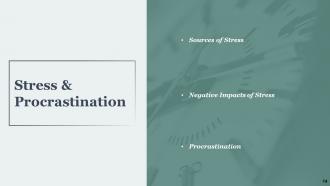
Folie 14 : Diese Folie zeigt Stressaufschub, der Stressquellen, negative Auswirkungen von Stress und Aufschub beschreibt.
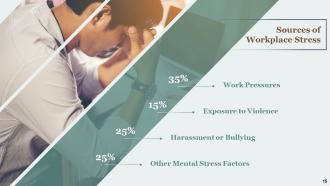
Folie 15 : Diese Folie zeigt Quellen für Stress am Arbeitsplatz, die beschrieben werden – Arbeitsdruck, Gewaltaussetzung, Belästigung oder Mobbing, andere psychische Stressfaktoren.
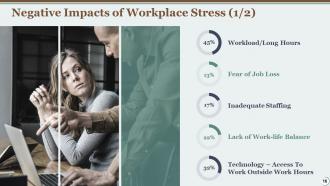
Folie 16 : Diese Folie zeigt die negativen Auswirkungen von Stress am Arbeitsplatz und beschreibt: Arbeitsbelastung/lange Arbeitszeiten, Angst vor dem Verlust des Arbeitsplatzes, unzureichende Personalausstattung, fehlende Work-Life-Balance, Technologie – Zugang zu Arbeit außerhalb der Arbeitszeiten.
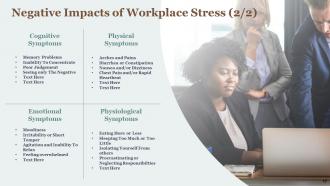
Folie 17 : Dies ist eine weitere Folie über die negativen Auswirkungen von Stress am Arbeitsplatz, die kognitive Symptome, körperliche Symptome, emotionale Symptome und physiologische Symptome beschreibt.
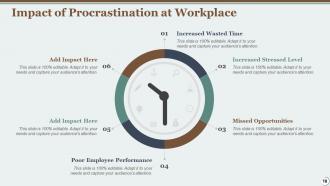
Folie 18 : Diese Folie zeigt die Auswirkungen von Prokrastination am Arbeitsplatz, die Folgendes umfassen: Erhöhte Zeitverschwendung, verpasste Gelegenheiten, erhöhtes Stresslevel, schlechte Mitarbeiterleistung usw.
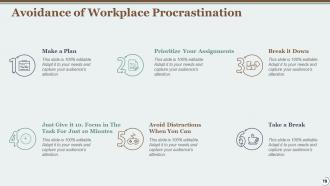
Folie 19 : Diese Folie beschreibt die Vermeidung von Aufschiebung am Arbeitsplatz – einen Plan erstellen, aufschlüsseln, Ihre Aufgaben priorisieren, eine Pause einlegen, Ablenkungen vermeiden, wenn Sie können, geben Sie einfach 10. Konzentrieren Sie sich nur 10 Minuten auf die Aufgabe.
Folie 20 : Diese Folie zeigt die Arbeitsplatzpause mit zugehörigen Bildern und Textfeldern zur Anzeige von Informationen.
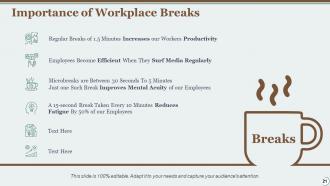
Folie 21 : Diese Folie zeigt die Bedeutung von Pausen am Arbeitsplatz mit Bildern und Textfeldern.
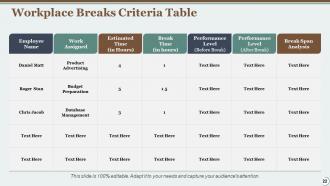
Folie 22 : Diese Folie zeigt die Kriterientabelle für Arbeitspausen mit Kategorien wie Mitarbeitername, zugewiesene Arbeit, geschätzte Zeit, Leistungsniveau usw.
Folie 23 : Diese Folie zeigt die Priorisierung der Arbeitsbelastung und der wichtigsten Aufgaben, die die Tabelle der Schlüsselzuweisungsaufgaben, der Prioritätsaufgabentabelle usw. beschreiben.
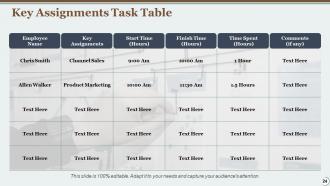
Folie 24 : Diese Folie präsentiert die Aufgabentabelle der Tastenzuweisungen mit Kategorien wie Mitarbeitername, Tastenzuweisungen, Startzeit, Endzeit usw.
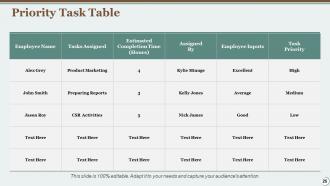
Folie 25 : Diese Folie zeigt die Prioritätsaufgabentabelle mit Kategorien wie zugewiesene Aufgaben, geschätzte Fertigstellungszeit, Mitarbeitereingaben usw.
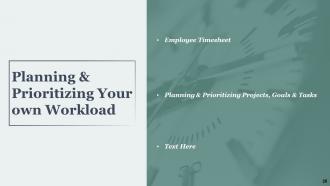
Folie 26 : Diese Folie stellt die Planung und Priorisierung Ihrer eigenen Arbeitsbelastung dar und beschreibt - Arbeitszeittabelle der Mitarbeiter, Planung und Priorisierung von Projekten, Zielen und Aufgaben usw.
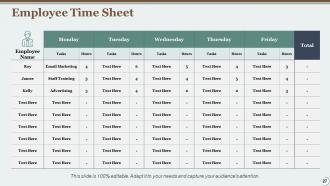
Folie 27 : Diese Folie zeigt das Arbeitszeitblatt der Mitarbeiter in Tabellenform mit zugehörigem Text.
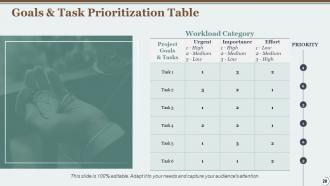
Folie 28 : Diese Folie zeigt eine Tabelle zur Priorisierung von Zielen und Aufgaben mit Kategorien wie Projektziele, Wichtigkeit, Aufwand usw.
Folie 29 : Diese Folie zeigt die Beschreibung der Aufgabenzuweisung und -bewertung - Teamfähigkeitsmatrix, teambasierte Bewertung, Bewertungsdiagramm für das Zeitmanagement der Mitarbeiter.
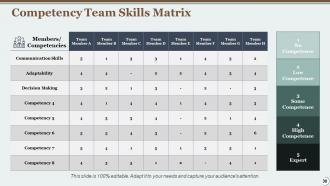
Folie 30 : Diese Folie zeigt die Kompetenz-Team-Skills-Matrix mit Mitgliedern, Kommunikationsfähigkeiten, Anpassungsfähigkeit, Entscheidungsfindung usw.
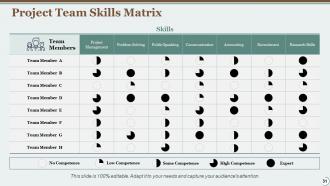
Folie 31 : Diese Folie stellt die Projektteam-Skills-Matrix mit Teammitgliedern, Projektmanagement, Problemlösung, öffentliches Reden usw. dar.
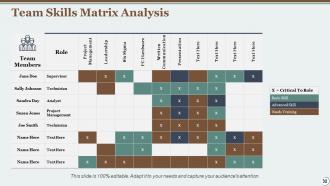
Folie 32 : Diese Folie zeigt die Teamfähigkeits-Matrix-Analyse mit Teammitgliedern, Rolle, Führung, Präsentation usw.
Folie 33 : Diese Folie zeigt eine Tabelle mit dem Mitarbeiter-Aufgabenstatus mit Status, Aktivität, verantwortlicher Person und Fälligkeitsdatum.
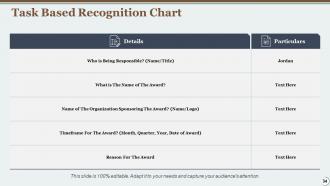
Folie 34 : Diese Folie präsentiert ein aufgabenbasiertes Erkennungsdiagramm mit zugehörigen Textfeldern.
Folie 35 : Diese Folie zeigt das Bewertungsdiagramm für das Zeitmanagement der Mitarbeiter in Tabellenform mit Textfeldern zur Anzeige von Informationen.
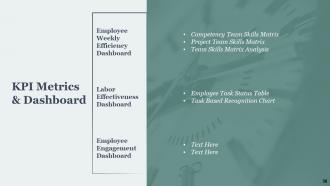
Folie 36 : Diese Folie stellt das KPI-Metrik-Dashboard dar, das das Dashboard zur wöchentlichen Effizienz der Mitarbeiter, das Dashboard zur Arbeitseffizienz und das Dashboard zum Mitarbeiterengagement beschreibt.
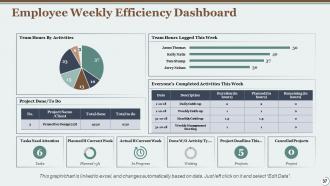
Folie 37 : Diese Folie zeigt das wöchentliche Mitarbeitereffizienz-Dashboard mit Donut-Diagramm, Tortendiagramm, Balkendiagramm und Tabelle zur Anzeige von Informationen.
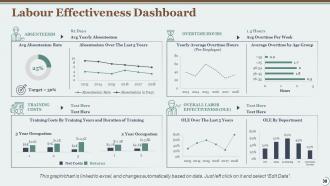
Folie 38 : Diese Folie zeigt ein Dashboard zur Arbeitseffektivität mit Balken- und Liniendiagrammen zur Anzeige von Informationen.
Folie 39 : Diese Folie zeigt ein Dashboard für das Mitarbeiterengagement, das technische Fähigkeiten, persönliches Wachstum, Beziehung zu Managern, Beziehung zu Kollegen beschreibt.
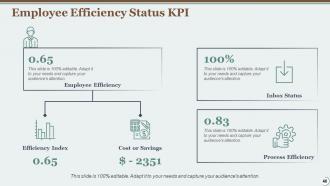
Folie 40 : Diese Folie zeigt den KPI für den Mitarbeitereffizienzstatus an, der beschreibt: Effizienzindex, Kosten oder Einsparungen, Mitarbeitereffizienz, Prozesseffizienz, Posteingangsstatus.
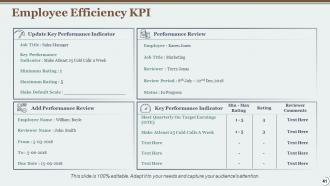
Folie 41 : Diese Folie stellt den KPI für die Mitarbeitereffizienz mit Key Performance Indicators und Performance Review etc. dar.
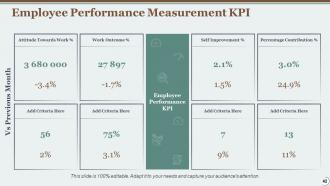
Folie 42 : Diese Folie zeigt KPIs zur Leistungsmessung der Mitarbeiter, die den prozentualen Beitrag, die Einstellung zur Arbeit, das Arbeitsergebnis, die Selbstverbesserung usw. beschreiben.
Folie 43 : Diese Folie zeigt Zeitmanagement-Symbole an.
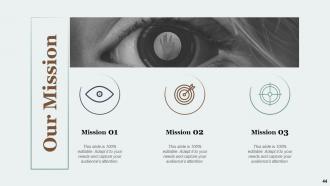
Folie 44 : Dies ist die Folie „Unsere Mission“ mit den dazugehörigen Bildern und Texten.
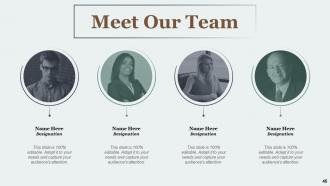
Folie 45 : Dies ist die Folie „Meet unser Team“ mit Namen und Bezeichnung.
Folie 46 : Hier geht es um unsere Firmenfolie, um Firmenspezifikationen usw. zu zeigen.
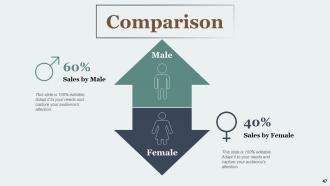
Folie 47 : Dies ist eine Vergleichsfolie zum Vergleich zwischen Waren, Einheiten usw.
Folie 48 : Dies ist eine Timeline-Folie. Zeigen Sie hier Informationen zum Zeitraum an.
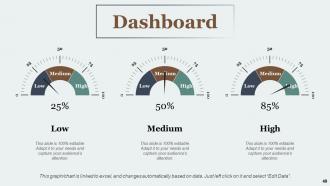
Folie 49 : Dies ist eine Dashboard-Folie mit Textfeldern zum Anzeigen von Informationen.
Folie 50 : Dies ist eine Finanzfolie. Finanzbezogenes Gestüt hier anzeigen.
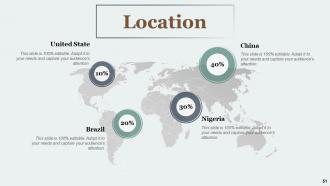
Folie 51 : Dies ist eine Standortfolie mit Länderkarten, um Daten zu verschiedenen Standorten anzuzeigen.
Folie 52 : Diese Folie zeigt Post-it-Notizen an. Veröffentlichen Sie hier Ihre wichtigen Notizen.
Folie 53 : Dies ist eine Venn-Folie mit Textfeldern.
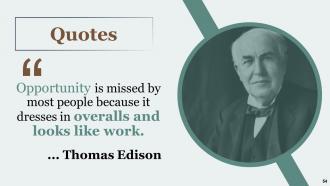
Folie 54 : Dies ist eine Zitate-Folie, um Botschaften, Überzeugungen usw.
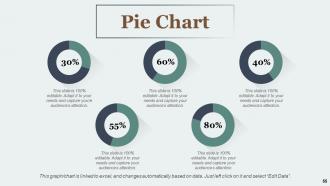
Folie 55 : Diese Folie zeigt ein Kreisdiagramm mit Daten in Prozent.
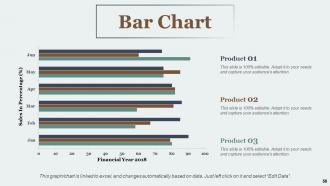
Folie 56 : Diese Folie präsentiert ein Balkendiagramm mit drei Produktvergleichen.
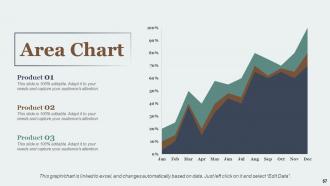
Folie 57 : Diese Folie zeigt ein Flächendiagramm mit drei Produktvergleichen an.
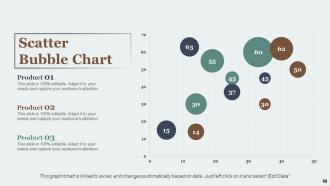
Folie 58 : Diese Folie stellt das Streublasendiagramm dar. Verwenden Sie es gemäß den Anforderungen.
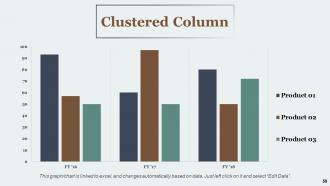
Folie 59 : Diese Folie zeigt ein Clustered Column-Diagramm. Sie können Daten nach Bedarf hinzufügen oder bearbeiten.
Folie 60 : Dies ist eine Dankesfolie mit Adresse, Kontaktnummern und E-Mail-Adresse.
Zeitmanagement Powerpoint-Präsentationsfolien mit allen 60 Folien:
Nutzen Sie unsere Powerpoint-Präsentationsfolien zum Zeitmanagement, um Ihre wertvolle Zeit effektiv zu sparen. Sie sind vorgefertigt und passen sich jeder Präsentationsstruktur an.








FAQs for Time Management
Honestly, start by tracking your time for a week - you'll probably hate what you discover lol. After that, focus on three things: figure out your priorities, block off chunks of time for specific work (way better than random to-do lists), and get comfortable saying no to stuff that doesn't matter. Most people work best in the mornings when their energy's high. I'm weird and prefer late nights, but whatever works for you. Oh, and boundaries around meetings are crucial - they'll eat your whole day if you let them.
Honestly, templates are lifesavers. You're not sitting there staring at blank slides anymore - just drop your content into the timeline, deliverables, milestone sections. Formatting used to eat up half my day, which was ridiculous. They actually make you think through everything upfront too, so you'll catch scheduling issues or resource problems before they bite you. Your stakeholders get the same clean format each time. Find one that fits how your projects usually run and tweak it once. Then you're set.
Okay so I've been using the Eisenhower Matrix lately - basically you sort stuff by urgent vs important. Game changer honestly. Also try time-boxing your biggest tasks first thing in the morning. There's this 1-3-5 rule too: pick one big thing, three medium tasks, five small ones for your day. Works pretty well most days (though sometimes I totally ignore my own system lol). For everything else, I just ask myself "what actually happens if this doesn't get done today?" Usually the answer is... not much. Write it all down first, then be ruthless about what actually matters vs what just feels urgent.
Dude, visual aids are a game changer for time management. Like, instead of staring at a boring spreadsheet, you can actually *see* where your hours disappear. Pie charts showing planned vs. actual time? Mind-blowing stuff. Your brain just processes visual info way faster than text - probably some evolutionary thing or whatever. I made a simple timeline for my last project and immediately spotted where I was wasting time on stupid stuff. Graphs make it super obvious when you're overcommitting or missing gaps in your schedule. Honestly wish I'd started doing this years ago.
Honestly, tech is like having a personal assistant that doesn't judge you for procrastinating. Start with just one app - I'd go with a basic calendar or task manager. Don't download every productivity app in existence (been there, regretted that). The good stuff happens when you automate the mindless tasks like scheduling and reminders. Website blockers are clutch for staying focused. My time-tracking app has become weirdly addictive - probably says something about my personality lol. Project management tools handle all the boring organizational stuff so your brain can actually do the real work instead of remembering random details.
Honestly, SMART goals saved my butt with time management. You know how you used to set goals like "get better at presentations"? Yeah, that was my problem too - way too vague. Now I write stuff like "practice one 10-minute presentation weekly for the next month." Makes all the difference because suddenly you know exactly what to block out in your calendar. The measurable and time-bound parts are game changers. Instead of just hoping things work out, you're actually estimating realistic timeframes. Take whatever big goal you're struggling with and try breaking it down SMART-style - you'll instantly see what time commitment you're really looking at.
Honestly, I'd start with something simple like Toggl or just a basic notebook. Apps like RescueTime are cool because they track everything automatically, but sometimes it feels weird knowing it's watching your every move, you know? Manual logging works too - just write down what you did every hour or so. Oh, and the Pomodoro thing is pretty solid since you're naturally checking in every 25 minutes anyway. Pick one method and stick with it for a week. Then look back at your data to see where all your time actually went. You'll probably be surprised by what you find!
Honestly, delegation is like having superpowers for your workload. You get to hand off stuff to people who are probably way better at it than you anyway. Start with smaller, less critical tasks first - builds trust without the stress if something goes sideways. The trick is being super clear about what you want and when you need it. Otherwise you'll end up micromanaging the whole thing, which defeats the point entirely. Once you nail it though, you're free to tackle the big-picture stuff that actually matters. Your team gets to shine at what they're good at, and you don't burn out trying to do everything yourself.
Oh man, I'm literally the worst at this but here's what I've learned: Stop saying yes to everything first. Seriously, overcommitting is like relationship poison but for your calendar. Write down 3 main things each morning before diving into emails - sounds basic but it actually works. Task switching kills me every time. Instead of bouncing around, try batching similar stuff together. Like, do all your calls back-to-back instead of scattered throughout the day. And honestly? Stop checking Slack every two seconds. People survived before instant notifications, we'll be fine waiting an hour to respond to non-urgent garbage.
Start with just 2-3 focused 25-minute blocks for your biggest tasks. Morning works best for me since I'm basically useless after 2pm lol. Put these in your calendar like actual meetings, then use the 5-minute breaks for coffee runs or stretching. Phone goes on silent - this part's crucial. Close those random tabs you don't need. After four cycles, take a longer break (15-30 minutes). Don't go crazy at first though. Begin with one or two sessions daily, then add more once it feels natural. The whole thing falls apart if you try doing too much right away.
Ugh, procrastination is the worst for time management - you end up with this massive pile of stuff to do and everything becomes urgent. I swear I've spent entire mornings organizing my bookshelf instead of starting actual work. What helps me is chopping big projects into tiny pieces and doing them early when I'm not brain-dead yet. Also set mini-deadlines for yourself, not just the final one. Honestly, the hardest part is just starting. Even doing like 10 minutes breaks the spell somehow and you'll usually keep going.
Okay so first thing - write down all the stuff you absolutely can't move, work and personal. Then treat your personal time like actual appointments. I'm serious, put "gym" or "dinner with mom" on your calendar like it's a client call. You'll need wiggle room though because let's be honest, we're all terrible at estimating how long things take. Leave gaps between stuff so when work gets crazy you're not completely screwed. Time-blocking saved my sanity but it took me like two weeks to figure out what actually worked for my schedule.
Time-blocking seriously changed everything for me. You basically assign chunks of your day to specific tasks instead of just winging it. Sounds boring, I know, but it actually cuts way down on that mental exhaustion from constantly deciding what to do next. Plus you're not jumping between totally different types of work all day. I was skeptical at first too - thought it'd feel too scheduled. But honestly? It's less stressful because you can actually see when stuff will get done. Try just blocking your mornings for focused work first and see how it goes.
Dude, mindfulness is honestly a game-changer for time management. You start catching yourself when you're doom-scrolling Instagram instead of doing actual work. It helps you focus on one thing at a time rather than juggling five tasks badly. But here's the real magic – you'll pause before automatically saying yes to random requests. Like, you actually think "does this matter to me?" Pretty revolutionary, I know. Oh, and try doing a quick breathing thing before you look at your calendar each morning. Sounds weird but it works.
Looking back at your week shows you the gap between what you think you're doing vs reality. I thought I was amazing at time estimates until I actually started tracking - wow, was I wrong! You'll catch stuff like tasks that always run long or your peak energy hours. Friday check-ins work great - just 10 minutes to spot what went well and what flopped. Then you can ditch the time-wasters and focus more on what's actually working. It's honestly kind of addictive once you start seeing the patterns.
-
Appreciate the research and its presentable format.
-
Appreciate the research and its presentable format.
-
Awesome
-
Nice presentation
-
Nice presentation