

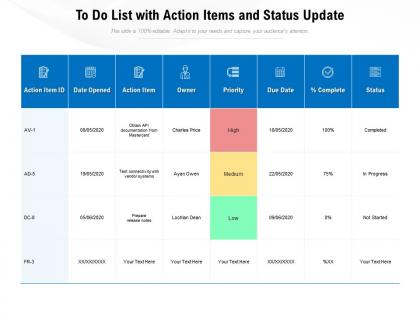
To do list with action items and status update




Try Before you Buy Download Free Sample Product
 Impress Your
 Audience
 100%
100% Editable
 Save Hours
 of Time


Our To Do List With Action Items And Status Update are topically designed to provide an attractive backdrop to any subject. Use them to look like a presentation pro.
People who downloaded this PowerPoint presentation also viewed the following :
To do list with action items and status update with all 2 slides:
Use our To Do List With Action Items And Status Update to effectively help you save your valuable time. They are readymade to fit into any presentation structure.
FAQs for To do list with action items
Honestly, just focus on three things: figure out what's actually urgent, block out time for it, and break big stuff down so it's not overwhelming. I always do my hardest work in the morning when I'm not brain-dead yet. Pick whatever system doesn't annoy you - could be your phone, could be a random notebook. Give yourself extra time because literally everything takes longer than you think it will. Oh, and don't try to be perfect right away. Just test one approach for a week before you decide it sucks and move on to something else.
Honestly, these tools are game-changers for keeping everyone on the same page. No more "wait, who's doing what?" confusion or digging through endless email chains to find that one deadline. Everything's right there - tasks, due dates, file uploads, the works. Real-time updates mean you actually know if stuff's getting done without having to bug people constantly. My team was skeptical at first (classic), but now we can't function without it. Just pick something simple like Trello or Asana and stick with it. The hardest part is getting everyone to use it consistently, but once they do? Projects actually flow instead of falling apart.
Honestly, good prioritization saves your sanity. I learned this the hard way after missing way too many deadlines! You'll stop feeling like you're drowning in tasks when you figure out what actually needs your attention first. What works for me: rank everything by urgent vs important each morning. Sounds boring but it's literally a lifesaver. Otherwise you end up doing random busy work while the big stuff piles up. The whole point is focusing your energy where it counts most. Short bursts on high-impact tasks beat spending hours on whatever feels easiest that day.
Honestly, just pick one thing to track for a couple weeks and see what happens. Completion rates are pretty telling - like, are you actually finishing your daily stuff or just moving things around? Missing deadlines is another red flag (been there way too many times lol). Time tracking can be eye-opening too. Tasks taking forever usually means you're either terrible at estimating or getting sucked into distractions. But here's the thing - the best indicator is probably just how you feel. Less frantic? More on top of things? That's when you know it's working. Don't overthink it.
Ugh, the worst thing you can do is overcommit and pretend your to-do list is endless. I learned this the hard way! Limit yourself to 3 big tasks per day max. Don't fall into that trap of doing easy stuff first just to feel productive - hit the important things when you're fresh. Also, stop spending forever organizing your tasks instead of actually doing them (guilty as charged). Capture everything in one simple system so nothing gets forgotten. But honestly? Most people fail because they don't set realistic limits on what they can actually finish in a day.
Honestly, just pick one good tool and stick with it - Asana or Trello work great. Getting real-time updates on what everyone's doing is huge when you're all remote. Set up automated notifications so stuff doesn't get forgotten (trust me on this one). The dashboards actually help you spot problems early instead of scrambling later. I tried juggling like three different apps at first and it was a mess. Way better to get your whole team consistently using the same platform. You won't have to bug people constantly asking "hey, where are we on that project?"
Ugh, procrastination is the worst but I've figured out some stuff that actually works. Chop big tasks into ridiculously small pieces - like "write subject line" not "send update email." There's this 2-minute rule where if something takes under 2 minutes, you just do it right away. Game changer honestly. I'm obsessed with time-blocking too - giving tasks actual time slots instead of random to-do lists. Starting with the easiest part usually tricks my brain into momentum, even though it feels backwards. Oh and Pomodoro timers are clutch for staying focused. Just pick one thing and try it this week!
Honestly, just map your daily stuff to whatever project framework you're already using. Agile? Turn those tasks into user stories or sprint items. Waterfall's more about lining things up with project phases. I'm obsessed with Kanban boards though - seeing everything flow through visually just makes sense to me. The trick is connecting your task updates back to the main project timeline. Otherwise things get lost and you'll hate yourself later. Figure out your framework first, then grab a tool that actually links both levels together smoothly.
Honestly, you've gotta be crystal clear about what you want and when. Don't just pick whoever's free - match the person to their actual skills and workload. I made that mistake before, trust me. Tell them WHY the task matters, not just what to do. People care more when they get the bigger picture. Set deadlines with check-in points, then back off and let them work. Nobody likes being micromanaged, you know? The biggest thing though - make sure they feel comfortable asking questions early instead of panicking at the last minute.
Honestly, visual stuff just makes way more sense than keeping everything in your head. Gantt charts are clutch for seeing dependencies - you know, when one task has to finish before another can start. I'm weirdly addicted to Kanban boards though, especially dragging things into the "Done" column (so satisfying lol). Both help you catch problems early instead of scrambling later. Start simple with three columns: To Do, In Progress, Done. You'll instantly spot where things are getting backed up and your team won't be confused about what's priority.
Honestly, checking in on your tasks regularly is a game-changer. You'll catch problems before they blow up into disasters. Priorities change all the time too (ugh, don't even get me started on how often my boss shifts directions), so these reviews help you figure out what actually matters right now. Bottlenecks become obvious. You can shuffle work around when needed. There's some stat about projects being 25% more likely to finish on time with regular reviews - sounds about right from my experience. Just do like 15 minutes weekly to see what's working and what isn't.
Honestly, good task management is a game changer for work-life balance. You'll actually finish work at a decent hour instead of staying late because you're scrambling. I always block my hardest tasks first thing in the morning - gets them out of the way and frees up mental space. When you can see everything organized and prioritized, there's way less of that "I'm drowning in stuff" feeling. You know what I mean? Like, you can actually point to what you got done instead of just feeling busy and stressed. It stops work from bleeding into your personal time, which... yeah, that's huge.
Honestly, templates are a game changer. Instead of reinventing the wheel every single time, you've got your structure ready to go. Your team stays on the same page too, which cuts down on so much confusion. I used to forget random steps all the time when I was swamped - templates fix that. Quality stays solid because you're not scrambling to remember what you missed. Oh, and they're perfect for onboarding since new people can just follow the process. I'd start with whatever project type you do most often, then expand from there once you see how much time it saves.
Honestly, the best task management systems just work with how your brain already functions. Like, if you're super visual, go for Kanban boards. List people should stick with simple to-dos. I'm totally the type who needs subtasks broken down everywhere (probably overthinking it, but whatever). First, figure out what drives you - are you all about deadlines, or do you work better when you've got energy? Maybe you're priority-focused? Then find tools that let you tweak notifications, categories, and how you handle due dates. Calendar blocking works great for some people too. The whole point is matching the system to your actual workflow instead of forcing yourself into something that feels wrong.
Honestly, AI task stuff is everywhere right now - tools that actually figure out your work patterns and tell you what to do next. Pretty wild. Since everyone's doing hybrid work, there's way more focus on handing tasks back and forth between teammates smoothly. Integration is huge too - your task app connects to literally every other thing you use now. Time-blocking used to be this fancy productivity hack, but it's just built into everything. Oh, and energy-based scheduling is getting popular (scheduling hard stuff when you're actually awake, basically). I'd mess around with AI features in whatever you're already using before jumping ship to something totally new.
No Reviews