

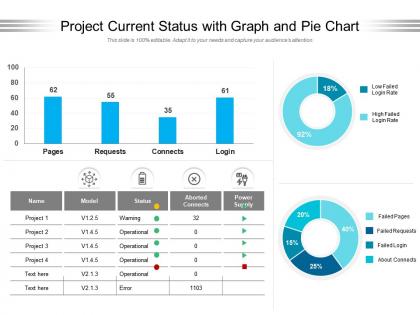
Project current status with graph and pie chart




Try Before you Buy Download Free Sample Product
 Impress Your
 Audience
 100%
100% Editable
 Save Hours
 of Time


Our Project Current Status With Graph And Pie Chart are topically designed to provide an attractive backdrop to any subject. Use them to look like a presentation pro.
People who downloaded this PowerPoint presentation also viewed the following :
Project current status with graph and pie chart with all 2 slides:
Use our Project Current Status With Graph And Pie Chart to effectively help you save your valuable time. They are readymade to fit into any presentation structure.
FAQs for Project current status with graph
So for timeline stuff, Gantt charts are clutch. Kanban boards work really well when you need to see workflow - like what's moving where. If you're doing agile sprints, burndown charts are solid for tracking progress. Dashboard views with progress bars are honestly what most executives want anyway (they eat up those colorful summaries). Don't try cramming everything into one view though - sometimes mixing techniques works better. I'd start by asking what your audience actually cares about seeing, then just pick whatever makes that info clearest. Way easier than overthinking it.
Honestly, color coding is a game changer because your eyes just grab colors way faster than reading status updates. Red for anything blocked or overdue, yellow when stuff's getting risky, green for smooth sailing. Traffic light colors are your friend - people get it instantly. I sometimes throw in blue for done items too. The trick is picking your colors once and never changing them, otherwise your team will be confused every meeting. Trust me on this one - consistency beats creativity here. Your future self will thank you when you can scan a whole dashboard in like 3 seconds.
Oh man, if you need dynamic project visuals, Tableau or Power BI are solid choices. Google Data Studio works too if budget's tight. They all connect straight to your data and update themselves - way better than manually updating charts every week (been there, it sucks). Actually, check what you're already using first. Monday.com and Asana have decent dashboards built in that might do the trick. No point buying new software if you don't need to, right? Start with whatever licenses you already have, then see if you need something fancier later.
Dude, Gantt charts are such a game changer for this stuff. They basically translate all your project chaos into something visual that anyone can actually understand - timelines, who's doing what, dependencies, the works. No more endless meetings where everyone's like "wait, where are we again?" The visual thing really helps, especially with stakeholders who aren't super technical. Plus you can spot potential delays before they screw everything up. I'd update yours weekly (maybe Fridays?) and just share it during your regular check-ins. Trust me, it'll save your sanity.
Okay so infographics are perfect for project milestones because nobody wants to read through dense status reports. You can show your timeline visually, highlight wins, and make progress super obvious at first glance. Executives love them since they can digest everything in like 10 seconds. Color-code different project phases and use simple icons - honestly, the less text the better. When I started doing this, stakeholders actually started paying attention to my updates instead of just skimming emails. Visual format just clicks for people way better than spreadsheets ever will. Trust me, it'll save you so much time explaining where things stand.
Dude, try turning your status updates into actual stories instead of just dumping charts on people. Walk them through what happened - like, why did these numbers change? What does it mean going forward? I'm obsessed with the problem-solution-outcome thing lately. Show the challenge first, then how your team tackled it (with data obviously), then the results. Way more engaging than bullet points, trust me. Oh and frame it as "here's what the data's telling us" rather than just rattling off completed tasks. People actually pay attention when there's a narrative thread they can follow.
Start with timeline, budget burn, and milestone hits - those are non-negotiable. Resource utilization matters tons if you're spinning multiple plates. Risk indicators and blockers will save your ass since they derail projects fast. Quality stuff like defect rates depends on what you're building, obviously. Honestly, the visual piece is where most people screw up - stakeholders need to get the health status instantly, not hunt for it. Stick to maybe 5 key metrics tops. Any more and people's eyes glaze over. Make sure whatever you pick actually helps you make calls, not just pretty charts.
Dude, knowing your audience is literally everything. Executives want those high-level dashboards - just show them KPIs and risks so they can make quick calls. Technical people? They actually want all the messy details, timelines, bottlenecks they can fix. Mixed groups are honestly the absolute worst to present to, but you can do those layered visuals that start broad then get specific. Oh, and people from other departments need way more context than your own team does - they don't live in your world every day. Just ask who'll be there beforehand and match your slides to what they actually need to see.
Honestly, data overload is gonna be your biggest headache. Stakeholders always want to see EVERYTHING, but that just makes a messy dashboard nobody can read. Figure out what decisions they actually need to make first, then only show those metrics. Also - and this one bit me hard before - get your data sources straight from day one. Define what everything means and how often it updates, or you'll be explaining discrepancies forever. Go with high-level views that let people drill down instead of shoving it all on one screen. For every chart, literally ask yourself "so what?" Works every time.
Honestly, real-time dashboards are a game changer because you can see problems as they're happening instead of finding out a week later when it's too late. Bottlenecks become obvious immediately. Your team can't really hide behind vague "it's in progress" updates when everyone sees the red status - which sounds harsh but actually keeps people motivated. I'd say pick something that connects with whatever you're already using (don't make people update two systems, they'll hate you). Try it on just one project first though. You'll figure out pretty quickly which metrics actually help vs. just look impressive to executives.
Honestly, layered dashboards are the way to go here. Start simple - executives just want those red/yellow/green status lights and maybe 3-4 key numbers they can glance at. Then build in drill-down options so your tech people can dig into the detailed charts and timelines when they need to troubleshoot stuff. Color-coding works great since nobody has to think about it. Keep the jargon off your main screens but tuck technical details into tooltips - that way both groups get what they actually care about. Oh, and definitely test with both audiences first. You'll catch weird assumptions you didn't even know you had.
Honestly, dashboards are a lifesaver once you get the hang of them. They pull all your project stuff into one place so you're not digging through random spreadsheets or bugging people for updates. During meetings, you just show the dashboard and boom - everyone knows what's happening. Progress, roadblocks, deadlines - it's all right there. The best part? Stakeholders can check things themselves instead of constantly texting you "hey what's the status on X?" Start simple though - maybe track 3 or 4 key things first. I learned that the hard way by trying to track everything at once.
Dude, visuals are a game changer for project reviews. Like seriously, I've watched executives who normally check their phones suddenly perk up when you show them a risk heatmap instead of another spreadsheet. People process visual stuff so much faster - they get your project status right away instead of trying to decode a bunch of numbers. Charts, dashboards, progress bars - whatever works. Just pick one solid visual for each main point you're making. Trust me, your meetings will go from everyone looking bored to actually having real conversations about strategy. It's honestly kind of wild how big the difference is.
Pie charts are great when your budget pieces add up to 100% - like seeing how much goes to staff vs equipment at a glance. For comparing stuff across different projects or months though? Bar graphs win every time. I'm totally guilty of using pie charts too much just because they're prettier, but honestly bars show trends way better. Quick rule: pie when things need to total something, bars when you're just comparing random amounts. Oh and start with whatever makes sense to your brain first - you can always switch later if it looks weird.
Dude, those old-school project reports are such a pain - just endless spreadsheets and documents that are outdated before you even open them. Real-time dashboards are a game changer though. You get interactive charts, progress bars, color-coded warnings that actually make sense instantly. Nobody wants to wade through 15 pages of status updates anymore (I mean, who has that kind of time?). Your stakeholders can spot problems and track milestones right away. Honestly, once you try a visual dashboard, you'll wonder why you ever bothered with those boring reports. Way less explaining, way more doing.
No Reviews