


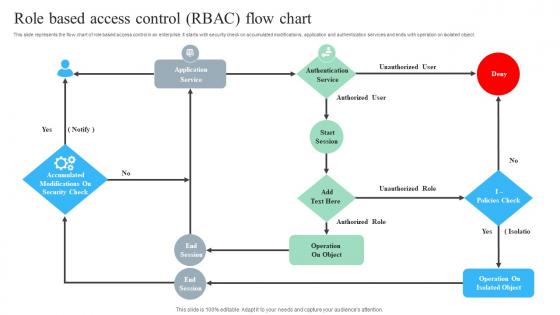
Role Based Access Control RBAC Flow Chart




Try Before you Buy Download Free Sample Product
 Impress Your
 Audience
 100%
100% Editable
 Save Hours
 of Time


This slide represents the flow chart of role based access control in an enterprise. It starts with security check on accumulated modifications, application and authentication services and ends with operation on isolated object.
People who downloaded this PowerPoint presentation also viewed the following :
Role Based Access Control RBAC Flow Chart with all 6 slides:
Use our Role Based Access Control RBAC Flow Chart to effectively help you save your valuable time. They are readymade to fit into any presentation structure.





FAQs for Role Based Access Control
So basically you create roles instead of giving permissions to people directly. Like, don't give Sarah access to payroll - make an "Accountant" role with those permissions and put Sarah in it. Think of it like organizing playlists by mood instead of just dumping all your songs together. Way less of a headache later. Users get whatever their role needs, nothing more. Honestly, this approach saves you so much time when you're dealing with lots of people. Just start by figuring out what the main job roles are at your company first.
RBAC is basically giving people just the permissions they need for their actual job. No more, no less. You create roles like "HR Manager" or "Sales Rep" with specific access built in, instead of everyone having random permissions everywhere. When someone switches teams or quits, you just change their role instead of tracking down every single thing they could access - which honestly saves so much headache. The best part? It cuts down on insider threats big time. I'd start by looking at what each role on your team actually needs access to. You'll probably be shocked at how much unnecessary access people currently have floating around.
So you've got four main pieces: users, roles, permissions, and sessions. Think of it like organizing office keys - instead of giving everyone keys to every single door, you make key rings for different job types. Way less chaos. Users are just your people. Roles group job functions together (admin, editor, whatever). Permissions say what actions someone can actually do. Sessions handle the logged-in stuff. Honestly, I'd start by figuring out what user types you already have and what they really need access to. Makes designing the whole role structure way easier. Don't overthink it at first - you can always add complexity later.
Yeah, RBAC totally works with other models! Most places I've seen actually stack it with ABAC when they need more specific rules - like checking location or time of day. High-security spots often throw MAC into the mix too. RBAC's great for the basic "who gets what role" stuff, but honestly? Sometimes you need that extra context. Like, maybe someone can access payroll data but only during business hours from the office. Start by figuring out where your current RBAC setup feels too rigid - that'll tell you what else to add on top.
So RBAC roles are like permission bundles you slap on users instead of setting up each tiny permission manually. Picture it as job titles - your "Marketing Manager" role comes loaded with campaign editing, analytics access, all that stuff. Way easier than micromanaging every single person's permissions (learned that the hard way lol). New hire? Just assign their role and boom, they're set. Need to change what marketers can access? Update the role once instead of clicking through fifty different user profiles. Honestly saves so much time it's not even funny.
Honestly, role creep is gonna be your biggest headache - people just collect permissions like Pokemon cards over time. Defining granular roles gets messy super quick too. Your first attempt at role design will suck (trust me, happens to literally everyone), so just accept you'll need multiple rounds. Users will whine when you take away access they're "used to" even if they never actually used it. Oh, and if you're dealing with legacy systems? The technical migration part is absolutely brutal. Start broad with simple roles, then get more specific later. Also budget way more time for training people than you think you need.
Honestly, RBAC is a lifesaver for compliance stuff. Auditors eat up that clear paper trail showing who accessed what and when. You know how GDPR and HIPAA require least privilege access? RBAC handles that automatically by giving people permissions based on their actual job role. No more random "can I get admin access" requests from everyone. When someone switches teams or quits, you just flip their role and their access updates instantly. I learned this the hard way - but if you set up your roles right from day one, audits become way less stressful.
So RBAC is clutch when you need everything centralized and consistent. With DAC, users can just hand out access to their stuff - total nightmare to manage. But roles? You set them up once and you're done. Works great for big companies or anywhere compliance matters (banks, hospitals, government). Employee turnover becomes way less painful too. Someone leaves? Revoke the role. New hire? Boom, assign them to existing roles instead of figuring out permissions from scratch. The audit trail is honestly the best part - you can actually see who has access and why. I'd start by looking at your current setup and see if it maps to clear role groups.
Ugh, role explosion is the worst. So here's what works: build roles like a pyramid where the top ones automatically inherit permissions from below. Don't make a unique role for every single person - I learned that the hard way. Group people by what they actually do, not their job titles. Templates help for common stuff. Oh and you'll want to audit regularly because things get messy fast. Map out how your org really works first, then build roles around that. Way easier than trying to fit roles to individuals.
Think of auditing as your RBAC insurance policy - it tracks who's doing what and when. You'll catch permission creep (people collect roles like Pokemon cards but never give up the old ones), spot weird access patterns, and stay compliant. Honestly, most people hate doing it but it's what saves you from awkward conversations about data breaches later. Set up automated logging and do quarterly role reviews. Short, boring sessions beat long, panicked damage control sessions every time.
Start with role hierarchies - they're lifesavers for scaling without going crazy. Parent roles automatically push permissions down to child roles, so new teams don't mean rebuilding everything. Get automated provisioning tools that assign roles based on department or job title. Trust me, manual assignment becomes a nightmare quickly! Quarterly role audits are huge - clean up dead permissions and merge similar roles. Oh, and set up governance processes early. I've seen companies with 500+ roles where nobody remembers what half of them do. It's not pretty.
Make roles about job functions, not specific people - so "Marketing Manager" instead of "Sarah's access." Give people the bare minimum they need to do their work, nothing extra. Simple hierarchy is your friend here - I learned this the hard way when we had nested roles within nested roles and nobody could figure out what was going on anymore. Group related permissions together and name things clearly. Honestly, avoid creating tons of tiny roles or you'll drown in them later. Check your setup regularly and write down what each role does. Future you will thank you when you're not trying to decode your own system at 2am.
Honestly, RBAC is a game changer for team stuff. You just create roles that match how people actually work - like "Developer" or "Project Manager" - instead of dealing with individual permissions for everyone (trust me, that gets messy fast). New people get access right away when they join. Someone switches teams? Easy to update their role. The best part is nobody's constantly asking "hey can you share that file?" because everyone knows what they can already access. Pro tip: base your roles on how work actually flows, not whatever's on the company org chart.
Depends what you're working with, honestly. Cloud stuff? AWS IAM, Azure AD, Google Cloud IAM are all pretty decent - they basically do the work for you. Enterprise level, I'd look at Okta, SailPoint, maybe Microsoft Identity Manager. Budget's probably gonna be the deciding factor though. Smaller operations can get away with FreeIPA or OpenLDAP just fine. My buddy at work swears by Okta but they've got money to burn. I'd map out what systems you're already running first, then pick whatever plays nicely with your current setup. No point fighting against what you've already got.
Cloud RBAC is honestly a nightmare because everything's scattered across different services and regions. You've got EC2, S3, databases - each needing specific permissions. The worst part? Every cloud platform has its own IAM system that rarely plays nice with what you already have set up. Auto-scaling makes it even messier since resources come and go constantly, so your roles can't be static anymore. I'd start by figuring out how your current roles translate to cloud permissions, then automate as much of the provisioning as you can. Trust me, doing it manually will drive you insane.
-
“Immediate response, professional support, and effective solutions that were customized and immediately provided. Well done- Thank you!”
-
Exclusive and extensive collection of templates. Really helped me create a professional presentation in just no time.