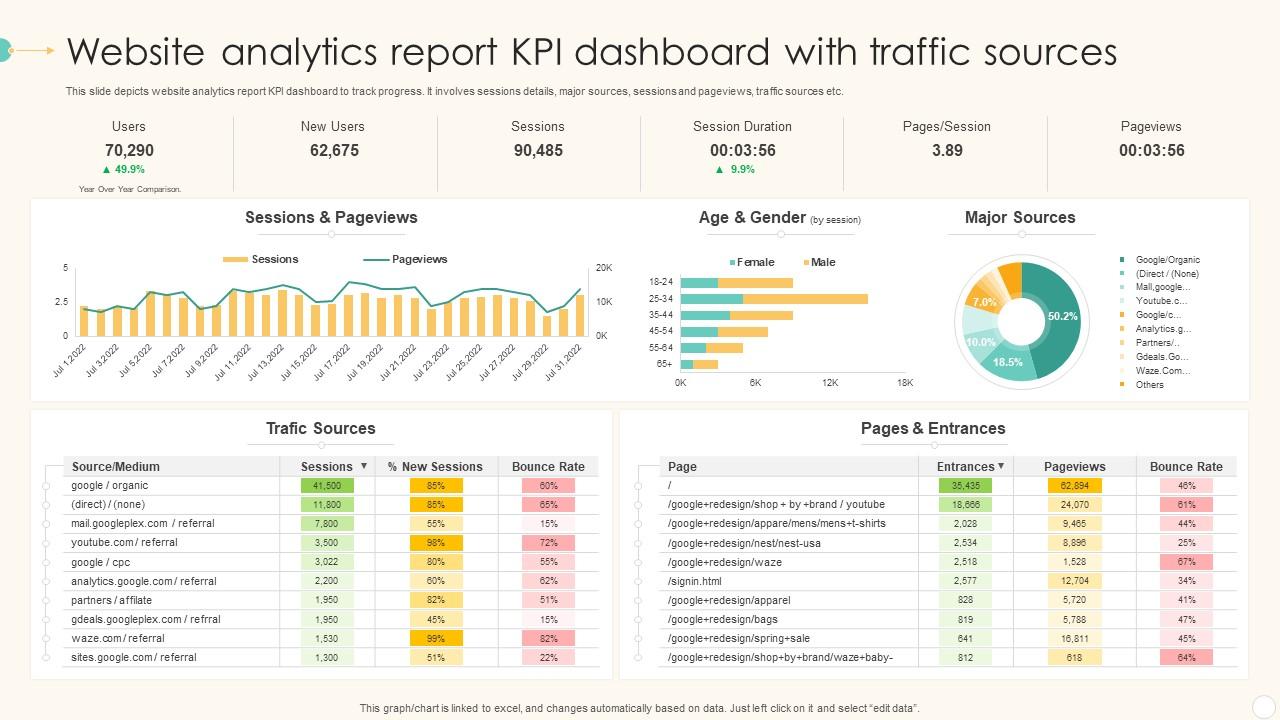
Website Analytics Report KPI Dashboard With Traffic Sources

Rating:
100%
Website Analytics Report KPI Dashboard With Traffic Sources
Slide 1 of 7
Favourites Favourites

Try Before you Buy Download Free Sample Product

Audience Impress Your
Audience
Editable 100%
Editable
Time Save Hours
of Time
The Biggest Sale is ending soon in
0
0
:
0
0
:
0
0
Rating:
100%
abc

People who downloaded this PowerPoint presentation also viewed the following :

FAQs for Website Analytics Report KPI Dashboard

Honestly, just track four things and you'll be golden. Traffic volume shows who's actually finding your site. Then look at bounce rate - are people immediately clicking away or sticking around? That's huge. Conversion rate is probably the most important one though, measuring if visitors actually do what you want (buy stuff, sign up, whatever). Oh and session duration tells you about engagement quality. I see too many people obsessing over page views and other fluff metrics that don't really mean anything. These four give you everything you need to make smart decisions.

So basically these metrics are like your users telling you exactly what sucks about your site. High bounce rates? Your pages are probably confusing or slow as hell. Heat maps are honestly eye-opening - people click in the weirdest places, never where you'd expect. Time on page shows if your content actually holds attention or if everyone's bailing halfway through. I always think of it like eavesdropping on user behavior. They're giving you a roadmap for fixes without even realizing it. Way more reliable than guessing what might work.

So bounce rate is basically the percentage of people who hit your site and immediately peace out without clicking anything else. Pretty much tells you if visitors are finding what they want or nah. When it's high, could be your page takes forever to load, content sucks, or they just didn't find what they expected. Context is key though - like if someone bounces from your contact page after getting your phone number, that's actually good! I'd focus on pages with weirdly high bounce rates first. Those are your problem children that need fixing.

So regular analytics just tell you *what* happened - like your conversions tanked. A/B testing actually shows you *why*. You can test different headlines, button colors, layouts, whatever, and see what actually moves the needle. Way more useful than just staring at charts wondering what went wrong. Your analytics will usually hint at problem spots anyway, so that's where I'd focus your tests first. Honestly, it's the difference between guessing and actually knowing what works. Just pick one thing to test at a time or you'll never know which change made the difference.

Start with Google Analytics 4 - it's free and handles most of your basic traffic/conversion tracking. Once you get the hang of that, Hotjar is incredible for heatmaps and watching how people actually navigate your site (I was honestly shocked the first time I saw users completely ignore what I thought was obvious). Most people go overboard and install like 5 different analytics tools right away. Don't do that. GA4 first, then maybe add Mixpanel or Amplitude later if you need better event tracking for A/B tests. They cost more but the data's cleaner. Just add tools when you actually know what you're missing.

So basically, demographic data tells you who's actually reading your stuff. Like if 60% of your audience is 25-34 year olds in cities, maybe don't write about retirement planning (unless that's your weird angle). You can adjust your tone and posting schedule to match what they want. I've seen websites completely change direction after realizing their real audience was nothing like what they thought. It's pretty eye-opening honestly. Use this info to look at your old posts and figure out what to create next - focus on the people who are already there engaging with you.

So conversion rates are basically how you know if people actually do stuff on your site instead of just bouncing. Like, are they buying things or signing up for your newsletter? Without tracking this you're just guessing if your marketing's working or if you're wasting money. Google Analytics is where you want to set this up - track purchases, signups, whatever actually matters for your business. The best part is seeing exactly where people bail out of your funnel. I learned this the hard way when I realized my checkout page was a disaster but my traffic looked "good."

Dude, heatmaps are game-changers - you can literally watch where people click and scroll on your site. Way better than staring at boring bounce rate numbers. I spent like an hour yesterday just watching people completely ignore our main button while clicking on random text that wasn't even linked lol. The crazy thing? You'll spot stuff regular analytics totally miss. People getting stuck halfway down pages, hovering over things forever, or missing your CTAs entirely. Honestly feels a bit creepy at first but super useful. Just start with whatever pages get the most traffic and fix the obvious problems first.

Honestly, the worst mistake is obsessing over page views when you should care about actual conversions. Also don't make calls based on like three days of data - that's just noise. Your overall bounce rate might look decent, but maybe mobile users are struggling hard. I see this all the time. Just because your traffic tanked right after updating your logo doesn't mean the logo killed it, you know? Correlation isn't causation. Always check multiple metrics and wait at least a few weeks before panicking or celebrating.

Ugh, slow pages are the worst. Users bounce crazy fast—Google found 53% of mobile visitors dip if it takes over 3 seconds. Your engagement and conversions tank. But what's sneaky is how it screws up your analytics too. Tracking scripts don't fire right when people bail quickly, so your data gets wonky. Search engines hate slow sites, which hurts rankings on top of everything else. Honestly, I'd start with compressing images and fixing server response times. Those two things usually give you the most bang for your buck.

So there's a bunch of ways to slice up your website data. Traffic source is huge - like where people are coming from (Google, social, paid ads, etc). Device type too since mobile users act totally different than desktop ones. Demographics help if you're curious about age ranges or locations. I'd honestly start with those basic ones first because they'll show you the biggest differences right away. Oh and new vs returning visitors - that one's pretty eye-opening. You can get fancy later with custom segments based on specific pages or how long people stick around, but don't overthink it initially.

So UTM parameters are basically your best friend for this - just add those little tracking codes to every social media link you share. Something like `utm_source=facebook&utm_medium=social&utm_campaign=spring_promo` at the end of your URLs. Then Google Analytics will actually show you which posts are working instead of just saying "social media" brought people over. Oh, and definitely keep a spreadsheet of your UTM codes because trust me, you'll forget what you called things and end up with a mess. The social reports in most analytics tools are pretty basic, but UTM tracking gives you the real details you need.

So high exit rates basically mean people are bailing from that page more than usual. Sometimes it's totally fine - like on a "thanks for your order" page, obviously people leave after that! But when it's happening on your homepage or product pages, yeah that's a problem. I'd start by checking the obvious stuff first. Is it loading super slow? Navigation confusing? Maybe the page just doesn't deliver what people expected when they clicked through. Heat maps are pretty helpful for seeing where users get frustrated and give up. User testing too, though that takes more time. Once you spot the issues, you can tweak things and see if it helps.

Analytics are a game changer - they'll show you what's actually driving results vs what you think is working. I've seen people throw money at Facebook ads while their email campaigns were secretly crushing it. Check which channels bring your best traffic and where people are bouncing. The demographic stuff is super helpful for targeting too. Track the whole customer journey, not just that final click before someone buys. Then you can focus your budget on what's actually working and ditch the campaigns that are just burning cash. Trust me, some of the insights will totally catch you off guard.

Honestly, diving into mobile vs desktop analytics is a game changer. You'll catch stuff like mobile users bouncing because buttons are too small or pages load like molasses. Desktop folks might hate your navigation for totally different reasons. I'm obsessed with checkout abandonment rates - mobile always seems worse there, which screams "fix your mobile checkout first!" Short bursts of data analysis beat trying to fix everything at once. Oh, and don't just copy-paste solutions across platforms. What works on desktop usually needs tweaking for mobile anyway.

Ratings and Reviews

100% of 100
Review Form
Write a review
Most Relevant Reviews
  1. 100%

    by Cyril Gibson

    SlideTeam is the way to go when you are in a time crunch. Their templates have saved me many times in the past three months.
  2. 100%

    by Dannie Washington

    Best Representation of topics, really appreciable.

2 Item(s)

per page: