

Work experience editable powerpoint timeline




Try Before you Buy Download Free Sample Product
 Impress Your
 Audience
 100%
100% Editable
 Save Hours
 of Time


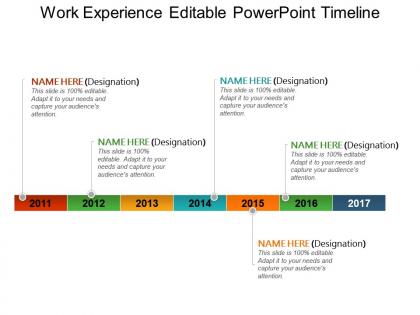
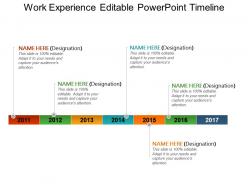
Choose work experience editable PowerPoint timeline slide to present your work in the industry in an innovative and professional way. When it comes to pitch your business among, investors, board of directors, new clients then it is essential that you pay attention towards every aspect. This PPT layout helps you to show the career timeline of your company as you can show from where you begin and till date what all has been achieved. You can also incorporate the name of the top business leaders who have ensured to give their best to take business this far. The timeline can also be used to share details about key achievements, milestones etc. Moreover, you may use this presentation template to communicate information about your global leaders at different locations, valuable team members and their achievements. The PowerPoint graphic has been creatively designed to highlight the importance of business development. You can edit and amend the design according the company need as this PPT design is editable. So download and use it for business introduction. Allow folks to benefit from your immense experience with our Work Experience Editable Powerpoint Timeline. Elaborate on your journey.
People who downloaded this PowerPoint presentation also viewed the following :
Work experience editable powerpoint timeline with all 5 slides:
Introduce caution with our Work Experience Editable Powerpoint Timeline. Ensure folks don't get hurt by the jig.
FAQs for Work experience
Definitely hit the basics first - job titles, companies, dates, and your biggest wins at each place. Chronological order makes it way easier for people to follow. I'd add any promotions or major career shifts too, those tell a good story. Oh, and don't sleep on relevant education or certifications if they actually matter for what you do now. Focus on the stuff that genuinely advanced your career though - nobody needs to hear about every mundane task. You want the highlights reel, not a play-by-play of your entire work history. Keep it punchy.
Honestly, visuals make such a huge difference for timelines. I'd throw in some icons for different jobs, maybe color-code your career phases so people can scan it fast. Good typography hierarchy is clutch too - makes your wins pop. Progress bars or connecting lines between roles? Chef's kiss. Way better than just boring date lists. Oh, and those skill development charts can show growth over time, which employers love seeing. Don't go overboard though - I've seen timelines that look like a Rainbow Brite explosion and it's... not great. Sketch it out first before you mess with any fancy design software.
Honestly, just start with Canva or Adobe Express - they've got loads of professional timeline templates you can tweak fast. PowerPoint's solid too if you're already used to it. Sometimes the basic stuff works best anyway. Lucidchart's pretty nice for fancier timelines, or Google Drawings if you don't want to spend money. Pick whatever won't make you want to throw your laptop out the window when you're trying to move dates around. Oh, and focus on clean fonts and consistent spacing over flashy graphics - looks way more professional that way.
Honestly, having your timeline organized just makes everything smoother. Recruiters can quickly see how you've grown and what skills you've picked up along the way. Don't try hiding employment gaps - being upfront about them actually looks way better. During interviews, you'll have this clear roadmap to walk through your experience and show how each job led you to where you are now. I always tell people to go chronological with solid dates and highlight what you actually accomplished, not just what your job description said. Makes such a difference when someone's scanning through dozens of resumes.
Biggest mistakes? Leaving random gaps without explanation and being super vague about dates. Keep it chronological and don't cram every little detail into each job description. Oh, and never lie about your job titles - I learned that one the hard way when I couldn't back up my claims in an interview! Focus on what you actually achieved with real numbers instead of just listing boring duties. Your most recent stuff should get the most space since that's what they care about. Work backwards from your current role. Keep descriptions short but specific enough to show you made a difference.
Don't do a separate skills section - that's so outdated. Instead, work them right into each job description. Pick 2-3 main skills per role and show how you actually used them. Something like "Marketing Manager (2019-2022) - built up my digital marketing chops, ran social campaigns that boosted engagement 40%." Way better than just randomly listing "digital marketing" somewhere else. The timeline thing is perfect because they can literally see how you got better at stuff over the years. Always connect skills to real results if you can swing it.
Honestly, 10-15 years is the sweet spot for most people. Early in your career? Include everything - even that random internship counts. But if you're more senior, just list the older jobs with company/title/dates and skip the bullet points. Different industries are weird about this though. Some only care about your last few years, others want to see that long history. I'd focus on what's actually relevant to the job you want next. And yeah, definitely ditch that weird job from 2003 that makes no sense anymore - nobody needs to know about every single thing you've ever done.
Yeah, totally depends on the industry. Tech places want to see how fast you picked up new skills and what impact your projects had. Healthcare's all about patient outcomes and your certifications - that stuff matters way more there. Finance folks love seeing analytical wins and how you handled risk. Creative industries though? They honestly just want to see your portfolio growth more than anything else. Actually, here's what I'd do first - stalk the company's website and figure out what they actually care about. Then rearrange your timeline to put those matching experiences right up front. It's such a simple trick but works every time.
Your resume shouldn't just be a boring list of job titles and dates - think of it more like telling a story. Connect the dots between your moves so hiring managers can actually see the progression. Like if you worked at a startup and learned to juggle different roles, explain how that set you up to manage cross-functional teams later. Each job switch should feel intentional, not random. People won't figure out your career logic on their own (honestly, they barely skim these things), so spell out the "why" behind each transition. Make it clear you weren't just hopping around aimlessly.
Okay so basically a timeline shows how you've grown in your career by putting everything in order - like promotions, bigger teams you managed, increased budgets, that kind of stuff. Way more effective than just randomly listing jobs. You want to show that upward movement, right? Like going from individual contributor to team lead, or handling local accounts then jumping to national ones. Oh and definitely throw in specific numbers and wins at each step. I honestly think it's one of the best ways for hiring managers to quickly see you're not just job-hopping but actually advancing.
Start with stuff that's directly related to the job you want - those are gonna be your strongest points. Leadership roles, big projects, anything where you had real responsibility or made an impact. Even that random part-time gig from college could work if you learned something useful from it. Look for positions where you managed people or budgets, or can show actual results with numbers. Internships and volunteer work count too if they're relevant. Honestly, I'd skip most of the random summer jobs unless they somehow tie into your bigger story. Map it all out chronologically first - you'll spot the gaps pretty quickly.
Oh totally! Timeline JS and Tiki-Toki are great for this - you just drop in an embed code and you're done. Way simpler than I thought it'd be honestly. I'd put it on your "Experience" page so it doesn't mess with your main work stuff. Just make sure it works on mobile since everyone's scrolling on their phones these days. Oh and keep each point short but link them to your actual projects. That's where the magic happens - people can jump straight from timeline to your case studies. Makes the whole thing feel way more connected, you know?
Definitely include your volunteer stuff! It fills those awkward employment gaps and shows you're not just sitting around doing nothing. You'll be highlighting real skills - leadership, teamwork, project management - that employers actually want to see. Honestly, I think it's sometimes more impressive than regular jobs because you're doing it for free. Plus it gives interviewers something interesting to talk about beyond your typical work history. Just describe it the same way you would any other job. The skills are legit, so treat them that way. Oh and it shows what you care about too.
Look at what they're actually asking for in the job posting and match your experience to that stuff. I learned this the hard way - used to blast the same resume everywhere and got crickets. Now I rearrange things so the most relevant projects and skills jump out first. Maybe lead with that coding bootcamp if it's a tech role, or bump up your management experience for leadership positions. Make different versions for different job types. Honestly, hiring managers are lazy (aren't we all?) so don't make them hunt for why you're perfect. Just spell it out.
Honestly, hover effects are a game changer - they let people dig into project details without cluttering everything up. Try ditching the boring left-to-right layout for something more creative, like a spiral or branching thing. Icons help too, especially little graphics for different companies or job types. I'm obsessed with color-coding different career phases lately - it just makes everything click visually. Oh, and make it scannable but give people a reason to actually explore your stuff deeper. You don't want them bouncing after two seconds.
-
Illustrative design with editable content. Exceptional value for money. Highly pleased with the product.
-
Best Representation of topics, really appreciable.