


Hourly timeline template presentation powerpoint




Try Before you Buy Download Free Sample Product
 Impress Your
 Audience
 100%
100% Editable
 Save Hours
 of Time


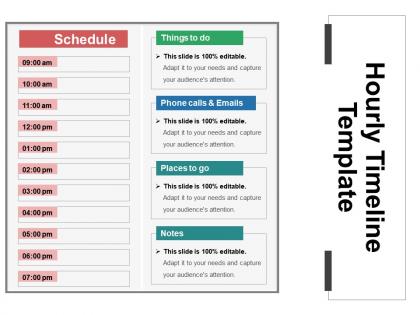
SlideTeam’s professionals has come up with this incredible hourly timeline PowerPoint slide and this slide is suitable for project managers and business planners to present schedules, plans, status reports as well as other project data in small time increments. The hourly schedule PPT template design is useful for medium plans or long-term plans. However, some projects need a detailed breakdown of daily tasks on basis of hours. By using the hourly chart design presentation slide, a user can discuss plan, track as well as communicate the important details. The hourly project timeline template for PowerPoint is useful to describe short-duration tasks that need to achieve. The 24 hour project timeline chart presentation template is perfect to provide professionals a simpler as well as more familiar way of communicating with staff, clients, executives, etc. Project manager can use the hourly task schedule PPT slide for illustrating short-duration tasks such as milestones. Use this hourly task timeline slide design to quickly create an impressive timeline with minutes or hours as time intervals rather than days, weeks or months. The history hourly chart template slide consist of a simple and straightforward design. Our Hourly Timeline Template Presentation Powerpoint glance at it from every angle. Every facet gets exposed.
People who downloaded this PowerPoint presentation also viewed the following :
Hourly timeline template presentation powerpoint with all 5 slides:
PowerPoint is a great tool when you need to create a compelling presentation but many do abuse its use. Just leave the creation of your Hourly Timeline Template Presentation Powerpoint to the professionals who are trained for that.

FAQs for Hourly timeline
So you'll want time slots with task descriptions and priority levels for each hour. Buffer time is huge - seriously, everything takes longer than you think it will. Add duration estimates and maybe some checkboxes to mark stuff complete. If it's a team thing, note who's doing what. Honestly, the simpler the better or you just won't stick with it. Start basic and tweak as you figure out what actually works for how you operate day to day.
So basically these templates help everyone see what's happening when during the day - no more confusion about who's doing what at 2pm. Dependencies become super obvious, and you'll catch bottlenecks before they mess everything up. When things go wrong (which they always do), you can pivot fast. Everyone knows their deadlines and handoffs too. Honestly think of it like GPS but for your actual workday - sounds dorky but it's true. Just grab a basic template first, then tweak the time blocks to match how your team actually works.
Oh totally! Event planners swear by them - those people are insane about timing. Healthcare does too for shift changes and patient rounds. Manufacturing lines use them constantly since everything's so precise. I've even seen restaurants map out their dinner rush hour by hour, which honestly makes sense when you think about it. Construction crews love them for coordinating different trades throughout the day. Broadcasting is another big one where every minute matters. Really though, if you're juggling multiple people doing specific stuff at exact times, you'll want one. Super helpful for anything with lots of moving pieces in a single day.
Start with your big deadlines and work backwards - that's way easier than trying to build forward. Color-code everything so you can spot different tasks or team members instantly. Don't get too fancy with the formatting though, I've watched people waste hours making their templates look "perfect" when simple works better. Buffer time is crucial between phases because literally everything runs late. Oh, and leave room to mark dependencies and where things might get stuck. The whole thing needs to be flexible since projects never go exactly as planned, but keep the basic structure solid.
Honestly, hourly templates are kind of a game-changer if you can handle the micromanaging aspect. You're literally blocking out "9-10am research, 10:30-11:30 writing" instead of just scribbling "finish report Tuesday." It's way more detailed than daily or weekly planning. Daily templates are more like your basic to-do list for the day, weekly ones cover bigger picture stuff. I'll be real though - it feels super rigid at first and maybe a little obsessive? But if you're always running late or scrolling your phone when you should be working, try it for a week. You'll actually see where all your time disappears to.
Excel or Google Sheets are probably your best bet - tons of templates you can mess around with. PowerPoint works too if you want it to look nice for a presentation. Canva actually has some really clean timeline templates that don't look like boring spreadsheets. If your work has Smartsheet or Monday.com, those are solid but probably overkill for what you need. I'd honestly just start with whatever you've got on your computer already. You can always switch later if you need something fancier, but most people never do.
Go digital if you're constantly tweaking things or need to share with others. The collaboration stuff actually works really well. Plus reminders and syncing across your phone/laptop is clutch. Print works better for meetings when you can't pull out your laptop, or if you're one of those people who thinks better writing things down by hand. I get it - sometimes screens are just too distracting. Honestly? Start with digital since it's way more flexible. Then just print a backup copy when things get crazy busy. That's what I do anyway.
Honestly, color coding is a game changer for timelines. I usually do red for urgent stuff because it literally screams at you from the page. Different colors for task types or team members - whatever works for your setup. The visual breaks help you spot conflicts or weird gaps super fast instead of reading everything line by line. Way less intimidating than staring at a huge block of text too. Just don't go crazy with it - stick to maybe 3 or 4 colors tops or you'll create some chaotic rainbow situation that's worse than where you started.
Look, hourly timeline templates are honestly game-changers for catching project disasters before they happen. You can spot bottlenecks and dependency issues way earlier when you're tracking things hour by hour instead of just winging it with rough daily estimates. Resource conflicts become super obvious too - like when you realize you've got three people scheduled for the same conference room. I learned this the hard way on a launch last year. The key is starting with your most critical phases first, then expanding from there. You'll actually have time to fix problems instead of just scrambling at the last minute.
Try breaking your meeting agenda into actual time blocks - 15 minutes for updates, 30 for discussion, whatever. Honestly, it's a game changer for preventing those meetings that just... never end. Same thing with follow-ups - don't just say "by end of day" because does that mean 3pm or 6pm? Be specific about deadlines, even down to the hour sometimes. I started doing this last month and we actually get stuff done now instead of just talking in circles. Block out your next team meeting with timestamps and watch how much more focused everyone gets.
Honestly, the worst thing you can do is pack every hour slot way too full. You'll just end up stressed and behind schedule. Always leave buffer time between stuff - I learned this the hard way when everything started running late. Don't treat your template like it's set in stone either. Be realistic about timing too, because tasks almost always take longer than you think they will. Oh, and definitely test it out for a few days first. You'll probably need to adjust things once you see how it actually works with your routine.
Honestly, those hourly templates are clutch for remote work. Like, nobody can see you're actually grinding, so having that log helps tons. I started blocking my day into 1-2 hour chunks - nothing fancy, just "emails" or "project X." You'll be shocked how off your time estimates are though. Tasks I thought would take 30 minutes? Try 2 hours. But that's the point - you catch those time sinks and have real data when your boss asks what you've been up to. Plus it kills that weird end-of-day panic where you're like "did I even accomplish anything?" Super simple to start with.
Definitely go with templates that have clear time blocks - hourly ones are perfect for day-long stuff or when you need detailed planning. Make sure there's room for kids to write in their own tasks and deadlines. Visual stuff like color coding is clutch (trust me, they eat that up). Keep it simple though - you don't want them constantly asking for help. The good ones have little reflection spots at each time section. Oh, and find something that works both printed and digital since you never know what your tech situation will be like. Honestly, templates with progress bars are my favorite - kids actually use those.
Show clear before/after states and hit those key decision points in your timeline. Hourly breakdowns are perfect - they force you to chunk complex stuff into pieces people can actually digest. I've watched presentations where someone throws up a massive Gantt chart and everyone just zones out completely. Walk them through the critical moments instead. When did you hit walls? Pivot? Hit milestones? Color-code different activities and add quick notes about what drove each hour's decisions. Oh, and honestly? The story matters more than perfect timestamps. They need to see your actual progress, not just a bunch of dates.
So everyone's doing the clean, minimalist thing now - way better than those crazy cluttered templates from before. Interactive stuff is everywhere too, like you can click time blocks or hover for more info. Definitely go for color-coding by priority, makes scanning so much faster. Also your template better work on mobile because literally everyone checks schedules on their phone now. One thing though - make sure you can adjust the time chunks. Sometimes you need 15-minute slots, other times hourly blocks work fine. Really depends on what you're presenting.
-
Attractive design and informative presentation.
-
Perfect template with attractive color combination.