

Work experience timeline template for cv powerpoint images




Try Before you Buy Download Free Sample Product
 Impress Your
 Audience
 100%
100% Editable
 Save Hours
 of Time


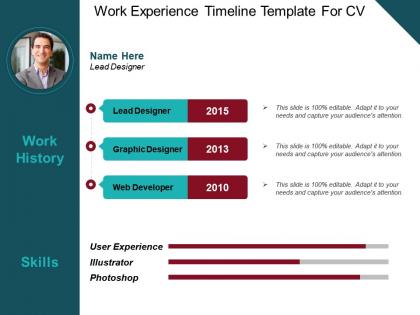
The work experience timeline CV PowerPoint slide is useful for an individual to develop an amazing first impression. Ideally, the self introduction presentation slide is suitable for presentation on a job interview, group meeting, or even motivational and work-related seminar. Moreover, the work experience example PPT template is useful in school as well as casual event presentations. This work experience resume template for PowerPoint is perfect to give self introduction along with detail work experience. However, the users can use insert the text related to their speech in the template, especially while giving the presentation in seminars, the user uses the self introduction resume slide to familiarize the audience with his personal as well as professional background. With this method, the viewers feel comfortable with the new face and they carefully listen to the speech, when they know the previous experiences of an individual on the subject matter. The job experience CV timeline PPT slide assists the user to demonstrate his set of skills and capabilities as well. The job experience timeline resume is useful to illustrate an individual's career objective, key skills, work experience, etc. Get the fundamentals clearly across with our Work Experience Timeline Template For Cv Powerpoint Images. Ensure the basics are never forgotten.
People who downloaded this PowerPoint presentation also viewed the following :
Work experience timeline template for cv powerpoint images with all 5 slides:
Our Work Experience Timeline Template For Cv Powerpoint Images help clarify all emerging doubts. They are always bound to crop up.
FAQs for Work experience timeline template for
Start with your most recent job and work backwards - that's just how people expect to see it. Include the basics like job titles, company names, and dates you worked there. Then add 2-3 bullet points about what you actually accomplished or your main responsibilities. Honestly, don't overthink this part too much. If you got promoted or switched roles at the same company, definitely mention that since it shows you're growing. Early in your career? Throw in internships or contract gigs too. Just keep each section tight and easy to scan - hiring managers are usually rushing through these anyway.
Honestly, timelines are game-changers for resumes. Recruiters can instantly see how you've grown instead of hunting through boring bullet points. Your promotions and role changes become super obvious, which is exactly what you want. Career gaps? Way less awkward when they're part of a visual flow rather than glaring holes in your work history. I'd go chronological with quick hits of your biggest wins at each job - maybe I'm biased, but I think it just tells a better story than traditional formats. Makes you look way more put-together too.
Okay so spacing is huge - don't cram everything together or it looks like a mess. Pick one accent color for dates or job titles, keeps it cohesive. I'd stick to max two fonts and make sure company names really pop visually. White space is honestly your best friend here. Simple icons work if they fit your field, but I've seen people go crazy with graphics that just become distracting. Oh and test it by stepping back - your eye should flow naturally down the page. If you're squinting to read anything, fix the hierarchy.
Honestly, just tailor your timeline to whatever industry you're targeting. Tech companies want to see product launches and major project milestones. Creative fields? Show off your portfolio pieces and campaigns alongside job switches. Finance and healthcare are obsessed with certifications - seriously, they eat that stuff up. Consulting roles care more about big client wins and relationship stuff. The trick is figuring out what actually matters in your field first, then rearranging everything so those achievements jump out. Don't just list job changes chronologically if that's not what they're looking for, you know?
Honestly, Canva's probably your best bet - it's free and you can knock something out in like 15 minutes. Adobe Express is solid too if you want those polished templates without needing design skills. PowerPoint works great if you're already familiar with it, gives you more control. I've actually seen people make really cool timelines in Excel by just getting creative with the formatting (sounds weird but it works). Lucidchart's nice for more complex stuff. Google Slides is another easy option. Start with Canva though - super intuitive and you'll have something that looks professional pretty quick.
Honestly? Every 3-6 months is probably your best bet. I used to be terrible at this and would scramble when I suddenly needed my resume updated. Big stuff like promotions or new jobs - update immediately. But don't sleep on the smaller wins either. Finished some training? Led a project? Add it. Here's what works for me: set a quarterly reminder and just spend 15 minutes going through everything. Way easier than trying to remember two years of accomplishments later. Trust me, hiring managers can tell when your timeline looks stale or rushed together.
Honestly, the worst thing you can do is leave random gaps with zero explanation - like what were you doing for 8 months in 2022? Also that froyo job from 2015? Skip it unless it's somehow relevant. Pick either month/year or just years for dates and stick with it throughout. I see so many resumes that randomly switch between "Jan 2020" and "2019-2021" and it looks sloppy. Focus on jobs that actually matter for what you're applying to. And when you describe what you did, throw in some numbers if you can - "increased sales" sounds way less impressive than "boosted sales 15%."
Think of your resume like chapters in a book - each job is a story with challenges and wins. Instead of boring bullet points, show what problems you solved. "Led team through system migration during our busiest quarter" hits way harder than "managed IT projects." Connect the dots between roles too. Maybe add why you switched jobs each time - people actually care about that stuff. Each position should build on the last one, showing growth. Honestly, most resumes read like robots wrote them, so even small stories will make you stand out.
Start with your most recent job and work backwards - that's the way everyone expects it. Hit the basics: company, title, dates, then 2-3 bullet points about what you actually accomplished. Don't just say "responsible for sales" - give them numbers like "boosted sales 25%." I'd stick to the last 10-15 years unless you've got something really relevant from way back. Practice it beforehand so you're not fumbling around trying to remember dates (so awkward). Oh, and bring a printed copy just in case - you never know when tech decides to fail you.
Don't just list what you did - show how those duties built skills that matter everywhere. Like instead of "managed inventory," try "developed organizational systems and attention to detail through inventory management." See the difference? Hiring managers are busy and honestly might not connect those dots themselves, especially for career switchers. Pull out the good stuff: leadership, problem-solving, communication, project management. Those translate to any job. Oh, and definitely mirror the language from their job posting when you describe these skills. Makes it way easier for them to spot what they're looking for.
You definitely want images and icons on your timeline! They make everything so much easier to scan through quickly. Company logos work great because recruiters instantly recognize stuff like Google or Apple logos - honestly saves them mental energy. Simple icons for different industries help too. Just keep them small and consistent so your timeline doesn't look like a hot mess. Oh, and make sure you're using current logos, not some outdated version from 2015. The whole point is creating these visual anchor points that guide someone's eye down your career story. Makes you way more memorable than a wall of text.
Honestly, a timeline in your portfolio is such a game-changer. It lets people see your career path without squinting through your resume trying to figure out what happened when. Plus you can call out your big wins and show how each job actually built your skills. I'm kinda mad I didn't think of this sooner lol. Hiring managers love it because they can spot your growth patterns instantly. If you're doing it digitally, make it clickable or whatever. Just don't forget to explain why you made each move - it shows you're not just job-hopping randomly.
Who's gonna be reading this thing? That's literally the first question you need to answer. Employers want to see achievements and actual numbers, not just "I did marketing stuff." But if it's for your team or whatever, you can be way more chill about it. Oh and honestly, your experience level changes everything too - new grads should definitely play up those internships and side projects. More experienced people? Focus on the leadership stuff and big wins. Also think about whether they're just gonna skim it or actually read through the whole thing. Just match your tone to what they actually care about.
Dude, color choice is everything for timeline readability. Go with high contrast - dark text on light backgrounds works best. Skip anything that'll make people squint (red on green is the worst). I made that mistake once and my boss literally had to lean forward to read my timeline lol. Use maybe 2-3 colors tops to group similar stuff or highlight big wins. But here's the thing - always check how it looks printed in black and white first. You'd be surprised how many "perfect" color combos turn into gray mush on paper. Keep it clean and your timeline will actually get read instead of tossed aside.
You want to show clear progression, not just random job jumping. Tech people usually go junior developer → senior → team lead → engineering manager over like 5-8 years. Healthcare maps out education → residency → specialty training → practice. Marketing does coordinator → specialist → manager → director. Finance people are obsessed with their titles - analyst → associate → VP (seriously, they love that stuff). Teachers go classroom → department head → admin roles. The whole point is showing you built skills and took on more responsibility at each step, you know?
-
Use of icon with content is very relateable, informative and appealing.
-
Awesomely designed templates, Easy to understand.