

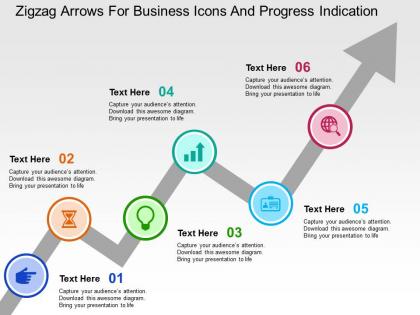
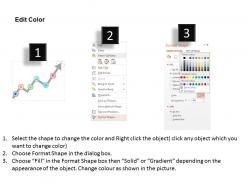
Zigzag arrows for business icons and progress indication flat powerpoint design




Try Before you Buy Download Free Sample Product
 Impress Your
 Audience
 100%
100% Editable
 Save Hours
 of Time


Our Zigzag Arrows For Business Icons And Progress Indication Flat Powerpoint Design enable clear and cogent argument. Even critics will be forced to agree.
People who downloaded this PowerPoint presentation also viewed the following :
Zigzag arrows for business icons and progress indication flat powerpoint design with all 4 slides:
Avoid aimless activity with our Zigzag Arrows For Business Icons And Progress Indication Flat Powerpoint Design. Always have a definite goal ahead.
FAQs for Zigzag arrows for business icons and progress indication
Honestly, zigzag arrows are a game-changer for complex stuff. Regular straight arrows made my presentations so confusing before I figured this out. They're perfect when you need to show messy, real-world processes - like project timelines that get derailed, customer journeys with tons of touchpoints, or anything iterative. The zigzag instantly tells people "hey, this isn't simple." Your audience gets it right away instead of expecting some neat A-to-B flow. Super useful for workflows that loop back on themselves or have setbacks. I probably overuse them now, but they really do make things clearer when you're dealing with complicated processes.
Dude, zigzag arrows are actually clutch for showing messy processes! Like when you're mapping out a customer journey or product development - that stuff's never linear, right? The zigzag instantly screams "this was complicated" without you having to explain it. Way better than bullet points listing every obstacle. I use them whenever there's back-and-forth movement or setbacks involved. Your audience gets it immediately - oh, this required persistence and probably sucked at times. Perfect for transformation stories or anything iterative. Honestly beats the hell out of those boring straight arrows that make everything look way easier than it actually was.
Honestly, I use zigzag arrows whenever I'm showing messy, real-world processes - you know, the ones that aren't perfectly linear. They're great for troubleshooting guides or complex workflows where things loop back on themselves. Straight arrows make everything look too simple and direct. But zigzag ones? They actually show that your process has detours, iterations, maybe some roadblocks. Perfect for feedback loops too. I mean, most interesting processes aren't just A→B→C anyway, right? Just don't go crazy with them or your flowchart will look like a tornado hit it.
Definitely! Zigzag arrows work great for messy processes that aren't straightforward. I use them for anything with branches, loops, or when things bounce around - like agile workflows or troubleshooting guides. They're honestly perfect for user journey maps since people never follow the path you expect them to. Feedback loops are another good spot for them. Oh, and try different colors for each zigzag section if you're showing phases or different teams involved. Makes it way less confusing to follow.
Honestly, bold and simple is the way to go with zigzag arrows - don't get fancy with thin lines that nobody can see. High contrast colors are your friend here. Make sure it actually shows direction and flow instead of looking like some weird lightning strike (trust me on this one lol). Size matters too - you don't want it taking over your whole slide or being so tiny it's pointless. I'd sketch it out on paper first before messing with it digitally. Oh and use them sparingly! They lose impact if you're zigzagging all over every slide.
Definitely go high-contrast with those zigzag arrows! Dark on light backgrounds works great, or bright colors like orange/red/blue on white. I've watched so many presentations where pale yellow arrows just vanish into the slide - honestly such a mess. Make them thick enough to actually see too. You want people following the flow you're showing them, right? Don't pick colors that blend with your other stuff. Oh and test it on whatever screen you'll actually be using beforehand - colors look way different projected than on your laptop.
So zigzag arrows basically trick your brain into following this bouncy path instead of just glancing and moving on. They're way more interesting than those boring straight ones everyone uses. The back-and-forth thing mimics how we actually think - not in straight lines, you know? Each turn creates a new spot where people refocus, so they stay engaged longer. Really good for connecting different parts of slides when your content is scattered around. Honestly, anything beats making people follow some predictable arrow that just screams "corporate presentation." Try them next time you need better flow.
Honestly, Adobe Illustrator is your best bet if you have it - the pen tool lets you get crazy precise with those zigzag angles. Inkscape's free and pretty decent too, so I'd probably try that first before dropping money on Adobe. Canva has some templates but they're kinda basic for custom stuff. Oh, and Figma works well if it's for something digital since tweaking anchor points is super easy. I always forget about Figma but it's actually really good for this kind of thing. Start with Inkscape though - see if it does what you need!
Honestly, zigzag arrows are great when your ideas don't follow a straight path. Use them for feedback loops - like when customer input goes back to product development, then circles around again. They work well for iterative processes too, or when multiple factors bounce off each other in decision-making. Way more interesting than plain straight arrows if you ask me. Oh, and if you're mapping different types of relationships, try using different colors for each zigzag path. Makes everything way easier to follow. They're perfect when concepts influence each other in that back-and-forth way.
Honestly, the worst thing you can do is throw zigzag arrows everywhere when a regular arrow works fine. Makes slides look messy as hell. Also don't make them super thin or light - I've been there, and they completely vanish when you're presenting. Stay consistent with your zigzag style throughout. More than 2-3 per slide? Way too much. They should actually mean something too - like showing a rough process or whatever. Not just random decoration. Here's what I do: cover up the arrow and see if zigzag even makes sense for what you're trying to show.
Okay so zigzag arrows are honestly a game-changer for presentations. The animation catches people's attention way better than static stuff, and they're great for showing how ideas connect or highlighting transitions. I've literally watched boring slides become actually engaging just by ditching bullet points for these animated arrows. They work really well for step-by-step processes or cause-and-effect stuff. Plus the movement keeps people focused during those longer presentations where everyone usually zones out. Trust me, your audience will actually follow what you're saying instead of checking their phones.
Honestly, zigzag arrows are a game changer for breaking down complicated stuff. Instead of dumping everything in boring bullet points, you get this nice step-by-step flow that people actually want to follow. The back-and-forth pattern keeps things visually interesting - plus it creates breathing room on the page. I use them all the time for timelines and process flows. Even works great for comparing pros and cons. Your audience won't zone out like they do with dense paragraphs. Trust me, swap out your next wall of text with zigzag arrows and watch people actually pay attention for once.
Zigzag arrows scream chaos and electricity to most people. They're all over comic books for those "zap!" moments, which makes them feel super dynamic. People also think sudden changes, aggression, or lightning-fast energy when they see them - basically anything that's not following a straight, predictable path. Sometimes they read as flexibility too, like you're dodging obstacles instead of plowing through them. Honestly, I think they work great if you want that edgy vibe, but they might be too intense depending on your message. Don't use them if you're going for calm or professional - they'll just look chaotic and distracting.
Oh totally! Big arrows definitely catch the eye faster, but you don't want them looking like road signs, you know? I'd go smaller for subtle hints and bigger when you really need someone to notice. Match your reading direction too - horizontal zigzags for moving left-to-right, vertical ones for scrolling up/down. Though honestly, I've messed this up before and had arrows pointing nowhere useful, which was embarrassing. Just test a few sizes first. The worst is when they're so massive they take over your whole design.
Dude, there's so much you can do instead! Curved lines look way more organic than those harsh zigzags. Numbered circles are perfect when things don't flow in one direction. I'm totally into connected nodes right now—they just hit different, you know? Dotted paths work great too. Timeline layouts are solid, or you could try branching structures like a family tree. Even basic shapes like hexagons connected with straight lines can look clean. Oh, and spirals if you're feeling fancy! Just match whatever style fits your content's vibe. Sketch out a few options first and see what clicks.
-
Great quality slides in rapid time.
-
Innovative and Colorful designs.