


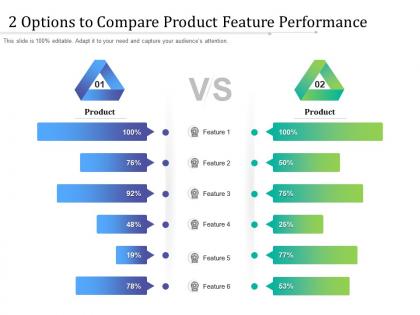
2 options to compare product feature performance




Try Before you Buy Download Free Sample Product
 Impress Your
 Audience
 100%
100% Editable
 Save Hours
 of Time


Our 2 Options To Compare Product Feature Performance are explicit and effective. They combine clarity and concise expression.
People who downloaded this PowerPoint presentation also viewed the following :
2 options to compare product feature performance with all 2 slides:
Give your audience a fulfilling experience. They will find our 2 Options To Compare Product Feature Performance elevating.
FAQs for 2 options to compare
Honestly, most templates out there look super dated - like someone's still living in 2015. Go for something clean that won't compete with your actual content. Make sure you can easily swap in your brand colors and fonts. You want the usual suspects: title slides, content layouts, charts, timelines, team bios. Oh, and check it works in both PowerPoint and Google Slides if your team's mixed on platforms (learned that one the hard way). Best ones come with the proposal flow already mapped out - intro, problem, solution, pricing, next steps. Saves you from having to rebuild the whole thing from scratch.
Honestly, yes - your template choice totally matters. People judge presentations the same way they judge websites at first glance. Bad design will tank even brilliant ideas, while good aesthetics actually help your audience absorb complex info better. I've seen solid presentations fall flat just because someone used Comic Sans or whatever. Pick something that fits your vibe - sleek and minimal for executives, maybe something with more personality for creative teams. Just make sure the design supports what you're saying instead of fighting against it. Clean beats flashy every time.
Dude, animated templates are seriously worth it. People engage 2-3x more with them compared to static ones. The motion just draws your eye in, you know? Static stuff gets scrolled past so fast these days. Your audience will actually stick around longer too, which is huge for getting your message across. Social platforms love video content so you'll get better reach there. Honestly, they just look way more professional - like you actually put effort in. If you're trying to get people to stop and actually pay attention to something important, go animated for sure.
Oh man, template layouts are HUGE for engagement. I've literally watched conversion rates spike 40% just from cleaning up messy designs - people bounce so fast when things look cluttered. White space is your best friend here, plus good typography that doesn't make people squint. The tricky part? What crushes it for B2B emails might totally flop on social content. Your audience is different than mine, so you'll need to test stuff. Start A/B testing small tweaks on your best templates. Clean designs that guide someone's eye naturally will always win over chaotic ones.
Look for color schemes you can actually customize - same with fonts and layouts so it matches your brand. Swappable images are clutch, and make sure text boxes resize without breaking everything (learned that one the hard way). Master slide editing saves SO much time when you need to update logos or headers across the whole deck. Oh and grab templates with multiple layout options for each slide type. Nobody wants their presentation looking like everyone else's copy-paste job, you know?
Yeah, compatibility matters big time - nobody wants that awkward "can you convert this?" moment mid-meeting. Google Slides wins for real-time collaboration hands down, but PowerPoint's still got more bells and whistles. Really comes down to your team though. Everyone using Office 365? PowerPoint's the obvious choice. Mixed bag with external clients? You'll need something that works with both. Oh and definitely test whatever tool you pick with the file formats you actually use before you're stuck with it.
Dude, your color scheme and fonts can totally make or break your whole presentation. I've watched so many decent talks go south because someone picked neon green text on a red background or something equally tragic. Your colors set the mood and draw attention where you want it. Fonts? They need to be big enough that the person in the cheap seats can actually read them. When you nail both, you look super professional and people stay focused. Bad choices just distract everyone from what you're actually trying to say. Find a template that matches your vibe with clean, readable fonts.
Oh totally! Education templates are packed with quizzes and progress bars - basically anything to keep students hooked. Corporate stuff? Way more boring but practical - think approval workflows and compliance features. Healthcare templates come with HIPAA stuff baked in (which honestly sounds like a nightmare to set up yourself). Retail ones go heavy on product displays and checkout systems. The basic framework's the same across industries, just different add-ons. I'd definitely filter by your industry when you're looking - saves you from scrolling through a million irrelevant options.
First thing - check if the graphics are vector-based, not pixelated. They'll look way better when you're projecting on big screens. Make sure the whole template set matches style-wise too, because nothing screams "amateur hour" like random clip art mixed together. Graphics should help your message, not compete with it. Clean beats flashy every time, trust me. You want templates you can actually customize - colors, fonts, the works - so it fits your brand. Oh, and definitely test a few slides at full presentation size first. I learned that one the hard way.
Reviews are honestly your best friend when picking templates. People don't sugarcoat it - they'll straight up tell you if something was a nightmare to customize or actually worked well. I always check what users in similar industries are saying first since they're dealing with the same stuff you will be. The functionality comments are super helpful too. Filter by your topic area and look for patterns in the feedback. Short version: if multiple people say it performed well and wasn't a pain to work with, that's probably your winner. Trust me, it saves so much trial and error later.
Honestly, templates are a lifesaver. They've got the chart types and colors already figured out so you don't waste hours tweaking everything. Plus you won't end up with some hideous pie chart that makes people's eyes bleed. The good ones follow design rules for readability too - super helpful if you actually want people to understand your data. Oh, and they're built for specific data types so everything just fits better. I always grab a template that matches my data structure first, then tweak it from there. Way smarter than building from scratch.
Look for anything marked "responsive" or "mobile-optimized" in the template gallery - those adjust automatically to different screen sizes. The newer ones are usually fine, but oh man, some of the older templates look absolutely terrible on phones. Trust me on that one. Always use the mobile preview before you pick something. Simple layouts work way better for remote stuff anyway. Make sure text isn't microscopic and buttons are actually tappable. I've sat through too many presentations where you can't read anything on mobile - it's painful for everyone involved.
Ugh, don't fall for the fancy templates - I swear that's where everyone goes wrong! Clean and simple beats flashy every time. Skip anything with crazy animations or fonts so tiny you need a magnifying glass. Your brand colors matter way more than some random designer's color scheme. Plus bad contrast ratios will make your audience squint (been there, done that). The whole point is supporting your message, not making people go "wow, shiny." Honestly? Find something basic, then make it yours with your own content and branding. Way better approach.
So storytelling templates are built for emotional impact - they help you craft tension, develop characters, and nail the resolution with visuals that follow your story arc. Data templates? Totally different beast. Clean layouts, consistent formatting, logical hierarchy so people can actually process all those numbers quickly. It's like comparing a Netflix pitch to your boring quarterly review (sorry, had to say it). Creative visuals and flexible layouts work great for stories, but data stuff needs those structured grids and standardized charts. Really comes down to whether you're trying to persuade someone or just inform them.
Honestly, go with something minimal and clean - all that white space looks so much better than cluttered slides. Dark mode is a must (I'm obsessed with dark themes lately). Interactive stuff like clickable menus and embedded videos keep people actually paying attention. Bold fonts work great, just don't go crazy with animations. Oh, and make sure it has collaboration features since everyone's still working remotely. The best templates adapt to different devices automatically and suggest layouts based on your content. Trust me, it saves so much time when you're rushing to finish a presentation.
No Reviews