


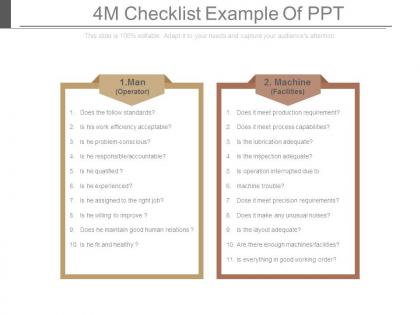
4m checklist example of ppt




Try Before you Buy Download Free Sample Product
 Impress Your
 Audience
 100%
100% Editable
 Save Hours
 of Time


Get the audience fully engaged with our 4m Checklist Example Of Ppt. They establish a direct connection.
People who downloaded this PowerPoint presentation also viewed the following :
4m checklist example of ppt with all 7 slides:
Illustrate the innumerable benefits of exercise with our 4m Checklist Example Of Ppt. Elaborate on how jogging helps.
FAQs for 4m checklist
So there's this 4M thing - Message, Manner, Media, Minutes. Your message is what you actually want them to walk away remembering. Media's your slides and visuals. Minutes is timing stuff, don't go over. Manner is probably the hardest part - like how you stand, your voice, whether you seem nervous or whatever. I swear everyone spends hours making slides look perfect but then gets up there and mumbles through it. Quick check before you go up: got your main point? Slides decent? Won't run long? Feel confident? That's basically it.
The 4M Checklist basically stops your audience from zoning out halfway through. Message means having one clear point. Market is knowing what your audience actually cares about. Media covers your visuals and format. Mechanics is just delivering smoothly without stumbling over yourself. Honestly, it's like training wheels for presentations - prevents you from rambling about stuff nobody wants to hear. You'll think from their perspective instead of just word-vomiting information. When all four work together, people stay tuned in because everything feels relevant to them. Map your next presentation against these Ms before you go up there.
So basically the 4M Checklist keeps your project presentations organized - covers Man (team/resources), Machine (tools/tech), Material (deliverables), and Method (your processes). Honestly it's a lifesaver when stakeholders start bombarding you with random questions. I usually structure my whole presentation around it, or just run through it mentally before big meetings. Makes sure I haven't forgotten anything obvious, you know? Oh and definitely keep it nearby during Q&As - you'll thank me later when someone asks about resources and you've actually thought it through already.
Yeah, totally! Just swap out the examples and jargon for your specific industry while keeping those four Ms as your backbone. Healthcare folks would talk about patient outcomes and compliance stuff instead of generic metrics. Manufacturing? More about safety protocols and quality control - that kind of thing. Honestly, I think the framework is pretty solid because those four pillars work everywhere, but you've gotta make the content speak their language. Figure out the biggest headaches in your industry first (like 3-5 main ones), then sprinkle those pain points into each section. Makes it way more relevant.
Oh man, the worst thing you can do is blow through Material and Methods because you think it's boring. That's literally where you lose people if it's not solid. Also, I see so many people get stuck overthinking their main message for way too long, then completely rush the delivery part - which is honestly such a waste when your content is actually good. Plus people treat these like four separate things instead of just... letting them work together? Anyway, definitely time yourself practicing each part. Your delivery should match whatever energy your message actually needs.
Okay so the 4M thing is actually genius - you figure out your Message, Market (audience), Medium, and Method before touching PowerPoint. I used to dive straight into slides and waste hours reorganizing everything. Now I scribble the 4Ms on a sticky note first. Saves me from building slides I don't need or picking the wrong format for my audience. It's like having directions instead of driving around aimlessly. The whole creation process goes way faster when you know where you're headed from the start.
So the 4M thing is actually pretty smart - you just check four boxes before hitting send on anything. Message is what you're saying, Medium is how (email vs Slack vs whatever), Market is your audience, and Moment is timing. Honestly, most people skip the timing part but it matters way more than you'd think. Run through those four real quick and suddenly your communication doesn't sound like mush. Works for everything - presentations, emails, even texts to your boss. Try it next time you're writing something important and see what happens.
Think about Steve Jobs unveiling the iPhone - he crushed it because everything aligned perfectly. The message was crystal clear (revolutionary device), visuals were clean and minimal, his demos flowed seamlessly, and he built this incredible anticipation with his timing. Brené Brown does something similar in her TED talks, just different vibe - personal stories, simple slides, conversational tone. Honestly, even boring quarterly meetings get way better when you nail all four elements. I've watched presentations completely transform when people focus on clear takeaways, clean visuals, confident delivery, and matching their energy to the room.
Honestly, going digital with your 4M Checklist is a game changer. Set up automated reminders so you don't forget checks. Mobile apps let you log Man, Machine, Material, and Method data right there on the spot - way better than scrambling for paper forms later. Everything gets stored in searchable databases too. The coolest part? You'll get instant alerts when something goes off track instead of finding out hours later. I'd start with just one M category though, don't try to do everything at once. Once that's running smooth, expand to the others. Auto-generated trend reports help you catch problems early before they blow up.
Honestly, the biggest pain is people thinking it's just more busywork. Teams roll their eyes like "great, another checklist to fill out." Finding where to actually plug it into your current workflow is tricky too - nothing was built with 4M reviews in mind, so timelines get weird. My advice? Start super small with one process that's already giving you headaches. When people see it actually catches problems, they stop complaining. Well, most of them anyway. Once you've got that win, then you can expand to other areas without as much pushback.
Honestly, feedback loops are what separate decent checklists from ones that actually work. Your team will spot gaps in the Man, Machine, Material, Method stuff that you totally missed at first. Set up weekly check-ins to ask what's tripping people up or what problems keep happening even when they follow the process. Then just update the checklist based on what they tell you. People actually use it more when they feel like their input matters - which makes sense, right? The whole thing becomes this living document that gets better instead of just sitting there collecting digital dust.
Minimalism and data storytelling are huge right now, and they actually play really well with 4M stuff. Clean layouts work best - seriously, nobody wants to stare at cluttered slides anymore. Bold fonts and white space guide people through your points naturally. Interactive bits are smart too since you control the pacing. Oh, and the whole authentic presenting thing? That's perfect because 4M is all about ditching corporate jargon anyway. I'd honestly just pick one visual trick and test it on your next presentation. You'll probably notice people paying attention way more.
Honestly, visual stuff makes checklists way better. Try color coding - red for urgent, yellow for watch out, green for all good. Like traffic lights, you know? Icons help too. Wrench for machine issues, little person for staffing problems, gears for processes. Dashboards are cool if you're feeling fancy, but even basic checkboxes work. I mean, anything's better than scanning through boring text blocks all day. Your team will actually spot problems fast instead of reading every damn line. Short version: make it so people can glance and instantly know what's wrong.
Dude, start with the basics - defect rates and how often your equipment breaks down. Those numbers shift pretty fast when people actually stick to checking Man, Machine, Material, and Method. Customer complaints drop too, which is always nice. But honestly? The best way to tell is just watching your floor run smoother day-to-day. Way less chaos, fewer "oh shit" moments. Also track if people are even using the checklist - I've seen places measure everything except whether anyone's following the damn thing. Pick maybe 2-3 metrics tops and actually watch them consistently.
So your message stays the same, but everything else changes. The screen becomes your stage now - bigger fonts, cleaner slides, way more visuals. Tech stuff gets critical: test your internet like crazy, have backups ready, practice screen sharing until it's muscle memory. Here's the thing though - you've gotta be way more animated on camera. Bigger gestures, more voice changes, look directly at that little camera dot (not the screen, which feels weird but whatever). Zoom fatigue is real so you're basically fighting for attention the whole time. Start tweaking your checklist with virtual tweaks now.
-
Helpful product design for delivering presentation.
-
Innovative and attractive designs.