


Analysis Of Ecommerce Sales In Power BI




Try Before you Buy Download Free Sample Product
 Impress Your
 Audience
 100%
100% Editable
 Save Hours
 of Time


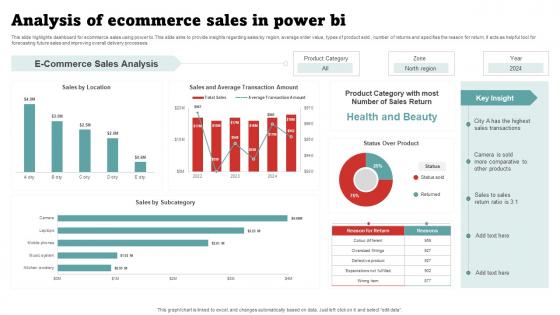
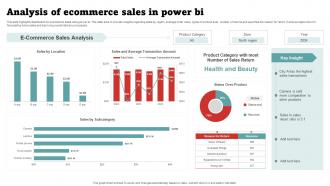
This slide highlights dashboard for ecommerce sales using power bi. This slide aims to provide insights regarding sales by region, average order value, types of product sold , number of returns and specifies the reason for return. It acts as helpful tool for forecasting future sales and improving overall delivery processes.
People who downloaded this PowerPoint presentation also viewed the following :
Analysis Of Ecommerce Sales In Power BI with all 10 slides:
Use our Analysis Of Ecommerce Sales In Power BI to effectively help you save your valuable time. They are readymade to fit into any presentation structure.








FAQs for Analysis Of Ecommerce Sales
Honestly, start with conversion rate and average order value - those two are gold. Customer acquisition cost and lifetime value matter tons too. Revenue per visitor is my personal obsession, I probably check it way too much lol. Cart abandonment tells you if your checkout sucks, and return customer percentage shows if people actually like you. Don't go crazy adding a million metrics right away though. Get these basics down first, then maybe throw in bounce rate and email stuff later. Trust me, too many dashboards just makes your brain hurt.
Honestly, sentiment analysis has been a game changer for understanding what customers really think beyond those basic star ratings. You'll catch patterns super fast - like if tons of people are complaining about your packaging being terrible or some feature that constantly breaks. Way better than just guessing what's wrong. Pull reviews from your top 5 products first and run them through any sentiment tool. The themes that pop up will show you exactly which improvements to tackle first, plus what features actually work well for marketing. Oh, and you can spot quality issues early before they blow up into bigger headaches.
So A/B testing is basically how you figure out what actually makes people buy stuff instead of just guessing. You test different versions of pages or buttons against each other - like maybe a green checkout button vs red. Honestly, I've been shocked how wrong my "obvious" choices were. Test one thing at a time though, otherwise you won't know what caused the change. Oh and start with your busiest pages since you'll get clear results way faster there. It's pretty much the best way to boost conversions without the guesswork.
Look, drowning in spreadsheets is the worst. Data viz tools basically turn all that messy eCommerce chaos into charts you can actually read. You'll spot seasonal trends instantly. See which products are crushing it. Track how customers move through your site - way better than squinting at numbers for hours. Google Analytics dashboards are pretty solid to start with, or just use whatever Shopify gives you (assuming you're on Shopify). The whole point is seeing patterns fast. Like, revenue dips become obvious. Geographic stuff jumps out. Conversion funnels make sense instead of being this mysterious black box.
Ugh, data fragmentation is the worst part honestly. Your customer info gets spread across like 5 different platforms - analytics, payment stuff, email systems, social media. Good luck piecing that together into something useful. Privacy rules make it trickier too since you can't just grab whatever data you want anymore. Real-time processing? That's a whole other mess when everything moves this fast. Here's what I'd do: pick one decent integration tool first. Focus on nailing your main metrics consistently before you go crazy trying to track everything.
Dude, predictive analytics is SO much better than just eyeballing last year's numbers. It actually looks at customer patterns, seasonal stuff, and outside factors to predict what you'll need. No more panic ordering when you suddenly run out of bestsellers (been there, done that). The algorithms catch trends you'd totally miss otherwise and help nail your reorder timing. Honestly? Just start with your top 20% of products first. That's where the real money is anyway, and you'll see the cash flow impact right away. Your customers will thank you too.
RFM segmentation is definitely where I'd start - recency, frequency, monetary value. It's basically the bread and butter for ecommerce stuff. So you're looking at when they last bought something, how often they shop, and what they're spending. Once you've got that down, throw in some behavioral stuff like what categories they're into or which channels they prefer. Honestly though? Don't go overboard with segments. I've seen teams create like 15 different groups and then nobody knows what to do with them. Stick to maybe 4-6 that actually make sense for your marketing people to work with. Start basic with RFM, see how your campaigns perform, then get fancy later.
Oh nice question! So heatmaps show you where people click, scroll, and basically get confused on your site. Think of it like seeing which parts are "hot" vs totally ignored. You'll catch stuff like important buttons that nobody notices or content people just skip over completely. Super helpful for spotting rage-clicks too - when someone frantically clicks because something's not working. Honestly, once you see the data it's pretty obvious where things need fixing. I'd start with your homepage and checkout pages since those matter most for conversions.
Dude, customer behavior analysis is pure gold for pricing. Track your conversion rates at different price points - that's where the magic happens. You'll see exactly when people bail (like cart abandonment at certain thresholds) and what they're actually willing to shell out for. Different customer groups have totally different price sensitivity too. Honestly, it beats guessing what your stuff is worth. Look for patterns in when they buy, which features they care about, then test dynamic pricing or targeted discounts. Way better than just crossing your fingers and hoping your pricing works.
Dude, protect customer data like your life depends on it. Encrypt everything and only give access to people who absolutely need it. Get consent before collecting anything - GDPR and CCPA will destroy you with fines if you don't. Be upfront about tracking because nobody likes feeling watched. I learned this the hard way at my last job. Set up security audits regularly and have a breach plan ready. Trust me, it's not if but when something happens. Good security tools cost money upfront, but lawsuits cost way more.
Dude, mobile optimization is a game changer for eCommerce sales. I've seen conversion rates go from like 1-2% up to 3-4% just from fixing mobile issues. Revenue can jump 20-40% when you actually get it right. Check your Google Analytics - compare mobile vs desktop performance and you'll probably be horrified at the difference. People bounce way less when your site doesn't suck on mobile, and they'll stick around longer too. Plus their order values tend to be higher since they're not rage-quitting mid-checkout. Honestly, most sites are terrible on mobile and don't even realize it.
So basically these ML algorithms dig through all your customer data - browsing history, what they've bought before, demographics, all that stuff. They're scary good at predicting what someone wants next. You can set up recommendation engines (those "people also bought" things), personalized search results, even dynamic pricing that changes based on the user. Honestly, I'd start with basic product recommendations since they're not too hard to add to most platforms. Oh and they typically bump revenue by like 10-30% which isn't bad. The algorithms can customize everything in real-time too - emails, website layouts, you name it.
Definitely start by breaking down CAC by channel - that's where you'll actually see what's happening. Don't just look at last-click attribution though, customers are all over the place before they convert. Segment by lifetime value too since obviously a $500 customer costs more to acquire than a $50 one (and that's fine). Cohort analysis helps you spot trends over time. Test different attribution windows. Oh and the LTV to CAC ratio thing - compare those consistently across channels so you know where to throw your money. Honestly, most people mess this up by not tracking the full journey.
Dude, social media data is a goldmine compared to just looking at your regular ecommerce numbers. You'll actually see what people think about your stuff and catch trends way before they show up in sales. The timing thing is huge too - you can figure out when your audience is actually scrolling and post then. Plus you get the "why" behind purchases, not just the what. Honestly, most people sleep on this but you can spot PR disasters before they blow up. Oh, and finding those influencers who actually drive traffic? Game changer. Just hook up some social listening tools to your dashboard and you're set.
Dude, cart abandonment tracking is a game changer. Most people bail because of surprise shipping fees or your checkout process is a nightmare. When you dig into the numbers, you'll be shocked at how much cash you're leaving on the table - I swear some stores could double their revenue just from this. Track which pages people quit on first, that shows you the worst spots. Then send follow-up emails to bring them back or fix whatever's broken. Honestly the checkout thing drives me nuts as a customer too, so start there.
-
“Superb. What a great finding. Thankful for SlideTeam. We were paying people to make slides which went all in vain. We are so happy to have found you.”
-
Great product with effective design. Helped a lot in our corporate presentations. Easy to edit and stunning visuals.