

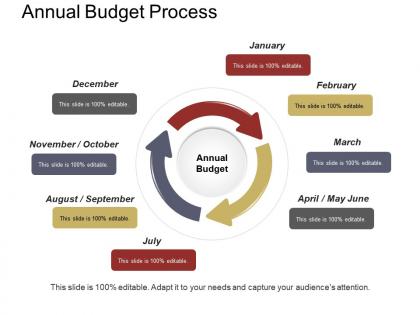
Annual budget process example of ppt




Try Before you Buy Download Free Sample Product
 Impress Your
 Audience
 100%
100% Editable
 Save Hours
 of Time


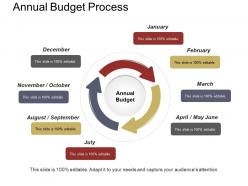
The annual budget process PPT slide projects income as well as expenses for a year. A user can share the information with others i.e. for non-individuals, it is expandable and it includes a balance sheet as well as cash flow statement through this annual budget example presentation slideshow. The annual budget template for PowerPoint is suitable for individuals, corporations, governments, as well as other types of organizations that need to keep an eye on the financial activity. You can take the help of the annual budget planning presentation template to explain that this budget can apply to either a fiscal or calendar year. The yearly budget process PPT slide helps the creators to plan for the upcoming year along with that they can make the necessary adjustments for meeting the financial goals. The 12 month budget planning PowerPoint slide helps an individual to manage his money in a better way. When it comes to corporations, governments, or other organizations, the annual budget is critical and usually mandatory for planning purposes related to sources of income or even necessary expenses such as assets, liabilities, & requirement of equity for supporting operations over a year period. Therefore, our professionally designed yearly budget planning presentation template is perfect for all types of organizations, corporations, etc. Our Annual Budget Process Example Of Ppt contain imaginative features. They enable you to be highly innovative.
People who downloaded this PowerPoint presentation also viewed the following :
Annual budget process example of ppt with all 5 slides:
Identify ill conceived actions with our Annual Budget Process Example Of Ppt. Avoid the danger they could have caused.



FAQs for Annual budget process
So basically you start with planning - figure out your goals, then get all the departments to submit their wish lists. Draft everything up, then comes the fun part (sarcasm) where everyone argues about cuts and changes. Leadership has to approve it all before you can actually roll it out to everyone. Oh, and set up some way to track everything once it's live. Honestly though, whatever timeline you think you need? Double it. I've never seen one of these finish on schedule - there's always some department that submits late or executives who want to completely rework something at the last minute.
Get your department heads involved from day one - they actually know where money gets wasted. Make them own their budget pieces instead of just asking for opinions they'll never see implemented. Don't just send spreadsheets around (seriously, who reads those?). Set up working sessions where people can hash out priorities together. Department heads first, then bring in team leads who catch stuff you'd miss. Give everyone real deadlines and parameters. Then - this is key - show them how their feedback changed the actual numbers in a final review meeting. Makes it feel collaborative instead of just checking boxes.
Track your budget variance first - that's actual vs planned spending. Then burn rate and cash flow projections. But the operational stuff matters just as much, maybe more honestly. Revenue per dollar spent, headcount efficiency, project completion rates. That's where it gets interesting - when you can see how your spending actually connects to results. Do monthly reviews where you're looking at everything together, not just the money side by itself. The financial numbers alone won't tell you if you're being smart about it.
So basically, nonprofits budget around their mission and whatever funding they've got locked in - grants, donations, that whole thing. For-profits? They're just chasing revenue and keeping shareholders happy. Grant cycles totally dictate nonprofit timing, plus you have to track restricted funds separately (which is honestly a pain). Business budgets focus more on market trends and profit margins. Way different priorities. Both usually do annual budgets with quarterly check-ins though. Just heads up - if you're jumping sectors, nonprofit boards will question every expense and how it helps the cause, not just whether you're making money.
Dude, it's crazy how much time you'll save. Instead of manually typing everything into Excel, just pull data straight from your accounting software. Real-time dashboards are clutch - everyone sees the same numbers instantly. Automated approvals cut out so much back-and-forth nonsense. The AI forecasting stuff actually works pretty well too, catches patterns I'd totally miss. Oh and no more brutal email chains about budget changes, thank god. Start with whatever plays nice with your current setup - switching everything at once is a nightmare.
Honestly, scenario planning saved my ass so many times - map out best case, worst case, and realistic outcomes before you start. Stash away like 5-10% as a "shit happens" fund because trust me, it will. Quarterly check-ins are way better than waiting a whole year to realize you're screwed. Don't lock yourself into tons of fixed costs if you can help it. I've watched teams crash and burn because they made their budgets too rigid. Oh, and that whole "planning for chaos upfront vs. panicking later" thing? Yeah, definitely go with option one.
Oh man, don't underestimate your expenses - that's like the
-
Very unique, user-friendly presentation interface.
-
Good research work and creative work done on every template.