


Annual Product Performance Report Powerpoint Presentation Slides




Try Before you Buy Download Free Sample Product
 Impress Your
 Audience
 100%
100% Editable
 Save Hours
 of Time


Launching a new product into the market is a daunting task that takes a lot of effort and money. Once the product has been established, tracking its performance in the market is even a more challenging task. Here is a professionally designed Annual Product Performance Report template that displays multiple methods, KPIs, and metrics that will help any marketing manager track their products performance. The presentation is helpful for marketing managers intending to successfully follow the performance of their product in the market and devise multiple strategies that will help increase revenues. To understand the product performance, one needs to assess the products capabilities, understand the product lifecycle, identify the USP of the product and understand how much it costs to manufacture the same. An in depth market analysis is required to realize the potential of the same. Identifying key performance indicators play a significant role in products analysis. These KPIs can be Revenues generated, Units sold by product and purchase value order, etc. Get access to this template now.
People who downloaded this PowerPoint presentation also viewed the following :
Content of this Powerpoint Presentation
Slide 1: This slide introduces Annual Product Performance Report. State Your Company Name and begin.
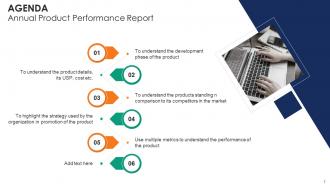
Slide 2: This slide states Agenda of the presentation.
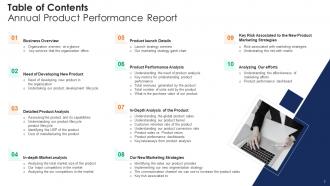
Slide 3: This slide presents Table of Content for the presentation.
Slide 4: This slide displays title for topics that are to be covered next in the template.
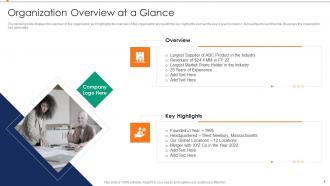
Slide 5: This slide represents overview of the organization along with the key highlights.
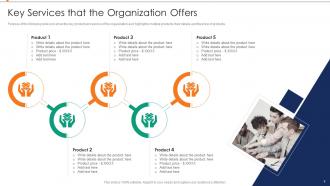
Slide 6: This slide showcases key product and service of the organization as it highlights multiple products, their details and the price of products.
Slide 7: This slide shows title for topics that are to be covered next in the template.
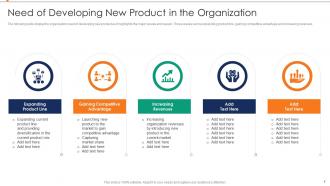
Slide 8: This slide presents Need of Developing New Product in the Organization.
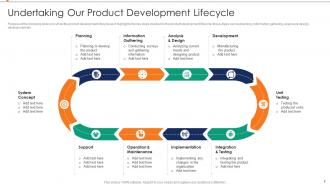
Slide 9: This slide displays product development lifecycle as it highlights the key steps involved in the product development lifecycle.
Slide 10: This slide represents title for topics that are to be covered next in the template.
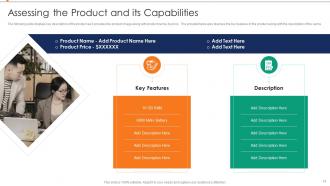
Slide 11: This slide showcases key description of the product as it provides the product image along with product name.
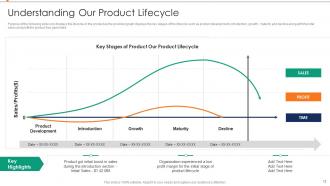
Slide 12: This slide shows key stages of the lifecycle such as product development, introduction, growth, etc.
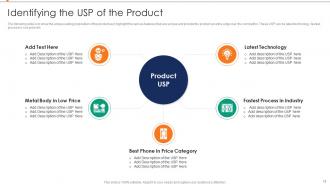
Slide 13: This slide presents unique selling proposition of the product.
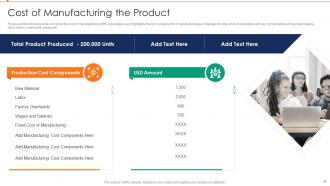
Slide 14: This slide displays the cost of manufacturing of the organization.
Slide 15: This slide represents title for topics that are to be covered next in the template.
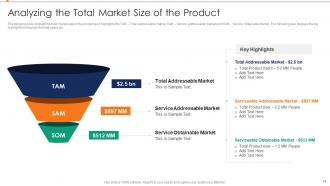
Slide 16: This slide showcases Analyzing the Total Market Size of the Product.
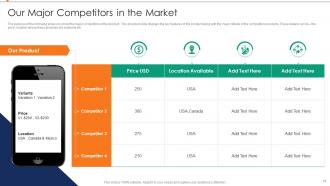
Slide 17: This slide shows Our Major Competitors in the Market.
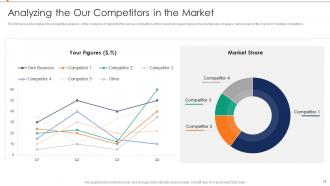
Slide 18: This slide presents Analyzing the Our Competitors in the Market.
Slide 19: This slide displays title for topics that are to be covered next in the template.
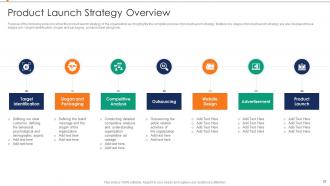
Slide 20: This slide represents product launch strategy of the organization.
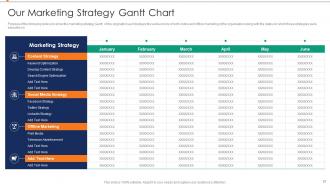
Slide 21: This slide showcases Our Marketing Strategy Gantt Chart with various tools of both online and offline marketing.
Slide 22: This slide shows title for topics that are to be covered next in the template.
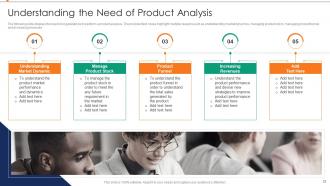
Slide 23: This slide presents Understanding the Need of Product Analysis.
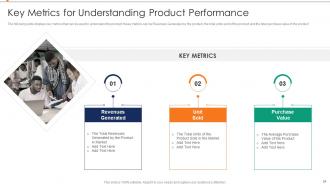
Slide 24: This slide displays Key Metrics for Understanding Product Performance.
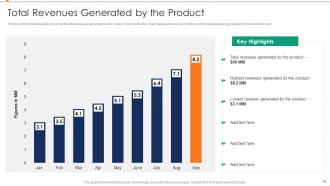
Slide 25: This slide represents Total Revenues Generated by the Product.
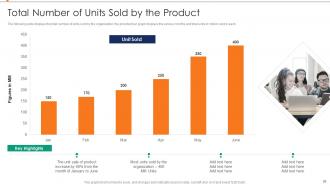
Slide 26: This slide showcases total number of units sold by the organization.
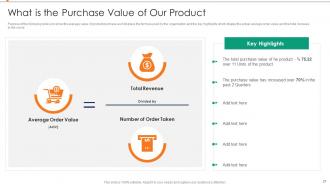
Slide 27: This slide shows What is the Purchase Value of Our Product.
Slide 28: This slide presents title for topics that are to be covered next in the template.
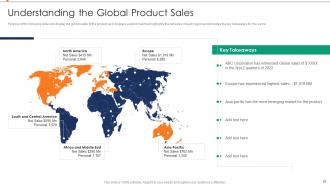
Slide 29: This slide displays Understanding the Global Product Sales.
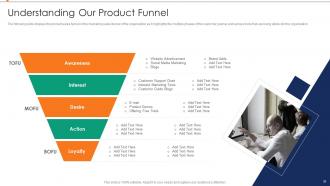
Slide 30: This slide represents product sales funnel or the marketing sales funnel of the organization.
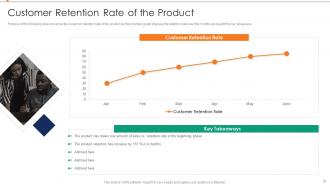
Slide 31: This slide showcases Customer Retention Rate of the Product.
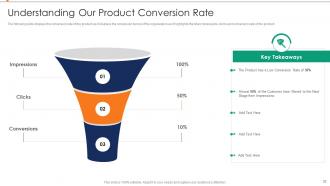
Slide 32: This slide shows Understanding Our Product Conversion Rate.
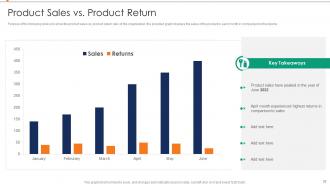
Slide 33: This slide presents product sales vs. product return ratio of the organization.
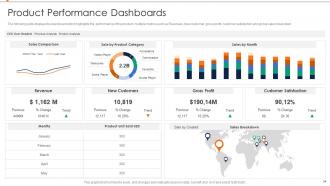
Slide 34: This slide displays the dashboard which highlights the performance of the product.
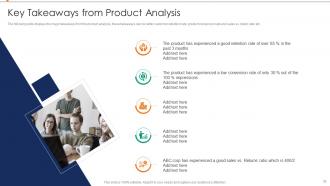
Slide 35: This slide represents Key Take Always from Product Analysis.
Slide 36: This slide showcases title for topics that are to be covered next in the template.
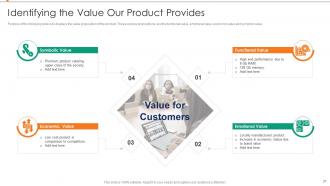
Slide 37: This slide shows value proposition of the product.
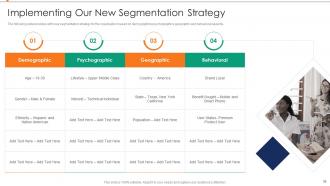
Slide 38: This slide presents Implementing Our New Segmentation Strategy.
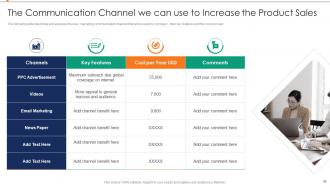
Slide 39: This slide displays new marketing communication channel that will be used by company.
Slide 40: This slide represents title for topics that are to be covered next in the template.
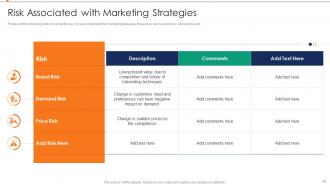
Slide 41: This slide showcases Risk Associated with Marketing Strategies.
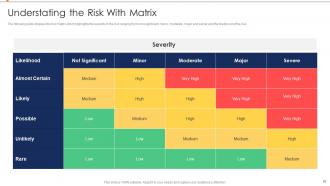
Slide 42: This slide shows risk matric which highlights the severity of the risk ranging.
Slide 43: This slide presents title for topics that are to be covered next in the template.
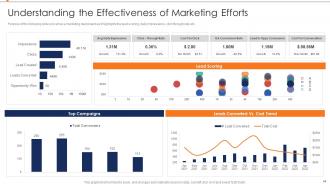
Slide 44: This slide displays Understanding the Effectiveness of Marketing Efforts.
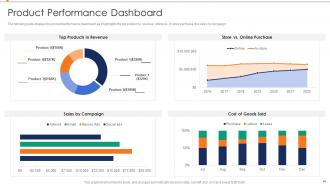
Slide 45: This slide represents product performance dashboard as it highlights the top product by revenue.
Slide 46: This slide showcases Icons for Annual Product Performance Report.
Slide 47: This slide is titled as Additional Slides for moving forward.
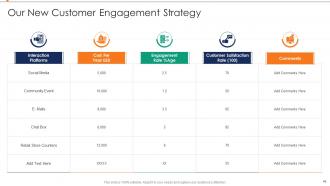
Slide 48: This slide shows Our New Customer Engagement Strategy.
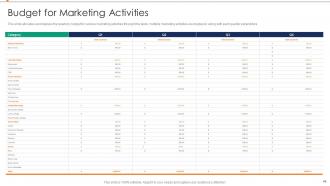
Slide 49: This slide allocates and displays the quarterly budget for various marketing activities.
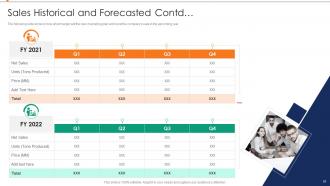
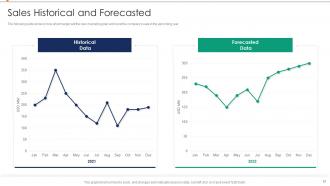
Slide 50: This slide displays what margin will the new marketing plan will boost.
Slide 51: This slide represents what margin will the new marketing plan will boost the company's sale.
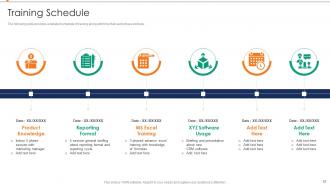
Slide 52: This slide showcases detailed schedule of training along with time that each phase will take.
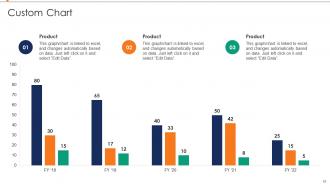
Slide 53: This slide displays Custom chart with two products comparison.
Slide 54: This slide shows Post It Notes. Post your important notes here.
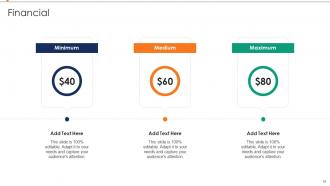
Slide 55: This is a Financial slide. Show your finance related stuff here.
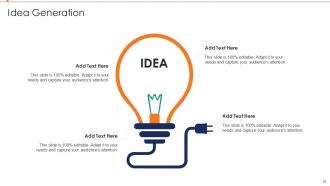
Slide 56: This is an Idea Generation slide to state a new idea or highlight information, specifications etc.
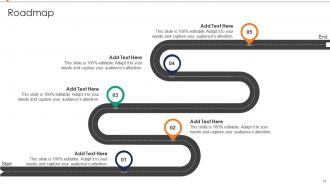
Slide 57: This slide presents Roadmap with additional textboxes.
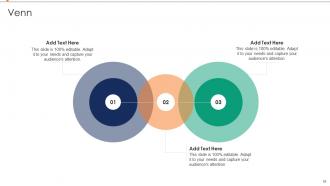
Slide 58: This slide depicts Venn diagram with text boxes.
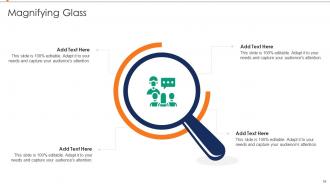
Slide 59: This slide showcases Magnifying Glass to highlight information, specifications, etc.
Slide 60: This is a Thank You slide with address, contact numbers and email address.
Annual Product Performance Report Powerpoint Presentation Slides with all 65 slides:
Use our Annual Product Performance Report Powerpoint Presentation Slides to effectively help you save your valuable time. They are readymade to fit into any presentation structure.






FAQs for Annual Product Performance Report
Honestly, just track five things that actually matter. Revenue growth and new users are obvious - gotta have those numbers ready. User engagement is huge too: daily/monthly active users, how many people stick around, churn rates. Customer satisfaction scores and support tickets sound super boring but execs love that stuff. Market share data is gold if you can find it. The trick is showing you're not just growing fast but growing smart, you know? Like, sustainable growth that won't crash next quarter. I'd throw it all in a simple dashboard so people can actually read the trends without squinting at spreadsheets for hours.
Honestly, charts and graphs are a lifesaver when you're trying to get your point across. Raw data just makes people's brains shut off - I've seen it happen in so many meetings. Heat maps will show you seasonal stuff right away, bar charts make it super obvious when you're comparing products, and trend lines tell the whole story about where things are headed. Your audience gets it in seconds instead of squinting at spreadsheet cells forever. Pick your most important numbers first, then match whatever chart type fits the story. Trust me on this one - executives check out completely when you throw data tables at them.
Honestly, I'd go with year-over-year comparisons first - they're great for spotting growth trends. Quarterly breakdowns help too since you'll catch any seasonal stuff. Cohort analysis is where it gets interesting though, shows you how different customer groups actually performed. Oh and variance analysis is clutch because it tells you exactly where you nailed your targets vs where you didn't. Competitive benchmarking works if you can actually get decent data on competitors (big if). Mix your hard numbers like revenue with customer survey feedback. Don't go crazy trying every method - pick 2 or 3 that match what you're trying to figure out.
So basically, customer feedback is what makes our annual report actually worth reading. We grab data from surveys, online reviews, support tickets - you name it. Helps us spot trends in satisfaction and figure out what people actually want (versus what we think they want, which is usually wrong lol). Short answer: without it we'd just be guessing. The feedback shapes our whole product roadmap and helps us fight for budget next year. Pro tip though - don't wait until you're writing the report to start collecting this stuff. You'll thank yourself later.
Start with the obvious stuff - grab their annual reports, press releases, whatever's public. Market research companies like Nielsen help too, but honestly? LinkedIn's where I find the best intel these days. Focus on what actually moves the needle: market share, pricing, customer satisfaction, sales growth. Just make sure you're comparing apples to apples with your timeframes. Set up reviews every quarter or so - I'd probably do it over coffee because spreadsheets are boring. You'll catch trends way earlier this way and can pivot before your competitors even know what hit them.
Honestly, the worst thing you can do is cherry-pick data to make everything look amazing - stakeholders aren't stupid and they'll call you out. Also, don't get sucked into vanity metrics that look pretty but mean nothing for the business. I once watched someone spend three weeks on charts that literally no one used lol. Focus on what actually drove results, good AND bad. External stuff matters too - like if there was a holiday or your competitor launched something. Oh, and figure out what "success" means for each product first, otherwise you'll just be swimming in random numbers.
Honestly, dig into which features people actually used vs what you *thought* they'd love - the surprises there are always eye-opening. Customer feedback will show you the biggest pain points to tackle first. Usage patterns? That's where you see what's working and what needs a complete pivot. The market comparison stuff is gold for spotting where competitors are beating you. Oh, and definitely get a mixed team together to go through all this data - way better than trying to make sense of it solo. Turn those insights into your Q1 priorities and you're set.
Look at your customer adoption rates first - that's the big one. Then dig into competitive positioning and whether your features actually match what the industry wants right now. Usage patterns are gold if they show you're riding the wave (like mobile or API stuff). Revenue per segment matters tons, especially in growing verticals where you're stealing market share. Oh, and don't sleep on regulatory compliance wins since literally everyone's drowning in that mess. The trick is tying your product data to what's happening outside your company, not just your internal dashboards. Can you draw straight lines from industry demands to what you built? That's your story.
Think of it like telling a story - hit them with your big wins first because honestly, execs zone out fast. Then explain what made those results happen. After that, get into the messy stuff you dealt with and how you fixed it. Don't skip the lessons learned section - that's where you show you're not just reporting numbers. Charts and visuals are your best friend here, way better than walls of text. Oh, and definitely end with what you need from them next year. Be specific about resources or they'll just nod and give you nothing.
Start with the CRM - that's got all your sales numbers and customer stuff. Then hit up Google Analytics for website data. Excel's still clutch for combining everything (yeah I said it). Customer survey platform will give you satisfaction scores too. Social media analytics might be worth checking if it applies to your thing. Honestly the CRM is like 80% of what you need anyway. Just build from there and add the other sources when you actually need them. Way easier than trying to pull from everywhere at once.
Dude, just turn your data into actual stories! Like instead of boring bullet points, say "Users kept complaining about X, so we built Y feature and boom - 30% better engagement." Make your charts feel like plot twists and customer quotes like real dialogue. Each section should have its own little story arc - problem, solution, results. I swear it works way better than drowning people in spreadsheets. Your roadmap becomes the "what happens next" teaser. Honestly beats watching executives check their phones during your presentation. Way more fun to write too.
Honestly, this doesn't look great for your team. Budget cuts are probably coming, and they might reallocate resources or even kill the product entirely if numbers don't improve. Leadership's gonna be breathing down your necks with constant check-ins and pressure to pivot fast. The worst part? Other teams will start avoiding you since nobody wants to waste resources on a sinking ship - been there, it sucks. Your headcount could take a hit too. I'd dig into whatever metrics they're obsessing over and come up with some solid turnaround plans before your next review.
Monthly checks work way better than quarterly ones, trust me. Annual reviews? Total waste - you're basically flying blind for 11 months straight. Look, I get why companies stick with the same old metrics, but honestly that's just lazy thinking. Your KPIs should change when your business does. Market shifts, priorities change, you figure out what actually matters. Set up quick 30-minute sessions each month with your team. Just dig into what's hitting and what's missing the mark. Way more effective than those marathon quarterly deep-dives everyone dreads.
Look, just be straight up about what bombed and what killed it in your report. Stakeholders aren't dumb - they can smell BS from a mile away anyway. Honestly admitting failures shows you actually get your product instead of just making excuses. Trust me on this one. You'll build way more credibility being real about the rough patches. Plus people give better feedback when they know you can handle the truth. I know it's tempting to make everything sound amazing, but transparency beats sugar-coating every time. Your data tells a story - let it.
Definitely set up some working sessions where you share the tech metrics and user data, and they bring the customer feedback stuff. First thing - figure out what story your numbers are actually telling about how well the product's doing. Marketing's honestly way better at making charts look good than we are (learned that the hard way), so let them handle the presentation flow while you do the technical deep-dives. They're also great at translating your feature adoption rates into business-speak that stakeholders actually care about. I'd get a kickoff meeting on the calendar for next week to split up responsibilities and timeline everything out.
-
Very unique, user-friendly presentation interface.
-
You know what? I'm so glad I opted for this PPT design. It has been a total game-changer for me and my presentations. Thank you!