



 0 Comment
 Customer Reviews

Did you know that most of your unhappy customers never complain, they just leave? And that is why you must consider a Customer Feedback Dashboard. It is more than just a report, it can assist your team understand what customers feel and say. Here, the initial process starts with collecting customer insights in one place, making it easier to track trends and take action.
If interested, check out our Top 10 Customer Service Dashboard Templates.
The dashboard includes feedback metrics such as Net Promoter Score (NPS) and Customer Effort Score (CES) to comprehend customer satisfaction. One big part of this is sentiment analysis which shows if feedback is positive, negative, or neutral. It can track moods without reading every single comment.
Take a look at our Top 10 Customer Feedback Analysis Templates with Examples and Samples.
With clear data visualization, you can turn dull real time feedback into colorful charts. The tool helps you improve the user experience and customer retention rates. It monitors the churn rate and explains why people leave and what to fix to retain them. Also, it can capture the Voice of Customer (VoC) from surveys, social media, and reviews—all in one place.
If you want your team to understand the concept better, present your ideas in a structured format. You must provide actionable insights in a clear, easy-to-share manner and plan better strategies. To make this easy for you, our design team has prepared some Customer Feedback Dashboard Templates with samples. These documents are 100% customizable, so you can make changes as per your business requirements.
With these PowerPoint templates, you can clearly show customer journey mapping in visual flows. You can discuss different customer satisfaction levels with your business owners and investors, ensuring everyone is on the same page. You can add relevant diagrams, charts, graphs, etc., and help your sales teams reduce churn and achieve their goals. In simple words, use these slides to study kinds of feedback trends and plan strategically for improved user experience.
Now, let us explore our Top 10 Customer Feedback Dashboard Templates with Examples and Samples
Template 1: Monthly Customer Feedback Strategic Data Analysis Dashboard Snapshot
The following PPT slide highlights monthly customer feedback details for a comparative analysis of reviews. It shows a visual representation of data sent, files collected, data quality, monthly region-wise information, project status, etc. The template also includes different net promoter scores to drive customer experience. With this format, you can get a clear picture of operational developments and customer feedback every month. You can check patterns in feedback every month and compare results to fix small problems early. Now, click on the link and get the template right away!

Template 2: Positive Negative Customer Feedback Dashboard PPT Template
If you implement a structured dashboard, you can spot good service areas and fix weak ones fast. So, add this colorful template to your list and give a ready-made format to present both good and bad feedback. The slide shows statistics about a weekly number of positive and negative customer responses with an overall email sentiment score. It further includes details about daily deals, special discounts, newsletters, and renewal reminders. Download the template now and explain customer feedback to your business owners and investors. You can also add visuals to show what customers love and what they complain about, all in one slide.

Template 3: Market Research Dashboard For Customer Feedback Analysis PPT Template
A Market Research Dashboard can show what real customers think about your product or service. This can help you fix what’s not working and keep what people love. So, use this template and summarize the results of the business market research survey to analyze customer feedback. Here, you can highlight results related to user description and user experience. You can show age category, user description, product satisfaction, etc. Now, get the template and plan better ads, offers, or product updates that actually work.

Template 4: Customer Support Services Assessment Dashboard PPT Template
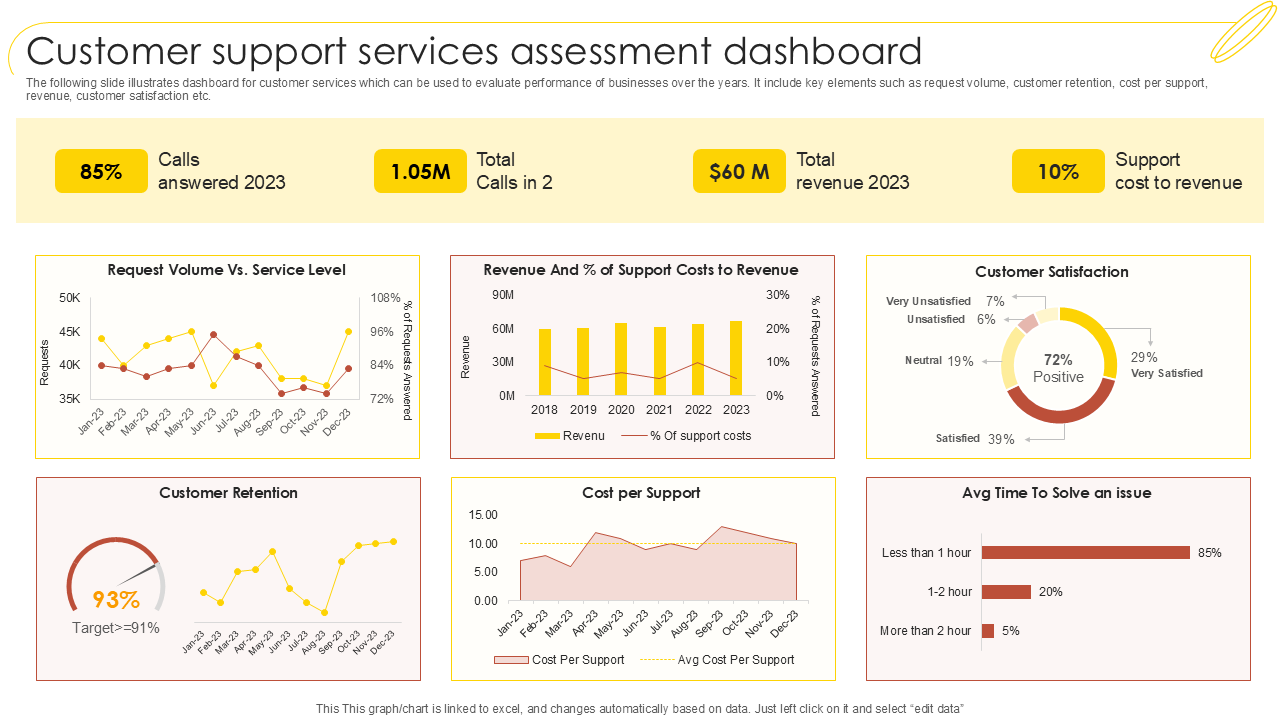
The following template illustrates a dashboard for customer services that can be used to evaluate businesses' performance over the years. It includes key elements such as the number of calls answered, total calls, revenue, support cost to customers, etc. It also shows elements like request volume, customer retention, cost per support, customer satisfaction, and time to solve an issue. You can modify the content of this document as you need and use it accordingly. Download the template from the link and show important findings to your boss or team without building slides from scratch.
Template 5: Customer Feedback Dashboard For Analyzing Market Sentiment PPT Template
You can use the PPT template and showcase a dashboard utilized for analyzing the customer sentiment prevailing in the market. It includes components such as NPS, average score, total response, sentiment by topic, positive sentiment, negative sentiment, etc. With this structure, you can see how people feel about your brand on social media, in surveys, and emails. So, get it right away and find out if recent product updates made people happier or not. You can also compare what customers say this month versus last month and accordingly plan smarter actions.

Template 6: Hotel Customer Feedback Analysis Dashboard PPT Template
With a structured feedback dashboard, you can guide your hotel managers to see what guests love or dislike. You can track guest opinions from check-in to check-out and fix problems quickly. So, include the template to your list and showcase a dashboard analyzing customer feedback for a hotel. It shows details like customer count, overall rating, staff performance, room service, recommendation score, etc. You can also add a few extra elements to the document and present your data. Now, grab the template and help your team reduce negative ratings.

Template 7: Customer Project Feedback Results Dashboard PPT Template
The following PowerPoint template shows the complete feedback dashboard of clients in a concise manner. It can help you evaluate how many customers fill out the feedback survey forms and how much feedback is positive and negative. Here, you can also display feedback score mix, activity in feedback log, feedbacks per day, and feedback levels per interaction. You can modify the elements as per your needs and prepare a ready-to-use report within a few clicks. So, download the template now and take full advantage of its features!

Template 8: Post Gamification Customer Feedback Monitoring Dashboard PPT Template
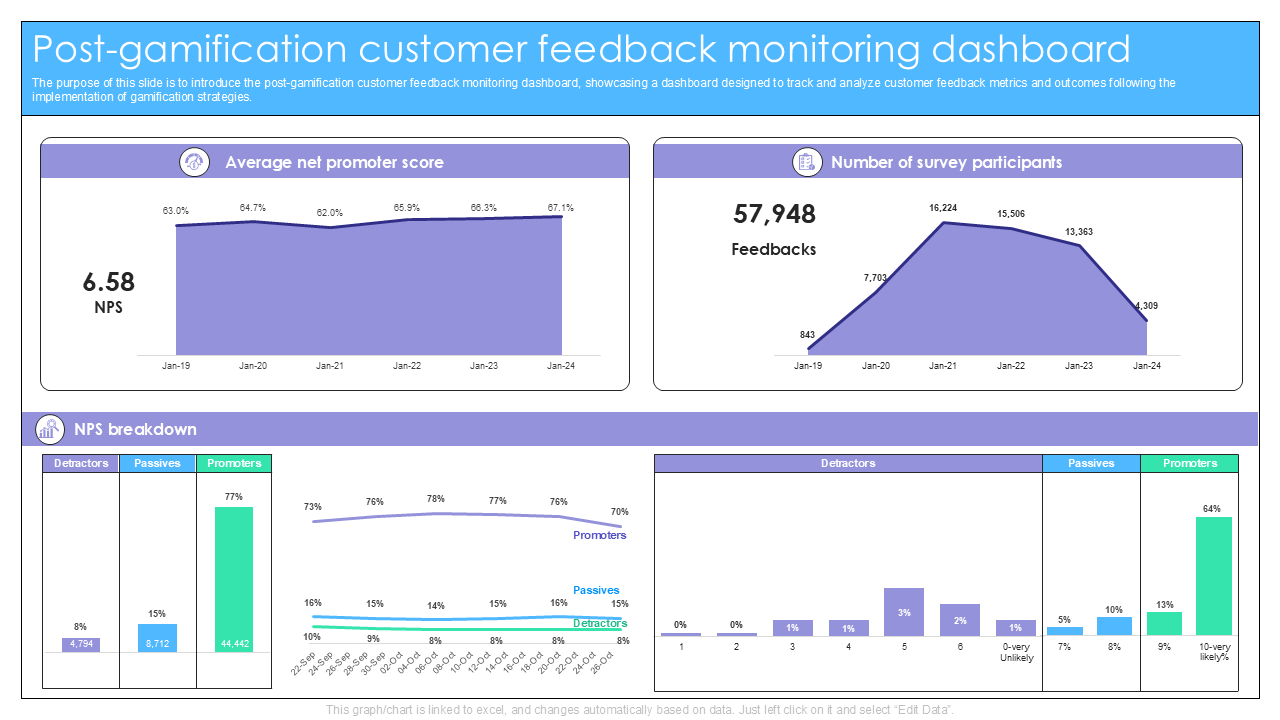
Add this simple yet attractive template to your presentation bundle and introduce the post-gamification customer feedback monitoring dashboard. The dashboard can guide you to track and analyze customer feedback metrics and outcomes using gamification strategies. Here, you can show elements such as the Number of Survey Participants, Average Net Promoter Score, NPS breakdown, etc. This template is available for you for immediate download, so get it right away and make the necessary changes. Make sure you include important feedback metrics and present customer reviews and scores in clean, visual slides during team meetings.
Template 9: Client Feedback Dashboard Showing Customer Retention PPT Template
With this colorful Client Feedback Dashboard, you can provide a clear overview of the project results from the customer's perspective. It can simplify customer retention data and make it easy to share with your team or manager. It shows a graphical representation of the Cumulative Score, Customer Retention, and Customer Effort Score for different categories. Get the template from the link and reap its benefits. Note that fast and clear actionable insights can assist your team in making changes that matter.

Template 10: Dashboard For Customer Satisfaction Survey Feedback Results PPT Template
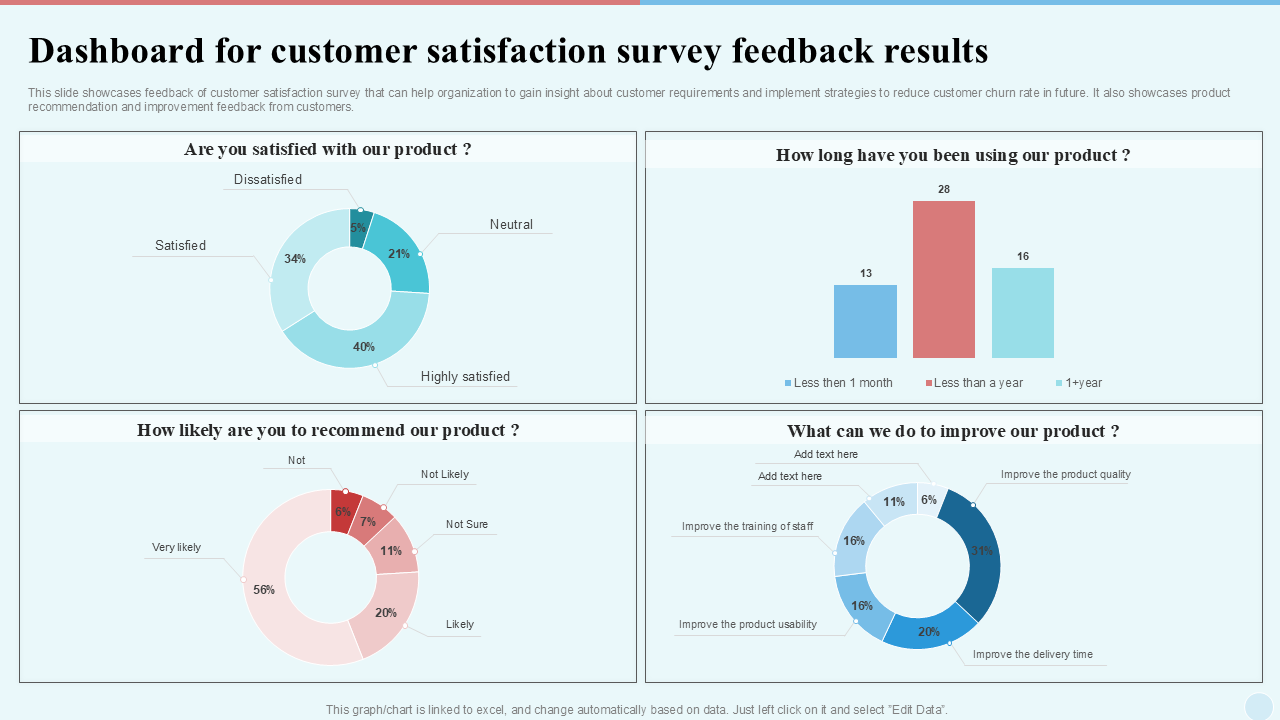
Use the following template and illustrate feedback from the customer satisfaction survey in a structured manner. It can guide your organization to gain insights into customer requirements and implement strategies to reduce customer churn rates in the future. It showcases the Customer Satisfaction Survey, Feedback Results, product recommendation details, and improvement strategies.
With this readymade format, you don’t have to scroll through long survey sheets as everything is organized into visuals like bars, lines, or pie charts. Now, get the template right away so that you can easily plug in your numbers and show the results.
Conclusion
The above-mentioned templates provide a ready-to-use solution for teams to understand customers' requirements. They contain easy visuals that show customer insights in a clear and concise format. These templates help explain feedback with data visualization, charts, and clean designs. You can also track sentiment analysis, highlight feedback metrics, and boost customer satisfaction all in one file. You can use these documents to make better strategies and improve customer retention. So, download them now and add real-time feedback points for better awareness.
PS: Also, check out our Top 5 Complaints Dashboard Examples with Samples and Templates.
Customer Feedback Dashboard FAQs
What key metrics should be tracked on a customer feedback dashboard?
To get a complete analysis of the customer feedback dashboard, you must track Net Promoter Score (NPS), Customer Satisfaction and Effort Scores. Also, include volume of feedback, resolution time, sentiment score, and other metrics that spot issues early and help plan improvements. These metrics can measure how happy your customers are and how well your team members respond.
How can a customer feedback dashboard help improve product or service quality?
A customer feedback dashboard tool can show where your customers face problems. You can implement it to spot negative reviews or low ratings. This can basically help teams fix bugs, improve features, and change business processes. With this feedback dashboard, your team can easily work on what matters most to the users and improve overall service quality.
What are the best tools for creating an effective customer feedback dashboard?
Tools include Qualtrics, Zendesk, HubSpot, and SurveyMonkey. You can also use Google Data Studio and Microsoft Power BI to create a customer feedback dashboard. These tools can help you gather feedback, analyze sentiment, and build reports by turning raw data into useful information. Choose one based on your business size and goals and support better customer retention.