




 0 Comment
 Customer Reviews

If data is the new oil, then forecasting is what keeps your business going—quickly, with a clear goal, and ready for the bumps along the road. But here's the catch: even the best prediction can fail if it's stuck in a spreadsheet full of junk or a report full of text. In a world that values speed and clarity, you need more than just numbers. You need stories. That's where forecasting dashboards come in handy.
Access our “Top 7 Sales Forecast Dashboard Templates with Examples and Samples” by clicking on the link provided.
Forecasting dashboards are more than pictures; they're data-backed crystal balls. They break down complicated trends into real-time, eye-catching information. Think about being able to monitor the sales trend for the following quarter at a glance or recognizing a problem in the supply chain before it happens. A strong forecasting dashboard doesn't simply help you make decisions; it makes them better, whether you're in charge of marketing, finance, or operations.
But let's be honest: putting together a fantastic dashboard from scratch is like putting together IKEA furniture without the instructions. That's why we made a toolset to help you do your work better, smarter, and a lot faster. Here are our Top 10 Forecasting Dashboard Templates with Examples and Samples. They are your quick way to convey amazing stories with data.
These templates are editable, made for professionals that want more than just static slides. Change the typefaces, switch the colors, change the charts, drag in your own data, and put in your logo.
Don't settle for "just okay" if you're getting ready for a big investor pitch, a quarterly review, or a strategy workshop. Use these templates to make your message stronger, make your vision clearer, and show the future with style and accuracy. Your data already tells you what will happen in the future; now it's time to show it off in style.
Also explore our “Top 10 Daily Dashboard Templates With Examples and Samples” by clicking on the link provided.
Template 1: Dashboard For Demand Planning Forecast Software
This dashboard for demand-planning and forecasting software lets you see demand forecasts and inventory levels in real time. It shows how much forecast software is used, divides it down by product family, and keeps track of forecasts at the product level. Several categories on the dashboard help you understand the data, including inputs for forecasts, outputs from the system, and the state of the inventory. You can update the real numbers, and make sure that the visualizations match your facts. Use this tool to keep an eye on demand patterns, make sure your inventory is ready, and keep your supply chain in sync.

Template 2: Business Sales Forecasting KPI Dashboard
This presentation shows the monthly revenue and deals earned that lets teams see how their sales are doing over time. It has visual elements that show how predicted numbers relate to real numbers, making it easy to see trends and differences. The dashboard has filters for time periods and sales segments that lets users look at data in more detail. This dashboard is ready to be plugged into presentations or executive reports because it was made to work with other software. Users can change the measurements, timeframes, and visualizations on the dashboard to show their own data. This application helps you make decisions based on data by giving you clear, organized information about sales projections and results.

Template 3: Forecast Plan Dashboard for Performing Scenario Analysis
This deck shows information about the accuracy of forecasts, the effect of adjustments, and the percentage of bias. It has a variance chart that shows how baseline and altered scenarios compare throughout planning cycles. A table shows the precise activities taken to improve things and the kinds of changes that were made. The dashboard shows changes in projected value, groups adjustments by reason, and shows the effect by product category. Users can sort data by department, scenario, and time frame for planning. You can change all of the features, which lets you add real data, departmental goals, and insights that are particular to the scenario.

Template 4: Startup Business Dashboard for Assessing Sales Forecast
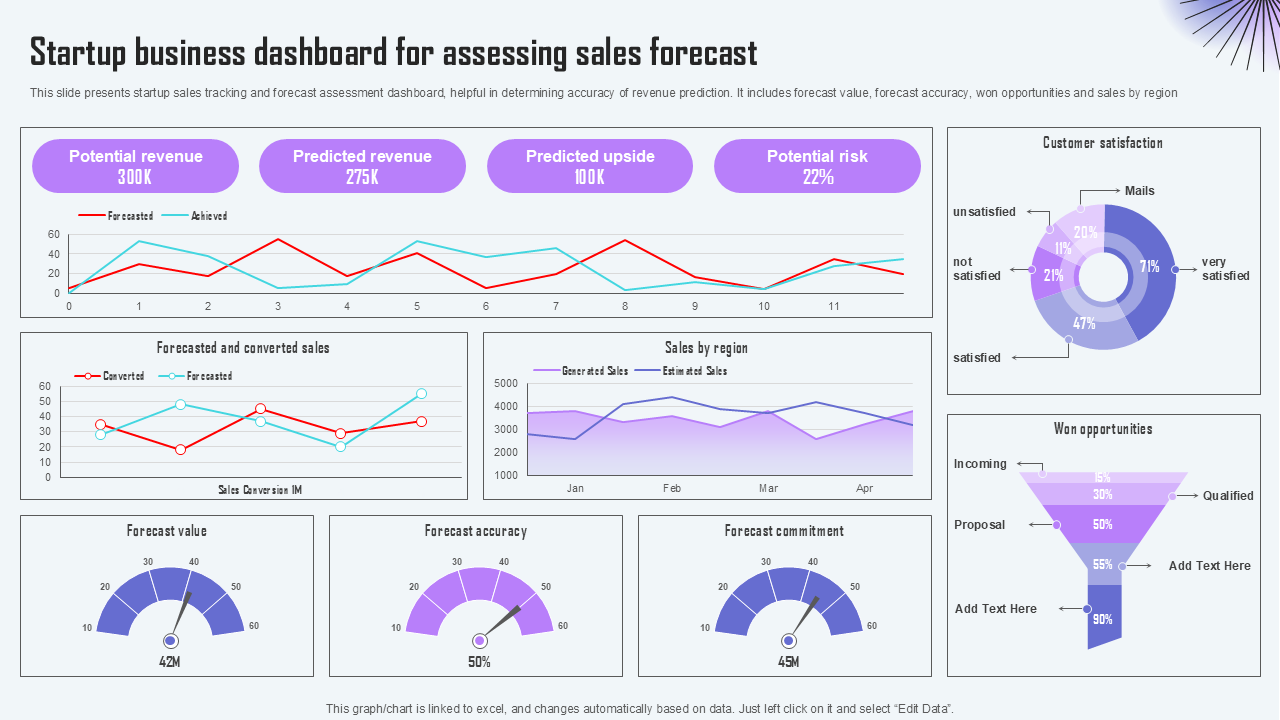
This template deck shows projected revenue, sales that were expected but not converted, sales by region, customer satisfaction rates, and prospects that were won. It brings all of these indicators together into one display that makes it easy to see what is working well and what needs to be improved. You may change the statistics, change the graphic elements, and add real performance data to the layout to make it your own. Use it to keep your sales strategy on track, keep an eye on industry trends, and help you make decisions based on data from the start to the end of your business.
Template 5: Construction Project Equipment Forecast Dashboard
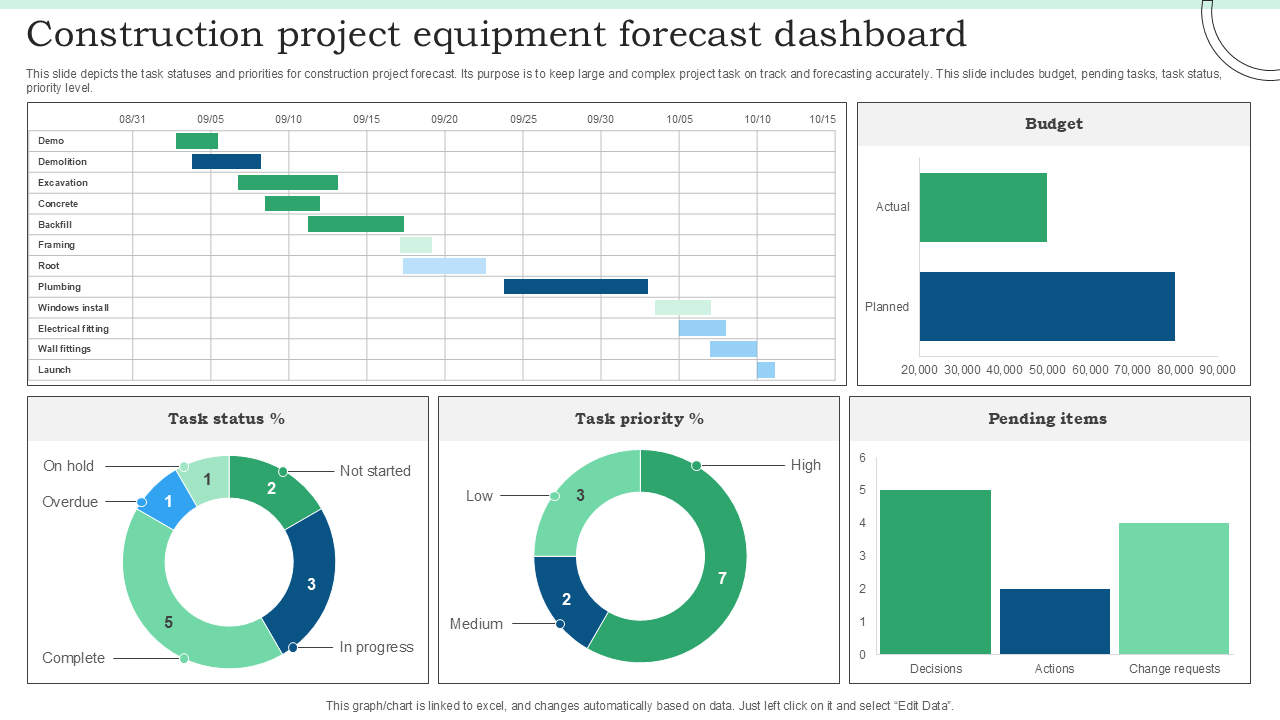
This shows how construction equipment is used and how it will be used in the future. It shows the status and priority of tasks for each type of equipment, makes sure that planned allocations match predicted needs, and keeps track of quarterly estimates of the prices of materials, labor, and equipment. The dashboard has variance charts that show how baseline and updated forecasts differ throughout different planning cycles. Tables show the several types of enrichment activities and adjustments that can be made based on the cause and product group. You can change the data, change the visualizations, and make sure that forecasts match the goals of the organization.
Template 6: Local Weather Forecasting Dashboards Report
This slide highlights the temperature, humidity, and precipitation levels for a specified place during a set period of time. It has key performance indicators (KPIs) like the highest and lowest temperatures each day, the humidity levels, and the possibility of rain. The dashboard puts all of this information into visualizations that are best for looking at weather data. Users can change the location, time frame, and actual weather data, making it fully configurable. It is straightforward to integrate and lets you change the layout and graphical aspects. This application lets you keep track of local weather trends with great accuracy and makes it easy to convey clearly in presentations or analytical reports.

Template 7: Project Management Dashboard with Financial Forecast PPT Template
This slide brings together project information from important areas like spending types, follow-up items, an overview of the project, its current status, problems, risks, contingencies, finances, timeline, and scope. It shows the start and end dates as well as the actual budget numbers. Users can see how much they are spending in each area compared to what they planned, check on tasks that still need to be done and actions that need to be taken to reduce risk, and keep an eye on their risk exposure and contingency allocations. The dashboard shows the present status of things, brings up current problems, and shows how often contingencies are used. You can add real statistics and timelines to editable tables and charts. It was made to work well with other systems, and it helps with accurate forecasting and making sure that project work is in line with financial and schedule goals.

Template 8: Resource Allocation Dashboard for Supporting Forecasting Activities
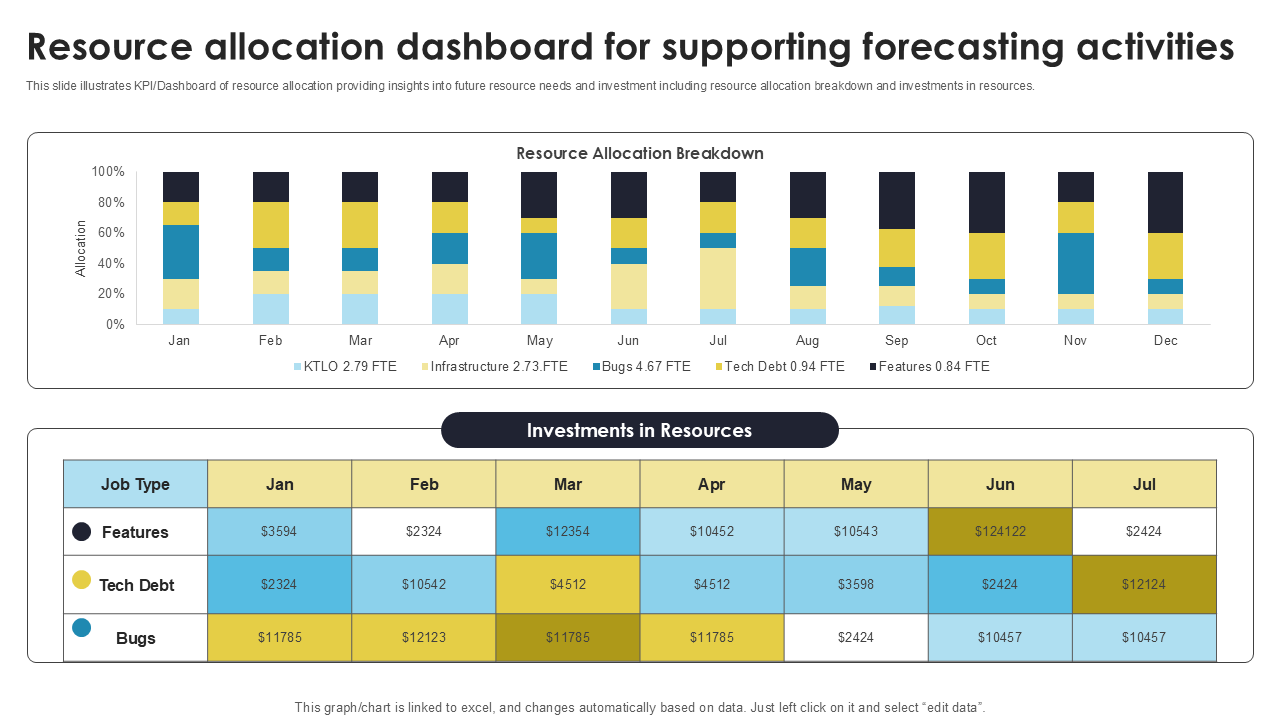
This shows how much resources are expected to be needed and how to plan investments across departments. It shows key performance indicators (KPIs) such usage rates, capacity vs demand, and future shortages of resources. The dashboard has charts that demonstrate how planned resource allocations compare to actual resource deployment, as well as trend lines that show how accurate the forecasts have been over time. It offers tables that show how resources are spread out among teams and filters that let you choose by department, project phase, or time period. Users can change any part of the tool, including data, visual layouts, and targets to make sure they match the goals of the organization. This makes it a useful tool for strategic resource planning and forecasting.
Template 9: Financial Services Organization Monthly Sales Forecast Dashboard
This brings together important sales numbers so you can keep an eye on performance and make decisions about your strategy. It shows monthly sales projections next to actual sales, which makes it easy to see how sales have changed over time. KPI cards highlight the total sales projected, the actual sales made, and the percentage of sales that were off. A line chart shows the direction of monthly sales, and a bar chart shows how forecasts and actual sales differ by product or service category. You can filter the dashboard by time period and region to get more specific analysis. Tables provide precise monthly information, and all graphic elements may be changed. Users can add their own data, change measurements, and make sure the dashboard fits with the organization's goals.

Template 10: Retail Sales and Distribution Dashboard With Forecasting
This brings together important sales data to keep an eye on performance and help with strategy. It shows monthly sales projections next to actual sales, which makes it easy to see how sales have changed over time. KPI cards highlight the total sales projected, the actual sales made, and the percentage of sales that were off. A line chart shows the direction of monthly sales, and a bar chart shows how forecasts and actual sales differ by product or service category. There are filters for time period and region on the dashboard, which lets you do custom analysis. Tables show precise monthly information, and users can change any of the visual elements by adding their own data, changing metrics, and aligning the dashboard with the organization's goals.

Wrapping it Up!
Forecasting dashboards are important tools for making sense of large amounts of data and turning it into useful information. This carefully chosen list of the Top 10 Forecasting Dashboard Templates with Examples and Samples gives professionals powerful tools to keep an eye on, evaluate, and show important forecasting indicators across all areas of business, from sales and demand planning to tracking finances and managing resources. You can alter and customize any template 100% to make integration easier, improve the quality of presentations, and allow data customisation without needing to know how to design. These dashboards make strategic planning and decision-making easier by letting you compare scenarios, measure KPIs, filter timelines, and break down data by location. These templates help you turn data into direction in a clear, effective, and accurate way, whether you're getting ready for a boardroom meeting or making your daily operations more efficient.
PS: Access our “Top 10 Weekly Dashboard Templates with Samples and Examples” blog by clicking on the link provided.
FAQs on Forecasting Dashboard
What is the purpose of forecasting?
The main goal of forecasting is to use past data, present trends, and analytical tools to guess what will happen in the future. It helps businesses plan for demand, use their resources wisely, handle risks, and make smart strategic choices. Forecasting helps businesses get ready for changes that are about to happen in the market, with customers, or in the supply chain. Forecasting helps with both short-term planning and long-term growth efforts by giving a data-backed picture of what will happen in the future.
What are the 7 steps of forecasting?
There are usually seven processes in forecasting, and the first one is to figure out what the forecast is for and how it will be used.
- Getting useful information from both inside and outside sources.
- Looking at and analyzing data patterns to figure out trends and how they change over time.
- Choosing the right strategy for making predictions (qualitative or quantitative).
- Making the forecasting model and making predictions.
- Checking the forecast for accuracy and reliability by validating and testing it.
- Keeping an eye on the results and changing the forecast when new data comes in.
What are the three types of forecasting?
There are three basic types of forecasting: qualitative, time series, and causal.
- When there isn't a lot of previous data, qualitative forecasting uses expert opinions, market research, and judgment.
- Time series forecasting looks at past data to find trends, cycles, and seasonal patterns that can be used to guess what will happen in the future.
- Causal forecasting looks at how different variables are related, including how spending money on marketing affects sales, using statistical methods like regression analysis.
- Each type works well in different business situations, based on how much data is available and what decisions need to be made.


