

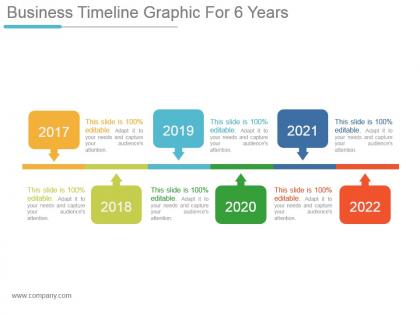
Business timeline graphic for 6 years powerpoint slide ideas




Try Before you Buy Download Free Sample Product
 Impress Your
 Audience
 100%
100% Editable
 Save Hours
 of Time


Ensure the breaks are equally engaging with our Business Timeline Graphic For 6 Years Powerpoint Slide Ideas. It will enliven the intervals.
People who downloaded this PowerPoint presentation also viewed the following :
Business timeline graphic for 6 years powerpoint slide ideas with all 5 slides:
Decide on how to end the impasse with our Business Timeline Graphic For 6 Years Powerpoint Slide Ideas. Address any dichotomy that exists.
FAQs for Business timeline graphic for 6 years
Okay so first thing - put clear dates and describe what actually happened at each milestone. I'd go chronological, left to right or whatever makes sense visually. Different colors or icons help people distinguish between like funding rounds vs product launches. Honestly, most timelines I see are just way too busy. Don't try cramming every little detail in there. Pick the stuff that actually matters to your story and keep descriptions short. Oh, and test it on someone who doesn't know your business - if they get confused, you've got too much going on.
Color coding totally saves your butt when timelines get messy. I usually do blue for planning, green for done stuff - keeps everything organized by phase or department. Honestly, it's night and day compared to boring black text everywhere. People spot patterns way faster too. Oh, and don't go crazy with colors or it'll look like a kid's art project. Stick to maybe 3-4 max. Your brand colors work great as a starting point, then just add some contrasting shades. Makes the whole thing actually readable instead of overwhelming.
Oh man, don't cram everything onto one timeline - it becomes a hot mess real quick. Keep fonts simple too, like maybe two max? I've seen people go wild with colors and different typefaces and honestly it just hurts to look at. Space things out based on actual time periods! This one drives me nuts - people make everything look evenly spaced when some events happened decades apart. Left to right flow, keep formatting consistent throughout. Start with your biggest milestones first, then squeeze in details if you've got space left over.
Honestly, it's all about who's gonna see it. Executives want the big picture stuff - major milestones, clean design, nothing cluttered. They'll zone out if you show them every little task. But project teams? Go nuts with the details and specific deadlines. I made this mistake once where I presented this crazy detailed timeline to our CEO and... yeah, awkward silence. Internal stuff can be way more casual too, while anything going to clients needs that polished look. Quick test: just think about what decisions they need to make from your timeline. That'll tell you how much detail to include.
Honestly, Canva's probably your best bet to start - their timeline templates are actually pretty decent and super quick to use. PowerPoint works too if you're already comfortable with it. Lucidchart's where I'd go for something more polished and corporate-looking, though it takes a bit more time to figure out. SmartDraw's similar. Adobe Illustrator gives you complete control but ugh, the learning curve is brutal unless you're already into design stuff. Visme's another good middle-ground option. I'd just start with Canva and see if it does what you need - you can always upgrade later if your boss wants something fancier.
Look, nobody wants to sit through another boring slideshow where everything just appears at once. Good animations actually make people pay attention instead of scrolling Instagram under the table. You can control how fast people absorb info by revealing stuff piece by piece - works great for timelines or complex data. But here's the thing: keep it simple. Those spinning, bouncing effects from 2010? Skip 'em. One element at a time is usually perfect so people don't get overwhelmed. I learned this the hard way after watching too many presentations that felt like PowerPoint threw up.
Milestones are like checkpoints that keep everyone sane. You know those big moments stakeholders actually care about? Product launches, funding rounds, major deadlines - that stuff. They break your project into chunks people can wrap their heads around instead of drowning in an endless task list. Your team gets clear targets to aim for, which honestly makes a huge difference for morale when you hit them. Just don't cram them too close together or you'll burn everyone out. Space them realistically so you can actually celebrate wins - trust me, those little victories matter way more than you'd think for keeping momentum going.
So basically you want to drop charts and graphs right onto your timeline at key moments. Like if you launched a product in Q2, throw a customer growth curve right there next to it. Revenue bars at quarterly points work great too. Makes everything way less boring than those typical timeline slides everyone zones out on. Pick visuals that actually match what happened - don't just slap random charts everywhere. Bar charts and line graphs are your friends to start with. Oh, and icons can work too if you're not feeling too chart-heavy. The whole point is people can see what happened AND why it mattered without squinting at tiny text.
So linear timelines are basically straight lines with events spaced out chronologically - super useful for project phases or company milestones where timing matters. Non-linear ones are way more flexible though. You can group stuff by themes, jump around time periods, even do cool circular designs. I'm honestly obsessed with these for storytelling since they show how events connect rather than just when they happened. Oh, and they look way more interesting visually too. Go linear when you need precision. Pick non-linear when you want something that'll actually grab attention and tell a better story.
So first figure out what milestones actually matter for your industry - like 5-7 key ones max. Tech moves fast, so you're talking product launches, funding rounds, user growth stuff. Manufacturing? Totally different beast - they care about R&D phases, regulatory approvals, scaling production. The design should match too. Tech people want everything clean and minimal, but manufacturing folks are fine with more traditional layouts (honestly makes sense given their audience). Oh and the language matters - tech stakeholders expect agile terminology while manufacturing thinks in quarters. Start with those critical milestones then build everything else around them.
Oh man, typography can make or break your timeline! Different font sizes help people scan quickly - big for dates, smaller for details. I've seen way too many where everything's the same size and it's honestly a mess to read. Match your fonts to your vibe too - clean sans-serif works great for tech stuff, while traditional companies might want something more classic. Don't go crazy though. Two or three font variations tops, and make sure there's good contrast so it's readable. Also check that your smallest text doesn't disappear on phones!
Think of each milestone like a chapter in your story. Don't just list dates and achievements - explain the *why* behind big decisions. What challenges did you face? How'd your team handle that insane quarter when everything fell apart? That's the good stuff. Connect the dots between events so people understand how one thing led to another. Use consistent colors or icons for different themes (growth spurts, product launches, whatever). Honestly, the human moments are way more interesting than just showing off wins. Help viewers follow your actual journey, not just a boring timeline.
So you want to make your timeline more interactive? Start with hover effects that show extra details when people mouse over each milestone. Clickable nodes are great too - they can expand to show photos or videos. Filtering is super helpful so people can zoom in on specific departments or whatever timeframe they care about. Animated progress bars look pretty slick, though honestly they might be overkill depending on your audience. The whole point is making it feel like people are exploring, not just reading a boring chart. I'd probably start simple with hover tooltips and see what people actually click on.
Make your labels super short - "Product Launch Q2" beats "The official launch of our new product line scheduled for the second quarter" any day. Color-code by category too (blue for milestones, red for deadlines). I swear, half the timelines I see look like someone threw words at a wall! Always include actual dates instead of vague stuff like "soon." Tag everything with team names so people can instantly see what hits their department. Oh, and keep formatting consistent throughout - your brain will process it way faster. Trust me on this one.
Timeline graphics are honestly a game-changer for keeping everyone on the same page with deadlines and milestones. Way more visual than those soul-crushing spreadsheets we all pretend to love. Break down your big goals by quarters so you can spot resource conflicts before they bite you. For projects, map out deliverables by phase – teams actually get how everything connects that way. Oh, and don't let it go stale sitting in some folder. An outdated timeline just confuses people more than helping them.
-
Great quality product.
-
Innovative and Colorful designs.