


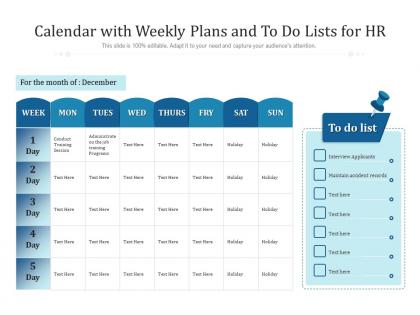
Calendar with weekly plans and to do lists for hr




Try Before you Buy Download Free Sample Product
 Impress Your
 Audience
 100%
100% Editable
 Save Hours
 of Time


Our Calendar With Weekly Plans And To Do Lists For HR are topically designed to provide an attractive backdrop to any subject. Use them to look like a presentation pro.
People who downloaded this PowerPoint presentation also viewed the following :
Calendar with weekly plans and to do lists for hr with all 2 slides:
Use our Calendar With Weekly Plans And To Do Lists For HR to effectively help you save your valuable time. They are readymade to fit into any presentation structure.
FAQs for Calendar with weekly plans and to do
So recruitment stuff has to go in there first - meetings, compliance deadlines, all that. Block out time for bigger strategic projects too, otherwise they'll never happen when fires start popping up. Track your key metrics and any training you've got planned. Oh, and performance issue follow-ups because those drag on forever if you don't stay on top of them. Honestly, buffer time is huge - I can't tell you how many times I've had my whole day blown up by some random employee crisis. Map out your weekly recurring stuff first, then add the rest.
Honestly, having a weekly HR planner is a total game-changer for keeping everyone aligned. I map out all my key meetings, deadlines, and team check-ins so stuff doesn't slip through the cracks. It's saved me from so many scheduling disasters - seriously, I used to double-book myself constantly before this. Your team actually knows what's happening and can prep properly instead of being caught off guard. I started sending mine out every Monday morning and wow, what a difference. People show up more prepared and our meetings don't drag on forever anymore.
For digital HR planners, I'd check out Asana or Microsoft Project first - they're pretty robust. Trello's great if you like the visual board thing, and Monday.com works similarly. Honestly though? Google Calendar does the trick if you set up recurring events with good color-coding. BambooHR and Workday have HR-specific planning built in, which is nice. My take is just use whatever your team's already on daily - I've seen so many "perfect" tools just sit there unused because nobody actually opens them. Even basic Outlook can work if you're creative with it.
So basically it's just a way to actually plan out your people stuff instead of scrambling. Block time for one-on-ones, performance chats, training sessions - all that. Otherwise it gets pushed aside when fires pop up (and there's always fires, right?). Honestly, most managers wing it with annual reviews and wonder why things go sideways. This keeps you checking in regularly, catching problems before they blow up. You'll have space for career planning, following up on improvement plans, whatever. The trick is sticking to it consistently instead of just making a pretty schedule you ignore.
Honestly, just bake compliance stuff right into your weekly routine. Set up those automated reminders for overtime limits, break rules, all that - trust me, I've watched so many managers panic when they hit that 40-hour mark unexpectedly! Check your local labor laws regularly since they're always changing. Friday afternoons work great for this - spend like 30 minutes scanning next week's schedule for potential issues. Templates help too, especially for shift swaps or time-off drama. Way better to catch problems early than deal with violations later. Make it habit, not something you remember last minute.
Honestly, block out specific days for each step - Mondays for resume reviews, Tues/Wed for phone screens, Thu/Fri for face-to-face interviews. Game changer! I learned this the hard way after too many weeks of pure chaos. Your planner becomes like mission control where you can actually see who's where in the process. Color-code by role or how urgent things are so nothing gets forgotten. Oh, and work backwards from your deadlines - plot when positions need to be filled, then figure out realistic weekly goals from there. Sounds obvious but you'd be surprised how often we skip this step.
Oh man, you'll love using a weekly planner for this! Map out their whole first week with meetings, training stuff, IT setup - basically everything so you don't forget the boring compliance things. I always schedule regular check-ins too because honestly, new people panic when they don't know what's happening next. They can actually see their schedule instead of wondering if they're supposed to be somewhere. Track how they're doing and give them extra time if needed. Pro tip: make it a template you can just copy for everyone new. Way easier than starting from scratch each time.
Start by figuring out your company's vibe first - startup chaos or buttoned-up corporate? I'd map out what actually happens each week (team meetings, reviews, random "emergencies" that could've waited). Build your template around that reality. Mondays work great for planning ahead, and honestly, Friday recognition stuff hits different when people are already checked out mentally. Make it match how your team operates, not whatever HR manual you read. Try one week, see what bombs or works, then tweak it. You'll probably need to adjust it like three times anyway.
Honestly, goal setting is what makes your HR planner actually work instead of just being another messy to-do list. Set like 2-3 specific goals every Monday morning. Then build your whole week around hitting those targets. This way you'll know if you're doing the stuff that matters - like developing your people - or just getting buried in paperwork hell (which happens way too often in HR, let's be real). Your goals become this filter for deciding what deserves your time and what doesn't. I started doing this last year and wow, such a game changer for staying focused.
I'd say twice a week minimum - Sunday night to map out the week, then Wednesday for damage control lol. HR is just chaos honestly, so daily check-ins work better if you've got the time. Priorities flip overnight with random employee drama, compliance stuff, or when leadership drops last-minute "urgent" requests. Always block out buffer time because those "surprises" happen every damn week. Oh and pro tip - don't pack your calendar too tight or you'll hate yourself by Thursday. Start with twice weekly and adjust from there based on how crazy things get.
So I'd start with just 3-4 metrics that actually matter to your team - stuff like time-to-fill, engagement scores, completion rates on HR projects. Nothing crazy fancy dashboard-wise, just pull from whatever systems you're already using. Weekly tracking beats monthly because you can fix things before they get worse. The real trick? Compare what you planned each week against what actually happened. Honestly, that's where most people mess up - they plan but never look back. Oh and don't try to track everything at once, you'll burn out fast. Get comfortable with a few metrics first, then add more later.
Honestly, don't try mapping out every single minute - learned that one the hard way. You'll go insane by Wednesday when it all falls apart. Buffer time is crucial between meetings because people always have "one quick thing" (spoiler: never quick). Back-to-back interviews or tough conversations? Recipe for burnout. Give yourself breathing room. Oh, and actually block time for the boring admin stuff - updating files, prep work, whatever. That junk always takes way longer than expected. I'd start super basic with just your non-negotiables and add more once you get the hang of it.
So here's the thing - tracking your team weekly actually reveals tons of useful patterns. You'll start noticing stuff like which departments always need extra help or when your seasonal rushes hit. Honestly, it's way better than just winging it every time someone calls out sick. Review your notes monthly (I know, another meeting, but trust me) and you'll spot trends that help you plan ahead. Maybe you always need temps in March, or accounting crashes every quarter-end. Document this stuff because it becomes your roadmap for hiring budgets and figuring out where you're consistently short-staffed.
Honestly, ditch those boring bullet points - they're killing your HR plans. Color-coded dashboards work amazing for showing priorities at a glance. Kanban boards are clutch too (you know, the planned/in progress/done columns). Timeline views have been my go-to lately because people actually get how everything connects during the week. For exec meetings, infographic summaries hit different - way more engaging. Some folks prefer video walkthroughs if you're comfortable on camera. The key is figuring out what your stakeholders actually want to see, then sticking with that format so they know what to expect each week.
Your employees literally have all the answers you need for planning your HR week. Send them quick surveys about what stresses them out most and when they actually want to do things like performance reviews. I bet you'll find out some stuff that totally surprises you. Take their responses and use those to figure out what deserves your time each week. Here's the thing though - you've gotta ask follow-up questions when they complain about something. Otherwise you're just guessing at solutions. Way better than building your schedule around some generic HR textbook advice that doesn't fit your actual workplace.
No Reviews