

Case Management Dashboard Snapshot With Resolved Cases




Try Before you Buy Download Free Sample Product
 Impress Your
 Audience
 100%
100% Editable
 Save Hours
 of Time


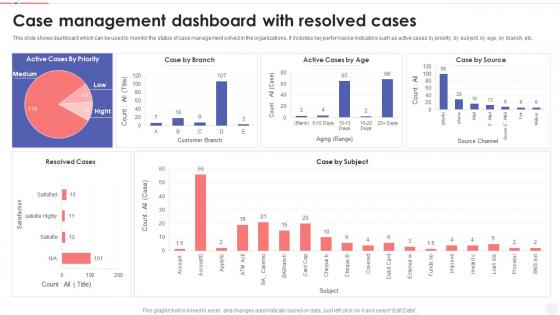
This slide shows dashboard which can be used to monitor the status of case management solved in the organizations. It includes key performance indicators such as active cases by priority, by subject, by age, by branch, etc.
People who downloaded this PowerPoint presentation also viewed the following :
Case Management Dashboard Snapshot With Resolved Cases with all 7 slides:
Use our Case Management Dashboard With Resolved Cases to effectively help you save your valuable time. They are readymade to fit into any presentation structure.





FAQs for Case Management Dashboard Snapshot
So definitely track your case volume - new ones coming in vs what you're actually closing out. Resolution times matter too, plus how old your backlog is getting. You'll want to see how work gets spread across the team because some people always end up drowning while others are cruising, you know? Priority breakdowns are huge - can't have urgent stuff just sitting there forever. SLA compliance rates tell you if you're actually hitting your targets. Customer satisfaction scores are gold if you're collecting them. Honestly though, start with maybe 6-8 key metrics on your dashboard so you don't get overwhelmed, then dig deeper when something looks off.
Honestly, charts are a game-changer for workload stuff. Bar charts showing each person's cases? You'll spot who's drowning immediately. Heat maps are pretty cool too - they show which departments are getting slammed. I used to waste so much time scrolling through spreadsheets trying to find patterns. Now I just look at a visual and boom, there's the bottleneck. Start with a basic bar chart of active cases per person. Then you can get fancy with filters for dates and priority levels. Way better than staring at numbers all day.
Put your most urgent stuff right at the top - active cases, anything overdue, alerts that need attention. I'd group related things together, like case details next to communication history (makes way more sense). Use consistent colors for your status indicators and don't bury the search/filter options. White space is your friend here - nobody wants to stare at a wall of data that makes their brain hurt. Oh, and definitely test it with real users first. They'll spot problems you missed every single time.
Honestly, real-time data is a game changer for dashboards. You'll catch problems as they're happening instead of finding out about them way too late. We switched to live feeds last year and went from constantly putting out fires to actually staying ahead of issues. Though you gotta make sure your system can handle it - crashed our servers twice before we figured that out lol. Don't feel like you need everything updating live though. Figure out what actually needs real-time updates versus stuff that's fine refreshing every hour or so.
Look, analytics basically stops you from flying blind on gut feelings all the time. You'll start seeing patterns in your cases that were right there but somehow invisible before. The dashboard tracks stuff like resolution times and success rates in real time - pretty eye-opening honestly. Instead of constantly putting out fires, you can actually get ahead of problems and see which approaches work best for different case types. My advice? Don't go crazy trying to track everything at once. Pick maybe 2-3 metrics that hit your biggest headaches first.
Dude, dashboards are game-changers for case tracking. You'll actually see patterns instead of drowning in individual tickets. Like which solutions work fastest, when certain case types blow up, who on your team crushes through cases consistently. Charts make trends super obvious - way better than spreadsheets, trust me. We didn't have this visibility last quarter and ended up with a nightmare backlog situation. Could've totally avoided that mess. Set up weekly automated reports so you're not just reacting when everything's already on fire. The visual stuff really clicks once you start using it regularly.
Honestly, it totally depends on who's actually using the thing. Your case managers are gonna want quick access to their caseloads, deadlines, client updates - they're basically glued to it all day. Supervisors need the bigger picture stuff like team metrics and where things are getting stuck. Keep client views super simple though - just case progress, appointments, document uploads. Executives? They want ROI numbers and compliance rates, obviously. I'd map out everyone's daily workflow first - you'll figure out what they actually need vs. what sounds cool but never gets used.
Your dashboard really needs to show who's doing what in real time - status indicators are clutch here. Comment threads on each case will save you from endless Slack archaeology later. Set up automated handoff notifications since you can't just walk over to someone's desk anymore (honestly miss that sometimes). Make sure everything's obvious enough that people in different time zones don't get confused about what's happening. Also throw in deadline reminders because we're all human. The goal is keeping everyone synced without constant check-ins.
Start with role-based access - only show users the cases they can actually work on. Multi-factor authentication is clutch, and encrypt everything (data in transit, at rest, all of it). I swear half the dashboards out there just give everyone admin rights which is insane. Build audit trails too so you know who's been poking around where. Oh, and set session timeouts - people walk away from their computers way more than they should. Map out your user roles first though, that'll make the rest way easier.
Throw a quick feedback widget directly in your dashboard - users can report bugs or ideas without jumping around to different pages. Quarterly user sessions are honestly pretty fun and you'll pick up way more than you expect. Analytics will show you which features people actually use vs. ignore. The key thing though is closing that loop - when someone suggests something and you build it, tell them! Otherwise they think you're just collecting feedback into a black hole. I'd start with the widget since it's super easy to add but gets you real data fast.
So for case management dashboards, Tableau and Power BI are great if you don't mind the learning curve - they're powerful but honestly kind of a pain at first. Monday.com and Asana are way easier to jump into. Don't sleep on Excel either - I know it sounds basic, but a decent Excel dashboard can be surprisingly effective when you're starting out or cash is tight. The main thing is getting something your team will actually stick with. Oh, and definitely test a few free trials with your real data first. Trust me on that one - what looks good in demos doesn't always work for your specific mess of cases.
So dashboards basically fix that annoying thing where nobody knows what other departments are doing. You can actually see what legal's working on, where operations is at, plus any red flags from finance - no more endless email chains or phone tag. Honestly saves you from those awkward "wait, wasn't that your job?" conversations. The automated notifications are clutch too, hits the right people when cases move to different stages. Oh and definitely start by figuring out which teams touch your cases most, then get them dashboard access with the right permissions. Total game changer.
Track your case managers on resolution times and client satisfaction scores - those are your bread and butter. Response time matters too because nobody likes being ignored. I'd also watch escalation rates and whether they're actually closing cases successfully or just passing the buck. Documentation quality is another big one since messy notes screw over the whole team. Caseload volume gives you the full picture of who's handling what. Start pulling this stuff monthly, though honestly you might want to check some metrics more often once you see what trends pop up.
So basically you'll want to hook up some ML models to your dashboard - they crunch through old case data and spot patterns in outcomes and client info. Most platforms can show predictions as little risk scores or progress indicators right next to your normal metrics. Start with clean historical data (boring but necessary) and pick maybe 2-3 things you actually want to predict. Don't go crazy trying to forecast everything right away. The algorithms are surprisingly good at catching stuff you'd probably miss. Honestly, closure probability and escalation risk are usually the best starting points.
Honestly, data integration will probably make you want to pull your hair out - nothing ever talks to each other properly. Getting your team on board is the other big pain point. People are weirdly stubborn about switching up their routines, even for something way better. Oh, and brace yourself for scope creep because suddenly everyone's gonna have "essential" features they forgot to mention. Systems are messy, data mapping sucks. But here's what worked for me: nail down your core metrics first. Get those rock solid, then slowly add the fancy stuff. Way less headaches that way.
-
I am really satisfied with their XYZ products. Used their slides for my business presentations and now I am taking their help for my son's high-school assignments. Super satisfied!!
-
The best part about SlideTeam is their meticulously prepared presentations (complete-decks and single-slides both), infused with high-quality graphics and easy to edit. All-in-all worthy products.