





 0 Comment
 Customer Reviews

Observe a hospital emergency room carefully and you realize how the staff coordinates with each other to provide exceptional patient care.
They track the flow of treatment and recognize when a significant problem arises. This means all information is made available all the time to all those working on the case to ensure there can be no miscommunication.
Access SlideTeam’s world-class top 10 problem management dashboard templates that use communication tools and technologies to strengthen data-driven operations through efficiency gains.
Imagine what will happen if they don't share the same level of visibility on the case? Some hospitals have already been fined because they didn’t manage patient instances well.
Therefore, all hospital administrations need to implement a professionally-designed case management dashboard. This improvement enhances patient treatment, resulting in a decrease in the frequency of repeat hospital visits. With the implementation of this dashboard, the management tracks every detail about each patient’s care.
But it is also true that creating a dashboard like this not only consumes time but also requires extensive involvement of human resources. Our PPT enables your team to manage resources through accurate measurement and case management reporting. SlideTeam’s top 10 management dashboard encompasses a comprehensive range of tools.
Let’s explore!
Template 1 : Transforming Case Management with Data Analytics Tools PPT Template
This template helps professionals understand the role of data analytics in case management. It begins with a data-driven decision-making process and moves on to discussing predictive analytics and showcases how these tools can be beneficial in case management. One of the USPs of this template is that it highlights challenges and explains how data case management tools resolve these issues. The template also covers data sources, collection methods, integration, and real-time analytics.
[product_image id=1451393]
Template 2: Dynamic Case Management Software Template
This template helps you convert complex software functionalities into structured implementation strategies for transparent and seamless deployment. This reduces the complexity of the case management system, making things easier for your development teams. This will not only build their technical expertise but also keep them focused and retain their competitive advantage in software solutions. The template addresses the detailed software architecture required in contemporary case management processes. The layout showcases in-depth discussions on system integration, user interface design, and real-world deployment approaches to optimize case management. This enables you to focus on developing improved methods for delivering solid case management software.
[product_image id=1423209]
.
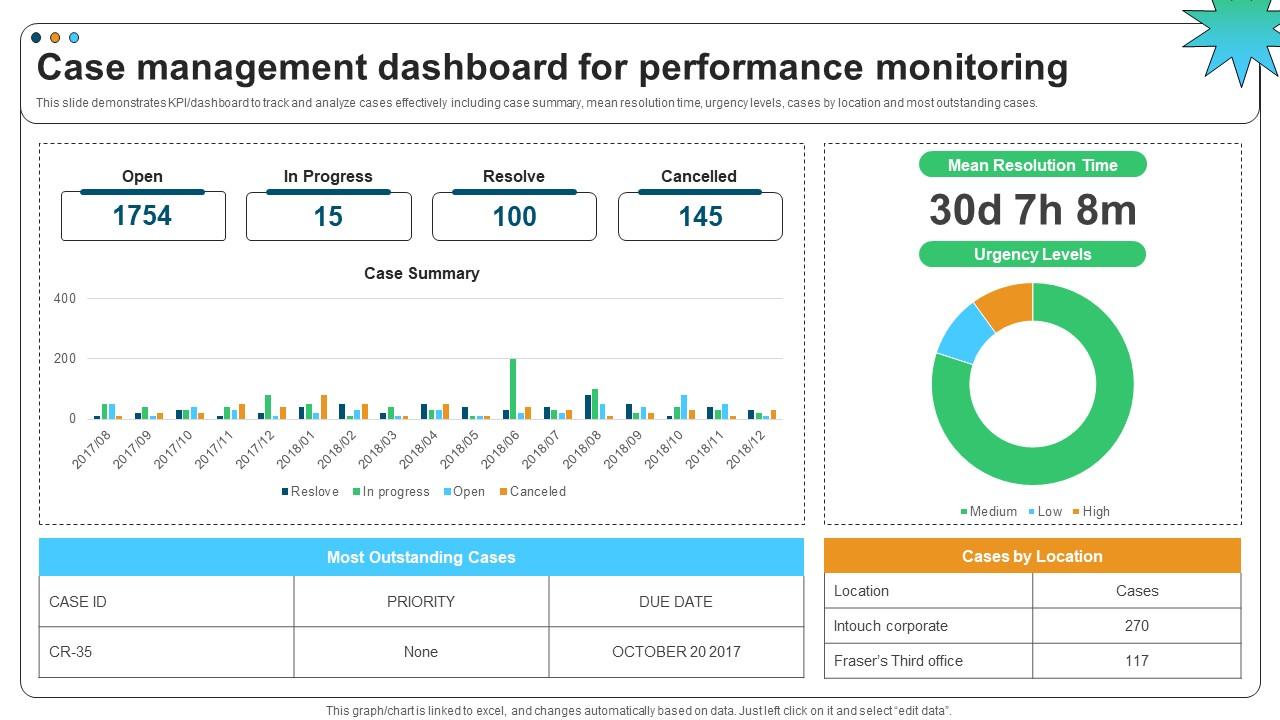
Template 3: Case Management Dashboard For Performance Monitoring Template
This case tracking dashboard template simplifies performance tracking complexity, making it convenient for your monitoring teams. The template plays a crucial role in developing their analytical strength. Additionally, it keeps them up to date and maintains their operational lead in the event of resolution. The slide covers essential KPIs, including resolution times, urgency levels, and location-based case distribution for effective performance monitoring. It also includes comprehensive coverage of case summaries, outstanding case tracking, and practical dashboard design strategies.
Template 4: Dashboard for Insider Threat Cases Management Template
This template provides comprehensive security dashboards for insider threat cases. It offers structured threat management systems for precise and proactive monitoring. This ensures that all your team members are on the same page, leading to improved threat detection and making things easier for your security teams. The template also plays a critical role in enhancing their threat assessment strength. That makes them alert and maintain their defensive edge against internal threats. This case resolution dashboard includes security metrics, such as active cases, risk categories, and policy notifications, which are necessary for effective insider threat management.

Template 5: Case Management Dashboard for Real-Time Monitoring Template
The PPT Template highlights KPIs to highlight monthly activity and progress. Some key features of this template include line and bar graphs that help visualize trends, such as new and concluded cases, as well as pie charts that show the time spent by each department and case type. The template also provides information for comparing total costs per department. Identification of delays, trends, or unusual activity in case handling is also an important function.

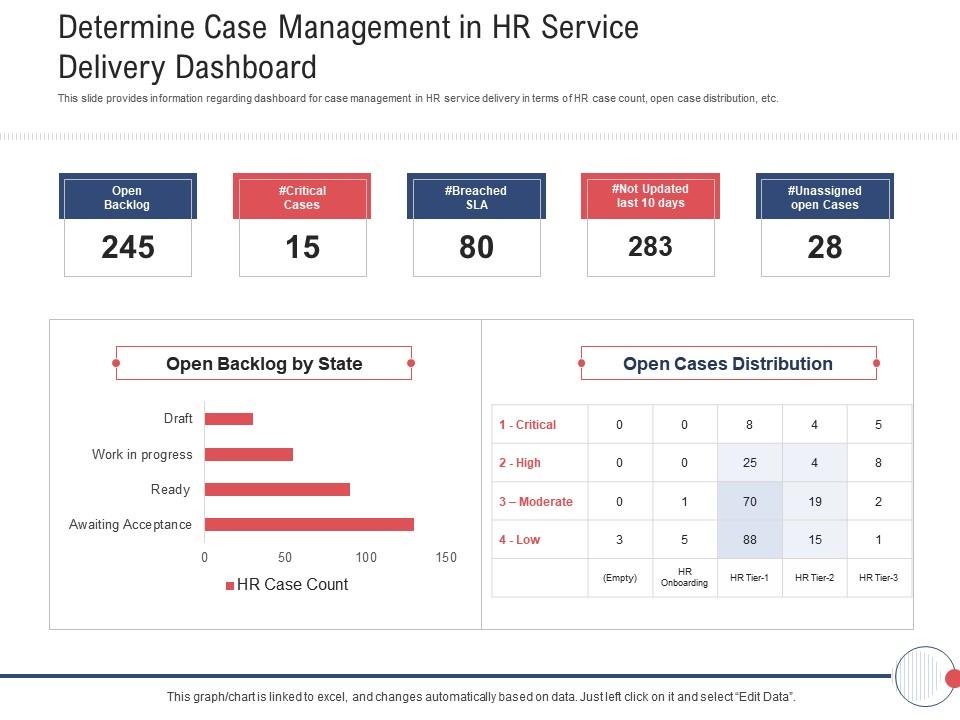
Template 6: Determine Case Management in HR Service Delivery Dashboard PPT
This dashboard helps your team track and manage HR cases. The well-designed, clutter-free template includes relevant parameters, such as HR case count, open backlog, and open cases by priority. Some features of these templates are color-coded bar graphs and real-time metrics. There is also a detailed breakdown that displays the exact number of cases under each HR tier. A significant aspect of this template is that it clearly labels each part. This PPT Slide also provides an overview of problem areas and bottlenecks, leading to improved efficiency and better decision-making.

Template 7: Determine Case Management in HR Service Delivery Dashboard Template
This detailed dashboard enables the HR team to monitor and manage service delivery cases. It represents important data on HR case management, even as the template also discusses critical metrics, including the total number of open cases and the number of vital overdue cases. The diagram also provides a visual breakdown of case loads, status-based distribution, priority sorting, and quick metrics. It enables faster case resolutions and improved workload management. It also enhances SLA compliance to ensure timely case handling, which is essential for better customer case management. The template also provides actionable insights.
Template 8: Contractor Safety Management Dashboard Template
This dashboard provides a centralized view of contractor safety performance across locations and stages of assessment. The dashboard displays four interactive visualizations that provide basic details. These include a ‘Location assessment’ bar chart that outlines builder distribution across the six locations, with Location one being the most significant concentration. The second bar chart is for "Under review", which counts pending location assessments. Additionally, the template features two identical vertical bar charts, side by side: "Compliant" and "Non-Compliant". Use the slide to get a clear idea of safety issues on a case-by-case basis.

Template 9: Case Management Dashboard Snapshot with Resolved Cases Template
The template offers sophisticated case management analytics to track organizational case resolutions through six thoughtful visualization panels. The priority allocation pie chart uses the existing cases, as being designated as medium, low, and high. It also provides an analysis of branch performance, revealing how well each branch is performing. Additionally, there is an age-based analysis that visualizes insights based on the case lifecycle. The template also includes source channel analytics that capture source activity. Satisfaction metrics are rated as satisfied, satisfied highly, and not satisfied. Thus, the template is ideal for managers who want to enhance the resolution of cases.

Template 10: Hospital KPI Dashboard with Case Status of Patients PPT
It offers comprehensive healthcare analytics, integrating patient case management and operational performance monitoring. The interface showcases five essential KPI cards. At the same time, the eight interactive visualizations set the stage for a descriptive, multifaceted analysis. A provider analysis reveals which members have the highest claim amounts. The template also includes a demographic analysis that explains claim trends based on age and gender. Additionally, the template features a diagnosis analysis, which targets individual disease categories; for example, Disease 1 shows 60 readmissions and 18 claims. Thus, the template enables hospital administrators to evaluate their financial performance, monitor patient outcomes, and allocate treatment resources efficiently.

GO FOR ENHANCED VISIBILITY AND CONTROL
Case management dashboards offer a revolutionary mechanism for oversight management, providing organizations with enhanced visibility and control. These templates offer client management dashboard capabilities for professional fields and workplaces, including law firms, healthcare organizations, HR departments, and customer service businesses.
PS Legal Case management dashboards can be used to streamline operations, from complex cases to everyday inquiries. Our 10 case management templates also enable monitoring of any case type.
FAQs on Case Management Dashboard
1. What is a case management dashboard, and what purpose does it serve?
A case management dashboard is a single visual interface that displays real-time case data through charts, KPIs, and analytics. This type of dashboard allows you to monitor case status, measure performance metrics (ex, resolution times, SLA compliance), and optimize resource allocation while maintaining quality standards. A properly constructed case management dashboard consolidates raw case information and converts it into actionable insights and intelligence. Case management dashboards provide feedback that helps managers identify bottlenecks, manage workloads effectively, and maintain operational oversight of all active cases within the organization.
2. Who typically uses case management dashboards?
Legal professionals use these to track litigation and client matters; healthcare professionals include them in tracking patient cases and claims; social workers and welfare professionals use them to manage cases involving families and children; human resources uses them to deal with employee complaints, grievances, and investigations; customer service uses them to track open support tickets; IT uses them to track incidents; and project managers use them to track safety compliance and contractor management.
3. What types of cases can be monitored using such a dashboard?
Case management dashboards monitor any structured workflow including legal cases (litigation, compliance violations), healthcare cases (patient treatments, insurance claims), HR cases (employee complaints, employee discipline), customer service cases (customer support tickets, billing disputes), safety cases (workplace incidents, compliance with safety regulations), financial cases (investigations of fraud), operational cases (system failure, vendor disputes), etc. The Workflow Management Dashboard is flexible, allowing it to adapt to the characteristics of specific case types and stages of each group workflow within a particular industry.


