


Competence matrix powerpoint presentation slides






Try Before you Buy Download Free Sample Product
 Impress Your
 Audience
 100%
100% Editable
 Save Hours
 of Time


Use Competence Matrix PowerPoint Presentation Slides to list down and compare the needed competencies for position with the existing skill level of the employees performing the roles. Conduct gap analysis by adding these relevant competence matrix PPT templates to assess the need of the critical training. Use these competence skill matrix presentation slides as a tool for the skill development of the employees. Identify employees who have critical skills needed for promotion with the help of competence matrix PowerPoint presentation deck. This deck comprises of topics such as skill matrix by job role, skill matrix by score level, skill matrix in IT industry, job skill matrix, competency skill team matrix, team member skill matrix, and more. Incorporate competence matrix PowerPoint templates to get a comprehensive view of the skills and behaviours needed. These templates are completely customizable. Edit the color, text, icon, and font size as per your requirement. Add competence matrix PPT templates to identify skill gaps across your organization. Banish hate with our Competence Matrix Powerpoint Presentation Slides. Lay the foundation for affection to grow.
People who downloaded this PowerPoint presentation also viewed the following :
Content of this Powerpoint Presentation
Slide 1: This is an introductory slide for Competence MATRIX. State Your Company Name and get started.
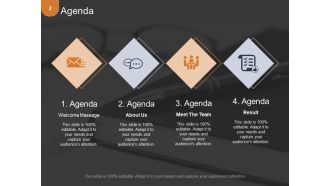
Slide 2: This is an Agenda slide. State your agendas here.
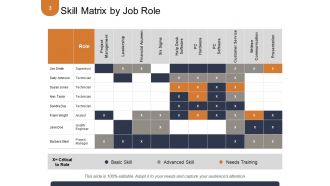
Slide 3: This slide shows Skill Matrix by Job Role displaying- Basic Skill, Advanced Skill, Needs Training.
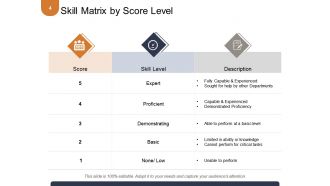
Slide 4: This slide shows Skill Matrix by Score Level showing Skill Level and Description.
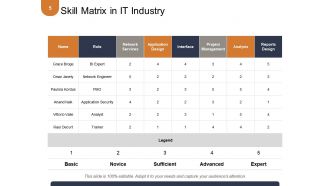
Slide 5: This slide shows Skill Matrix in IT Industry in tabular form.
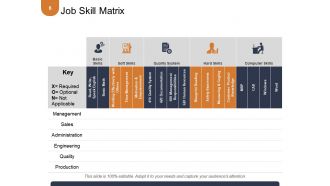
Slide 6: This slide shows Job Skill Matrix in tabular form.
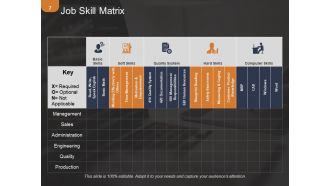
Slide 7: This slide also shows Job Skill Matrix in tabular form.
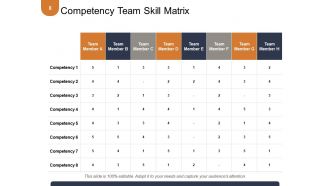
Slide 8: This slide presents Competency Team Skill Matrix in tabular form.
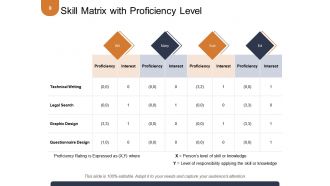
Slide 9: This slide showcases Skill Matrix with Proficiency Level in tabular form.
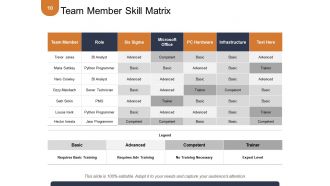
Slide 10: This slide Team Member Skill Matrix in tabular form.
Slide 11: This slide showcases Competence Matrix Icons Slide. Use the icons as per need.
Slide 12: This slide is titled Additional Slides. You may change content as per your need.
Slide 13: This is Our Team slide with name, designation and image boxes.
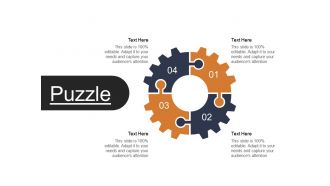
Slide 14: This is a Puzzle image slide to show information, specifications etc.
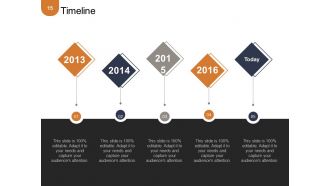
Slide 15: This is a Timeline slide to show evolution, growth, milestones etc.
Slide 16: This is a Quotes slide to convey company messages, beliefs etc. You can change the slide contents as per need.
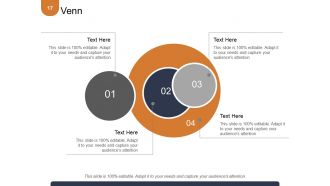
Slide 17: This is a Venn diagram image slide to show information, specifications etc.
Slide 18: This is Our Target image slide. State targets, aspirations etc. here.
Slide 19: This is an Idea & Bulb image slide to show information, specifications, innovative aspects etc.
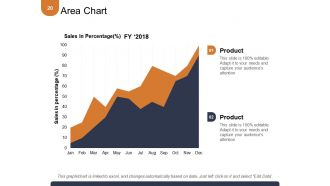
Slide 20: This is an Area Chart slide to show product/entity comparison, specifications etc.
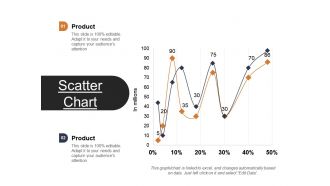
Slide 21: This is a Scatter Chart slide to show information, comparison specifications etc.
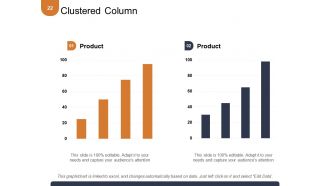
Slide 22: This is a Clustered Column Chart slide to show information, comparison specifications etc.
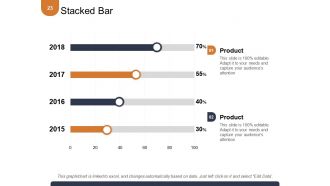
Slide 23: This slide shows a Stacked Bar Graph for two product/entity comparison, information, specifications etc.
Slide 24: This is a Thank You slide with Address# street number, city, state, Contact Numbers, Email Address.
Competence matrix powerpoint presentation slides with all 24 slides:
Demonstrate your attributes effectively with our Competence Matrix Powerpoint Presentation Slides. They help establish your eligibility.







FAQs for Competence matrix
Oh, a competence matrix? It's just a grid where you map out everyone's skills. Put your team members on one side, list the key competencies on the other, then rate how good each person is at each thing. Think of it like a report card but for work skills, I guess. Super helpful for spotting who's weak where and who might be ready for bigger projects. You can see training gaps pretty quickly too. I'd start with maybe 5-10 core skills that actually matter for your role. Don't overthink it - just be honest about where people really stand right now.
So basically a competence matrix shows you who's good at what on your team. No more scrambling around wondering who actually knows Python or project management. You can assign tasks way smarter and catch skill gaps early. Plus it's great for figuring out who needs training and planning for when people inevitably leave (because they always do, right?). The best part? You won't accidentally burn out your star players while other people sit around bored. Just map out what everyone can do - takes like an hour but saves you tons of headaches later.
Start with the obvious stuff - what programming languages, design tools, or industry knowledge does your project actually need? Then think about soft skills like communication and problem-solving. Project management is huge too. I'd definitely add "works well under pressure" because, let's face it, something always goes wrong at the worst possible moment. Cross-functional collaboration matters more than people think - you don't want silos. Make a simple list of required skills, then rate where each team member is now versus where they need to be. Boom, instant gap analysis. Way easier than overthinking it.
So a competence matrix is basically like a skill snapshot of your team. Shows you exactly where everyone's at and what gaps need filling. Instead of those boring generic training sessions, you can actually target what people need. I've seen teams waste so much time on irrelevant stuff before using these. Track progress becomes way easier too. Your employees get to see their own growth path, which keeps them motivated. You'll also spot who's ready for bigger challenges or promotions. Just start by listing current skills vs what each role actually needs. Game changer, honestly.
Honestly? Start with Excel or Google Sheets - everyone knows how to use them and they're super easy to share around. BambooHR and Cornerstone OnDemand are solid if you want something fancier with actual competency tracking built in. I've watched so many teams get caught up picking the "perfect" platform when a basic spreadsheet would've worked fine. Power BI or Tableau are worth looking at if you're at a bigger company and need better reporting. My advice? Don't overthink it. Go with whatever your team already uses, then upgrade later if you actually need to.
Think of a competence matrix as mapping out who knows what on your team. List all the skills each role actually needs, then rate where everyone currently sits. Honestly, it's kind of eye-opening - you'll spot gaps you didn't even know existed. Maybe Sarah's way overqualified for her current position, or your whole department is missing some critical skill. The best part? No more guessing when it comes to training budgets or new hires. You've got real data backing your decisions instead of just winging it based on hunches.
Honestly, a competence matrix is like having a map of your team's skills. You'll see who's good at what and where the gaps are - makes hiring decisions so much easier. Career planning becomes clearer too since people can actually visualize their next steps. Performance reviews get less awkward because you're judging against real skills, not just vibes. Plus you'll know who's promotion-ready and who might need some development. The whole "what happens if this person quits" thing becomes way less terrifying. Just throw together a basic spreadsheet to start - doesn't need to be fancy.
Look at what skills actually matter in your industry first - like healthcare certs or financial compliance stuff. Generic templates are trash, honestly. Talk to your best employees and managers instead. They'll tell you what really makes someone succeed there, not just the obvious technical stuff. Don't forget the soft skills that fit your company culture too. Oh, and make sure people can see how learning these skills helps them move up. That's what gets them actually interested in developing themselves rather than just going through the motions.
You absolutely need feedback or your competence matrix turns into total garbage. Get input from managers, teammates, whoever - they'll tell you if someone actually knows their stuff versus what's written on paper. Quarterly reviews work great, but honestly even casual conversations help. The thing is, skills change constantly and roles evolve way faster than we update documents. Don't let HR handle this alone either - that never works out well. Make it collaborative so people actually buy into using it. Otherwise you're just maintaining some pointless spreadsheet that sits in a folder somewhere.
Here's what I'd do - grab that competence matrix and turn it into your hiring roadmap. Map out the skills and behaviors you actually need, then build interview questions around those specific areas. Honestly, it cuts through so much of the usual hiring BS where people just go with their gut. During panel interviews, have each person focus on different competency areas so you're not all asking the same stuff. Create a basic scoring sheet too - makes it way easier to compare candidates afterward. I mean, you'll still get a feel for personality and fit, but at least you're being fair about the technical stuff. Game changer for reducing bias.
Honestly, the trick is making them feel like actual partners instead of lab rats. Explain what's in it for THEM - better career paths, spotting skill gaps, training opportunities. Don't just hand them a finished matrix to fill out. Get them involved in building the thing from scratch - like workshops where they help define what competencies even matter. Way more buy-in that way. Be upfront about how you'll use their info and make it clear this isn't some sneaky performance review. Oh, and give them real work time to do it properly. Nobody wants another after-hours assignment.
So basically, a competence matrix shows you exactly what skills each role needs, which makes succession planning super straightforward. You'll instantly see who's promotion-ready and who needs work in certain areas. Think of it as a skill map for your whole team - honestly beats the hell out of just winging it. The matrix helps spot your rising stars and figure out targeted training to fill their gaps. You can also notice bigger patterns across departments and build out leadership pipelines more thoughtfully. Start by comparing your current people's skills against future leadership positions. That'll show you your best succession bets right away.
Honestly, visuals are a game-changer for competence matrices. Nobody wants to stare at endless spreadsheet rows - your brain just shuts off. But add some color coding or heat maps? Suddenly people actually pay attention. I always use different colors for skill levels and throw in bar charts when comparing teams. You'll spot gaps and strengths way faster than scrolling through text. Heat maps are my favorite though - they make proficiency levels pop right out at you. The whole thing goes from "ugh, more data" to actually useful insights you can act on.
Honestly, the hardest part is getting people on board - employees think it's just another way to judge them, and managers don't want to spend time doing proper evaluations. Can't blame people for getting defensive when their skill gaps might get called out. Keeping the thing updated is a pain too. If you let it get stale, it becomes completely pointless. Oh, and good luck getting different managers to rate consistently - defining those competency levels clearly enough is trickier than you'd think. Start with one team first, get their input, then expand from there.
Every 6 months works for most teams, but honestly it depends on your industry. Tech moves fast? Go quarterly. More stable field? Annual's probably fine. I'd bump it up if you're dealing with major changes - new software rollouts, restructuring, that kind of chaos. Perfect timing is during performance reviews or when you're planning promotions since you're already thinking about skills anyway. Pro tip: set a calendar reminder right now because these things are so easy to forget until someone's like "wait, why doesn't anyone know how to use this system we implemented last year?"
No Reviews