

Skill Matrix Powerpoint Presentation Slides




Try Before you Buy Download Free Sample Product
 Impress Your
 Audience
 100%
100% Editable
 Save Hours
 of Time


Slide Team presents you Skill Matrix PowerPoint Presentation Slides which helps in the assessment of employee skills. Utilize these skill matrix PPT visuals to conduct gap analysis, where there is a shortage of appropriate skills and experience. This can help you to identify training needs. The competence matrix PowerPoint complete deck comprises of content ready slides such as skill matrix by job role, skill matrix by score level, skill matrix in IT industry, competency team skill matrix, skill matrix with proficiency level, etc. These expertise matrix PPT slides are completely customizable. You can add or delete the content from templates. Our team of experts has also included icons for your convenience. Incorporate competence matrix PPT visuals as a tool for the skill development of your team. This allows you to illustrate the skills and abilities held by your employees. Download knowledge matrix PowerPoint templates to recognize the star performer of your organization.
People who downloaded this PowerPoint presentation also viewed the following :
Content of this Powerpoint Presentation
Slide 1: This slide introduces Skill Matrix. State Your Company Name and begin.
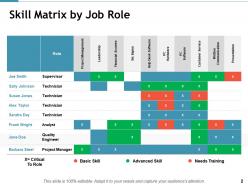
Slide 2: This slide showcases Skill Matrix by Job Role.
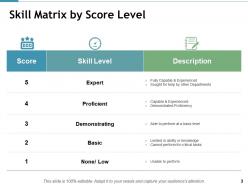
Slide 3: This slide shows Skill Matrix by Score Level.
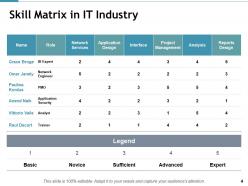
Slide 4: This slide presents Skill Matrix in IT Industry.
Slide 5: This slide showcases Job Skill Matrix with these of the following Hard Skills, Computer Skills, Quality System, Soft Skills, Basic Skills.
Slide 6: This slide presents Competency Team Skill Matrix.
Slide 7: This slide showcases Skill Matrix with proficiency level.
Slide 8: This slide shows Team Member Skill Matrix.
Slide 9: This slide is titled Additional Slides to move forward.
Slide 10: This is an Our Team slide with name, image &text boxes to put the required information.
Slide 11: This is a Target slide. State targets here.
Slide 12: This is a Venn diagram image slide to show information, specifications etc.
Slide 13: This is a Quotes slide to convey message, beliefs etc.
Slide 14: This is a Timelines slide to show- Plan, Budget, Schedule, Review.
Slide 15: This slide showcases a Puzzle with imagery.
Slide 16: This slide displays a Bulb or idea image.
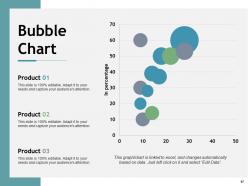
Slide 17: This slide showcases Bubble Chart.
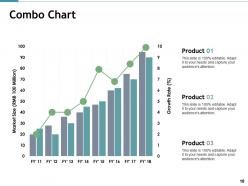
Slide 18: This slide presents Combo Chart.
Slide 19: This is a Thank You image slide with Address, Email and Contact number.
Skill Matrix Powerpoint Presentation Slides with all 19 slides:
Inaugurate your endeavor with our Skill Matrix Powerpoint Presentation Slides. Get off the blocks in an impressive fashion.
-

Skill Matrix
-
Skill Matrix by Job Role
-
Skill Matrix by Score Level
-
Skill Matrix in IT Industry
-
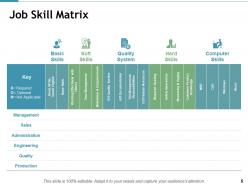
Job Skill Matrix
-
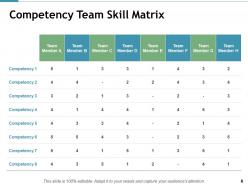
Competency Team Skill Matrix
-
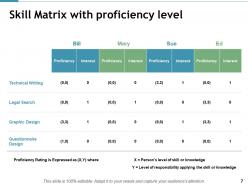
Skill Matrix with proficiency level
-
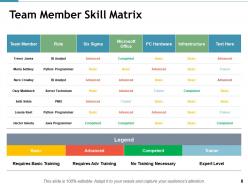
Team Member Skill Matrix
-

Additional Slide
-

Our Team
-
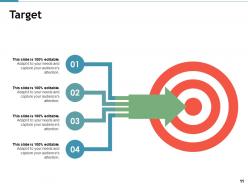
Target
-
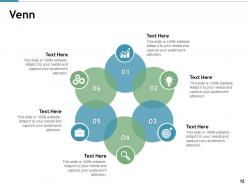
Venn
-
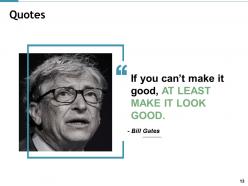
Quotes
-
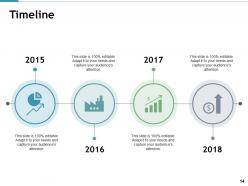
Timeline
-
Puzzle
-
Bulb Or Idea
-
Bubble Chart
-
Combo Chart
-
Thank You Slide
FAQs for Skill Matrix
So basically it's like a spreadsheet where you map out everyone's skills and how good they are at each one. Skills go across the top, names down the side, then you rate people with numbers or colors or whatever. Pretty handy for figuring out who's missing what skills! I'd start small though - just focus on the must-have stuff first. Get everyone involved in rating themselves honestly (managers too), and don't let it collect dust. Update it every few months maybe? The whole point is using it for real stuff like deciding who gets training or which person should lead that new project. Otherwise you're just making fancy charts nobody cares about.
So basically you map out everyone's skills against what you actually need for projects. Makes those random bottlenecks way more obvious when you see it visually laid out. I'd start with your most critical skills first, then rate where everyone stands. Focus training money on the biggest gaps - way better ROI that way. Plus you'll spot who your go-to people are for mentoring others, which honestly saves a ton on training costs. It's pretty eye-opening once you get it all down on paper. Trust me, suddenly everything clicks about why certain projects always get stuck.
Definitely put down employee names and their actual skills - like "Python programming" not just "tech savvy" you know? I do beginner/intermediate/advanced but 1-5 works too. Track current levels vs where they need to be so gaps are obvious. Include both technical stuff and soft skills that matter for your team. Here's what really helps though - note who actually wants to learn what. Makes planning promotions so much easier later. Oh and update it every quarter or it'll just collect digital dust. Start basic, you can always make it fancier.
Honestly, you need a few different angles to figure out what people actually know. Have everyone rate their own skills first, then get their managers to do the same thing separately. Super interesting to see where those don't match up! For stuff like teamwork, definitely grab some peer feedback too. Pull in recent performance reviews or examples from actual projects they've worked on. Oh and maybe have people show you what they mean - like walk through a sample or demo something real quick. The whole point is getting multiple viewpoints instead of just trusting one person's take on it.
Honestly, skill matrices are game-changers for team stuff. No more awkward "umm who actually knows React?" moments during meetings. You'll spot exactly who has what skills, which makes forming project teams way less of a guessing game. People can also see what their teammates are good at - builds way more trust than you'd expect. Plus you catch skill gaps before they bite you. I'd probably start small though, maybe just track like 5-10 skills that matter for your current project. Makes those planning conversations so much smoother once everyone's on the same page about capabilities.
Think of a skill matrix like GPS for your career - shows you where you're at and maps out where you need to go next. I love how it cuts through all that wishy-washy "work on communication" feedback that doesn't help anyone. Instead, you get specific gaps to fill and can actually build a plan with real deadlines. Track what's working, what isn't. The trick is getting your boss to reference it regularly during one-on-ones (mine forgets sometimes, honestly). Way more useful than those generic development conversations that go nowhere.
Think of a skill matrix as your cheat sheet for succession planning. Map out what everyone can do vs. what critical roles actually need. You'll see who's promotion-ready and who needs more training before someone inevitably quits at the worst possible moment. Honestly, it's saved my butt more times than I can count. The visual makes it super obvious where your gaps are. Start with your most important positions, then figure out development plans from there. Way better than scrambling when people leave unexpectedly.
Oh man, ditch those Excel spreadsheets - they're the worst. I'd check what your current HR system can do first since most have skill tracking buried somewhere in the menus. Tools like BambooHR or AG5 are solid choices that'll automatically track certs and bug people about renewals. The visual dashboards are honestly pretty sweet for spotting gaps across teams. Some even sync with training platforms so skills update automatically when someone finishes a course. Having everything centralized instead of scattered across random files? Total game changer. Start with what you've got though - you might be surprised what features are already there.
Honestly, most people overcomplicate these things from day one. Start with just 3-4 skill levels and focus on what actually matters for each role - nobody wants to navigate some massive spreadsheet nightmare. The other huge mistake? Building it and then never touching it again. I've literally seen these things sit unused for months while managers keep having the same "how do I develop my team" conversations. You have to actually use it for promotions, one-on-ones, figuring out where people need help. Get your team bought in early. Keep tweaking it based on what works. Otherwise you're just creating more admin work nobody asked for.
So each team needs totally different skills, right? Sales guys care about CRM systems, negotiation tactics, product knowledge - that stuff. IT wants certifications, coding languages, security protocols. HR focuses more on conflict resolution and compliance (boring but necessary lol). Here's what actually works: get the team leads involved in picking their 8-12 most important skills. They know what matters way better than you do. Then set up clear levels for each skill so people know what "proficient" actually means. Otherwise you'll end up with useless generic assessments that don't tell you anything real.
Track how fast people are closing skill gaps - that's your main indicator. Employee engagement around learning usually jumps when you nail this (clear growth paths are huge motivators). Internal promotions should tick up too. Project success rates matter, plus how quickly new hires get up to speed in roles. Training ROI is obvious but honestly, the real litmus test? Ask your managers if they're actually using it for succession planning and staffing decisions. If they're not, something's off with your approach. Oh, and don't sleep on surveying people directly about their development - sometimes the numbers look good but the experience sucks.
Update it right away when people's roles shift or they pick up new skills - seriously, don't let it sit there getting outdated. I'd add new skill columns and tweak everyone's proficiency levels as they grow. Half the teams I know forget this part and end up with completely useless charts that bear zero resemblance to reality. Document both the technical stuff and soft skills that actually matter for what they're doing. Maybe set up quarterly reviews? Someone needs to own keeping this thing current though - otherwise you'll just have a fancy spreadsheet that tells you nothing useful about your team's actual capabilities.
Oh totally! They're actually super helpful for remote teams since you can't just peek over cubicle walls anymore. We use Google Sheets for ours - nothing fancy but everyone can see it. Throw it in your main Slack channel or wherever people hang out digitally. Pro tip: update it every few months because remote folks seem to learn random stuff way faster than office people (probably all that extra time from no commuting, honestly). Makes figuring out who knows what SO much easier when you're trying to staff projects. Way better than playing "does anyone know Angular" in general chat.
Set up quarterly or bi-annual review cycles - that timing usually works pretty well. Get people to self-assess their skills, then have managers double-check during their regular one-on-ones. Honestly, the trick is tying these updates to stuff that's already happening. Performance reviews, project wrap-ups, new certifications - all perfect triggers. Otherwise people just forget about it (myself included). We tried making it a standalone thing once and it was a disaster. Build it into workflows you've already got running instead of creating another random task for everyone to ignore.
So basically, a skill matrix shows you where your team's missing certain abilities - and honestly, it's pretty eye-opening when you realize all your senior tech people come from similar backgrounds (happens way more than it should). You can make better calls about who gets training, which projects go to whom, and what kind of people to hire next. Based on actual skills, not just gut feelings. Plus everyone can see exactly what they need to learn to move up. Makes the whole advancement thing way more transparent, which is huge for people from underrepresented groups who might not have the inside scoop otherwise.
No Reviews