


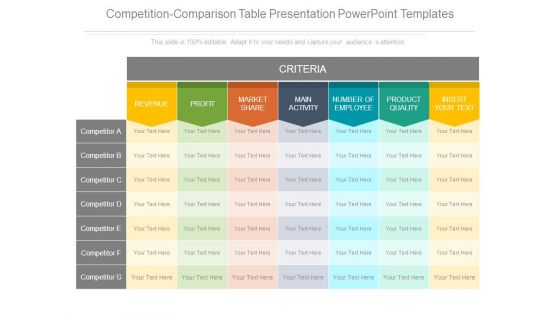
Competition comparison table presentation powerpoint templates





Try Before you Buy Download Free Sample Product
 Impress Your
 Audience
 100%
100% Editable
 Save Hours
 of Time


Accomplish every goal you aimed for with our Competition Comparison Table Presentation Powerpoint Templates. Achieve what you had intended.
People who downloaded this PowerPoint presentation also viewed the following :
Competition comparison table presentation powerpoint templates with all 7 slides:
Folks find no cause for contempt with our Competition Comparison Table Presentation Powerpoint Templates. Their haughty approach will disappear.
FAQs for Competition comparison table
So competitor names, pricing, and features obviously go first. Customer ratings and market share help too. But honestly? The strengths/weaknesses columns are where the magic happens - that's where you'll spot the gaps everyone's missing. I always add a random "notes" section because there's weird stuff that matters but doesn't fit anywhere else. Color coding makes patterns pop instantly. Oh, and make sure your template actually tells a story about where you stand versus the competition. Sounds obvious but most people just make boring spreadsheets.
Honestly, good visual design is what separates tables people actually look at from ones that just sit in email attachments forever. Color-code your winners so they pop. Alternate row colors - trust me, it helps more than you'd think. Clean fonts, bold headers, decent spacing between sections. Icons beat text when you can swing it (checkmarks vs writing out "yes" every time). I always tell people to think dashboard, not Excel dump. Oh and avoid tiny font sizes - nobody's squinting through your data no matter how comprehensive it is.
Honestly, just start with **Google Sheets** - it's free and you can share it with anyone. **Excel** works too if you're more comfortable with that. **Airtable** is where I'd go next though, way better for organizing data and the collaboration stuff is smooth. Oh and **Notion** is solid if you're already living in there (which, let's be real, half the internet is at this point). You could try **Canva** or **Figma** for something prettier, but they're not great for actually sorting through data. I'd stick with Sheets to start, then move to Airtable when you need more power.
Stick to hard numbers and facts - pricing, features, customer reviews, actual performance data. Research everyone the same way using consistent sources. Don't cherry-pick stuff that makes you look amazing (I know, super tempting). Be honest about weaknesses too, yours included. Keep the language neutral and cite sources when you can. Here's what really helps - get a fresh pair of eyes on it before you send it out. They'll catch bias you totally missed because you're too close to it. I've seen so many comparison tables that are obviously slanted and it just makes people roll their eyes.
SaaS companies use these tables constantly - they're always up against like 5 other competitors in every deal. Consulting firms love them too for showing off their services. Healthcare tech, fintech startups, real estate software... basically any B2B space where buyers are shopping around. Marketing agencies probably overuse them honestly, but they work. Even e-commerce brands throw them in decks when they're competing with Amazon or bigger platforms. The thing is, if your prospects are comparing multiple options (which they always are), you need these tables to tell your story first. Otherwise someone else controls how the comparison looks.
Honestly, color coding your comparison table is a game changer. I usually go with green for our wins, red for where we're getting beat, and gray for the boring stuff that's basically the same everywhere. Your brain picks up on colors way faster than reading through all that text - like, stakeholders can see the patterns instantly instead of squinting at spreadsheet hell for ten minutes. Oh, and don't go crazy with the colors. Three or four max, otherwise it looks like a rainbow threw up on your data and nobody can focus on what actually matters.
Don't stuff everything into one massive table - nobody wants to decode that mess. Also make sure you're being fair when rating competitors, because biased comparisons are so obvious it's embarrassing. Research their actual features instead of making assumptions (learned this the hard way). Focus on what customers genuinely care about, not whatever internal metrics your team thinks are cool. I'd stick to maybe 5-7 main points to start. You can always make separate tables later if you need to dive deeper into specific stuff.
Set up columns for each competitor, then add rows for stuff like pricing, features, market share, customer satisfaction. Don't write paragraphs – just use bullet points or quick phrases. Nobody's got time to read essays in a table. Color-coding works great too. I usually do red for weaknesses, green for strengths. Makes it way easier to scan quickly. Focus on the things that'll actually impact your decisions, not every tiny detail. Keep your language the same across all competitors so you can spot trends. The whole point is making something you can glance at and immediately see opportunities or red flags.
Honestly, qualitative comparisons are perfect for stuff you can't really put numbers on. Like how intuitive a software interface feels, or which company actually has decent customer service. Those things matter but good luck quantifying them, you know? I'd go qualitative when your audience wants to understand the real differences between options - the stuff that actually affects their day-to-day experience. Raw data won't tell you if one platform is frustrating to navigate compared to another. Use it when you need to paint the full picture of how competitors stack up in ways that spreadsheets just miss.
Quarterly updates work for most industries, but tech moves way faster - you'll need to refresh every 4-6 weeks there. Honestly, the real trick is watching for competitor launches, pricing changes, or when they pivot their messaging. Those need immediate updates. Set a calendar reminder for regular check-ins, though I'm terrible at actually following those myself. More stable industries can definitely stretch it to quarterly. Start by looking at your current tables - if they feel stale, they probably are. Keep tabs on competitor announcements too.
Dude, you should definitely start with a competition table before diving into strategy stuff. These things show you exactly where you stack up - pricing, features, positioning, all that. I've watched teams completely change direction once they actually mapped everything out visually instead of just wing it. Makes you get specific about what you're really fighting over, you know? Honestly, most people skip this step and just talk about competitors in vague terms. Big mistake. Build the table first and I bet it'll surprise you - might even flip your whole approach. Worth the time, trust me.
Tailor your competitive analysis based on who's reading it. Executives want the big picture - market share, revenue impact, strategic stuff. Product teams need technical specs and feature breakdowns. Sales people? Give them pricing details and talking points they can actually use with prospects. Marketing wants messaging angles they can run with. It's honestly like speaking different languages sometimes! Same data underneath, but you gotta reshape how you present it. Oh, and ask each team what decisions they're making with this info first - saves you from guessing what they need.
Check out their websites first - annual reports and press releases have solid data. Social media helps too. I learned to always verify stuff across 2-3 sources because companies will totally fudge numbers depending on where they're posting them. SimilarWeb's pretty useful for traffic stats you can't find anywhere else. For pricing, just go through their actual signup process or book a demo call. Oh, and write down where you got everything from and when - this stuff goes stale really fast. There's nothing worse than presenting outdated competitor info and looking like an idiot.
Look, those comparison tables are game-changers for seeing your whole competitive landscape. Map out features, pricing, who they're targeting - all in one spot instead of having notes everywhere (been there). You'll spot market gaps you can jump on and figure out where you actually stand out. Plus it shows which competitors are gonna be your biggest headaches. The whole bird's-eye view thing really works. I'd start with maybe 3-4 main competitors first, then add more as you go. Way easier to wrap your head around everything when it's laid out like that.
Honestly, it really depends on what industry you're in, but I'd start with the basics - market share, how they price stuff, customer acquisition costs, revenue growth. Customer satisfaction matters way more than most people think. I've watched companies get obsessed with adding features while completely missing what their customers actually care about, which is... not smart. Also track their marketing spend and distribution - that tells you a lot. Don't go crazy trying to monitor everything though. Pick maybe 5-7 things that actually matter to your goals first, then add more later.
-
Great designs, Easily Editable.
-
Innovative and Colorful designs.